SVG Importer

free scripts, plugins, models, textures
User avatar
clintonman
Captain
Posts: 5659
Joined: 21 May 2009, 21:08
Type the number ten into the box: 0
Location: California

SVG Importer

Post by clintonman »

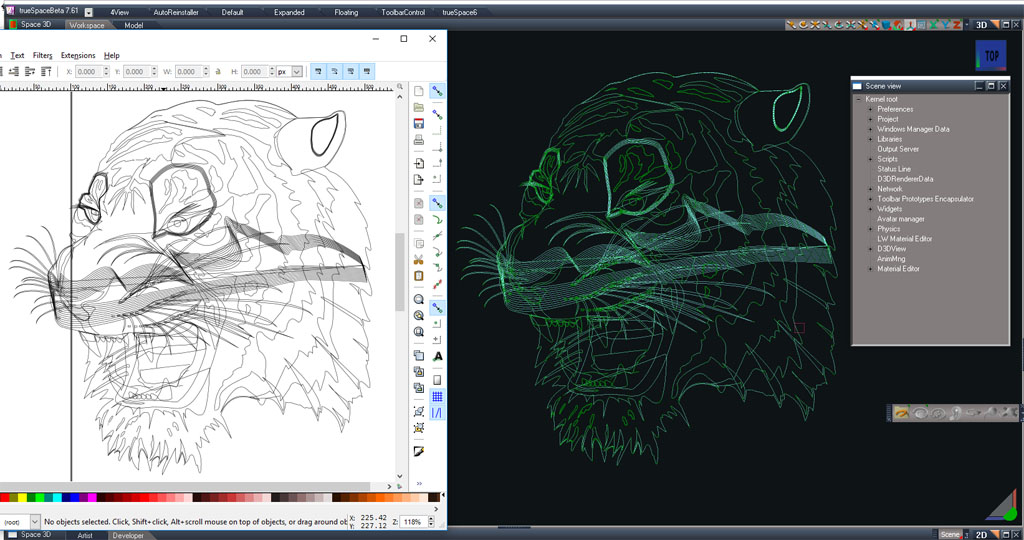
svgTest3.jpg
SVG importer script for trueSpace 7.61

It reads in SVG files and saves the curves in COB format for modelspace/truespace6

http://clintons3d.com/plugins/truespace ... mport.html"

Nov 21, 2015: Small update, now reads polylines
Last edited by clintonman on 21 Nov 2015, 21:24, edited 2 times in total.
Clinton Reese

http://clintons3d.com
User avatar
Emmanuel
Chief Warrant Officer
Posts: 670
Joined: 14 Jun 2009, 06:47

Re: SVG Importer

Post by Emmanuel »

Cool !
Thank you Clinton :bananamouse:
User avatar
Draise
Captain
Posts: 3200
Joined: 21 Sep 2009, 19:33
Type the number ten into the box: 0
Location: Bogota, Colombia

Re: SVG Importer

Post by Draise »

I gave it a whirl with an SVG and got the following error:
error.JPG
I can't load anything...
User avatar
clintonman
Captain
Posts: 5659
Joined: 21 May 2009, 21:08
Type the number ten into the box: 0
Location: California

Re: SVG Importer

Post by clintonman »

can you share the svg file?
Clinton Reese

http://clintons3d.com
User avatar
Cellulo
Lieutenant
Posts: 927
Joined: 27 Sep 2012, 07:48
Type the number ten into the box: 9
Location: France

Re: SVG Importer

Post by Cellulo »

Thanks Clintonman, is it compatible with tS7.6 full ?
User avatar
clintonman
Captain
Posts: 5659
Joined: 21 May 2009, 21:08
Type the number ten into the box: 0
Location: California

Re: SVG Importer

Post by clintonman »

Cellulo wrote:Thanks Clintonman, is it compatible with tS7.6 full ?
Works with tS7.61 full and std.
Clinton Reese

http://clintons3d.com
User avatar
Cellulo
Lieutenant
Posts: 927
Joined: 27 Sep 2012, 07:48
Type the number ten into the box: 9
Location: France

Re: SVG Importer

Post by Cellulo »

Ok thanks.
User avatar
Draise
Captain
Posts: 3200
Joined: 21 Sep 2009, 19:33
Type the number ten into the box: 0
Location: Bogota, Colombia

Re: SVG Importer

Post by Draise »

Here you go Clinton, here is the SVG:

Download
User avatar
clintonman
Captain
Posts: 5659
Joined: 21 May 2009, 21:08
Type the number ten into the box: 0
Location: California

Re: SVG Importer

Post by clintonman »

Fixed, the error was caused by a known problem. The importer can't handle exponents in the numbers. The update takes small exponent values and makes them zero.
Also the stand alone svg importer won't be updated anymore. All new changes will go into the curves loader found in the curves toolbar.

http://clintons3d.com/plugins/truespace ... urves.html"

BTW, @Draise your sample will import with a very spikey looking curves. That's caused by some kind preview bug for sharp cornerd curves. If you adjust the curve resolution the spikes will disappear. Also if you export to tS cob the spikes don't show in modelspace. I think the "O" spike is a special case and may need adjusting manually.
Clinton Reese

http://clintons3d.com
User avatar
Draise
Captain
Posts: 3200
Joined: 21 Sep 2009, 19:33
Type the number ten into the box: 0
Location: Bogota, Colombia

Re: SVG Importer

Post by Draise »

Wow, that was great! Good work!

I will try out your new curves stuff, this one I have not updated in a while. Neato.

Thanks Clinton.. :worship:
User avatar
clintonman
Captain
Posts: 5659
Joined: 21 May 2009, 21:08
Type the number ten into the box: 0
Location: California

Re: SVG Importer

Post by clintonman »

svgimport_2017_1.jpg
Left tiger is the raw import, middle is with some manual cleanup and the right is the original tiger shown in a web page

More improvements: get it here - http://clintons3d.com/plugins/truespace ... urves.html"

The main motivation is that I wanted the ability to export CSS animations for SVG files. During the process got sidetracked by many needed improvements.
fixed a path bug
polygon import improved, import as curves then freeze and add pivots
import color and transparency
freeze curve maintains hierarchy
text import font, font size, font style and transforms
CSS animation export

TODO: script to make cleanup easier, current steps are 1. rectangle select all edges 2. form face 3. invert selection 4. delete 5. if facing wrong direction flip face
Clinton Reese

http://clintons3d.com
User avatar
clintonman
Captain
Posts: 5659
Joined: 21 May 2009, 21:08
Type the number ten into the box: 0
Location: California

Re: SVG Importer

Post by clintonman »

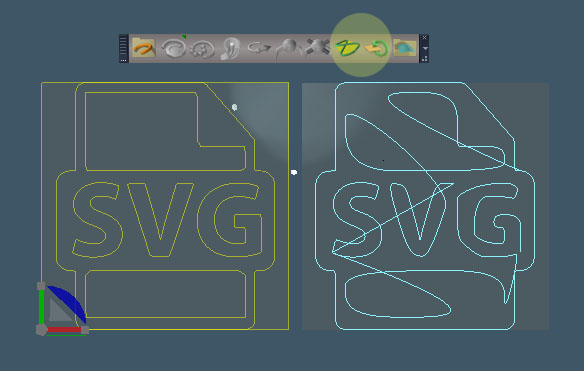
svgimport_2017_2.jpg
Another update. Image shows the option to break compound paths into individual curve items and shows 2 new buttons for cleanup and flipping faces.

The CSS animation is working, but I found that Microsoft browsers don't work. They can't apply CSS animations to SVG tags, so this version adds Greensock animation export. Greensock is a javascript based animation system, "GreenSock Animation Platform (GSAP) is a suite of tools for scripted, high-performance HTML5 animations in all major browsers."

This version also adds some scaling and better text sizing.
Clinton Reese

http://clintons3d.com
User avatar
clintonman
Captain
Posts: 5659
Joined: 21 May 2009, 21:08
Type the number ten into the box: 0
Location: California

Re: SVG Importer

Post by clintonman »

May 31, Update supports svg image tags, constant color materials option, animation export ignores disabled clips. Also a couple of bug fixes for opacity keys and a file path bug.
Clinton Reese

http://clintons3d.com

Return to “Repositorium”