a question about the keyframe properties in the model side scene editor.
the tension/continuity/bias ....what do they do? I assume its got to do with the way the KF is interpolated? I find that the camera will overshoot the mark when zooming in on an object [ie- it will get to the KF position, but then continue zooming in for some frames after the keyframe], an undesirable effect in most of my cases. Does the T/C/B effect this?
also, what are the X/Y/Z fields control?
sorry for the hard qwezzies. thanks
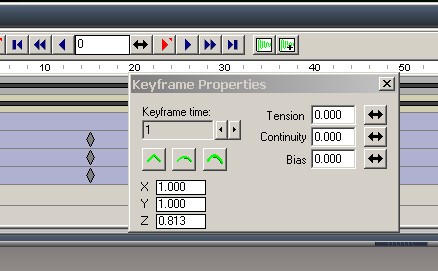
keyframe properties in the model side
-
leevviiJ
- Petty Officer First Class
- Posts: 52
- Joined: 05 Sep 2009, 05:11
keyframe properties in the model side
-
marcel
- Captain
- Posts: 2247
- Joined: 21 May 2009, 19:52
- Type the number ten into the box: 0
- Location: paris - France
Re: keyframe properties in the model side
these setting change the curve of the trajectory. you can have a straight line with angle between each position of the keyframe or a smooth curve. also you can change the acceleration. you have 3 ways to move the object in animation: X, Y and Z are the position of the object. it have the same effet as the object info panel. you can also change the position of the object when you move the curve directly on the scene editor (with the view mode selected to see the curves). You can see the info panel or the XYZ value in the properties change at the same time when you move the curve. also When you edit the curve, you can change the acceleration. it is easier to understand than to use bias and tension. you can begin a movment with acceleration and finish with a slowdown.
Design - illustration - Animation
http://www.crea-vision.fr
-
leevviiJ
- Petty Officer First Class
- Posts: 52
- Joined: 05 Sep 2009, 05:11
Re: keyframe properties in the model side
excellent, i reasoned that it must have been, thanks for the explain, & thanks again Marcel.
I havent really looked at the curve editor yet, think i will get on to that one right away.
