hello,
does anyone know where i can find a decent tutorial on baking lightmaps? specifically, i have an architectural visualization project and was hoping to use ts & lightworks or virtualight radiosity/gi and lightmap baking... in the end, i'll be bringing it in to Unity with some custom coded augmented reality interfaces to be rendered stereoscopically in real time. i've tried, over the past few days, to bake lightworks radiosity with no real success. although i do have a fairly primitive augmented reality piece i can share if there's interest as well, but i only used ts to create the .3ds files...
also, for what it's worth, i used to be CTO for an immersive imaging company specializing in stereo, so if there's interest, i'll share everything i know about doing stereo on whatever platform that there may be interest in. we focused on making "comfortable" stereo for education, medical, and industrial applications.
lemme know!
thanks!
i.phaedrus
lightmap tutorial
-
i.phaedrus

- Petty Officer Third Class
- Posts: 13
- Joined: 04 Nov 2009, 21:03
- Type the number ten into the box: 0
lightmap tutorial
-
3dvisuals dude

- Chief Warrant Officer
- Posts: 643
- Joined: 03 Jun 2009, 02:53
- Type the number ten into the box: 0
Re: lightmap tutorial
I am not sure where to find a trueSpace tutorial on baking lightmaps, but I can offer you the following...
"Parva," who is generally considered the expert in the Community here on making ultra realistic shaders and renders that are breathtaking, wrote in the following thread that he uses a program called "Giles" for his lightmap baking and refers to it as a "superb tool."
http://forums1.caligari.com/truespace/s ... stcount=50
The link to this outstanding freeware is here:
http://www.frecle.net/index.php?show=giles.about
Hope that helps while you wait for someone to provide a link regarding trueSpace lightmap baking.
"Parva," who is generally considered the expert in the Community here on making ultra realistic shaders and renders that are breathtaking, wrote in the following thread that he uses a program called "Giles" for his lightmap baking and refers to it as a "superb tool."
http://forums1.caligari.com/truespace/s ... stcount=50
The link to this outstanding freeware is here:
http://www.frecle.net/index.php?show=giles.about
Hope that helps while you wait for someone to provide a link regarding trueSpace lightmap baking.
-
Benji
- Senior Chief Petty Officer
- Posts: 280
- Joined: 22 May 2009, 01:23
Re: lightmap tutorial
Yep, Giles is far better than ts for this kind of thing. It's a cool app.
-
noko
- Senior Chief Petty Officer
- Posts: 170
- Joined: 24 May 2009, 04:16
Re: lightmap tutorial
Tiles gave a good run down using Giles. Once light maps are done you can use them by importing like object file using Froo's object importer. Here is link to Tiles tutorials, first one deals with lightmaps with giles:
http://reinerstileset.4players.de/tutorialsE.html"
http://reinerstileset.4players.de/tutorialsE.html"
-
i.phaedrus
- Petty Officer Third Class
- Posts: 13
- Joined: 04 Nov 2009, 21:03
- Type the number ten into the box: 0
Re: lightmap tutorial
Thanks for the pointers, much appreciated. Not long after I posted last night, I cam across Giles. I'll try that and post what I find.
thanks again!
-i.phaedrus
thanks again!
-i.phaedrus
-
i.phaedrus
- Petty Officer Third Class
- Posts: 13
- Joined: 04 Nov 2009, 21:03
- Type the number ten into the box: 0
Re: lightmap tutorial
ok, so after spending way too much time trying to get models out of the model side into giles, i read thru some posts looking for a collada or fbx export plug in. then, out of curiosity, i went over to the ws side and see that there is a collada exporter that works pretty well, except that when i open the .dae files in giles, they are rotated. the odd thing is each model seems to be rotated by a different amount. any suggestions?
thanks!
phae
thanks!
phae
-
Tiles

- Master Chief Petty Officer
- Posts: 401
- Joined: 27 May 2009, 08:34
Re: lightmap tutorial
Ah, the good ol pipeline problems. Never got it to work with Collada. I think i gave up at your described point.
I have used the Modeler X for export. That works. Besides one oddity. Giles dislikes negative UV values. Gives a black result then. And trueSpace produces an Y offset when exporting with Modeler X, shifiting the whole stuff by one texturesize upwards. Which leads to negative values.
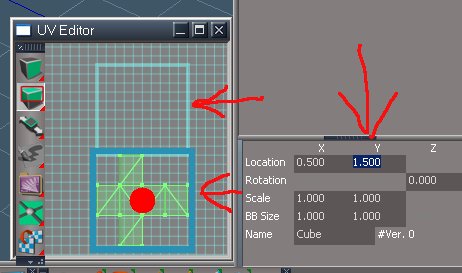
What you have to do is to open the models in Workspace UV Editor, select the whole UV mesh, and add 1 to the Y value (You can write +1 behind the current value, no need to do the calculation by yourself. trueSpace does the math by pressing enter then). Then switch to Modeler, and export it as X. I think i have used Ascii settings. And now the X file should arrive fine in Giles, having positive UV values, and the lightmapping should work now. A bit work, but worth it
Be careful to keep a backup of your original scene ...
I have used the Modeler X for export. That works. Besides one oddity. Giles dislikes negative UV values. Gives a black result then. And trueSpace produces an Y offset when exporting with Modeler X, shifiting the whole stuff by one texturesize upwards. Which leads to negative values.
What you have to do is to open the models in Workspace UV Editor, select the whole UV mesh, and add 1 to the Y value (You can write +1 behind the current value, no need to do the calculation by yourself. trueSpace does the math by pressing enter then). Then switch to Modeler, and export it as X. I think i have used Ascii settings. And now the X file should arrive fine in Giles, having positive UV values, and the lightmapping should work now. A bit work, but worth it
Be careful to keep a backup of your original scene ...


Free Gamegraphics, Freeware Games http://reinerstilesets.de
-
i.phaedrus
- Petty Officer Third Class
- Posts: 13
- Joined: 04 Nov 2009, 21:03
- Type the number ten into the box: 0
Re: lightmap tutorial
Hey tiles,
thanks for the reply. good explanation makes a lot of sense. however, i really dislike the .x format in favor of .fbx & .dae. i wrote a script to rotate the objects -90 degrees.
thans again!
-phae
thanks for the reply. good explanation makes a lot of sense. however, i really dislike the .x format in favor of .fbx & .dae. i wrote a script to rotate the objects -90 degrees.
thans again!
-phae
-
Tiles
- Master Chief Petty Officer
- Posts: 401
- Joined: 27 May 2009, 08:34
Re: lightmap tutorial
Well, with Modeler X i don`t have the texture problems neither. So that`s why i prefer it over Workspace Collada and its odd way to put the textures into a folder, renaming them all to file_xyz. With Modeler X i can keep my original texturenames intact. Which makes things a bit easier in case you have a scene with 100+ texures as i had before. Means when the Bridge hasn`t killed the original texturenames anyway
Anyways, in the end every working way is a valid way. Would you mind to share your script? Could come in handy not only for this situation
Anyways, in the end every working way is a valid way. Would you mind to share your script? Could come in handy not only for this situation
Free Gamegraphics, Freeware Games http://reinerstilesets.de
-
i.phaedrus
- Petty Officer Third Class
- Posts: 13
- Joined: 04 Nov 2009, 21:03
- Type the number ten into the box: 0
Re: lightmap tutorial
Turns out, it had some, ummm, not so desirable side effects, so i just ended up rotating them by hand as i only have a few objects in my test scene. I may take another stab at it and if i do, i'll certainly post it here.
are you the same Tiles that posts to the Giles forum on frecle? i'm still having a hard time (much harder than i expected i would have) getting good lighting solutions out of giles... any suggestions or tips/tricks?
thanks!
-phae
are you the same Tiles that posts to the Giles forum on frecle? i'm still having a hard time (much harder than i expected i would have) getting good lighting solutions out of giles... any suggestions or tips/tricks?
thanks!
-phae