I am trying to get the Vray options panel to appear on the far right. This used to work for me but does not now. I can select the Vray renderer, it will render the image . But when I right click on one of the render buttons the Vray options panel will not appear. I have read through the Vray manual and done all that it says but still will not appear. I even reinstalled tS 7.61 and Vray 1.53 and still the panel does not appear. Any ideas?
Windows XP64
tS 7.61 + Vray 1.53
Cannot call up Vray options panel
-
MikeNTX

- Petty Officer Second Class
- Posts: 24
- Joined: 22 May 2009, 00:09
- Type the number ten into the box: 0
- Location: Texas
Cannot call up Vray options panel
-
Tiles

- Master Chief Petty Officer
- Posts: 401
- Joined: 27 May 2009, 08:34
Re: Cannot call up Vray options panel
This will not work without the patch that allows to use Vray 1.53 with tS 7.61B8. VRay 1.53 just works up to tS 7.6. This patch to make VRay 1.53 work with tS 7.61B8 can be found at my trueSpace Workspace plugins linklist in the community updates section (see my signature), or HERE. 100 KbtS 7.61 and Vray 1.53
Install trueSpace, install VRay 1.53 into the tS 7.61 directory, then run the patch. Now load the VRay plugin in the package manager, and it should work

Free Gamegraphics, Freeware Games http://reinerstilesets.de
-
MikeNTX
- Petty Officer Second Class
- Posts: 24
- Joined: 22 May 2009, 00:09
- Type the number ten into the box: 0
- Location: Texas
Re: Cannot call up Vray options panel
I should have mentioned I have the patch for Vray 1.53 installed on my tS 7.61 installation and still I did not get this panel to come up for Vray. Also I have 7.6 installed with Vray 1.53 and I do not get this panel in it either. I know long ago I had this problem and someone from Caligari told me what to do on the Caligari forum. Of course that is gone now.
-
Tiles
- Master Chief Petty Officer
- Posts: 401
- Joined: 27 May 2009, 08:34
Re: Cannot call up Vray options panel
Hmm, then i`m clueless.
There is a backup of the Caligari Forum somewhere from what i remember. I cannot find it. But the wayback machine seems to have something backupped. I just hope it is deep enough.
http://web.archive.org/web/200801031931 ... /index.php"
There is a backup of the Caligari Forum somewhere from what i remember. I cannot find it. But the wayback machine seems to have something backupped. I just hope it is deep enough.
http://web.archive.org/web/200801031931 ... /index.php"
Free Gamegraphics, Freeware Games http://reinerstilesets.de
-
trueBlue

- Captain
- Posts: 5548
- Joined: 06 Jul 2009, 22:50
- Type the number ten into the box: 10
Re: Cannot call up Vray options panel
You should remove all files that are left over from the Uninstall before Installing trueSpace7...
-
MikeNTX
- Petty Officer Second Class
- Posts: 24
- Joined: 22 May 2009, 00:09
- Type the number ten into the box: 0
- Location: Texas
Re: Cannot call up Vray options panel
Well I am not sure what else to do here, I have done clean installs and still have this problem. Also I have the same problem with the LightWorks renderer. I right click on the scene render button I do not get the options panel for it either.
-
bitkar

- Captain
- Posts: 2089
- Joined: 16 Mar 2010, 07:14
- Type the number ten into the box: 0
- Location: Czech Republic
Re: Cannot call up Vray options panel
does your right mouse button work? :)
just a joke, i have no idea, sorry man. its wierd - after uninstall, deleting all files, maybe cleaning win registry, installing back ts,vray+patch... it should work. Maybe something odd in your system? something corrupted or a virus? thats a tough problem.
just a joke, i have no idea, sorry man. its wierd - after uninstall, deleting all files, maybe cleaning win registry, installing back ts,vray+patch... it should work. Maybe something odd in your system? something corrupted or a virus? thats a tough problem.
Michal aka bitkar
tS freak since tS2 (1998) and forever (tS7.61 modeler)
tS freak since tS2 (1998) and forever (tS7.61 modeler)
-
Steinie

- Captain
- Posts: 2958
- Joined: 21 May 2009, 17:38
- Type the number ten into the box: 10
Re: Cannot call up Vray options panel
You also installed VRay into the "Package Manager" ?
-
stan
- Master Chief Petty Officer
- Posts: 584
- Joined: 21 May 2009, 17:20
Re: Cannot call up Vray options panel
OfflineRender.OpenPreferencesPanel()
try that in a script ..worth a shot..it's the command from the render button right click command..
try that in a script ..worth a shot..it's the command from the render button right click command..
-
MikeNTX
- Petty Officer Second Class
- Posts: 24
- Joined: 22 May 2009, 00:09
- Type the number ten into the box: 0
- Location: Texas
Re: Cannot call up Vray options panel
OK, I guess may be the last on this. First of all yes I loaded the Vray renderer and ran the patch first for tS 7.61. I again uninstalled tS7.61 and deleted the folder then reinstalled all and loaded Vray again. Again same thing with the control panel for Vray does not show up. On a whim I went into Workspace mode and tried the right click on the render button and lo and behold up came the Vray options panel. I switch back to model mode and it is still there and works. If I load a new scene it goes away and I have to start this all over with going to Workspace then back to Model. If this helps with anyone having an idea so that I can fix this so that I can call up the Vray options panel in Model mode please let me know. Otherwise I will just have to live with how it is now.
Thanks again, Mike
Thanks again, Mike
-
Tiles
- Master Chief Petty Officer
- Posts: 401
- Joined: 27 May 2009, 08:34
Re: Cannot call up Vray options panel
Just that we don`t misunderstand each other, it works to call the panel from Workspace side? I for myself could never call the VRay panel from within the Modeler side. A click at the Modeler render button just brings up the Photon render panel. You need the Workspace render button and a right click at it to open the VRay render panel.Again same thing with the control panel for Vray does not show up. On a whim I went into Workspace mode and tried the right click on the render button and lo and behold up came the Vray options panel. I switch back to model mode and it is still there and works.
My best bet in case it is not the point above is some fragments in the registry. So my advice would be to uninstall everyting again, delete all folders, run a reg cleaner software (there is freeware out there) and then to reinstall tS. My second thougth in case it still fails would be to reinstall Windows. That way you definitely get rid of everything broken.
And when it still fails, well, Blender still sucks for modeling. But Silo is not this expensive
Free Gamegraphics, Freeware Games http://reinerstilesets.de
-
trueBlue
- Captain
- Posts: 5548
- Joined: 06 Jul 2009, 22:50
- Type the number ten into the box: 10
Re: Cannot call up Vray options panel
Same here as Tiles, I have to Right click the Workspace render button(s) to call up the Vray panel.
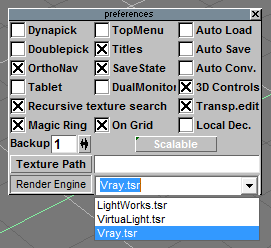
The only way to change the Renderer in Model is from the Model's File Menu/Preferences. Nevertheless you have to still use the above method. BTW: As noted in the documentation, Vray uses the Workspace to render from and not Model. HTH
The only way to change the Renderer in Model is from the Model's File Menu/Preferences. Nevertheless you have to still use the above method. BTW: As noted in the documentation, Vray uses the Workspace to render from and not Model. HTH
- Attachments
-
- Capture.PNG (11.18 KiB) Viewed 1742 times