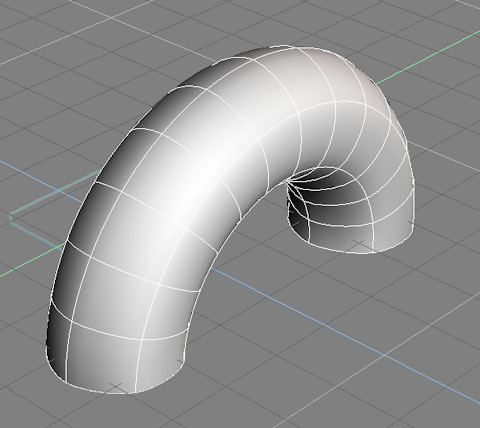
A new plugin to loft a curve about a circular path. The advantage over the built in lathe tool is that it does not convert the result to a polygon object, but keeps a nurbs surface instead. The advantage over the loft tool used with a circle is easier placement of the profile curve relative to the desired path. The plugin uses absolute coordinates or the object axis for the center of the loft. The loft tool uses the geometric center of the profile which can be difficult to judge depending on the profile shape. The plugin is named after and based on the Maya revolve tool.
about a third the way down this page:
http://www.clintons3d.com/plugins/trues ... index.html"
Lathe/Revolve curve for modelspace
-
clintonman
- Captain
- Posts: 5659
- Joined: 21 May 2009, 21:08
- Type the number ten into the box: 0
- Location: California
Lathe/Revolve curve for modelspace
-
clintonman
- Captain
- Posts: 5659
- Joined: 21 May 2009, 21:08
- Type the number ten into the box: 0
- Location: California
Re: Lathe/Revolve curve for modelspace
Update:
interactive preview curve for the lathe
cancel will remove the rail curve
named from the profile curve
http://clintons3d.com/plugins/truespace ... volve.html"
interactive preview curve for the lathe
cancel will remove the rail curve
named from the profile curve
http://clintons3d.com/plugins/truespace ... volve.html"
-
Emmanuel
- Chief Warrant Officer
- Posts: 670
- Joined: 14 Jun 2009, 06:47
Re: Lathe/Revolve curve for modelspace
Thank you Clinton.
I often do pipes network representation, using polygonal, and tried your new plugin with hopes it could let me use NURBS instead.
But as far as I see it is good to generate a geometry at once, not to build some complicated pipes network.
My typical workflow is to place a cylinder,
select a face,
clic the Lathe tool,
adjust the Rotation / Angle / Radius and Segments,
then build the lathe,
then use the Sweep tool to extend the pipe from the last selected face,
then lathe it again, etc...
Is there a chance you will improve your plugin in the future to allow that workflow, or is trueSpace's NURBS system not managable enough to build such complex geometries ?
I often do pipes network representation, using polygonal, and tried your new plugin with hopes it could let me use NURBS instead.
But as far as I see it is good to generate a geometry at once, not to build some complicated pipes network.
My typical workflow is to place a cylinder,
select a face,
clic the Lathe tool,
adjust the Rotation / Angle / Radius and Segments,
then build the lathe,
then use the Sweep tool to extend the pipe from the last selected face,
then lathe it again, etc...
Is there a chance you will improve your plugin in the future to allow that workflow, or is trueSpace's NURBS system not managable enough to build such complex geometries ?
-
clintonman
- Captain
- Posts: 5659
- Joined: 21 May 2009, 21:08
- Type the number ten into the box: 0
- Location: California
Re: Lathe/Revolve curve for modelspace
I don't think so. It sounds like you want a polygon type workflow for the NURBS tools and I think they are just generate geometry type things. Some can be adjusted afterward but not like polygon editing. The only complex nurbs pipe workflow I know is to create a curve and then use one of the extrude tools.