exporting to .avi format
-
dreamcatcher107
- Petty Officer First Class
- Posts: 70
- Joined: 23 Aug 2009, 16:26
- Type the number ten into the box: 0
- Location: Illinois, USA
exporting to .avi format
I now have all the elements of my project animated the way they should be and need to save or otherwise export an .avi file for post processing in my videography program but can not seem to locate the supported format within the export file tool. Any assistance is, as always, appreciated.
-
leevviiJ
- Petty Officer First Class
- Posts: 52
- Joined: 05 Sep 2009, 05:11
Re: exporting to .avi format
howdy, im no expert on these things, but i can help with rendering to AVI on the modeler side, are you rendering from workspace or modeler?
-
dreamcatcher107
- Petty Officer First Class
- Posts: 70
- Joined: 23 Aug 2009, 16:26
- Type the number ten into the box: 0
- Location: Illinois, USA
Re: exporting to .avi format
Apologies. I should have specified that I am on the Workspace side. Tell me what you know of exporting on the Model side and perhaps I can interpolate a Wrkspace solution. Thanks for the assist!
-
leevviiJ
- Petty Officer First Class
- Posts: 52
- Joined: 05 Sep 2009, 05:11
Re: exporting to .avi format
I havent used the workspace to render, but its easy on the model side, it only has choices for "offline" rendering.
FOR MODEL SIDE RENDERING, try this:-
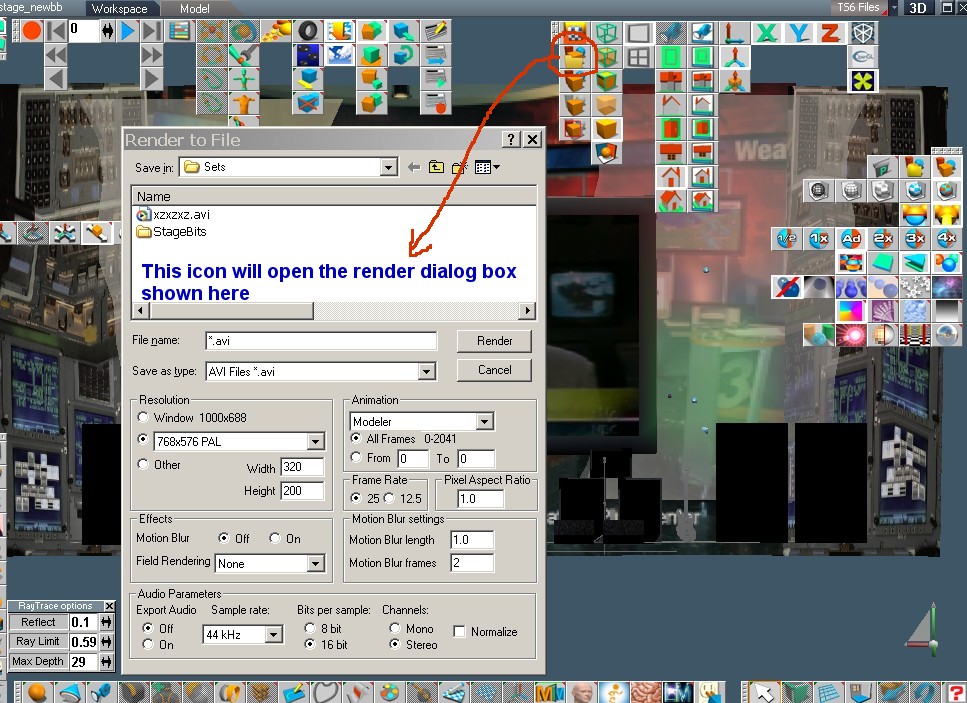
Once you have set up your animation, just click on the icon i have circled in the pic attached to this post, and the dialog box appears. Choose .AVI [it defaults to .PSD] and choose required settings, then hit render, which will bring up the codec dialog box, choose your poison and away you go!!
There is a dropdown menu in the render dialog screen that allows you to choose between -- current frame only -- or modeller -- or workspace, maybe this is what your looking for?
good luck mate.
FOR MODEL SIDE RENDERING, try this:-
Once you have set up your animation, just click on the icon i have circled in the pic attached to this post, and the dialog box appears. Choose .AVI [it defaults to .PSD] and choose required settings, then hit render, which will bring up the codec dialog box, choose your poison and away you go!!
There is a dropdown menu in the render dialog screen that allows you to choose between -- current frame only -- or modeller -- or workspace, maybe this is what your looking for?
good luck mate.
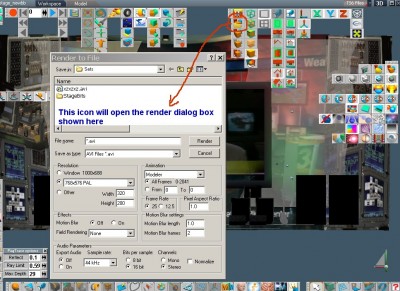
- a pic of the model side render icon and dialog box
-
richlevy

- Senior Chief Petty Officer
- Posts: 162
- Joined: 17 Aug 2009, 20:08
Re: exporting to .avi format
I always had problems with rendering out to compressed animation formats in TS, if you use the RendertoFile feature, you will be able to render out a sequence of png or jpgs to a folder (you can create a folder wherever you want on you computer).
Any NLE should have no problems loading the sequence of images. The advantage is that image sequences will have no compression artifacts and if the rendering fails (or needs to be rerendered) you will not have to start over from the beginning.
HTH
Rich
Any NLE should have no problems loading the sequence of images. The advantage is that image sequences will have no compression artifacts and if the rendering fails (or needs to be rerendered) you will not have to start over from the beginning.
HTH
Rich
My Flickr site, here you can see some of the photography I do:
http://www.flickr.com/photos/rich-l/" onclick="window.open(this.href);return false;
http://www.flickr.com/photos/rich-l/" onclick="window.open(this.href);return false;
-
dreamcatcher107
- Petty Officer First Class
- Posts: 70
- Joined: 23 Aug 2009, 16:26
- Type the number ten into the box: 0
- Location: Illinois, USA
Re: exporting to .avi format
My thanks to both of you for your ideas. I tried the Model side render option to an .avi file but found that the LE controllers did not function, even though the timers were running. All I got was a static set of frame captures - no movement.
I would prefer not to export individual .jpeg etc. images as the Pinnacle Studio program I wish to use afterwards doesn't compile individual stills into an action animation. The individual scene file size is too large to be fluid across the timeline.
Admittedly, I don't know enough about the animation timeline in TS, but if you can assist with enabling the Model side to display the LE script blocks, I believe that will solve the problem I am having.
I would prefer not to export individual .jpeg etc. images as the Pinnacle Studio program I wish to use afterwards doesn't compile individual stills into an action animation. The individual scene file size is too large to be fluid across the timeline.
Admittedly, I don't know enough about the animation timeline in TS, but if you can assist with enabling the Model side to display the LE script blocks, I believe that will solve the problem I am having.
-
trueBlue

- Captain
- Posts: 5548
- Joined: 06 Jul 2009, 22:50
- Type the number ten into the box: 10
Re: exporting to .avi format
There is a Customized Timer Event that I created and also a video showing it's use here:
vi ... 3341#p3341"
In the Workspace's Animation Editor, it should be enough to Record the Frames needed using the Customized Timer Event that are hooked up to your Controllers. Let me know if you have questions.
I was able to render a procedural animation in the AVI format using Model's Render to File/Workspace option with Vray but not Lightworks.
vi ... 3341#p3341"
In the Workspace's Animation Editor, it should be enough to Record the Frames needed using the Customized Timer Event that are hooked up to your Controllers. Let me know if you have questions.
I was able to render a procedural animation in the AVI format using Model's Render to File/Workspace option with Vray but not Lightworks.
- Attachments
-

-
dreamcatcher107
- Petty Officer First Class
- Posts: 70
- Joined: 23 Aug 2009, 16:26
- Type the number ten into the box: 0
- Location: Illinois, USA
Re: exporting to .avi format
Hi trueBlue -
I downloaded your two attachments and thank you for them both. I watched the tutorial and, even though it had so sound, understand that you connected the timer's frame control to the expanded matrix component, used the select button to pull it into the panel display and set beginning and ending keyframes after activating the needed element within the keyfram panel by R-clicking to bring it up. As you surmised, I do have some questions.
I have three timer events (with the blue boxed surround) that need to run - the rotation of the horse and counter-rotation of the surround hooked up at the primary LE level. Within the horse object I have two others - one is hooked up to pulsating lungs and nostrils; the other is hooked up to the various controllers and parts of the snorting fire and smoke.
None of the frame aspects of those timers have been hooked up, just the time aspects. I did notice that I could export the active features of both timers up to the primary LE level and tie your customized timer frame connect to them. Do I need to go back and connect those sub-level frame aspects on the timers somewhere or will they work as is?
Secondly, do I need to disconnect the time aspect(s) on each of the timers so I work only with the frames? I am somewhat confused on this point. When I first entered 4D and the primary LE level, I got no redline in the dope sheet, went back to your tutorial and noticed that in your keyframe control panel you selected the timer frame button. I will go back and check whether I can do just that as I originally did not enlarge the panel to look for it.
My predominant thought is that if I don't have all the frame hookups connected, I won't get what I need as a result. Finally, once I get this timeline established do I go back to Model side and try the .avi export again?
I downloaded your two attachments and thank you for them both. I watched the tutorial and, even though it had so sound, understand that you connected the timer's frame control to the expanded matrix component, used the select button to pull it into the panel display and set beginning and ending keyframes after activating the needed element within the keyfram panel by R-clicking to bring it up. As you surmised, I do have some questions.
I have three timer events (with the blue boxed surround) that need to run - the rotation of the horse and counter-rotation of the surround hooked up at the primary LE level. Within the horse object I have two others - one is hooked up to pulsating lungs and nostrils; the other is hooked up to the various controllers and parts of the snorting fire and smoke.
None of the frame aspects of those timers have been hooked up, just the time aspects. I did notice that I could export the active features of both timers up to the primary LE level and tie your customized timer frame connect to them. Do I need to go back and connect those sub-level frame aspects on the timers somewhere or will they work as is?
Secondly, do I need to disconnect the time aspect(s) on each of the timers so I work only with the frames? I am somewhat confused on this point. When I first entered 4D and the primary LE level, I got no redline in the dope sheet, went back to your tutorial and noticed that in your keyframe control panel you selected the timer frame button. I will go back and check whether I can do just that as I originally did not enlarge the panel to look for it.
My predominant thought is that if I don't have all the frame hookups connected, I won't get what I need as a result. Finally, once I get this timeline established do I go back to Model side and try the .avi export again?
-
trueBlue
- Captain
- Posts: 5548
- Joined: 06 Jul 2009, 22:50
- Type the number ten into the box: 10
Re: exporting to .avi format
If you can I would use one Timer for all of your Controllers, in this case the Customized Timer Event.
From your Controller's TimeIN attributes reconnect the wires to the Customized Timer Event's Frame attribute as shown in first Capture. For the nostrils you can Export the Controller's TimeIn attributes up one level and hook them up as well as mentioned above. See second Capture2.
Follow the video with regards to adding the (Selected) Custom Timer Event's Frame attribute to the Keying panel and Recording the required Start and Ending Frames. It is not necessary to run the Timer since there is no scripting involved.
Unless you have Vray I do not think you can Render to File in the AVI format. In which case you will have to Render out sequential images. If your Video application does not support sequential files there is alternative programs that can. One free option is VirtualDub.
From your Controller's TimeIN attributes reconnect the wires to the Customized Timer Event's Frame attribute as shown in first Capture. For the nostrils you can Export the Controller's TimeIn attributes up one level and hook them up as well as mentioned above. See second Capture2.
Follow the video with regards to adding the (Selected) Custom Timer Event's Frame attribute to the Keying panel and Recording the required Start and Ending Frames. It is not necessary to run the Timer since there is no scripting involved.
Unless you have Vray I do not think you can Render to File in the AVI format. In which case you will have to Render out sequential images. If your Video application does not support sequential files there is alternative programs that can. One free option is VirtualDub.
- Attachments
-
-


-
dreamcatcher107
- Petty Officer First Class
- Posts: 70
- Joined: 23 Aug 2009, 16:26
- Type the number ten into the box: 0
- Location: Illinois, USA
Re: exporting to .avi format
Thanks. I'll give it a try.
-
dreamcatcher107
- Petty Officer First Class
- Posts: 70
- Joined: 23 Aug 2009, 16:26
- Type the number ten into the box: 0
- Location: Illinois, USA
Re: exporting to .avi format
OK - I have followed trueBlue's suggestions and everything is hooked up successfully to a single timer. The horse still breathes and snorts fire too quickly. I have already backed the speed of these down to 5 times in a rotation and it is still too unnantural. The speed modifications within each of the controllers will have to be backed down again, likely to two times per rotation, so that it can be effectively realistically rendered. I'll keep you all posted and again, thanks for all the support. This project is going to be huge when completed!
-
dreamcatcher107
- Petty Officer First Class
- Posts: 70
- Joined: 23 Aug 2009, 16:26
- Type the number ten into the box: 0
- Location: Illinois, USA
Re: exporting to .avi format
The timing issue continues. While I have manipulated all the various movement speeds and the timer period, something still eludes me. I can't seem to understand the relationship between the controller speeds and the timer period. Can someone fill me in on this correlation? It seems to be my missing peice of the current problem solving puzzle.
-
trueBlue
- Captain
- Posts: 5548
- Joined: 06 Jul 2009, 22:50
- Type the number ten into the box: 10
Re: exporting to .avi format
I would suggest that you keep the Period set at 30 or below for smoother operation of the Timer Event.
In the Library Browser you will find a BinaryOp component in the Math - Operators library.
You could use this component inbetween your Controller's output and the Object's Expanded Matrice's input to controll the speed further and independently. Another option if the above does not work for you would be to Add and Keyframe an additional Customized Timer Event for part of your procedural seperatly. With that you could also Expand and or Shrink the AnimClip to adjust the speed.
Example capture shown uses a divide by 2 to slow down the output.
Hope that I did not stir you wrong by my suggestions.
In the Library Browser you will find a BinaryOp component in the Math - Operators library.
You could use this component inbetween your Controller's output and the Object's Expanded Matrice's input to controll the speed further and independently. Another option if the above does not work for you would be to Add and Keyframe an additional Customized Timer Event for part of your procedural seperatly. With that you could also Expand and or Shrink the AnimClip to adjust the speed.
Example capture shown uses a divide by 2 to slow down the output.
Hope that I did not stir you wrong by my suggestions.
- Attachments
-

-
dreamcatcher107
- Petty Officer First Class
- Posts: 70
- Joined: 23 Aug 2009, 16:26
- Type the number ten into the box: 0
- Location: Illinois, USA
Re: exporting to .avi format
No trueBlue, you pointed me in the right direction. The scope of this project and my far-reaching first timer effort  pushes the tutorials beyond their instructional methods. Go figure - an Architect thinks outside of 'the box'
pushes the tutorials beyond their instructional methods. Go figure - an Architect thinks outside of 'the box' -
dreamcatcher107
- Petty Officer First Class
- Posts: 70
- Joined: 23 Aug 2009, 16:26
- Type the number ten into the box: 0
- Location: Illinois, USA
Re: exporting to .avi format
I had to back things up a bit and attempt another approach. I have nested timers; one to the lungs, another to the firesnorts, and a third to the rotations of the horse All the controllers are connected to the timer buttons and not the frame buttons. On top of all that I have tied them into a final timer and connected the exported active toggles into that timer's frame button. Everything works nicely.
I have now moved into the 4D aspect of LE and can't manage to get the animation to do as expected in the dope sheet by setting the beginning and ending keyframes. I have tried this with and without activating the timer, but still can't get any motion when I move the red bar.
If I go into the sub timers and reconnect everything to the frame buttons, all the speed aspects return to the similar coordinative problem I had been previously tried to work through. I realize that if I can't capture this sequence in the LE 4D, I've no chance of even attempting an .avi render on the model side. Anybody got an idea?
I have now moved into the 4D aspect of LE and can't manage to get the animation to do as expected in the dope sheet by setting the beginning and ending keyframes. I have tried this with and without activating the timer, but still can't get any motion when I move the red bar.
If I go into the sub timers and reconnect everything to the frame buttons, all the speed aspects return to the similar coordinative problem I had been previously tried to work through. I realize that if I can't capture this sequence in the LE 4D, I've no chance of even attempting an .avi render on the model side. Anybody got an idea?
-
richlevy
- Senior Chief Petty Officer
- Posts: 162
- Joined: 17 Aug 2009, 20:08
Re: exporting to .avi format
Render a series of stills to a folder, than import that folder into your NLE program and make your animation there. I have always found that to be the most painless way to do it. Premiere, Vegas and After Effects all allow this. Even a couple of the opensource NLE's give you this option...
YMMV
HTH
Rich
YMMV
HTH
Rich
-
trueBlue
- Captain
- Posts: 5548
- Joined: 06 Jul 2009, 22:50
- Type the number ten into the box: 10
Re: exporting to .avi format
Okay here is another version of the Customized Timer Event that I have exposed the Time attribute for you.
Included is a Video explaing how to record this Timer's Time attribute in the tS761 Animation Editor. Red circle mouse highlighting equals a Left Mouse Button select and Blue circle equals a Right Mouse Button select.
Select the Select button.
Right click the Animation Editor's Set Keyframe icon.
Select the Timer Event/Time attribute in the Keying panel.
Record the start frame in the Animation Editor.
Move the Time line in the Animation Editor.
Set how much time is needed in the Timer Event's Time attribute and select your keyboard's Enter key.
Record the end frame in the Animation Editor.
Note that it is not necessary to run the Timer in order to capture the frames in the Animation Editor.
Render to File.
Included is a Video explaing how to record this Timer's Time attribute in the tS761 Animation Editor. Red circle mouse highlighting equals a Left Mouse Button select and Blue circle equals a Right Mouse Button select.
Select the Select button.
Right click the Animation Editor's Set Keyframe icon.
Select the Timer Event/Time attribute in the Keying panel.
Record the start frame in the Animation Editor.
Move the Time line in the Animation Editor.
Set how much time is needed in the Timer Event's Time attribute and select your keyboard's Enter key.
Record the end frame in the Animation Editor.
Note that it is not necessary to run the Timer in order to capture the frames in the Animation Editor.
Render to File.
- Attachments
-
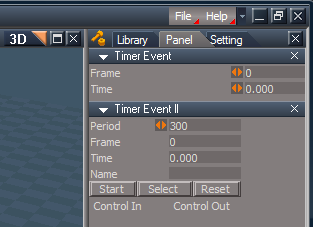
- Capture.PNG (14.23 KiB) Viewed 6449 times
-
- New Compressed (zipped) Folder7781.zip
- (888.03 KiB) Downloaded 296 times
Last edited by trueBlue on 16 Jan 2010, 18:56, edited 1 time in total.
-
dreamcatcher107
- Petty Officer First Class
- Posts: 70
- Joined: 23 Aug 2009, 16:26
- Type the number ten into the box: 0
- Location: Illinois, USA
Re: exporting to .avi format
Thanks trueBlue. I'll give it a try.
-
dreamcatcher107
- Petty Officer First Class
- Posts: 70
- Joined: 23 Aug 2009, 16:26
- Type the number ten into the box: 0
- Location: Illinois, USA
Re: exporting to .avi format
Thanks trueBlue -
Your timer event II allowed me to generate the three sequences in the 4D LE panel that compile the full animation. I have only to find a way to export the whole thing. I tried model side's render to .avi but got no motion. I also tried workspace side's render to file in .png using the animation button and only got a single frame.
There must be something I'm overlooking, but I can't figure it out. Any advice would be appreciated.
Your timer event II allowed me to generate the three sequences in the 4D LE panel that compile the full animation. I have only to find a way to export the whole thing. I tried model side's render to .avi but got no motion. I also tried workspace side's render to file in .png using the animation button and only got a single frame.
There must be something I'm overlooking, but I can't figure it out. Any advice would be appreciated.
-
trueBlue
- Captain
- Posts: 5548
- Joined: 06 Jul 2009, 22:50
- Type the number ten into the box: 10
Re: exporting to .avi format
Are you able to Play the completed animation in the Animation Editor?
For Workspace's Render to File
Make sure whatever folder you use is created and empty first.
For Workspace's Render to File
Make sure whatever folder you use is created and empty first.
- Attachments
-
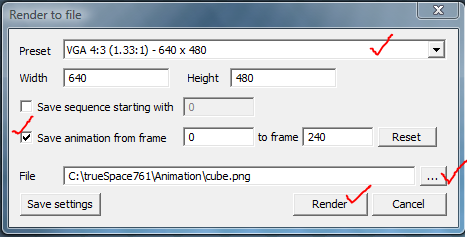
-
dreamcatcher107
- Petty Officer First Class
- Posts: 70
- Joined: 23 Aug 2009, 16:26
- Type the number ten into the box: 0
- Location: Illinois, USA
Re: exporting to .avi format
I figured out that by setting the 4D LE to the story tab I could render all the frames; one file is VGA while a second (the one I need for Studio) is NTSC. I also downloaded and installed that free assembler program you referred to. How do you suggest I proceed?
-
trueBlue
- Captain
- Posts: 5548
- Joined: 06 Jul 2009, 22:50
- Type the number ten into the box: 10
Re: exporting to .avi format
Which program are you using?
Normally I would think when you Import your images, you select the first image file and the rest are loaded automatically.
Normally I would think when you Import your images, you select the first image file and the rest are loaded automatically.
-
dreamcatcher107
- Petty Officer First Class
- Posts: 70
- Joined: 23 Aug 2009, 16:26
- Type the number ten into the box: 0
- Location: Illinois, USA
Re: exporting to .avi format
trueBlue, your inspiration is amazing. I figured out the other program you recommended, found that all of the NTSC .png images were loaded, dubbed them and just now rendered a full .avi file. I have yet to take it into Pinnacle Studio, but, sfter having to re-render indivuidual frames that were corrupt, the entire 3 minutes completed the preview process. I saved the .avi file thereafter.
Once I post process, I would be happy to share it with you. You have been a great Mentor...
Once I post process, I would be happy to share it with you. You have been a great Mentor...
-
trueBlue
- Captain
- Posts: 5548
- Joined: 06 Jul 2009, 22:50
- Type the number ten into the box: 10
Re: exporting to .avi format
Yahoooooooo!
Look forward to seeing your completed project.
Your persistence is admiral.
Look forward to seeing your completed project.
Your persistence is admiral.