Plugin: toolsLib
-
Fenerit

- Senior Chief Petty Officer
- Posts: 173
- Joined: 21 Nov 2011, 19:19
- Type the number ten into the box: 9
Plugin: toolsLib
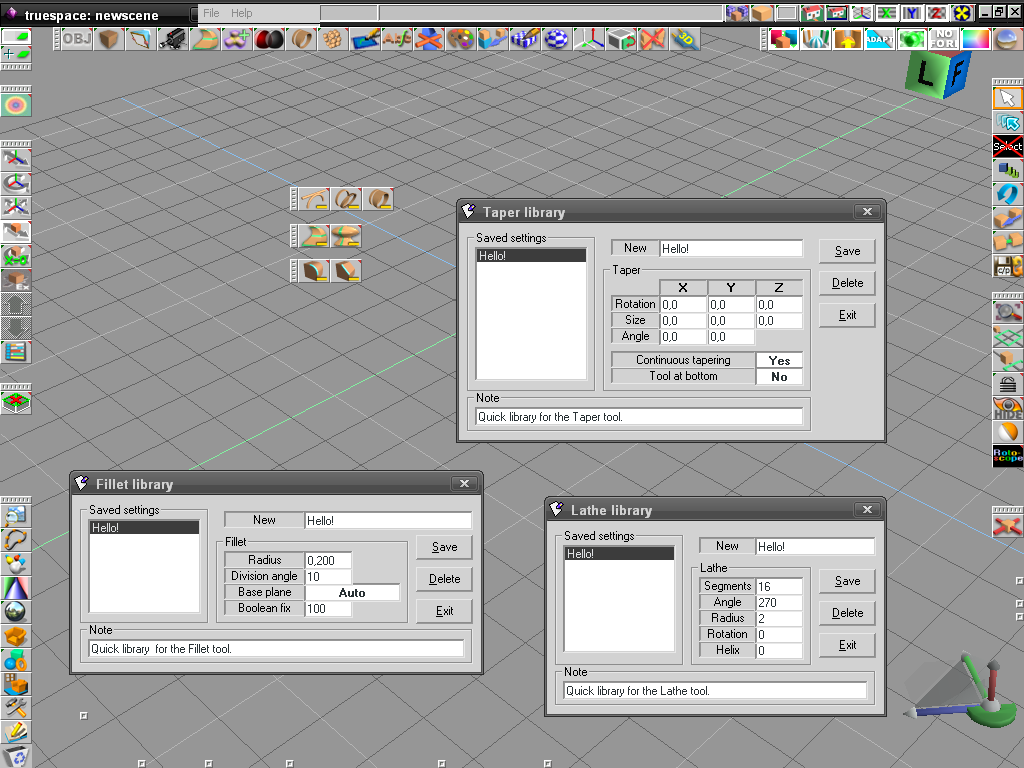
Hi there! I'm Fenerit and I apologize for the bad english. Second, I salute you all for the companion in those tS years. If someone is interested, below there is a zip file with several tools library which I made sometime ago. The library are standalone VB databases in which collects settings for the sweep/tip - lathe - fillet - chamfer - bend - skew - taper tools. All libraries have their relevant tSx plug-in (buttons) to be executed from within tS itself. See the "readme.txt" for the instructions.
- Attachments
-
- toolsLib.zip
- (154.41 KiB) Downloaded 345 times
-

- Screendump of three of seven libs.
Last edited by Fenerit on 27 Nov 2011, 19:51, edited 3 times in total.
-
v3rd3
- Lieutenant Commander
- Posts: 1191
- Joined: 21 May 2009, 20:04
Re: Plugin: toolsLib
thank you for this
-
Steinie

- Captain
- Posts: 2958
- Joined: 21 May 2009, 17:38
- Type the number ten into the box: 10
Re: Plugin: toolsLib
Grazie Fenerit!
Your english is not bad at all. Welcome to the forums!
Your english is not bad at all. Welcome to the forums!
-
bitkar

- Captain
- Posts: 2089
- Joined: 16 Mar 2010, 07:14
- Type the number ten into the box: 0
- Location: Czech Republic
Re: Plugin: toolsLib
great, someone new came and obviously knows how to program things for tS. That brings hope for a better future.
thanks
thanks
Michal aka bitkar
tS freak since tS2 (1998) and forever (tS7.61 modeler)
tS freak since tS2 (1998) and forever (tS7.61 modeler)
-
Fenerit
- Senior Chief Petty Officer
- Posts: 173
- Joined: 21 Nov 2011, 19:19
- Type the number ten into the box: 9
Re: Plugin: toolsLib
Thank you all, guys, for the friendly welcome. Recently I've found into a drawer an old hard disk with a few code concerning tS with which I played years ago. thus I've recompiled it; i.e such a naives libraries. At this point I think to include also thats for the Nurbs' options. Now I'm re-analyzing a never finished workaround on the rounded bevel code to achieve the face's subdivision like a "radar". I must set up newly my memory in these matters then I will see what will drawn up.
-
Fenerit
- Senior Chief Petty Officer
- Posts: 173
- Joined: 21 Nov 2011, 19:19
- Type the number ten into the box: 9
Re: Plugin: toolsLib
I take of bitkar' post to throw down my "views", apologizing whether in these my early posts I speak "at past": are just assessments to "break the ice".bitkar wrote:great, someone new came and obviously knows how to program things for tS. That brings hope for a better future.
thanks
"Code, I need code..."
 one would says. Of course this is the first issue and cannot be solved at the root. Secondary, neither for plug-ins, which surely aren't the tS "motor" there is a lot of code-examples widespread on the net. Remember that I've spent days in search of code digging in the net through Altavista
  . For what concern the external, in my country tS and Caligari company has ever been a bit "esoteric" like software house, and the sharing of informations about it very poor or absent at all. I wonder whether in my country there is someone which has Jewelspace, for example.
 Anyhow, around my land, everybody which use other software is convinced that the tS' interface was the main issue for its success; forgotting that with the new screentouch monitors should be the most suitable.
-
Emmanuel

- Chief Warrant Officer
- Posts: 670
- Joined: 14 Jun 2009, 06:47
Re: Plugin: toolsLib
Hello Fenerit and welcome on the forum!
It is always a warm in the heart when I see new releases of plugins for tS6/Modeler
Your libraries system is a very handy tool. Unfortunately it doesn't work when I call it from tS. See error message below.
I can run the exe files from tS's tsx folder though, but I had to download the msbvm50.dll to make it work.
I am on an XP Pro 64 system.
Do you have any idea how to remove to the error message when running the plugin from tS ?
It is always a warm in the heart when I see new releases of plugins for tS6/Modeler
Your libraries system is a very handy tool. Unfortunately it doesn't work when I call it from tS. See error message below.
I can run the exe files from tS's tsx folder though, but I had to download the msbvm50.dll to make it work.
I am on an XP Pro 64 system.
Do you have any idea how to remove to the error message when running the plugin from tS ?
- Attachments
-

- error.jpg (23.6 KiB) Viewed 6728 times
-
Emmanuel
- Chief Warrant Officer
- Posts: 670
- Joined: 14 Jun 2009, 06:47
Re: Plugin: toolsLib
Oh, on your screenshot, I see two tsX icons I think I've never seen before.
Are they other tools you've made ?
Are they other tools you've made ?

-
Draise

- Captain
- Posts: 3200
- Joined: 21 Sep 2009, 19:33
- Type the number ten into the box: 0
- Location: Bogota, Colombia
Re: Plugin: toolsLib
Welcome Fenerit!
-
Fenerit
- Senior Chief Petty Officer
- Posts: 173
- Joined: 21 Nov 2011, 19:19
- Type the number ten into the box: 9
Re: Plugin: toolsLib
@Emmanuel:
The error seem a mismatch amongst the bend and the skew libs, which I do not recognize; neither whether I erase both the skew/bend DAT files and thereafter I restart them alternatively. I will check the buttons' code soon but there is no references to the libraries into the tSx. I do not have XP Pro 64 and I do not know what could be its behaviour; surely such VB's dll is no longer required on the 32 bit version. Nonetheless, being the libraries executes as standalones exe, most probably it's matter of folder's path and how the Pro 64 does manage it. I can only waiting whether others have the same issue.
For what concern the "new icons", on right is the icon's hacking of the copy/paste plug-in, while on the left, yes, is one of three plug-ins which I made to semplify a way of operating during some scenes with which I dealt with time ago. I think I will post them after the check on the library's buttons code. They does resets the rotation for the proper object's axis leaving untouched the others, respectively. Right click does reset all the XYZ rotations, no matter on which axis is clicked on. Do look more accurately: there is another one.
The error seem a mismatch amongst the bend and the skew libs, which I do not recognize; neither whether I erase both the skew/bend DAT files and thereafter I restart them alternatively. I will check the buttons' code soon but there is no references to the libraries into the tSx. I do not have XP Pro 64 and I do not know what could be its behaviour; surely such VB's dll is no longer required on the 32 bit version. Nonetheless, being the libraries executes as standalones exe, most probably it's matter of folder's path and how the Pro 64 does manage it. I can only waiting whether others have the same issue.
For what concern the "new icons", on right is the icon's hacking of the copy/paste plug-in, while on the left, yes, is one of three plug-ins which I made to semplify a way of operating during some scenes with which I dealt with time ago. I think I will post them after the check on the library's buttons code. They does resets the rotation for the proper object's axis leaving untouched the others, respectively. Right click does reset all the XYZ rotations, no matter on which axis is clicked on. Do look more accurately: there is another one.
-
Fenerit
- Senior Chief Petty Officer
- Posts: 173
- Joined: 21 Nov 2011, 19:19
- Type the number ten into the box: 9
Re: Plugin: toolsLib
Yup! Hasta, Draise.Draise wrote:Welcome Fenerit!

P.S.
@Emmanuel: what is your precise tsx path? For the sake of completition, a "targeted" plug-in could resolve the issue path vs. Pro 64.

-
Emmanuel
- Chief Warrant Officer
- Posts: 670
- Joined: 14 Jun 2009, 06:47
Re: Plugin: toolsLib
Right! The problem was about tsx path. Thank youFenerit wrote: @Emmanuel: what is your precise tsx path?

I use to sort tsx by authors (I create folders in the tsx directory), and it seems your plugins didn't like that. If I place the plugins in a folder named toolsLib, in root of the tsx folder, all is running fine
Thanks again for this great addition to tS's toolset !
A suggestion maybe : do you think your library system could handle views dimensions ?
I mean, when we make a render from a new perspective/top/side view window, and need to re-do the render with some changes a few weeks later, it is important to re-use the same window proportions/size to make the new render. Otherwise, the new render will not match the old one in Photoshop and some post-render work couldn't be reused (I hope all this make sense...).
A library to store new View windows sizes with the project/render name would be very useful!
-
Fenerit
- Senior Chief Petty Officer
- Posts: 173
- Joined: 21 Nov 2011, 19:19
- Type the number ten into the box: 9
Re: Plugin: toolsLib
Mmmmm... The method should be the same of the toolsLib; nothing of transcendental: just the manual enters of the settings. (if I've well-understood the suggestion). I'll take a look. BTW, my old ideas for the new views windows was that of opening it directly maximized on the double monitor.Emmanuel wrote: ...
I mean, when we make a render from a new perspective/top/side view window, and need to re-do the render with some changes a few weeks later, it is important to re-use the same window proportions/size to make the new render. Otherwise, the new render will not match the old one in Photoshop and some post-render work couldn't be reused (I hope all this make sense...).
A library to store new View windows sizes with the project/render name would be very useful!
-
Emmanuel
- Chief Warrant Officer
- Posts: 670
- Joined: 14 Jun 2009, 06:47
Re: Plugin: toolsLib
cool !Fenerit wrote: I'll take a look. BTW, my old ideas for the new views windows was that of opening it directly maximized on the double monitor.
-
Fenerit
- Senior Chief Petty Officer
- Posts: 173
- Joined: 21 Nov 2011, 19:19
- Type the number ten into the box: 9
Re: Plugin: toolsLib
Hi! The toolsLib have been updated. Download link is the same, on the first post.
- Fix a bug with the deletion confirmation msg: now the window message is shown above the library and not beneath. For whom already have downloaded the files, is enough the exe's replacements only, for the library DATs and the tSx there is not need of replacements. Libraries already edited will works normally.
- Fix a bug with the deletion confirmation msg: now the window message is shown above the library and not beneath. For whom already have downloaded the files, is enough the exe's replacements only, for the library DATs and the tSx there is not need of replacements. Libraries already edited will works normally.
-
Fenerit
- Senior Chief Petty Officer
- Posts: 173
- Joined: 21 Nov 2011, 19:19
- Type the number ten into the box: 9
Re: Plugin: toolsLib
Hi Emmanuel:
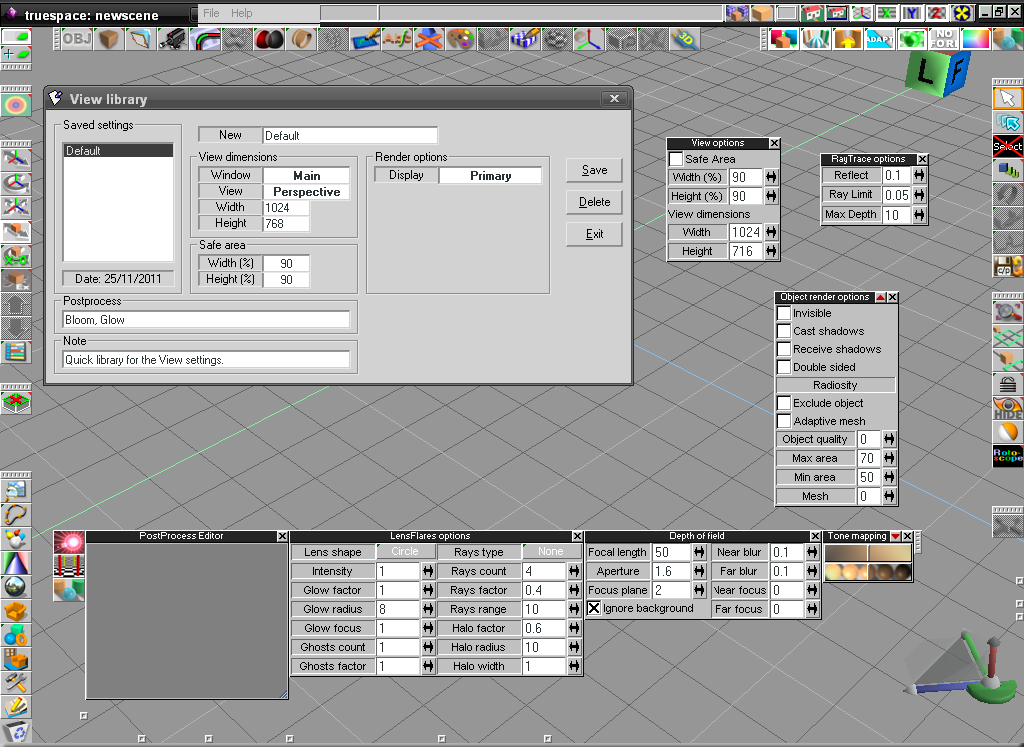
The library you are in search of could be extended to include lots of settings. See the screenshot. it could be useful, or is enough just the view's settings? suggestion on the parameters and on the "design" are welcome. Lots of settings, probably are best managed when for each project or for specific classes of projects is set forth their proper file saving, instead of scattering data across a quick database.
The library you are in search of could be extended to include lots of settings. See the screenshot. it could be useful, or is enough just the view's settings? suggestion on the parameters and on the "design" are welcome. Lots of settings, probably are best managed when for each project or for specific classes of projects is set forth their proper file saving, instead of scattering data across a quick database.
- Attachments
-
-
Emmanuel
- Chief Warrant Officer
- Posts: 670
- Joined: 14 Jun 2009, 06:47
Re: Plugin: toolsLib
That's good to see how this library can be improved !Fenerit wrote: The library you are in search of could be extended to include lots of settings. See the screenshot. it could be useful, or is enough just the view's settings?
Since render settings are saved along with the scene, I think view settings are sufficient for this library tool ; but some people may find that feature useful (for example, have a top view render with gray background, while other views save a white background information...)
Thank you again for all these pretty tools that make trueSpace6/modeler still alive
-
Fenerit
- Senior Chief Petty Officer
- Posts: 173
- Joined: 21 Nov 2011, 19:19
- Type the number ten into the box: 9
Re: Plugin: toolsLib
Sorry, (do not beat me!); I've re-upload the toolsLib.zip since I've forgot to include their folder, and has been removed the "show in taskbar" behaviour, which VB RESTORE BY ITSELF when one does an unrelated modification and albeit already set off. 