Imaginative title amirite?
So back on the old califorum I uploaded the "frogjump", which can be found here, and I also tried reviving that scene, but, the aniamtion was a bit "meh", scene was too complicated and render times were too wacky, and to top it off truespace flipped the birdy at me now the scene wont' load in true metaridley/WoTW fashion (for those of you who remember THOSE particular debakels)
Back it comes again then, got a new animation lined up for it which I'll go into at another point, and many new tricks to try, while I'm on the learning curve, let's see if I can drag everyone else along with me, having more than one person to spot any potential pitfalls is always a good idea.
First one being overcoming my inability to post process my renders, what takes them from okay to good. As tom suggested back on the old Califorums, rendering a sequence of stills is a much better option.
I plan on rendering these images in a specific and set way
-------------------------------------------------------------------------------------------------------------------
1) The main file (that is the landing pad, frogjump and immediate background objecs (smoke stacks you see in the image below)) are to be rendered with no background as .png files, I use .pngs because anything that isn't an object, any "white space" will become transparent, allowing me to paste more things on the background
1.5) Depending on how rendering .png calculates PPFX I may need to render all particles seperate
2) Render a z-pass for each frame (using the zrender plugin) and use it as a mask for depth of field or blur or whatever you want, download the plugin from here
3) Save the camera with it's animation, and start tearing my hear out while making the background, maybe a few more pads or smokestacks or buildings, render that from the camera
4) Render the backdrop (this is the same background as on the IBL light), render that from the animated camera
5) Put them all together on one layer, remove brightness, add contrast, add soft focus, colour corrcet, remove some more brightness, and repeat for every other frame. If I get this right, I'll be finishing post edit of each frame as the next one renders *hopefully*
-------------------------------------------------------------------------------------------------------------------
Putting all those stills together, featuring DesignDevil for the second time in this message, 'tis a little program called "Bivi" and I'm in love with it, it's in german but it really doesn't matter if you can't read it, it's a self explanitory program:
BiVi ist ein Programm welches Einzelbilder zu einem Video zusammenfassen kann.
(BiVi is a program which can combine single pictures into one video)
Hier Klicken!
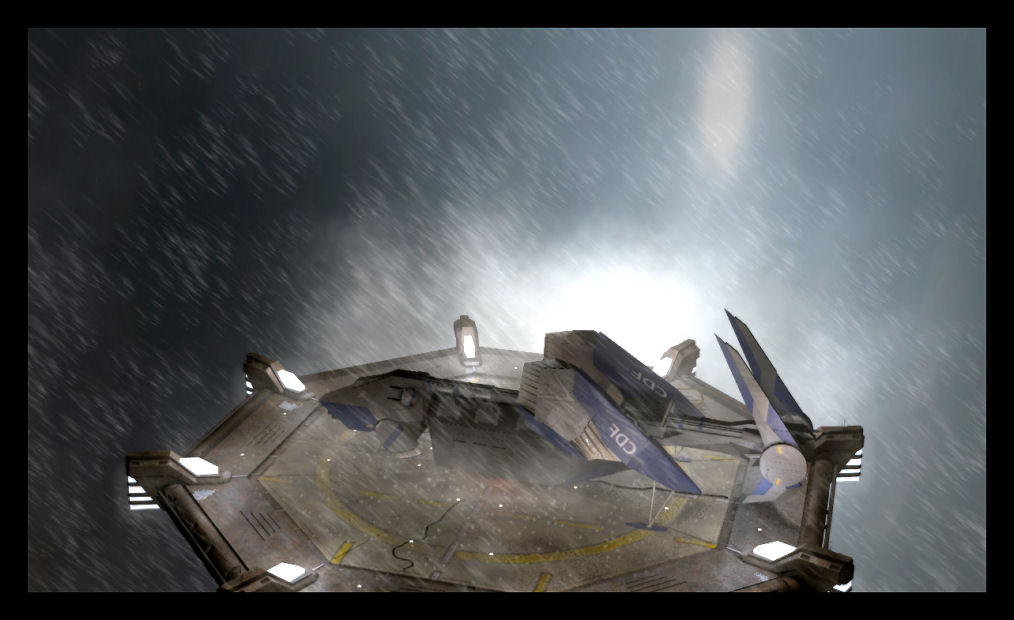
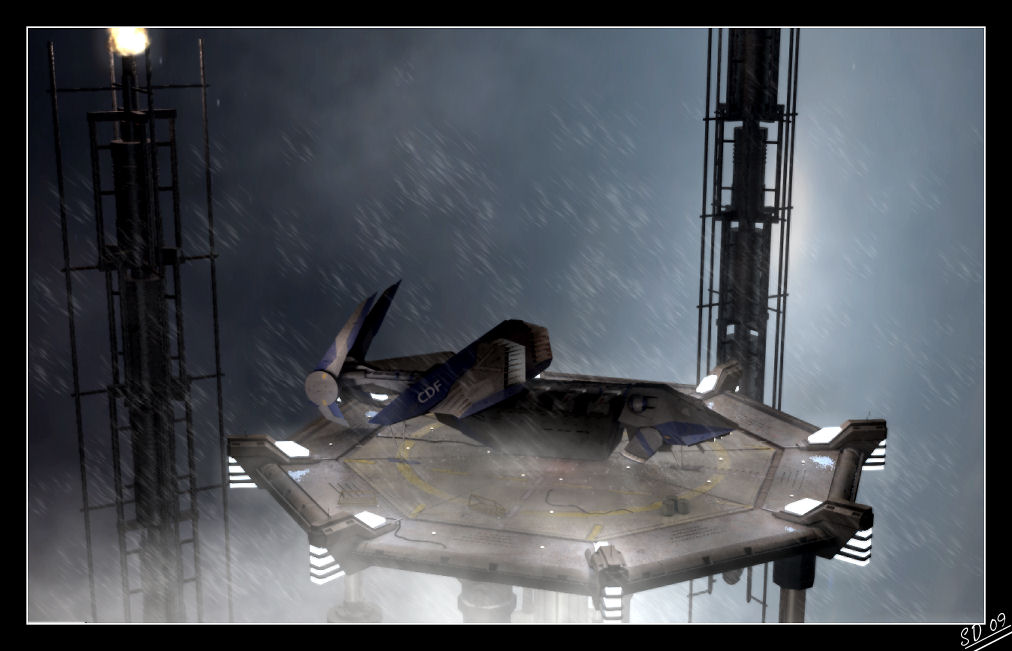
Here's two stills, one with the camera coming from the left, one with the camera coming from the right, still very much a WIP
Lighting was a pain
Particle effects look pretty
Environment modelling is a pain, I want a simple scene but not "half arsed", any suggestiosn (water and lots of clouds are a bit of a "no no") I have an idea if Marcel is willing to share his virtual duplication method he used in his irobot video
Rendering times were suprisingly good to me
The landing pad is something old i've had kicking around for ages
Tommorow I'll see about rendering a video based off of my idea while my orthodontist is busy re-arranging my mouth, no camera animation, just a static view from the top image, just to test out particles
Steve
Landing pad
-
Steve

- Master Chief Petty Officer
- Posts: 394
- Joined: 29 Jun 2009, 10:20
- Type the number ten into the box: 0
- Location: Hiding (Like a ninja)
Landing pad
- Attachments
-
-
-
LeonRegis

- Captain
- Posts: 1946
- Joined: 18 Aug 2009, 17:36
- Type the number ten into the box: 0
- Location: Brazil/Earth/Orion Arm/Milky Way/4th Dimension/This Universe/Multiverse???/Singularity???
Re: Landing pad
Hey weevil, you are a master!!! Amazing, your work I don't know if you see my greetings at the Short Term Plans Topic then I'll post here too. Just one question, it meant to be an history with images or an animation? 
--------------------------------------------------------------
Hello Weevil,
I know that you're a longtime member and I'm a baby compared to you, so welcome back
Greetings from Brazil!
Edit: I love your artworks
---------------------------------------------------------------
Sorry that I cannot help you I'm a newbie
--------------------------------------------------------------
Hello Weevil,
I know that you're a longtime member and I'm a baby compared to you, so welcome back
Greetings from Brazil!
Edit: I love your artworks
---------------------------------------------------------------
Sorry that I cannot help you I'm a newbie
Be the change you want to see in the world. - Mohandas Gandhi
-
marcel

- Captain
- Posts: 2247
- Joined: 21 May 2009, 19:52
- Type the number ten into the box: 0
- Location: paris - France
Re: Landing pad
I am not sure to understand what you need with my "virtual duplication ".
I remember the video of the landing. The cam movment was really good and natural.
I remember the video of the landing. The cam movment was really good and natural.
Design - illustration - Animation
http://www.crea-vision.fr
http://www.crea-vision.fr
-
LeonRegis
- Captain
- Posts: 1946
- Joined: 18 Aug 2009, 17:36
- Type the number ten into the box: 0
- Location: Brazil/Earth/Orion Arm/Milky Way/4th Dimension/This Universe/Multiverse???/Singularity???
Re: Landing pad
Where can I see those animations?
Be the change you want to see in the world. - Mohandas Gandhi
-
marcel
- Captain
- Posts: 2247
- Joined: 21 May 2009, 19:52
- Type the number ten into the box: 0
- Location: paris - France
Re: Landing pad
In the weevil frogjump thread
http://forums1.caligari.com/truespace/a ... 1230646204
http://forums1.caligari.com/truespace/a ... 1230646204
Design - illustration - Animation
http://www.crea-vision.fr
http://www.crea-vision.fr
-
LeonRegis
- Captain
- Posts: 1946
- Joined: 18 Aug 2009, 17:36
- Type the number ten into the box: 0
- Location: Brazil/Earth/Orion Arm/Milky Way/4th Dimension/This Universe/Multiverse???/Singularity???
Re: Landing pad
Amazing camera moves 
Be the change you want to see in the world. - Mohandas Gandhi
-
tahnoak

- Master Chief Petty Officer
- Posts: 339
- Joined: 02 Sep 2009, 01:31
Re: Landing pad
Great stuff Weevil.. very impressive. I loved the fluctuation of the craft as it was hovering and coming in for landing.
-
DesignDevil

- Master Chief Petty Officer
- Posts: 500
- Joined: 22 May 2009, 08:52
- Type the number ten into the box: 0
- Location: Neuruppin, Germany, Earth.
Re: Landing pad
wow ... pretty cool ... the cam movement and zoom makes it to a "real" scene. very impressive.
I still use TrueSpace 6.6
Link: My Youtube Channel
Link: www.DesignDevil.de - Plugins, Tutorials and more about TrueSpace 6.6
Link: My Youtube Channel
Link: www.DesignDevil.de - Plugins, Tutorials and more about TrueSpace 6.6
-
Breech Block

- Master Chief Petty Officer
- Posts: 482
- Joined: 13 Jun 2009, 20:31
Re: Landing pad
Hi Steve, it's really great to see you have dusted off this old project as this has always been one of my favourites. And it looks like your really going to town ramping up the quality levels too. The layering technique you described looks as if it will work quite well, even the likes of ILM still have to do all their stuff in layers so there is no getting away from the issue whoever you are. Couple of things with the images you posted. On the top one, the texture on the "aircraft" seems to be reversed. Don't know if that is on the model itself or the image has been mirrored in post. I would also change the colour of the tiny, round lights on the deck to either an amber or red as they are kinda getting washed out with all the other effects. And, if not done already, I would animate them so they pulse into the centre of the landing pad, kinda like a pilot's guideline. And last, but not least, with the large, chunky, upward facing lights that are surrounding the pad, I guess I'm expecting to see a more volumetric effect with all the wind and the rain. If this is proving too difficult effect to render as volumetrics are a killer render wise, you could fake it by adding geometry to where the light beams would be and simulating the volumetric effect with a good texture and alpha mask.
HTH and really looking forward to seeing this one develop.
HTH and really looking forward to seeing this one develop.

-
Steve
- Master Chief Petty Officer
- Posts: 394
- Joined: 29 Jun 2009, 10:20
- Type the number ten into the box: 0
- Location: Hiding (Like a ninja)
Re: Landing pad
Wow, lot of responses, thanks all for the compliments on the original animation, sadly I'm going to need to put a lot more work into this one, what I'll do when I have some time is show how easy it is to make camera movements such as that (and is actually a lot easier than cinematic camera animation). Let's hope this one stands up to the prvious animation ey?
@Leonregis, Hi to you, I've seen you around the forums quite a bit, can't wait to see your artwork too, greetings from the UK
@Marcel
http://forums1.caligari.com/truespace/s ... stcount=30"
That trick, I may be missing something but that is neither using a billboard technique, nor is it directly copying the object, how have you managed that?
@DesignDevil. BiVi and PPFX were massive helps, danke
@Tahnoak, thanks a lot, that animation will make a return and then some in this project, should be fun
@Breech
Good spot. The aircraft with the reversed stickers, I must admit was brought up before, and I must admit I forgot to do anything about it, I'm currently in the process of making a new ship for this project (the frogjump will be used in another project) and atm is only a stand-in model, but, I better fix that now before you all get bored of pointing it out
The lights, I think I'll change to a more amber colour and make them brighter, I'll need to animate them yes but that is going to take an entire animation "session", material editor and all. I'm against making them red simply because that colour would clash with the rest of the scene and the blue around the edge.
The blue around the edge I must admit, I'm not too fond of doing that, as that might cause too much clutter around the edge of the pad? Maybe we won't be able to see through it? I can make the local lights more powerful, do you think that would work? (that and I can't do volumetrics, I'm all ready using the fog foreground shader)
The video I've got attached was made before I read the comments, and I also need to have a look into why half the smokestack on the right is missing, I've checked over it tonnes of times and it appears on the wireframe, but not in render, textures are correct, it's not being obstructed, nothing, but, I think this video shows the scene better than a still shot can
Rendered into loads of jpgs, post edited every one, then, compiled them all in BiVi
http://www.mediafire.com/download.php?z4dtnlmgiht"
enjoy
@Leonregis, Hi to you, I've seen you around the forums quite a bit, can't wait to see your artwork too, greetings from the UK
@Marcel
http://forums1.caligari.com/truespace/s ... stcount=30"
That trick, I may be missing something but that is neither using a billboard technique, nor is it directly copying the object, how have you managed that?
@DesignDevil. BiVi and PPFX were massive helps, danke
@Tahnoak, thanks a lot, that animation will make a return and then some in this project, should be fun
@Breech
Good spot. The aircraft with the reversed stickers, I must admit was brought up before, and I must admit I forgot to do anything about it, I'm currently in the process of making a new ship for this project (the frogjump will be used in another project) and atm is only a stand-in model, but, I better fix that now before you all get bored of pointing it out
The lights, I think I'll change to a more amber colour and make them brighter, I'll need to animate them yes but that is going to take an entire animation "session", material editor and all. I'm against making them red simply because that colour would clash with the rest of the scene and the blue around the edge.
The blue around the edge I must admit, I'm not too fond of doing that, as that might cause too much clutter around the edge of the pad? Maybe we won't be able to see through it? I can make the local lights more powerful, do you think that would work? (that and I can't do volumetrics, I'm all ready using the fog foreground shader)
The video I've got attached was made before I read the comments, and I also need to have a look into why half the smokestack on the right is missing, I've checked over it tonnes of times and it appears on the wireframe, but not in render, textures are correct, it's not being obstructed, nothing, but, I think this video shows the scene better than a still shot can
Rendered into loads of jpgs, post edited every one, then, compiled them all in BiVi
http://www.mediafire.com/download.php?z4dtnlmgiht"
enjoy
-
Steve
- Master Chief Petty Officer
- Posts: 394
- Joined: 29 Jun 2009, 10:20
- Type the number ten into the box: 0
- Location: Hiding (Like a ninja)
Re: Landing pad
Here's the ship I'm going to be using, made in a random moment today. Need to decide on paints, and a name
We're either looking at:
Dragonfly
Wespe
Vesper
More to come on this later, modelling's not finished at all. Still need to model the cockpit, more engine detail, more grills, a searchlight "terminator" style, moving tailfins, lights, intakes and the ability to drop the pod and landing gear, then UVMapping and texturing all of the above I don't like)
http://i72.photobucket.com/albums/i192/ ... Wasp-1.jpg"
linked for huge size
We're either looking at:
Dragonfly
Wespe
Vesper
More to come on this later, modelling's not finished at all. Still need to model the cockpit, more engine detail, more grills, a searchlight "terminator" style, moving tailfins, lights, intakes and the ability to drop the pod and landing gear, then UVMapping and texturing all of the above I don't like)
http://i72.photobucket.com/albums/i192/ ... Wasp-1.jpg"

linked for huge size
-
LeonRegis
- Captain
- Posts: 1946
- Joined: 18 Aug 2009, 17:36
- Type the number ten into the box: 0
- Location: Brazil/Earth/Orion Arm/Milky Way/4th Dimension/This Universe/Multiverse???/Singularity???
Re: Landing pad
Skynightx
Just a suggestion. You can see some of my artworks at the Finished Artworks (Simple Things, Beautiful works topic) and the SMC 49...
Best Regards
Leon
Just a suggestion. You can see some of my artworks at the Finished Artworks (Simple Things, Beautiful works topic) and the SMC 49...
Best Regards
Leon
Be the change you want to see in the world. - Mohandas Gandhi
-
theuns
- Lieutenant Junior Grade
- Posts: 868
- Joined: 10 Jun 2009, 11:21
- Type the number ten into the box: 0
- Location: South Africa
Re: Landing pad
looking good so far, got some more small pics to share in the thread?
theuns - tSer since 2000
. http://theunsfvo.cgarena.com/" onclick="window.open(this.href);return false; |:.
. http://bluestarcreations.wordpress.com/" onclick="window.open(this.href);return false; |:.
.
http://theunsfvo.cgarena.com/" onclick="window.open(this.href);return false; |:..
http://bluestarcreations.wordpress.com/" onclick="window.open(this.href);return false; |:.-
Steve
- Master Chief Petty Officer
- Posts: 394
- Joined: 29 Jun 2009, 10:20
- Type the number ten into the box: 0
- Location: Hiding (Like a ninja)
Re: Landing pad
Rather a "Faux Pas" on my part, I'm currently in the middle of doing the notorious "Weevil juggle" where I'm trying to keep about....three/four 3D projects going at the same time, this one, I'm starting to get the Rose project up and going again, the bar needs work, and broken skies, it's rather like playing :THIS: game
Currently working on texturing that ship, jut trying to keep this topic slightly afloat
Currently working on texturing that ship, jut trying to keep this topic slightly afloat
-
tahnoak
- Master Chief Petty Officer
- Posts: 339
- Joined: 02 Sep 2009, 01:31
Re: Landing pad
Thanks for the update.
-
Steve
- Master Chief Petty Officer
- Posts: 394
- Joined: 29 Jun 2009, 10:20
- Type the number ten into the box: 0
- Location: Hiding (Like a ninja)
Re: Landing pad
Glub glub glub
This thing's been resurfaced, I salvaged the old aniamtion and got to work on expanding the scene itself, small uncoloured update, I'll be working on re-texturing and perhaps updating the ship in about a week or so
Enjoy
This thing's been resurfaced, I salvaged the old aniamtion and got to work on expanding the scene itself, small uncoloured update, I'll be working on re-texturing and perhaps updating the ship in about a week or so
Enjoy
- Attachments
-
- landing sequence 2.zip
- (1.53 MiB) Downloaded 254 times
-
Finis

- Captain
- Posts: 5410
- Joined: 21 May 2009, 18:26
- Type the number ten into the box: 0
- Location: America!
Re: Landing pad
Very believable ship movement. I like the cable that moves. How did you do that? The camera work is interesting. It looks not like a theater film but like a home movie so it is like someone at that installation was filming it.
I prefer dangerous freedom over peaceful servitude. -- Thomas Jefferson/Jean Jacques Rousseau
-
Breech Block
- Master Chief Petty Officer
- Posts: 482
- Joined: 13 Jun 2009, 20:31
Re: Landing pad
Glad you have decided to blow the dust off of this project. 
And it's looking even more awesome than it did before. Cant wait for the final version.
And it's looking even more awesome than it did before. Cant wait for the final version.
-
theuns
- Lieutenant Junior Grade
- Posts: 868
- Joined: 10 Jun 2009, 11:21
- Type the number ten into the box: 0
- Location: South Africa
Re: Landing pad
WOW! Love the camera work weevil... how did you do the shakey camera effect? Was it done in realtime workspace or modelspace?
theuns - tSer since 2000
. http://theunsfvo.cgarena.com/" onclick="window.open(this.href);return false; |:.
. http://bluestarcreations.wordpress.com/" onclick="window.open(this.href);return false; |:.
.
http://theunsfvo.cgarena.com/" onclick="window.open(this.href);return false; |:..
http://bluestarcreations.wordpress.com/" onclick="window.open(this.href);return false; |:.