What makes a renderer faster? Taking off all those tricks at textures, lightning and models, I want a hardware evaluation.
First question: A better Graphics card makes the render faster?
Second: A better processor or a better RAM memory for faster render?
Third: What makes more difference?
Thank you in advance!
Render time?
-
LeonRegis

- Captain
- Posts: 1946
- Joined: 18 Aug 2009, 17:36
- Type the number ten into the box: 0
- Location: Brazil/Earth/Orion Arm/Milky Way/4th Dimension/This Universe/Multiverse???/Singularity???
Render time?
Be the change you want to see in the world. - Mohandas Gandhi
-
spacekdet

- Captain
- Posts: 1810
- Joined: 27 May 2009, 15:00
- Type the number ten into the box: 10
- Location: On the day shift at the Utility Muffin Research Kitchen
Re: Render time?
Well, it's both!
For Model side, a faster processor/ more RAM will speed up your render since it is the CPU (and the Lightworks render engine) that is producing the render.
For Workspace, a faster/ better video card will speed up/ enhance the render (and also the overall workflow) since it will be the graphics card that will produce the real-time render.
If you are using an external render engine in Workspace (VRay, Yafaray, etc) then once gain it will be the CPU that produces the render.
For Model side, a faster processor/ more RAM will speed up your render since it is the CPU (and the Lightworks render engine) that is producing the render.
For Workspace, a faster/ better video card will speed up/ enhance the render (and also the overall workflow) since it will be the graphics card that will produce the real-time render.
If you are using an external render engine in Workspace (VRay, Yafaray, etc) then once gain it will be the CPU that produces the render.
-
LeonRegis
- Captain
- Posts: 1946
- Joined: 18 Aug 2009, 17:36
- Type the number ten into the box: 0
- Location: Brazil/Earth/Orion Arm/Milky Way/4th Dimension/This Universe/Multiverse???/Singularity???
Re: Render time?
You always know all things of truespace! You're a great member.
So Lightworks performance depends on the GPU and not graphics card?
Thank you for all help provided in the forums!
So Lightworks performance depends on the GPU and not graphics card?
Thank you for all help provided in the forums!
Be the change you want to see in the world. - Mohandas Gandhi
-
marcel

- Captain
- Posts: 2247
- Joined: 21 May 2009, 19:52
- Type the number ten into the box: 0
- Location: paris - France
Re: Render time?
Lightwork use only the cpu as 99% of the 3d soft.
truespace is not optimized for the gpu (and never will). this techno is too recent. it is not the same thing than use the gpu throught directx for the real time render. an optimized gpu soft can use the power of the card to do the work of the cpu. nvidia have the cuda technologie. some soft can use cuda (video editing). you can have a speed 3 or 4 time more compared to a quad cpu. to use cuda, you need also a video card with cuda (only the new generation have it). ATI have another similar technologie not compatible with cuda. in the future, the choose of the video card will depend more of the compatibility of these technologie with your favorite soft.
realtime in workspace use the gpu only to calculate and refresh the image on the screen in the same way than all the soft. There is no difference with model side. the speed is better only because the code of the soft is different and maybe more optimized. cuda is used to calculate physical simulation, vray render, realtime effect for hdvideo etc...
truespace is not optimized for the gpu (and never will). this techno is too recent. it is not the same thing than use the gpu throught directx for the real time render. an optimized gpu soft can use the power of the card to do the work of the cpu. nvidia have the cuda technologie. some soft can use cuda (video editing). you can have a speed 3 or 4 time more compared to a quad cpu. to use cuda, you need also a video card with cuda (only the new generation have it). ATI have another similar technologie not compatible with cuda. in the future, the choose of the video card will depend more of the compatibility of these technologie with your favorite soft.
realtime in workspace use the gpu only to calculate and refresh the image on the screen in the same way than all the soft. There is no difference with model side. the speed is better only because the code of the soft is different and maybe more optimized. cuda is used to calculate physical simulation, vray render, realtime effect for hdvideo etc...
Design - illustration - Animation
http://www.crea-vision.fr
http://www.crea-vision.fr
-
Prodigy

- Site Admin
- Posts: 957
- Joined: 21 May 2009, 14:46
- Type the number ten into the box: 0
- Location: Uruguay
Re: Render time?
The CPU is the only responsible to make faster renders ..
Vray and Lightworks are both support multi possessors, so that's the only way to make renders faster.. OR distribute render task to other computers..
The GPU is responsible for what you see during the modeling time.. so better gpu is equal to handle more polygons on your screen with a better FPS.
Memory: Truespace is 32bits.. so we have a problem here with the memory cos 32 bit has memory limitation over the 2gigs.
If you have more memory like 4 6 8 gigs of ram on a 32 bit OS and a 32bit Soft, that means that your truespace can use up to 2 gigs of your system memory, over that limit, all became unstable..
There's something that i want to figure, and it is, if we have 2 gigs of ram for TRUESPACE including Vray, or, Truespace has 2 gigs, and vray itself has another 2 gigs.. Cos i found in workspace one way to make a drastic reduction of ram for truespace, and i assume vray can win much more memory for making huge scenes etc..
the trick is change one mesh with millions of polygons for one simple cube.. i saw a huge reduction of memory so I'm quite happy with that workaround..
Sure, that is cool ONLY if you are working with high-poly scenes.. in other cases that is not necessary, and it doesn't work on modelside...
I will make a video tutorial showing the trick..
Vray and Lightworks are both support multi possessors, so that's the only way to make renders faster.. OR distribute render task to other computers..
The GPU is responsible for what you see during the modeling time.. so better gpu is equal to handle more polygons on your screen with a better FPS.
Memory: Truespace is 32bits.. so we have a problem here with the memory cos 32 bit has memory limitation over the 2gigs.
If you have more memory like 4 6 8 gigs of ram on a 32 bit OS and a 32bit Soft, that means that your truespace can use up to 2 gigs of your system memory, over that limit, all became unstable..
There's something that i want to figure, and it is, if we have 2 gigs of ram for TRUESPACE including Vray, or, Truespace has 2 gigs, and vray itself has another 2 gigs.. Cos i found in workspace one way to make a drastic reduction of ram for truespace, and i assume vray can win much more memory for making huge scenes etc..
the trick is change one mesh with millions of polygons for one simple cube.. i saw a huge reduction of memory so I'm quite happy with that workaround..
Sure, that is cool ONLY if you are working with high-poly scenes.. in other cases that is not necessary, and it doesn't work on modelside...
I will make a video tutorial showing the trick..
๑۩۞۩๑ prodigy ๑۩۞۩๑
-
Finis

- Captain
- Posts: 5410
- Joined: 21 May 2009, 18:26
- Type the number ten into the box: 0
- Location: America!
Re: Render time?
Not exactly a hardware recommendation but these help.
Exit as many programs as you can so more of your machine's power is available for TS.
Also, turn off your virus scanner, firewall, etc. Disconnect from the internet first and don't forget to restart your security software before reconnecting.
Exit as many programs as you can so more of your machine's power is available for TS.
Also, turn off your virus scanner, firewall, etc. Disconnect from the internet first and don't forget to restart your security software before reconnecting.
I prefer dangerous freedom over peaceful servitude. -- Thomas Jefferson/Jean Jacques Rousseau
-
Wigand
- Senior Chief Petty Officer
- Posts: 204
- Joined: 21 May 2009, 17:38
Re: Render time?
I can underline this. In our lab we got a new program for an analyser. After installing all was well.Finis wrote: Also, turn off your virus scanner, firewall, etc. Disconnect from the internet first and don't forget to restart your security software before reconnecting.
Suddenly the program needed more than a minute to launch. I checked the computer with
sysinternals programs and noticed that the virus scanner checked every file of the program while
the program was running. So the program seemed to wait for the virus scanner.
Therefore I excluded the programs folder from scanning. Now the program launches in 4sec.
Sure, this helpes only for programs with much file access.
-
marcel
- Captain
- Posts: 2247
- Joined: 21 May 2009, 19:52
- Type the number ten into the box: 0
- Location: paris - France
Re: Render time?
If you need all the night to render an animation you must turn off internet to avoid a reboot during the render. After an update, the pc can reboot even if TS is busy. thank Microsoft.
with lightwork the calcul is simple for the same scene:
nb of polygon x nb of light x nb pixels x nb frames x aliasing = time to render (or near)
for a test you can reduce several of these parameters then you know exactly the real time for the render of the final animation. ex: if you reduce 3 parameters with the half of the original, you final render will be 8 time longer (2x2x2). i do that before begin a long render for the night. in this way i know how many hours i have to eat and sleep
with lightwork the calcul is simple for the same scene:
nb of polygon x nb of light x nb pixels x nb frames x aliasing = time to render (or near)
for a test you can reduce several of these parameters then you know exactly the real time for the render of the final animation. ex: if you reduce 3 parameters with the half of the original, you final render will be 8 time longer (2x2x2). i do that before begin a long render for the night. in this way i know how many hours i have to eat and sleep
Design - illustration - Animation
http://www.crea-vision.fr
http://www.crea-vision.fr
-
RAYMAN

- Captain
- Posts: 2547
- Joined: 21 May 2009, 18:56
Re: Render time?
It largly depends on the software that is used not only the hardware.
Very seldom do I see that people compare the same level of quality.
basically there are 4 types of renderers unbiased that are the highest level of physical accuracy and biased and there is biased with gpu enhancement and
realtime mainly run on gpu power.
What noone here said was the word instancing..... very good renderers can use the same item in a scene a hundred or evn thousands of a time
without much longer render times.
One of the primary reasons why i posted much about Kerkythea (for stills) and Vue ( for stills and animations)
If you render a house with a hundred windows and build that up in Sketchup and export it with the Kerky exporter each instance -window(called a component
)is loaded only as one entity...... saving a lot of memory.
same with ecosystems in Vue. You can render a whole parkinglot of cars at the same speed as you would be able to render only 3 cars in another application
without instancing.
Same with grass and trees............
Very seldom do I see that people compare the same level of quality.
basically there are 4 types of renderers unbiased that are the highest level of physical accuracy and biased and there is biased with gpu enhancement and
realtime mainly run on gpu power.
What noone here said was the word instancing..... very good renderers can use the same item in a scene a hundred or evn thousands of a time
without much longer render times.
One of the primary reasons why i posted much about Kerkythea (for stills) and Vue ( for stills and animations)
If you render a house with a hundred windows and build that up in Sketchup and export it with the Kerky exporter each instance -window(called a component
)is loaded only as one entity...... saving a lot of memory.
same with ecosystems in Vue. You can render a whole parkinglot of cars at the same speed as you would be able to render only 3 cars in another application
without instancing.
Same with grass and trees............
-
compPanda
- Senior Chief Petty Officer
- Posts: 275
- Joined: 21 May 2009, 21:15
- Type the number ten into the box: 0
Re: Render time?
This depends how Truespace calls Vray and how the Vray process is implemented. If the Vray process runs as a "program" that only is started by TS, then it will have the whole 2gb from Windows. However, if Vray is implemented as a part of TS, then it will only have the same memory as TS.Prodigy wrote: There's something that i want to figure, and it is, if we have 2 gigs of ram for TRUESPACE including Vray, or, Truespace has 2 gigs, and vray itself has another 2 gigs.. Cos i found in workspace one way to make a drastic reduction of ram for truespace, and i assume vray can win much more memory for making huge scenes etc..
If you see Vray as a separate process in process list when you render with it, then it should have 2 Gb of ram. If you don't see it and only see TS then it will have to do with TS memory. Personally I haven't tried to see how Vray is implemented.
-
RAYMAN
- Captain
- Posts: 2547
- Joined: 21 May 2009, 18:56
Re: Render time?
Looks like it is implemented as a part of Truespace it doesnt run as a seperate exe file.
Sorry but i never saw Vray in Truespace as the same as the implementation with Max.
There its blinding fast !
Yet it was the best renderimplementation Truespace had.
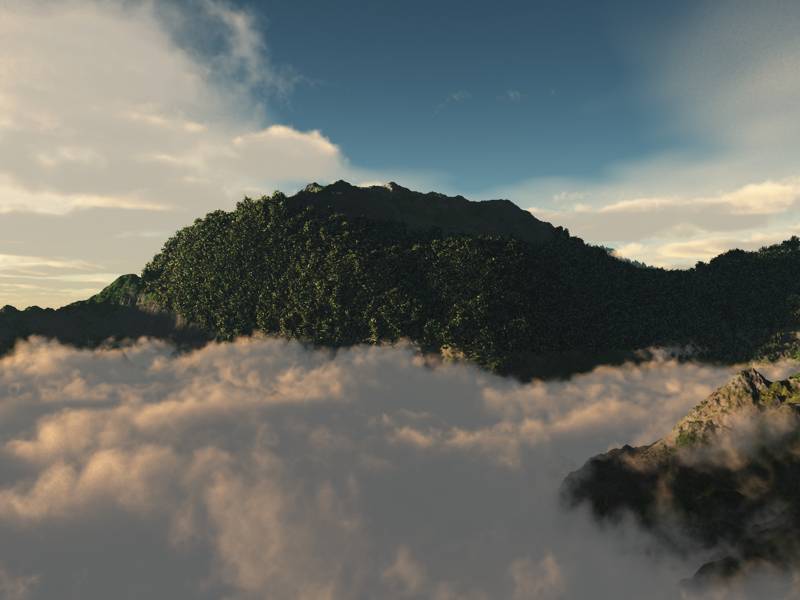
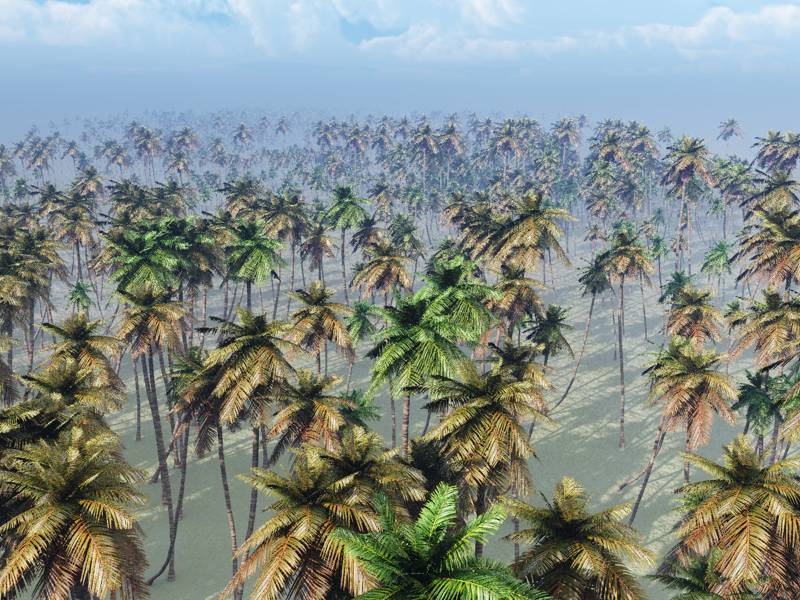
As an example of what i said about instancing both examples that i rendered here took less then 15 minutes each at 600 x 800 pix
with the cloud image having 457 982402 polygons and the flat scene (coconuttrees) 18 464610 polygons.
Both had global illumination and one had extensive haze....
None of both scenes would even load inside Truespace not to speak about rendering.
Sorry but i never saw Vray in Truespace as the same as the implementation with Max.
There its blinding fast !
Yet it was the best renderimplementation Truespace had.
As an example of what i said about instancing both examples that i rendered here took less then 15 minutes each at 600 x 800 pix
with the cloud image having 457 982402 polygons and the flat scene (coconuttrees) 18 464610 polygons.
Both had global illumination and one had extensive haze....
None of both scenes would even load inside Truespace not to speak about rendering.
- Attachments
-
-
-
DanX
- Senior Chief Petty Officer
- Posts: 179
- Joined: 23 May 2009, 17:53
- Type the number ten into the box: 0
- Location: Florida
Re: Render time?
What prodigy and Rayman said are both correct. At least this is my understanding as far as hardware is concerned the Processor speed if power supply is able to support its full potential is the number one reason your PC does anything with speed not just rendering. The more cores your pc has is more important for rendering because it divides up the load allowing more information to be processed at the same time. Ram ( random access memory) allows you to run more information without writing to your hard drive. Ram is lightning fast compared to the hard drive so if you have enough Ram to hold in its memory all of your scene file that is rendered then it will be much faster. If you do not then your pc is forced to write to your hard drive instead of your Ram. This will slow everything down.
Your graphics card is only for your interface. It allows you to see better representations of what is on your pc like a direct X videogame or TS workspace. Basically TS workspace is a multiplayer video game that you can author 3D content with? It renders in Direct X unless you use an outside render engine or plug-in.
So if you plan to use TS workspace then a quad core 3.0 GHz processor with three SLI enabled video cards or equivalent would be a nice machine but then you would still be limited by the 32 bit Architecture.
What Rayman said also is very important. Simply put the software matters.
by the way nice clouds Rayman.
Your graphics card is only for your interface. It allows you to see better representations of what is on your pc like a direct X videogame or TS workspace. Basically TS workspace is a multiplayer video game that you can author 3D content with? It renders in Direct X unless you use an outside render engine or plug-in.
So if you plan to use TS workspace then a quad core 3.0 GHz processor with three SLI enabled video cards or equivalent would be a nice machine but then you would still be limited by the 32 bit Architecture.
What Rayman said also is very important. Simply put the software matters.
by the way nice clouds Rayman.
-
RAYMAN
- Captain
- Posts: 2547
- Joined: 21 May 2009, 18:56
Re: Render time?
Yup Dan ! Your absolutly correct basicaly it boils down to A LOT OF TRICKS that a software uses to make maximum use of the
ram and cores that you have.Thats why not only you render engine is important but also you exporter sometimes even more important.
Its also important for the user to trick the eye of the public by using just a few copies of the same thing and repeat it in the picture.
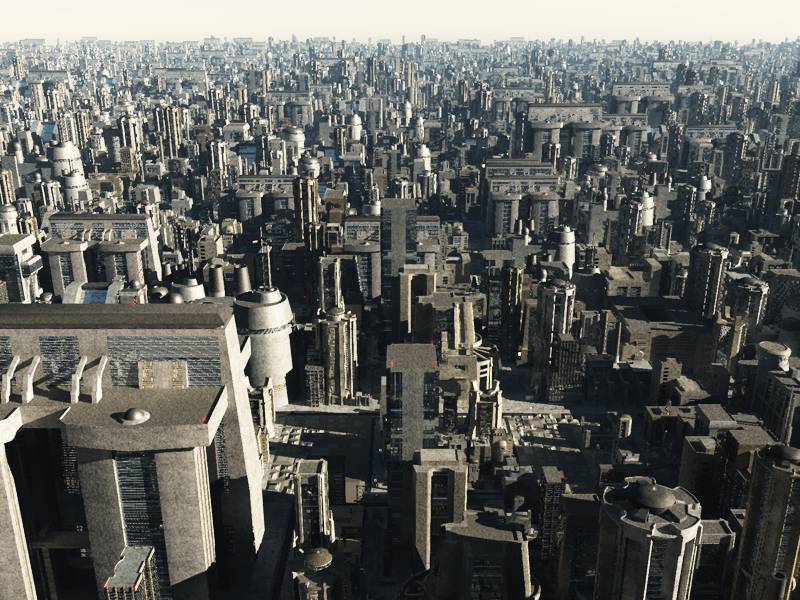
In this pictur you see 10 buildings and it would have 57 million polygons but rendered in 60 seconds at 600 x 800 pix. with radiosity and antialiasing and haze.
In the other example you see that sometimes even animations can be instanced....like these falling ball physics coming from truespace physics engine..
ram and cores that you have.Thats why not only you render engine is important but also you exporter sometimes even more important.
Its also important for the user to trick the eye of the public by using just a few copies of the same thing and repeat it in the picture.
In this pictur you see 10 buildings and it would have 57 million polygons but rendered in 60 seconds at 600 x 800 pix. with radiosity and antialiasing and haze.
In the other example you see that sometimes even animations can be instanced....like these falling ball physics coming from truespace physics engine..
- Attachments
-

- run.gif (1.57 MiB) Viewed 3427 times
-

- fall.gif (495.95 KiB) Viewed 3432 times
-
-
LeonRegis
- Captain
- Posts: 1946
- Joined: 18 Aug 2009, 17:36
- Type the number ten into the box: 0
- Location: Brazil/Earth/Orion Arm/Milky Way/4th Dimension/This Universe/Multiverse???/Singularity???
Re: Render time?
Thank you guys for all information!
Just to be sure, if I buy I new graphic card it won't make renders faster? So I should buy it just because of games?
Cya
PS: Amazing images Rayman! How you did that (tree test 1)??? Which software you used, it's soo beautiful and realistic!
Thanks again
Just to be sure, if I buy I new graphic card it won't make renders faster? So I should buy it just because of games?
Cya
PS: Amazing images Rayman! How you did that (tree test 1)??? Which software you used, it's soo beautiful and realistic!
Thanks again
Be the change you want to see in the world. - Mohandas Gandhi
-
RAYMAN
- Captain
- Posts: 2547
- Joined: 21 May 2009, 18:56
Re: Render time?
Leon if you buy a new grafic card dont buy anything exotic a normal good nvidia can be much more practical with normal programs like Truespace.leonregis wrote:Thank you guys for all information!
Just to be sure, if I buy I new graphic card it won't make renders faster? So I should buy it just because of games?
Cya
PS: Amazing images Rayman! How you did that (tree test 1)??? Which software you used, it's soo beautiful and realistic!
Thanks again
If your render program doesnt support it you wouldnt get much of a speedincrease but if it does it can sometimes be almost realtime like VRAY RT
hardware version(early alpha)( but hasnt been made public).
The picture was made with Vue 8 Inf from Eon software.
(Everything related to the program is in the Vue 8 threads in the general discussion sections here. There is also a new PLE version that is free and only has drawback of being watermarked but good enough for testing the speed.Plus ther is Wizards tutorial that is on the Caligari site.)
https://secure.e-onsoftware.com/try/vue_8_ple/index.php"
There is also a public beta of "Thea render" engine coming out on th 15. December also with instancing for you to test speed and quality
http://www.thearender.com/cms/"
Peter
-
Karthogen
- Master Chief Petty Officer
- Posts: 454
- Joined: 03 Jun 2009, 14:12
Re: Render time?
One of these days I am going to be getting VRAY.
Still saving my pennies, for the next big deal.
Still saving my pennies, for the next big deal.