New Lathe Script

free scripts, plugins, models, textures
User avatar
clintonman
Captain
Posts: 5659
Joined: 21 May 2009, 21:08
Type the number ten into the box: 0
Location: California

New Lathe Script

Post by clintonman »

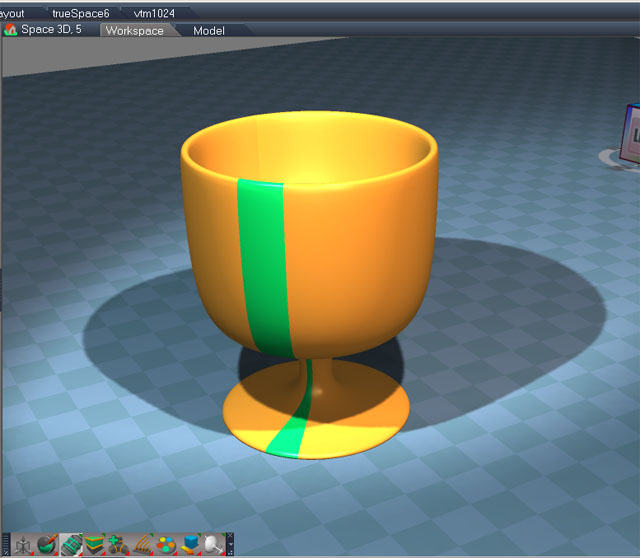
lathe.jpg
This image was used to create the icon for the button.

Lathe tool that works by using a radial array to control a series of sweeps.

Be sure to get the NEW lathe tool not the OLD one.

http://www.clintons3d.com/plugins/trues ... index.html"
Clinton Reese

http://clintons3d.com
User avatar
MikomDude
Captain
Posts: 1930
Joined: 04 Oct 2010, 11:12
Type the number ten into the box: 0
Location: The Hague, Netherlands

Re: New Lathe Script

Post by MikomDude »

Very nice! Thank you Clintonman :D
User avatar
Steinie
Captain
Posts: 2958
Joined: 21 May 2009, 17:38
Type the number ten into the box: 10

Re: New Lathe Script

Post by Steinie »

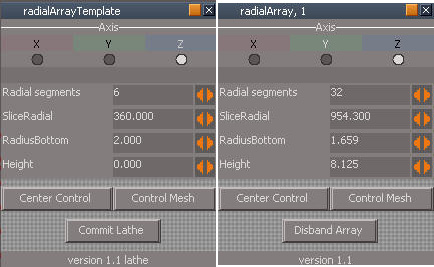
Can this Lathe script and the Radial Array be combined so that some
functions can be shared by one panel?
Thanks!
User avatar
clintonman
Captain
Posts: 5659
Joined: 21 May 2009, 21:08
Type the number ten into the box: 0
Location: California

Re: New Lathe Script

Post by clintonman »

Steinie wrote:Can this Lathe script and the Radial Array be combined so that some
functions can be shared by one panel?
Thanks!
I don't understand. What did you have in mind?
Clinton Reese

http://clintons3d.com
User avatar
Steinie
Captain
Posts: 2958
Joined: 21 May 2009, 17:38
Type the number ten into the box: 10

Re: New Lathe Script

Post by Steinie »

Use the same panel for both the "Radial Array" and the "Lathe" scripts.
I am not a programmer but both panels are just about identical. I was thinking of having
only one panel for both scripts. Add a new button that chooses between the Lathe or Radial script.
Attachments
Combined.jpg
User avatar
clintonman
Captain
Posts: 5659
Joined: 21 May 2009, 21:08
Type the number ten into the box: 0
Location: California

Re: New Lathe Script

Post by clintonman »

lathePanel.jpg
lathePanel.jpg (40.1 KiB) Viewed 4847 times
Update September 2019

http://clintons3d.com/plugins/truespace ... lathe.html

Several improvements based on the new Radial Array script:

works with rotated meshes
smoother operation no jumping or sticky controls
can set radius directly
y axis still bad - good for up to 90 degrees
marker lines to show lathe center
angle scrubber can go negative
new naming unique from radial array
persistent installer
Clinton Reese

http://clintons3d.com
User avatar
clintonman
Captain
Posts: 5659
Joined: 21 May 2009, 21:08
Type the number ten into the box: 0
Location: California

Re: New Lathe Script

Post by clintonman »

Updated release

The previous release did not work with rotated meshes. Fixed now.
Improved X and Y direction lathe operation - get twisting instead of flipping.
Clinton Reese

http://clintons3d.com
User avatar
trueBlue
Captain
Posts: 5548
Joined: 06 Jul 2009, 22:50
Type the number ten into the box: 10

Re: New Lathe Script

Post by trueBlue »

How do you get rid of this?
Lathe.png
Steps
Select a face on an object
LMB select the Lathe icon
Select another object.
Delete the Lathe template
New Scene
Object is still there.
User avatar
clintonman
Captain
Posts: 5659
Joined: 21 May 2009, 21:08
Type the number ten into the box: 0
Location: California

Re: New Lathe Script

Post by clintonman »

trueBlue wrote: 09 Oct 2019, 03:56 How do you get rid of this?
...
Run the tool to completion on any mesh will remove it.

You can also run this commands

Code: Select all

Node.Delete("/Widgets/Active Widgets Layer2/Markers");
Clinton Reese

http://clintons3d.com
User avatar
clintonman
Captain
Posts: 5659
Joined: 21 May 2009, 21:08
Type the number ten into the box: 0
Location: California

Re: New Lathe Script

Post by clintonman »

Update October 9 2019

added a cancel button
if the array is deleted the line markers disappear after the next object selection

October 10, 2019 - fixed error
Clinton Reese

http://clintons3d.com
User avatar
trueBlue
Captain
Posts: 5548
Joined: 06 Jul 2009, 22:50
Type the number ten into the box: 10

Re: New Lathe Script

Post by trueBlue »

clintonman wrote: 09 Oct 2019, 04:34
trueBlue wrote: 09 Oct 2019, 03:56 How do you get rid of this?
...
Run the tool to completion on any mesh will remove it.

You can also run this commands

Code: Select all

Node.Delete("/Widgets/Active Widgets Layer2/Markers");
I now see how the Markers exist if a user creates a New Scene before committing the Lath Sweep
I am going to add a command to the New Scene button command to remove the Markers in the UU7
I also notice if you save an Uncommitted Lathe Sweep object or scene, the Marker is missing.
Selecting the Open Link Editor button does not seem to have any value, but running the update copies script does
Do you see any reason to NOT replace the Open Link Editor button with a command that runs the update copies script?
Edit: This may be a better way
Export the Control In
Export Control IN.png
Export Control IN.png (13.95 KiB) Viewed 1692 times
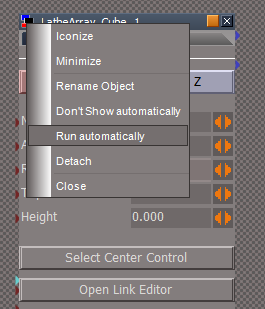
Set the panel to Run automatically
Run Auto.png
Run Auto.png (12.55 KiB) Viewed 1692 times
User avatar
clintonman
Captain
Posts: 5659
Joined: 21 May 2009, 21:08
Type the number ten into the box: 0
Location: California

Re: New Lathe Script

Post by clintonman »

trueBlue wrote: 10 Jun 2021, 15:41
clintonman wrote: 09 Oct 2019, 04:34
trueBlue wrote: 09 Oct 2019, 03:56 How do you get rid of this?
...
Run the tool to completion on any mesh will remove it.

You can also run this commands

Code: Select all

Node.Delete("/Widgets/Active Widgets Layer2/Markers");
...
I am going to add a command to the New Scene button command to remove the Markers in the UU7
...
I don't think it's a good idea for the new scene to be changing things outside of the scene. Also not good to change the way tS works fundamentally to fix a script problem. If you do it, add it as an option instead of changing how tS works.
Clinton Reese

http://clintons3d.com
User avatar
trueBlue
Captain
Posts: 5548
Joined: 06 Jul 2009, 22:50
Type the number ten into the box: 10

Re: New Lathe Script

Post by trueBlue »

clintonman wrote: 10 Jun 2021, 17:03
trueBlue wrote: 10 Jun 2021, 15:41
clintonman wrote: 09 Oct 2019, 04:34
Run the tool to completion on any mesh will remove it.

You can also run this commands

Code: Select all

Node.Delete("/Widgets/Active Widgets Layer2/Markers");
...
I am going to add a command to the New Scene button command to remove the Markers in the UU7
...
I don't think it's a good idea for the new scene to be changing things outside of the scene. Also not good to change the way tS works fundamentally to fix a script problem. If you do it, add it as an option instead of changing how tS works.
I tested deleting the Markers extensively and I am not seeing any issues
I can delete the Markers while using the Distant Feedback Display and trueSpace recreates the Markers

When you first install trueSpace the Markers do not exist
When you Reset the Default Context the Markers do not exist
trueSpace recreates the Markers at will`
User avatar
clintonman
Captain
Posts: 5659
Joined: 21 May 2009, 21:08
Type the number ten into the box: 0
Location: California

Re: New Lathe Script

Post by clintonman »

Update: June 15, 2021

added a button to copy the radius value to the top radius
does not clear undo history
updated the installer

http://clintons3d.com/plugins/truespace ... lathe.html
Clinton Reese

http://clintons3d.com

Return to “Repositorium”