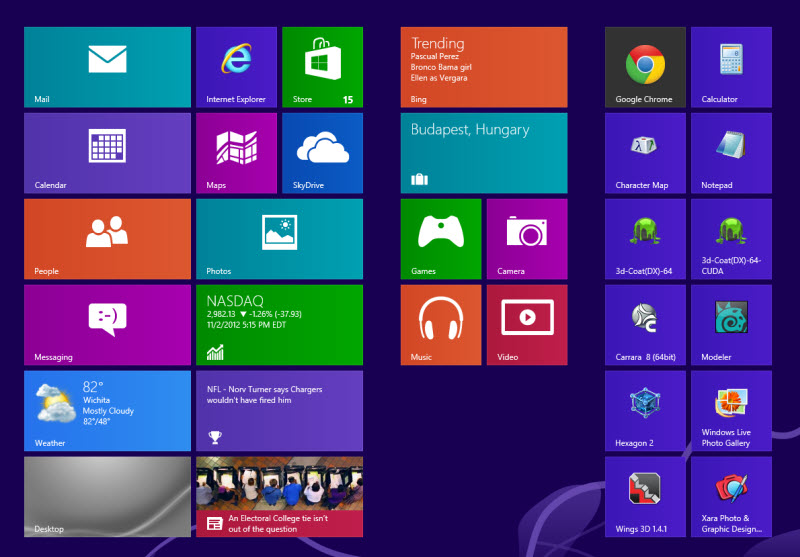
So far so good. The beginning looks like a Droid page, but you can use the standard desktop if you wish.
Appears to be a tad faster and no compatibility issues yet.
Windows 8, I Upgraded
-
jamesmc
- Captain
- Posts: 1776
- Joined: 08 Jul 2009, 15:35
Windows 8, I Upgraded
- Attachments
-
Walk by faith, not by sight.
-
spacekdet

- Captain
- Posts: 1810
- Joined: 27 May 2009, 15:00
- Type the number ten into the box: 10
- Location: On the day shift at the Utility Muffin Research Kitchen
Re: Windows 8, I Upgraded
I'm sorry, every time I see it I just think "Design by Fisher-Price".
-
RAYMAN

- Captain
- Posts: 2547
- Joined: 21 May 2009, 18:56
Re: Windows 8, I Upgraded
Its usefull if you have a tablet with thouchscreen but its counterproductive if your a user like mostspacekdet wrote:I'm sorry, every time I see it I just think "Design by Fisher-Price".
of us here who just use a folder structure.... and use the system for storing your artwork and creating it.....
in the last case its 3 steps backwards.....

But hey I´m all for using a touchsensitive pen for 3d !
Peter
-
Draise

- Captain
- Posts: 3200
- Joined: 21 Sep 2009, 19:33
- Type the number ten into the box: 0
- Location: Bogota, Colombia
Re: Windows 8, I Upgraded
Im probably going to install the prereleased version just to see what its like... I wish purchasing software here was cheap and easy. =P
It may help out my internet habits, having update widgets instead of using a browser with tabs.. also quick launching everything without using a startmenu or desktop shortcuts, which I found sometime ugly... The task bar remains which I like.
And..a tip:
windows key + D = desktop (even in W8)
It may help out my internet habits, having update widgets instead of using a browser with tabs.. also quick launching everything without using a startmenu or desktop shortcuts, which I found sometime ugly... The task bar remains which I like.
And..a tip:
windows key + D = desktop (even in W8)
-
neighborlee
- Petty Officer Second Class
- Posts: 23
- Joined: 10 Oct 2010, 20:05
Re: Windows 8, I Upgraded
I upgraded as well, getting the very reasonable win8 pro , and I regret nothing about it except that I don't have a touch screen for it 
I have a wp7 as well and vastly prefer it over android or iphone, so win8 is a very easy switch for me.
Came around to see what was going on with TS, and saw this thread and was curious.
cheers
nl
I have a wp7 as well and vastly prefer it over android or iphone, so win8 is a very easy switch for me.
Came around to see what was going on with TS, and saw this thread and was curious.
cheers
nl
-
3dfrog

- Senior Chief Petty Officer
- Posts: 175
- Joined: 21 May 2009, 21:09
Re: Windows 8, I Upgraded
touchscreen would be cool, but there is also this https://leapmotion.com/"
-
Jimmer
- Chief Petty Officer
- Posts: 122
- Joined: 22 May 2009, 11:54
Re: Windows 8, I Upgraded
Good news so far !!! (Don't forget to try your MODEL side plugins too.)
If you have the old CP post process filters (cpBLOOM, cpGLOW ect...)
giv'em a try too. Let us know.... Have fun...
If you have the old CP post process filters (cpBLOOM, cpGLOW ect...)
giv'em a try too. Let us know.... Have fun...
-
scapino

- Petty Officer Second Class
- Posts: 32
- Joined: 22 May 2009, 02:51
- Type the number ten into the box: 0
- Location: Portland, Oregon
Re: Windows 8, I Upgraded
I upgraded also. The real good news is the screen update problem in the modeler side is gone now. 
Kurt
Kurt
-
neighborlee
- Petty Officer Second Class
- Posts: 23
- Joined: 10 Oct 2010, 20:05
Re: Windows 8, I Upgraded
It was late last night and was getting tired, but now this morning I saw your message and thought HM yes I also had this trouble switching between model and workspace, and magically now its rather fastscapino wrote:I upgraded also. The real good news is the screen update problem in the modeler side is gone now.
Kurt
That, is wonderful, and can't wait to continue learning this awesome app.
It's a welcome addition for those of us who don't have a small bank to spend on similarly very expensive 3d apps
GO truespace
cu
nl
-
jamesmc
- Captain
- Posts: 1776
- Joined: 08 Jul 2009, 15:35
Re: Windows 8, I Upgraded
hehspacekdet wrote:I'm sorry, every time I see it I just think "Design by Fisher-Price".
Yeah, that does remind me of a Fisher-Price interface.

Edit: Added a Fisher-Price toy for comparison. hehe
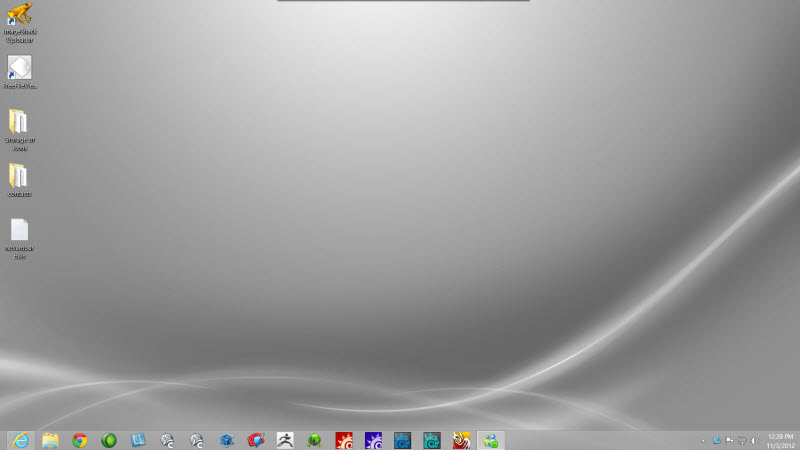
However, one can get a desktop just like previous versions, as seen below.
- Attachments
-
-

Walk by faith, not by sight.
-
CdeB

- Chief Petty Officer
- Posts: 109
- Joined: 21 May 2009, 19:13
- Type the number ten into the box: 0
- Location: Scandinavia!
Re: Windows 8, I Upgraded
Back for an occaisional drop in.
This is a very important thread for me as the only place I now regularly use trueSpace is for work, and I am about to get a new work computer which will be a core i7 rather that the Centrio laptop I now have. Window's 8 is a likely operating system. The boss took the argument that the only place I can do rendering was at home due to the underperforming laptop.
My services in this area are not so much in demand as before, as we now have a biomedical scientist who has retrained as a 3D artist and now is doing his Ph.D. mostly based on realistic movies that illustrate cell biology. I am still doing most of the "stills" for presentations though.
As far as Windows 8 is concerned it looks like, so far so good, but I do remember the old joke about the man who jumped off the Empire State building and who was heard to say, as he passed the 1st floor, "So far so good."
trueSpace as a hobby may also resurface, but that's for another thread.
Really awful to hear about Tom's situation, he was a fantastic asset to Caligari. Unfortunately, I am allergic to FaceBook (and don't have it), so will try and post something here.
This is a very important thread for me as the only place I now regularly use trueSpace is for work, and I am about to get a new work computer which will be a core i7 rather that the Centrio laptop I now have. Window's 8 is a likely operating system. The boss took the argument that the only place I can do rendering was at home due to the underperforming laptop.
My services in this area are not so much in demand as before, as we now have a biomedical scientist who has retrained as a 3D artist and now is doing his Ph.D. mostly based on realistic movies that illustrate cell biology. I am still doing most of the "stills" for presentations though.
As far as Windows 8 is concerned it looks like, so far so good, but I do remember the old joke about the man who jumped off the Empire State building and who was heard to say, as he passed the 1st floor, "So far so good."
trueSpace as a hobby may also resurface, but that's for another thread.
Really awful to hear about Tom's situation, he was a fantastic asset to Caligari. Unfortunately, I am allergic to FaceBook (and don't have it), so will try and post something here.
-
bitkar

- Captain
- Posts: 2089
- Joined: 16 Mar 2010, 07:14
- Type the number ten into the box: 0
- Location: Czech Republic
Re: Windows 8, I Upgraded
so, can anyone that has W8 tell me about how trueSpace works there? no problems? everything is refreshing as it should etc.? no crashes? make a review of W8 related to tS pls. Iam thinking about trying it out.
Michal aka bitkar
tS freak since tS2 (1998) and forever (tS7.61 modeler)
tS freak since tS2 (1998) and forever (tS7.61 modeler)
-
bitkar
- Captain
- Posts: 2089
- Joined: 16 Mar 2010, 07:14
- Type the number ten into the box: 0
- Location: Czech Republic
Re: Windows 8, I Upgraded
so, i can answer myself... tS starts up with several error msgs. Then you have window of tS without maximize, minimize and close buttons. It misses also other parts, like switching to workspace/modeler, sidepanel, etc. Its also not visible on taskbar!. It focuses, seems to work somehow, but you cant use the interface of it. If you hold mouse button to open group of icons, it wont open and you cant even unfold all icons in panel.
But win8 makes nice impression so far.... but anyway, my old winXP x64 will make the same job for me. So i will keep it. Only issue are new games, but i dont play too much, dont have time anyway.
So far, i didnt find a way to efficiently run tS. Even XP compatibility mode does no difference.
But win8 makes nice impression so far.... but anyway, my old winXP x64 will make the same job for me. So i will keep it. Only issue are new games, but i dont play too much, dont have time anyway.
So far, i didnt find a way to efficiently run tS. Even XP compatibility mode does no difference.
Michal aka bitkar
tS freak since tS2 (1998) and forever (tS7.61 modeler)
tS freak since tS2 (1998) and forever (tS7.61 modeler)
-
pugman 1
- Captain
- Posts: 1555
- Joined: 21 May 2009, 19:26
- Type the number ten into the box: 0
- Location: Germany
Re: Windows 8, I Upgraded
I installed win 8 on my old xp pc and true space worked fine
Strange that you are having problems soon i am going to install it on my main pc
and then see if if all my 3d apps work ,zbrush modo,3d coat vue infinite and silo
Strange that you are having problems soon i am going to install it on my main pc
and then see if if all my 3d apps work ,zbrush modo,3d coat vue infinite and silo
-
jamesmc
- Captain
- Posts: 1776
- Joined: 08 Jul 2009, 15:35
Re: Windows 8, I Upgraded
Was in and out because of the holidays so didn't read all of the posts.
I normally don't use trueSpace anymore, but fired up 7.61 on the Win 8 machine and had no issues. Didn't do a lot, imported the big textured cube, so the plug-ins work.
Didn't try a lot of things and tS is running as I type this.
I didn't have any problems with trueSpace, but didn't give it a comprehensive test so your mileage may vary.
I normally don't use trueSpace anymore, but fired up 7.61 on the Win 8 machine and had no issues. Didn't do a lot, imported the big textured cube, so the plug-ins work.
Didn't try a lot of things and tS is running as I type this.
I didn't have any problems with trueSpace, but didn't give it a comprehensive test so your mileage may vary.
- Attachments
-

Walk by faith, not by sight.
-
bitkar
- Captain
- Posts: 2089
- Joined: 16 Mar 2010, 07:14
- Type the number ten into the box: 0
- Location: Czech Republic
Re: Windows 8, I Upgraded
so you got no error msges (memmory leak and error number bla bla) and everything look normal? damn it. Do you have x64 version or 32bit? I have x64 and i have troubles. Or is it my hardware? I had troubles with tS and 64bit win7 too.
Michal aka bitkar
tS freak since tS2 (1998) and forever (tS7.61 modeler)
tS freak since tS2 (1998) and forever (tS7.61 modeler)
-
marcel

- Captain
- Posts: 2247
- Joined: 21 May 2009, 19:52
- Type the number ten into the box: 0
- Location: paris - France
Re: Windows 8, I Upgraded
Modelside 7.6 work well (better than 7.61) on my win7 64 bits and nvidia. Same as XP for me (Vista was bas). I don't know with workspace. I don't use it.
Design - illustration - Animation
http://www.crea-vision.fr
http://www.crea-vision.fr
-
jamesmc
- Captain
- Posts: 1776
- Joined: 08 Jul 2009, 15:35
Re: Windows 8, I Upgraded
It's Windows 8 Pro on an I7 processor, 8 gb memory, 1 gb Nvidia video card.bitkar wrote:so you got no error msges (memmory leak and error number bla bla) and everything look normal? damn it. Do you have x64 version or 32bit? I have x64 and i have troubles. Or is it my hardware? I had troubles with tS and 64bit win7 too.
No error messages
No memory leaks
All looks normal
Been running both 64 and 32 bit software on Windows 8 with no problems. Had a problem with an old game made in the 1990s, but other than that everything runs the same.
Walk by faith, not by sight.
-
froo
- Captain
- Posts: 2554
- Joined: 22 May 2009, 12:13
Re: Windows 8, I Upgraded
If I start tS by double clicking on the Default.ctx file in the tS folder it comes up, but I have no 3d widget.
When I add cubes I see none of them.
If I start tS by double clicking the dektop icon it hangs on a script.
When I add cubes I see none of them.
If I start tS by double clicking the dektop icon it hangs on a script.
-
pugman 1
- Captain
- Posts: 1555
- Joined: 21 May 2009, 19:26
- Type the number ten into the box: 0
- Location: Germany
Re: Windows 8, I Upgraded
Hi bitkar, it sounds like its a hardware problem .at the moment
i have win 7 64 bit 16 gig ram ati vidio card ,ts runs fine
i have win 7 64 bit 16 gig ram ati vidio card ,ts runs fine
-
bitkar
- Captain
- Posts: 2089
- Joined: 16 Mar 2010, 07:14
- Type the number ten into the box: 0
- Location: Czech Republic
Re: Windows 8, I Upgraded
ok, gentleman... its my fault. I have a good ending. I have never had problems runing tS even without instalation. When i reinstalled winXP from scratch, i never reinstalled tS and just started to use it. I tried this approach with newer win and thats why i diddnt work.
After fresh tS intallation (incl. the visuall C++ libraries), everything works smoooooth! :D
sorry for false alarm. It just needs reinstallation. Not running installed tS.
After fresh tS intallation (incl. the visuall C++ libraries), everything works smoooooth! :D
sorry for false alarm. It just needs reinstallation. Not running installed tS.
Michal aka bitkar
tS freak since tS2 (1998) and forever (tS7.61 modeler)
tS freak since tS2 (1998) and forever (tS7.61 modeler)
-
bitkar
- Captain
- Posts: 2089
- Joined: 16 Mar 2010, 07:14
- Type the number ten into the box: 0
- Location: Czech Republic
Re: Windows 8, I Upgraded
ok, iam on win8 pro x64, i hope i did good.. i bought new HDD - WD VelociRaptor for that, should be ok.. and more for my old PC update - PhenomII 1100T X6 Black edition. Its been the same since 2008 i think. It deserves upgrade.
Michal aka bitkar
tS freak since tS2 (1998) and forever (tS7.61 modeler)
tS freak since tS2 (1998) and forever (tS7.61 modeler)
-
jamesmc
- Captain
- Posts: 1776
- Joined: 08 Jul 2009, 15:35
Re: Windows 8, I Upgraded
Intel CPU and Nvidia GPU - can't go wrong with that combination imo.bitkar wrote:ok, iam on win8 pro x64, i hope i did good.. i bought new HDD - WD VelociRaptor for that, should be ok.. and more for my old PC update - PhenomII 1100T X6 Black edition. Its been the same since 2008 i think. It deserves upgrade.

Walk by faith, not by sight.
-
Jimmer
- Chief Petty Officer
- Posts: 122
- Joined: 22 May 2009, 11:54
Re: Windows 8, I Upgraded
If I do a fresh tS6.6 instalation from my Caligari disk do the needed
C++ libraries install as well from it ?
C++ libraries install as well from it ?
-
bitkar
- Captain
- Posts: 2089
- Joined: 16 Mar 2010, 07:14
- Type the number ten into the box: 0
- Location: Czech Republic
Re: Windows 8, I Upgraded
i think tS installs the C++ libraries every time...
James: i run with AMD alle the way (chipset, GPU, CPU)... i will buy Radeon 7870 soon to replace my old good 4870 :p You cant go wrong with that combination as its one company ;)
James: i run with AMD alle the way (chipset, GPU, CPU)... i will buy Radeon 7870 soon to replace my old good 4870 :p You cant go wrong with that combination as its one company ;)
Michal aka bitkar
tS freak since tS2 (1998) and forever (tS7.61 modeler)
tS freak since tS2 (1998) and forever (tS7.61 modeler)
-
Jimmer
- Chief Petty Officer
- Posts: 122
- Joined: 22 May 2009, 11:54
Re: Windows 8, I Upgraded
I'm still using winXP but I am starting to get the bug for win8.
Sonys got a new touch tablet with a pop-out keyboard.
Core i7 processor (3.00ghz turbo mode), 8 gigs ram and 2 USB prts.
Maybe, a nice place for tS (on the go) to live for awhile ?
Otherwise, I've been looking at HP Pavilions....
Sonys got a new touch tablet with a pop-out keyboard.
Core i7 processor (3.00ghz turbo mode), 8 gigs ram and 2 USB prts.
Maybe, a nice place for tS (on the go) to live for awhile ?
Otherwise, I've been looking at HP Pavilions....
-
spacekdet
- Captain
- Posts: 1810
- Joined: 27 May 2009, 15:00
- Type the number ten into the box: 10
- Location: On the day shift at the Utility Muffin Research Kitchen
Re: Windows 8, I Upgraded
So give us the TL;DR*: does trueSpace run on Win8 or not?
* Too Long;Didn't Read
* Too Long;Didn't Read
-
jamesmc
- Captain
- Posts: 1776
- Joined: 08 Jul 2009, 15:35
Re: Windows 8, I Upgraded
It opens up for me on Win 8. Haven't really done anything complicated with tS other than what my previous post indicates.spacekdet wrote:So give us the TL;DR*: does trueSpace run on Win8 or not?
* Too Long;Didn't Read
Walk by faith, not by sight.