This is what I have with absolutely no heat issues, no dirt build-up, no speed issues with 3D software etc.
I love this computer. You can't tell that it is even on it is so quite.
Processor: Intel Core i5-2300 processor (6MB Cache, 2.8GHz)
4 GB DDR3 SDRAM 1333MHz (4 DIMMs)
Heat Sink NO FAN. no liquid cooling needed. Completely quite!
There is no problems running all my different 3d programs or games.
AMD chips? New computer build maybe.
-
Steinie

- Captain
- Posts: 2958
- Joined: 21 May 2009, 17:38
- Type the number ten into the box: 10
Re: AMD chips? New computer build maybe.
-
Finis

- Captain
- Posts: 5410
- Joined: 21 May 2009, 18:26
- Type the number ten into the box: 0
- Location: America!
Re: AMD chips? New computer build maybe.
Thanks! With Mikom's warning I'll go ahead and get the evo 212. They are fairly cheap and I'd still save a little vs. the cost of the water cooler. With Steinie's experience with minimal cooling I feel confident that the water cooler is not necessary. That was for the hot A10 anyway.
It is soooo cold where Steinie is that fans aren't needed. His computer problems are keeping penguins off of his keyboard and frost off of the screen.
The photo of the I5's stock cooler looks much like the one on my current Pentium D which was running around 140F (60C) while rendering. The temp. monitoring program showed a flame icon so I guess that is too hot. Maybe I can scavenge the fan from the stock cooler and put it on the case.
I won't have a GPU card for some time, if ever, so no significant GPU rendering. The I5 does have a built-in graphics system so that should help. My old card is not that powerful and fits the AGP port which is obsolete now.
With 4 cores and 64bit chip this should be significantly faster than my old comp. So it doesn't have to be high end to be a big speed increase for me.
It is soooo cold where Steinie is that fans aren't needed. His computer problems are keeping penguins off of his keyboard and frost off of the screen.
The photo of the I5's stock cooler looks much like the one on my current Pentium D which was running around 140F (60C) while rendering. The temp. monitoring program showed a flame icon so I guess that is too hot. Maybe I can scavenge the fan from the stock cooler and put it on the case.
I won't have a GPU card for some time, if ever, so no significant GPU rendering. The I5 does have a built-in graphics system so that should help. My old card is not that powerful and fits the AGP port which is obsolete now.
With 4 cores and 64bit chip this should be significantly faster than my old comp. So it doesn't have to be high end to be a big speed increase for me.
I prefer dangerous freedom over peaceful servitude. -- Thomas Jefferson/Jean Jacques Rousseau
-
Finis
- Captain
- Posts: 5410
- Joined: 21 May 2009, 18:26
- Type the number ten into the box: 0
- Location: America!
Re: AMD chips? New computer build maybe.
Planning ahead. If I get 8GB of ram in one module then later I can upgrade to 16GB by putting another 8GB module in the other memory slot, right? That way the upgrade cost is one 8GB module instead of two 8GB modules and wasting two 4GB modules.
Do both memory slots have to be filled or is it ok to just have memory in one?
Do both memory slots have to be filled or is it ok to just have memory in one?
I prefer dangerous freedom over peaceful servitude. -- Thomas Jefferson/Jean Jacques Rousseau
-
v3rd3
- Lieutenant Commander
- Posts: 1191
- Joined: 21 May 2009, 20:04
Re: AMD chips? New computer build maybe.
It is ok to have the memory stick in just one slot. The trick to pairing memory is to make sure the 2 are the same brand and model. When you add a module to your memory pool you should check that the 2 SIMM's are working well together. A great utility for testing your memory is http://www.memtest.org/.
It is quite possible, even with the same brand and model that you can have diminished real memory that windows will not report as a problem. For example, a couple of builds ago I had windows reporting full memory when memtest found I was actually getting around 86% because of firmware conflicts. Swapped the added SIMM for another and I was running 97%. Big improvement.
It is quite possible, even with the same brand and model that you can have diminished real memory that windows will not report as a problem. For example, a couple of builds ago I had windows reporting full memory when memtest found I was actually getting around 86% because of firmware conflicts. Swapped the added SIMM for another and I was running 97%. Big improvement.
-
Finis
- Captain
- Posts: 5410
- Joined: 21 May 2009, 18:26
- Type the number ten into the box: 0
- Location: America!
Re: AMD chips? New computer build maybe.
Will do V3rd3. Just one stick for now.
New design. Getting over budget so I'll wait for after Christmas sales. Might go to a cheaper cpu+mobo combo if prices don't improve then. Went back to AMD cpu. Amazon's prices have gone up. I'll watch for alternatives and bargains when it is time to buy. I'll put the fan that comes with the cpu on the case.
Bundle savings at Microcenter
CPU: AMD FX 8320 Black Edition 3.5GHz AM3+, Scores a respectable 8,128 on these benchmarks.
MOBO: ASRock 970 Extreme4 Socket AM3+ 970 ATX AMD, Handles Nvidia and AMD gpu's.
Amazon
RAM: Crucial Ballistix Sport 8GB (1 X 8GB) DDR3 PC3-12800 1600MHz
HD: WD Blue 1 TB Desktop Hard Drive, Will get 500 GB if they cost much less. Not much difference now.
COOLING: Cooler Master Hyper 212 EVO - CPU Cooler
CASE: Antec Three Hundred Two Gaming Case, Might get the 300 it's cheaper.
POWER: Thermaltake 240-Pin 600w TR-600
Tiger Direct
OS: Windows 8.x 64 bit
New design. Getting over budget so I'll wait for after Christmas sales. Might go to a cheaper cpu+mobo combo if prices don't improve then. Went back to AMD cpu. Amazon's prices have gone up. I'll watch for alternatives and bargains when it is time to buy. I'll put the fan that comes with the cpu on the case.
Bundle savings at Microcenter
CPU: AMD FX 8320 Black Edition 3.5GHz AM3+, Scores a respectable 8,128 on these benchmarks.
MOBO: ASRock 970 Extreme4 Socket AM3+ 970 ATX AMD, Handles Nvidia and AMD gpu's.
Amazon
RAM: Crucial Ballistix Sport 8GB (1 X 8GB) DDR3 PC3-12800 1600MHz
HD: WD Blue 1 TB Desktop Hard Drive, Will get 500 GB if they cost much less. Not much difference now.
COOLING: Cooler Master Hyper 212 EVO - CPU Cooler
CASE: Antec Three Hundred Two Gaming Case, Might get the 300 it's cheaper.
POWER: Thermaltake 240-Pin 600w TR-600
Tiger Direct
OS: Windows 8.x 64 bit
I prefer dangerous freedom over peaceful servitude. -- Thomas Jefferson/Jean Jacques Rousseau
-
Finis
- Captain
- Posts: 5410
- Joined: 21 May 2009, 18:26
- Type the number ten into the box: 0
- Location: America!
Re: AMD chips? New computer build maybe.
CPU and MOBO are on the way. My friend in Kansas got them at Microcenter after the price went down $50!
Edit: He got a military discount too!
Edit: He got a military discount too!
I prefer dangerous freedom over peaceful servitude. -- Thomas Jefferson/Jean Jacques Rousseau
-
Finis
- Captain
- Posts: 5410
- Joined: 21 May 2009, 18:26
- Type the number ten into the box: 0
- Location: America!
Re: AMD chips? New computer build maybe.
Watching the ups and downs of Amazon's prices for the rest of the hardware and looking for alternatives and deals. Soon ... soon.
So windows 8.1 oem licenses are tied to the mobo right? That means I can install it on my new PC on the HD and later, when I can get one, on a SSD (with uninstall from HD if required) because it is the same mobo? Is that ok with an OEM license? Ultimately, I'd like to have the OS and some working space on a SSD and a HD for regular data storage with no OS on it.
The regular license isn't that much more but if I can save a few dollars then great.
So windows 8.1 oem licenses are tied to the mobo right? That means I can install it on my new PC on the HD and later, when I can get one, on a SSD (with uninstall from HD if required) because it is the same mobo? Is that ok with an OEM license? Ultimately, I'd like to have the OS and some working space on a SSD and a HD for regular data storage with no OS on it.
The regular license isn't that much more but if I can save a few dollars then great.
I prefer dangerous freedom over peaceful servitude. -- Thomas Jefferson/Jean Jacques Rousseau
-
Finis
- Captain
- Posts: 5410
- Joined: 21 May 2009, 18:26
- Type the number ten into the box: 0
- Location: America!
Re: AMD chips? New computer build maybe.
Ordered the rest of the computer parts. Bargains and I got an electronic coupon and mostly free shipping.
So much savings that I'll get a graphics card/gpu. Has to have cuda. Otherwise what is a good but really cheap one? $40 or less.
So much savings that I'll get a graphics card/gpu. Has to have cuda. Otherwise what is a good but really cheap one? $40 or less.
I prefer dangerous freedom over peaceful servitude. -- Thomas Jefferson/Jean Jacques Rousseau
-
Finis
- Captain
- Posts: 5410
- Joined: 21 May 2009, 18:26
- Type the number ten into the box: 0
- Location: America!
Re: AMD chips? New computer build maybe.
What are the networking options for Win 8.1 vs. Win 8.1 Pro?
I want to connect old and new comps to transfer files and a render farm might be nice in the future.
Any advice for a cheap video/gpu card with cuda?
I want to connect old and new comps to transfer files and a render farm might be nice in the future.
Any advice for a cheap video/gpu card with cuda?
I prefer dangerous freedom over peaceful servitude. -- Thomas Jefferson/Jean Jacques Rousseau
-
jamesmc
- Captain
- Posts: 1776
- Joined: 08 Jul 2009, 15:35
Re: AMD chips? New computer build maybe.
I have no problem with networking. All my connectivity is wired though. Never did like wireless.Finis wrote:What are the networking options for Win 8.1 vs. Win 8.1 Pro?
I want to connect old and new comps to transfer files and a render farm might be nice in the future.
Any advice for a cheap video/gpu card with cuda?
I use a Motorola modem and a D-Link "Gamer Lounge" router with Cox Cable Internet service. Plugged everything and Windows 8.1 recognized everything instantly from my old network configurations.
So I didn't have to set up anything.
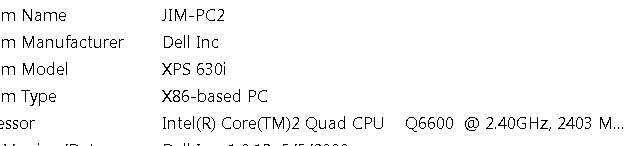
I have the old reliable older computer seen below as the master in the network system (if there is such a thing anymore). Match that up with a cheap portable drive, flash drives and you have all the humming and drumming you want.
Very stable system and with Windows 8.1 I can encrypt stuff so even the NSA can't find it (shhh....) I use the 64 bit (Intel 920 i7 processor)Win 8.1 computer to run graphics software that has 8gb memory and it's faster than quarter in the pocket of a 9 year old boy at an arcade.
Hey! No laughing at my network names, it too many years of development and thousands in research costs. (cough)

- Attachments
-

- network.png (4.33 KiB) Viewed 5336 times
-
- pc-2.png (3.36 KiB) Viewed 5336 times
Walk by faith, not by sight.
-
Finis
- Captain
- Posts: 5410
- Joined: 21 May 2009, 18:26
- Type the number ten into the box: 0
- Location: America!
Re: AMD chips? New computer build maybe.
Thanks James but are you running Win 8.1 Pro or regular?
Network names. In college they got spiffy computers for each computer science professor. The profs named them after Native American pueblos like Acoma, Pojoaque (po-wah-kee), and Tesuque (teh-su-kee). So one rebel named his Tecate.
Network names. In college they got spiffy computers for each computer science professor. The profs named them after Native American pueblos like Acoma, Pojoaque (po-wah-kee), and Tesuque (teh-su-kee). So one rebel named his Tecate.
I prefer dangerous freedom over peaceful servitude. -- Thomas Jefferson/Jean Jacques Rousseau
-
jamesmc
- Captain
- Posts: 1776
- Joined: 08 Jul 2009, 15:35
Re: AMD chips? New computer build maybe.
Running Win 8.1 ProFinis wrote:Thanks James but are you running Win 8.1 Pro or regular?
Network names. In college they got spiffy computers for each computer science professor. The profs named them after Native American pueblos like Acoma, Pojoaque (po-wah-kee), and Tesuque (teh-su-kee). So one rebel named his Tecate.
- Attachments
-

Walk by faith, not by sight.
-
Finis
- Captain
- Posts: 5410
- Joined: 21 May 2009, 18:26
- Type the number ten into the box: 0
- Location: America!
Re: AMD chips? New computer build maybe.
Thanks James. Yeah, desktop! I hear that Win 8 is always getting on the web. Disconnecting or blocking that will be a project. Only things I explicitly authorize, like os and software updates, or start, like Firefox, may get on the web.
I like the Antec three-hundred-two case. It is bigger than I thought. Metal. Good construction. Easy access to both sides and front. It has two tremendous fans installed. Plenty of drive and gadget bays. There are several places for fans and three intake ones have air filters. However, the two on the side panels have no filters so that counters the effect of the filtered ones.
I like the Antec three-hundred-two case. It is bigger than I thought. Metal. Good construction. Easy access to both sides and front. It has two tremendous fans installed. Plenty of drive and gadget bays. There are several places for fans and three intake ones have air filters. However, the two on the side panels have no filters so that counters the effect of the filtered ones.
I prefer dangerous freedom over peaceful servitude. -- Thomas Jefferson/Jean Jacques Rousseau
-
Finis
- Captain
- Posts: 5410
- Joined: 21 May 2009, 18:26
- Type the number ten into the box: 0
- Location: America!
Re: AMD chips? New computer build maybe.
Good thing the case is big. I got the hyper evo 212 cpu cooler yesterday. It is enormous. The cooler that came with the cpu, while reported to be not awesome, looked pretty good.
I prefer dangerous freedom over peaceful servitude. -- Thomas Jefferson/Jean Jacques Rousseau
-
spacekdet

- Captain
- Posts: 1810
- Joined: 27 May 2009, 15:00
- Type the number ten into the box: 10
- Location: On the day shift at the Utility Muffin Research Kitchen
Re: AMD chips? New computer build maybe.
There's so much more room for activities!
-
v3rd3
- Lieutenant Commander
- Posts: 1191
- Joined: 21 May 2009, 20:04
Re: AMD chips? New computer build maybe.
It's a great cpu cooler for the price (EVO) ... The PC I built for my wife's office uses one ... not used for CG but does a fine job.
-
Finis
- Captain
- Posts: 5410
- Joined: 21 May 2009, 18:26
- Type the number ten into the box: 0
- Location: America!
Re: AMD chips? New computer build maybe.
Thanks V3rd3. Everyone says it is good.
Spacekdet: All that room in the case. Maybe a pool? A basketball court?
Spacekdet: All that room in the case. Maybe a pool? A basketball court?
I prefer dangerous freedom over peaceful servitude. -- Thomas Jefferson/Jean Jacques Rousseau
-
Finis
- Captain
- Posts: 5410
- Joined: 21 May 2009, 18:26
- Type the number ten into the box: 0
- Location: America!
Re: AMD chips? New computer build maybe.
Maybe I need an upgrade. Yeah, 4 Zeon processors, 40 cores, and 512 GB of memory. I could render some stuff with that. http://www.supermicro.com/products/moth ... .cfm?SAS=Y
I prefer dangerous freedom over peaceful servitude. -- Thomas Jefferson/Jean Jacques Rousseau
-
Finis
- Captain
- Posts: 5410
- Joined: 21 May 2009, 18:26
- Type the number ten into the box: 0
- Location: America!
Re: AMD chips? New computer build maybe.
My old cd/dvd drives have the ribbon cables and the new mobo doesn't use that so I have a new, economical, CD/DVD burner on the way.
So far so good. No lightning, fire, or melting. It boots to the point of asking for the boot device and recognizes the cpu and memory.
Air flow. Probably not much difference but whether to put the cpu cooler blowing horizontally into the fan on the back or up into the fan on top? Now it is blowing to the back. The case has two exhaust fans. One blows out of the back behind (left in pic) the cpu cooler. One blows out of the top above the cpu fan. So input air is vacuumed in through the front and through vents on each side panel.
Gpu card has a fan and the power supply pulls air in through a vent on the bottom and blows it out the back.
The cpu cooler is big. I think it is not locked in properly to a thing that keeps it from rotating under its bracket. I'll take it off and reinstall. I am also concerned about tightening it too much. How much is enough?
Can't install Windows until I get the cd/dvd drive.
Edit: I think I'll have the cpu cooler blow up into the top exhaust fan. That would create more vertical air flow which would help the Gpu card and the mounting screws will be more accessible.
So far so good. No lightning, fire, or melting. It boots to the point of asking for the boot device and recognizes the cpu and memory.
Air flow. Probably not much difference but whether to put the cpu cooler blowing horizontally into the fan on the back or up into the fan on top? Now it is blowing to the back. The case has two exhaust fans. One blows out of the back behind (left in pic) the cpu cooler. One blows out of the top above the cpu fan. So input air is vacuumed in through the front and through vents on each side panel.
Gpu card has a fan and the power supply pulls air in through a vent on the bottom and blows it out the back.
The cpu cooler is big. I think it is not locked in properly to a thing that keeps it from rotating under its bracket. I'll take it off and reinstall. I am also concerned about tightening it too much. How much is enough?
Can't install Windows until I get the cd/dvd drive.
Edit: I think I'll have the cpu cooler blow up into the top exhaust fan. That would create more vertical air flow which would help the Gpu card and the mounting screws will be more accessible.
- Attachments
-

I prefer dangerous freedom over peaceful servitude. -- Thomas Jefferson/Jean Jacques Rousseau
-
nigec

- Master Chief Petty Officer
- Posts: 561
- Joined: 21 May 2009, 18:46
Re: AMD chips? New computer build maybe.
I have a similar cooler and fan setup and have no over heating problems, infact I rarely hear the cooler fan cranking up on heavy renders, get some sort of CPU monitoring software to check the temp across the cores is similar, your ok with a few degrees either way
Issue I have is my crappy Quadro 600 runs very hot and found out these entry level cards need to forced to use all of their fan speed, something like Asus GPU Tweak can do this
If you plan to run multiple GPU's 600watts may not be enough
All those fans will drag in a lot of dust and pet hairs, we have a constant battle with the latter.. get a bald dog lol Our tower is about the same size and has to live on the floor, the dog.. such a loyal thing sleeps under the desk while I'm working
Issue I have is my crappy Quadro 600 runs very hot and found out these entry level cards need to forced to use all of their fan speed, something like Asus GPU Tweak can do this
If you plan to run multiple GPU's 600watts may not be enough
All those fans will drag in a lot of dust and pet hairs, we have a constant battle with the latter.. get a bald dog lol Our tower is about the same size and has to live on the floor, the dog.. such a loyal thing sleeps under the desk while I'm working
-
Finis
- Captain
- Posts: 5410
- Joined: 21 May 2009, 18:26
- Type the number ten into the box: 0
- Location: America!
Re: AMD chips? New computer build maybe.
I've got all the dust in world here Nigec. Desert. The front and power supply air intakes have filters but the two side panel intakes don't. Makes the others of little effect. I'll see about filters for them. Still won't stop the fine particles. There are so many openings for air it seems more like an open frame to hold stuff.
I got an msi gt 610 gpu card. I notice that it has the heat sink and fan on the bottom. Seems like they should have the hot stuff and fan on top. Can't afford multi-gpu's. I'd get a bigger one rather than multi if I could.
Some monitoring software came with the mobo. I'll watch the temps. Especially at first.
I got an msi gt 610 gpu card. I notice that it has the heat sink and fan on the bottom. Seems like they should have the hot stuff and fan on top. Can't afford multi-gpu's. I'd get a bigger one rather than multi if I could.
Some monitoring software came with the mobo. I'll watch the temps. Especially at first.
I prefer dangerous freedom over peaceful servitude. -- Thomas Jefferson/Jean Jacques Rousseau
-
Finis
- Captain
- Posts: 5410
- Joined: 21 May 2009, 18:26
- Type the number ten into the box: 0
- Location: America!
Re: AMD chips? New computer build maybe.
Win 8.1 installed plus some monitoring software that came with the mobo. So far I'm not hating W8 with the desktop but I've only got about 30 minutes on it. It let me create a local user account no trouble, no MS account needed, which I had read took some extra effort. The cpu ran at 87F to 89F and the lowest target temp available on the fan control program is 113F so cooling is working great. A little chilly in the house though. I'll see how it goes this Summer. Install some more stuff and get it on the web.
I prefer dangerous freedom over peaceful servitude. -- Thomas Jefferson/Jean Jacques Rousseau
-
Finis
- Captain
- Posts: 5410
- Joined: 21 May 2009, 18:26
- Type the number ten into the box: 0
- Location: America!
Re: AMD chips? New computer build maybe.
Now posting from the new computer. I borrowed some networking equipment from a friend and I'm transferring everything to keep from the other computer.
I prefer dangerous freedom over peaceful servitude. -- Thomas Jefferson/Jean Jacques Rousseau
-
spacekdet
- Captain
- Posts: 1810
- Joined: 27 May 2009, 15:00
- Type the number ten into the box: 10
- Location: On the day shift at the Utility Muffin Research Kitchen
Re: AMD chips? New computer build maybe.
Is it like buying a new pair of tennis shoes and all of a sudden you feel like you can run faster and jump higher?
-
Finis
- Captain
- Posts: 5410
- Joined: 21 May 2009, 18:26
- Type the number ten into the box: 0
- Location: America!
Re: AMD chips? New computer build maybe.
Problem. Four times now the new machine has powered off with no warning. It doesn't shutdown. Just power gone instantly as if unplugged. It won't come back on until I turn off the switch on the power supply for a minute. I'll try using the power supply from the old one to check if it is that.
I prefer dangerous freedom over peaceful servitude. -- Thomas Jefferson/Jean Jacques Rousseau
-
Steinie
- Captain
- Posts: 2958
- Joined: 21 May 2009, 17:38
- Type the number ten into the box: 10
Re: AMD chips? New computer build maybe.
Heat issues? That was always my the problem with my older computer. Check your CMOS settings. (I think)
Either that or something funky with your power supply.
Last but not least a virus protector is trying to save your computer.
Either that or something funky with your power supply.
Last but not least a virus protector is trying to save your computer.
-
nigec
- Master Chief Petty Officer
- Posts: 561
- Joined: 21 May 2009, 18:46
Re: AMD chips? New computer build maybe.
Check the Ram and any other plugin device is seated right
One issue I had with mine was I took the chip out and it reset the BIOS to use IDE drives so the SSD wouldn't boot
an air bubble on the chip could cause it
If you can't get it working try with just one ram stick and the on board graphics (if it has it) then if that works gradually add the other parts
One issue I had with mine was I took the chip out and it reset the BIOS to use IDE drives so the SSD wouldn't boot
an air bubble on the chip could cause it
If you can't get it working try with just one ram stick and the on board graphics (if it has it) then if that works gradually add the other parts
-
Finis
- Captain
- Posts: 5410
- Joined: 21 May 2009, 18:26
- Type the number ten into the box: 0
- Location: America!
Re: AMD chips? New computer build maybe.
The air from the power supply is cool which might be odd itself. I'd expect it to be warm.
When it shuts off there is no power. Lights are off nothing is running. Unplugging it for a minute works like flipping the power supply switch: will come back on after that.
I'll put the old computer's power supply in first. If that fixes it then the new power supply is it (Amazon return policy and good warranty). Else I'll check the other things you all mentioned (thanks).
There's only one 8gb ram stick. There is no on board graphics. Love the mobo but that is strange. Will re-seat everything if the old PS doesn't fix it.
Checking bios/early boot stuff for info or power monitoring.
When it shuts off there is no power. Lights are off nothing is running. Unplugging it for a minute works like flipping the power supply switch: will come back on after that.
I'll put the old computer's power supply in first. If that fixes it then the new power supply is it (Amazon return policy and good warranty). Else I'll check the other things you all mentioned (thanks).
There's only one 8gb ram stick. There is no on board graphics. Love the mobo but that is strange. Will re-seat everything if the old PS doesn't fix it.
Checking bios/early boot stuff for info or power monitoring.
I prefer dangerous freedom over peaceful servitude. -- Thomas Jefferson/Jean Jacques Rousseau
-
MikomDude

- Captain
- Posts: 1930
- Joined: 04 Oct 2010, 11:12
- Type the number ten into the box: 0
- Location: The Hague, Netherlands
Re: AMD chips? New computer build maybe.
Make sure the RAM stick is in the right slot as well as properly locked in. Although the problem does sound like your PC isn't getting enough power from the PSU.
If the problem persists, run a MemTest just to be sure it isn't the RAM.
This is odd though since most hardware-related issues should give you a bluescreen.
If the problem persists, run a MemTest just to be sure it isn't the RAM.
This is odd though since most hardware-related issues should give you a bluescreen.
-
nigec
- Master Chief Petty Officer
- Posts: 561
- Joined: 21 May 2009, 18:46
Re: AMD chips? New computer build maybe.
I have the same/similar cooler on a Asus board and its quite tricky to fit without getting the heatsink compound all over the place, if the CPU gets hot it would just shut down with no warning
When I bought my i7 it came with the wrong chip(wrongly listed on Amazon) but I got a replacement and fitted it myself, it wouldn't boot so the cooler was on and off a few times lol
turned out to be a BIOS problem so all was well but I ended up with an air bubble and had to take it to bits again.. I feel your pain! I was convinced I'd knackered it when it wouldn't boot up, it was only two weeks old
Fingers crossed it'll be something simple
When I bought my i7 it came with the wrong chip(wrongly listed on Amazon) but I got a replacement and fitted it myself, it wouldn't boot so the cooler was on and off a few times lol
turned out to be a BIOS problem so all was well but I ended up with an air bubble and had to take it to bits again.. I feel your pain! I was convinced I'd knackered it when it wouldn't boot up, it was only two weeks old
Fingers crossed it'll be something simple
-
Finis
- Captain
- Posts: 5410
- Joined: 21 May 2009, 18:26
- Type the number ten into the box: 0
- Location: America!
Re: AMD chips? New computer build maybe.
Been working so haven't put the old PSU in. It might not be compatible with the new system but I think its 430w is enough.
I don't think it is heat. At least if the ASRock extreme tuning utility (came with mobo) is correct. (No "extreme tuning" done I just use its monitor and fan control.) It shows the cpu idling around 95F to 105F. During a render with Bryce and all cores/threads pegged 100% it ran around 165F for about 25 minutes with no trouble. A hardware monitor available before full boot, on the setup menu where the bios stuff is too, agrees with the ASR-ETU and shows reasonable voltages. I tried a free temp monitor (name?) that would show temps for each core. The temps were obviously wrong, way too cool, and the temps were the same for each core, unlikely, so I don't think that was reliable.
The mobo has a cpu overheat protection feature and I'll bet it just powers off like this but I doubt there is a heat problem. The power supply is not hot since its exhaust air is cool.
Memory stick is in the slot recommended by mobo docs for single sticks. Maybe not seated well. I'll check the seating of the power connections to mobo too but I don't see why that would work again after flipping the PSU switch.
Well, experimenting is needed not theorizing. Get more data. First I'll check seating of everything. Then try to use the old power supply.
I don't think it is heat. At least if the ASRock extreme tuning utility (came with mobo) is correct. (No "extreme tuning" done I just use its monitor and fan control.) It shows the cpu idling around 95F to 105F. During a render with Bryce and all cores/threads pegged 100% it ran around 165F for about 25 minutes with no trouble. A hardware monitor available before full boot, on the setup menu where the bios stuff is too, agrees with the ASR-ETU and shows reasonable voltages. I tried a free temp monitor (name?) that would show temps for each core. The temps were obviously wrong, way too cool, and the temps were the same for each core, unlikely, so I don't think that was reliable.
The mobo has a cpu overheat protection feature and I'll bet it just powers off like this but I doubt there is a heat problem. The power supply is not hot since its exhaust air is cool.
Memory stick is in the slot recommended by mobo docs for single sticks. Maybe not seated well. I'll check the seating of the power connections to mobo too but I don't see why that would work again after flipping the PSU switch.
Well, experimenting is needed not theorizing. Get more data. First I'll check seating of everything. Then try to use the old power supply.
I prefer dangerous freedom over peaceful servitude. -- Thomas Jefferson/Jean Jacques Rousseau
-
v3rd3
- Lieutenant Commander
- Posts: 1191
- Joined: 21 May 2009, 20:04
Re: AMD chips? New computer build maybe.
This could be power fluctuation from your grid as well. Do you have an uninterruptible power supply? A cheap ups can clean the power going to your box by absorbing peaks and valleys enough to maintain a steady voltage. You can probably pick up a 15-20 minute battery for $60 bucks or so.... apc is a good brand that I use for some of my machines.
If you want to spend a couple of extra bucks to get decent value buy a unit that you can replace the batteries yourself. Saves you the long term cost of throwing out the whole unit when the batteries go (and they will).
With your new power supply you might look at the quality or integrity of the connectors on the rails going to your mobo. If the contacts are loose fan vibrations or air flow from a strong fan can jar bad connectors loose.
Keep us posted ... hope all goes well
If you want to spend a couple of extra bucks to get decent value buy a unit that you can replace the batteries yourself. Saves you the long term cost of throwing out the whole unit when the batteries go (and they will).
With your new power supply you might look at the quality or integrity of the connectors on the rails going to your mobo. If the contacts are loose fan vibrations or air flow from a strong fan can jar bad connectors loose.
Keep us posted ... hope all goes well
-
nigec
- Master Chief Petty Officer
- Posts: 561
- Joined: 21 May 2009, 18:46
Re: AMD chips? New computer build maybe.
my i7 is around 89f idle and 141.8 with Presto CPU it never goes higher than 150f with any render, but I'm in the uk and room temp is around 71f at the moment, however the computer is in a confined space.
Scary though my GPU hits 200f while GPU rendering, needless to say I rarely use it lol
Scary though my GPU hits 200f while GPU rendering, needless to say I rarely use it lol
-
spacekdet
- Captain
- Posts: 1810
- Joined: 27 May 2009, 15:00
- Type the number ten into the box: 10
- Location: On the day shift at the Utility Muffin Research Kitchen
Re: AMD chips? New computer build maybe.
Just a few more degrees and you could make some tea on that thing.nigec wrote: Scary though my GPU hits 200f while GPU rendering, needless to say I rarely use it lol
-
Finis
- Captain
- Posts: 5410
- Joined: 21 May 2009, 18:26
- Type the number ten into the box: 0
- Location: America!
Re: AMD chips? New computer build maybe.
It didn't power off for a couple of days so I thought it might be input fluctuations like V3rd3 said. Did it twice today so I put the old power supply in. I'll try a few days with that. If no trouble I'll try the new one again since it could have been poorly connected to the mobo. Should have reseated that before trying the old one.
Thanks for the heat info Nigec. Looks like the temps are ok.
V3rd3 what are rails? I looked in the vents on the power supply (opening it voids the warranty) and saw nothing that looks like rails. Its got 'em. The descriptions of it note that. I couldn't see much though. I did notice that a clear sheet of plastic blocks half of the fan. That seems to be its purpose but it also seems odd. That half of the PS has few large, likely hot, components. Its cool output air indicates no heat problem there though.
Thanks for the heat info Nigec. Looks like the temps are ok.
V3rd3 what are rails? I looked in the vents on the power supply (opening it voids the warranty) and saw nothing that looks like rails. Its got 'em. The descriptions of it note that. I couldn't see much though. I did notice that a clear sheet of plastic blocks half of the fan. That seems to be its purpose but it also seems odd. That half of the PS has few large, likely hot, components. Its cool output air indicates no heat problem there though.
I prefer dangerous freedom over peaceful servitude. -- Thomas Jefferson/Jean Jacques Rousseau
-
Finis
- Captain
- Posts: 5410
- Joined: 21 May 2009, 18:26
- Type the number ten into the box: 0
- Location: America!
Re: AMD chips? New computer build maybe.
It has not powered off with the old power supply. Putting the new one back in just to be sure it wasn't things not seated well. If it happens again then I'll use the return policy for a replacement.
I prefer dangerous freedom over peaceful servitude. -- Thomas Jefferson/Jean Jacques Rousseau
-
v3rd3
- Lieutenant Commander
- Posts: 1191
- Joined: 21 May 2009, 20:04
Re: AMD chips? New computer build maybe.
Sorry rails refers to the wire from the power supply to the component through the connector. Too many techies in my life. Rails is the technical term for the specific wire connecting a specific component delivering a specific voltage. I believe the technical explanation is that the wire delivers a measured or regulated voltage to the part.
Sorry if the explanation sucks I am in the middle of blitz packing for my move to the new place. I will be off for a couple of weeks and try again then.
The plastic sheet is likely a flow regulator... a lot of engineering in cooling systems is there to create a desired turbulence. Apparently smooth airflow does not get cool air into all the nooks and crannies of hot parts so the disruption is by design.
There was an article I remember reading some time ago that talked about deliberately causing disrupted air flow to cool harley davidson engines for one their high end bikes.
Sorry if the explanation sucks I am in the middle of blitz packing for my move to the new place. I will be off for a couple of weeks and try again then.
The plastic sheet is likely a flow regulator... a lot of engineering in cooling systems is there to create a desired turbulence. Apparently smooth airflow does not get cool air into all the nooks and crannies of hot parts so the disruption is by design.
There was an article I remember reading some time ago that talked about deliberately causing disrupted air flow to cool harley davidson engines for one their high end bikes.
-
Finis
- Captain
- Posts: 5410
- Joined: 21 May 2009, 18:26
- Type the number ten into the box: 0
- Location: America!
Re: AMD chips? New computer build maybe.
I hope your new home is a good place to live and that the move goes well.
If any of the connectors are touchy then it still has to go back.
If any of the connectors are touchy then it still has to go back.
I prefer dangerous freedom over peaceful servitude. -- Thomas Jefferson/Jean Jacques Rousseau
-
v3rd3
- Lieutenant Commander
- Posts: 1191
- Joined: 21 May 2009, 20:04
Re: AMD chips? New computer build maybe.
Thanks. Still a ton to do but I hope we get there.
Absolutely agree with the return if dodgy... failure on the voltage regulation would mean a very short life for your components.
Absolutely agree with the return if dodgy... failure on the voltage regulation would mean a very short life for your components.
-
Finis
- Captain
- Posts: 5410
- Joined: 21 May 2009, 18:26
- Type the number ten into the box: 0
- Location: America!
Re: AMD chips? New computer build maybe.
Yep, there it went. Powered off. I put the packing and such from all the computer stuff in one box. I hope they aren't picky about having the exact twist ties and plastic bags it came in.
I prefer dangerous freedom over peaceful servitude. -- Thomas Jefferson/Jean Jacques Rousseau
-
Finis
- Captain
- Posts: 5410
- Joined: 21 May 2009, 18:26
- Type the number ten into the box: 0
- Location: America!
Re: AMD chips? New computer build maybe.
Sent the power supply back. It was after the return date but Amazon was cool and I got a partial refund. Running with the PS from the old computer.
The CPU hit 71C/161F but usually was 69C/157F during a render. It idles at 47C/116F. Room temp a little over 29C/85F. 55C is recommended and 62C max safe. It throttles itself to slower speed at 70C. So I'll be sure the cooler is installed well and see what I can do about fans.
The CPU hit 71C/161F but usually was 69C/157F during a render. It idles at 47C/116F. Room temp a little over 29C/85F. 55C is recommended and 62C max safe. It throttles itself to slower speed at 70C. So I'll be sure the cooler is installed well and see what I can do about fans.
I prefer dangerous freedom over peaceful servitude. -- Thomas Jefferson/Jean Jacques Rousseau
-
Shell1850
- Chief Petty Officer
- Posts: 135
- Joined: 21 May 2009, 21:44
Re: AMD chips? New computer build maybe.
I worked on a computer that shut it self down. The problem was one of the wires would short to the power supply and shut down. I used a couple of layers of clear shipping tape. It fixed the problem. Voids the warranty but saved on shipping costs.
-
Finis
- Captain
- Posts: 5410
- Joined: 21 May 2009, 18:26
- Type the number ten into the box: 0
- Location: America!
Re: AMD chips? New computer build maybe.
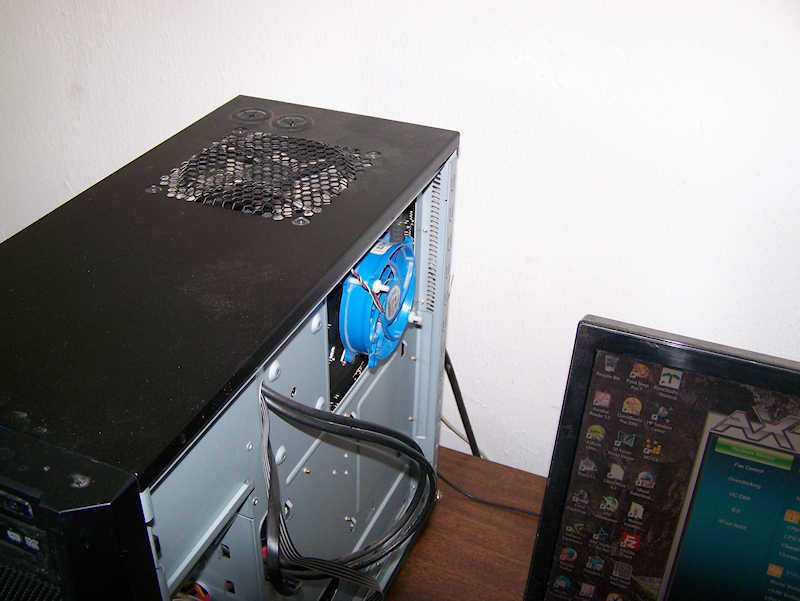
It has been running at 60C during renders. I removed the Cooler Master Evo and the thermal paste and applied a thicker amount to ensure good coverage. That made no difference in temps so I added the blue fan salvaged from my old computer on the back of the mobo behind the cpu. There is a vent in the case there. That lowered the temp to 54C - 55C with room temp 77F/25C. I'll accept that since it is the recommended max temp.
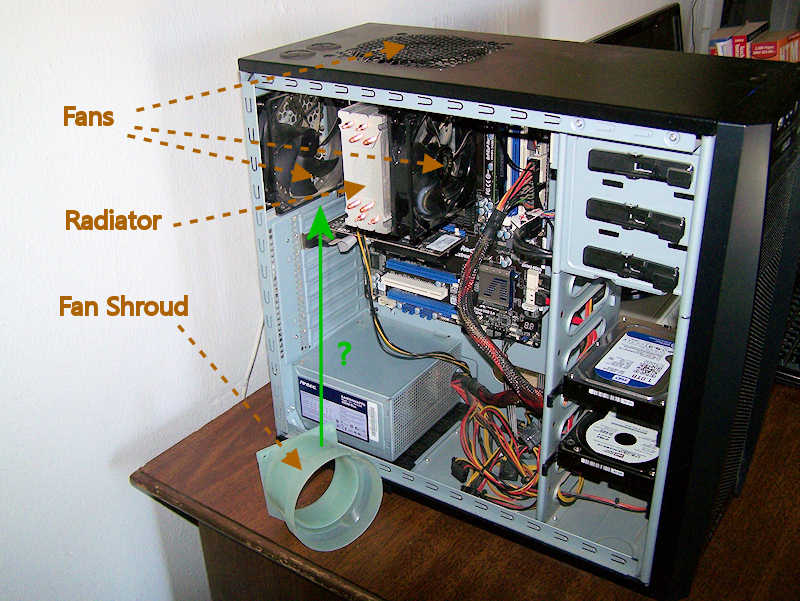
What do you think of this idea? See annotated photo. Air flow is front to back from the fan on the front (photo right) of the radiator, through the radiator, and out via the fan on the back. Some upward too from the top fan. My old computer had this shroud on the fan for the cpu cooler. What if I put a shroud between the fan on the back and the cooler radiator. That would pull all the air exiting there through the radiator.
What do you think of this idea? See annotated photo. Air flow is front to back from the fan on the front (photo right) of the radiator, through the radiator, and out via the fan on the back. Some upward too from the top fan. My old computer had this shroud on the fan for the cpu cooler. What if I put a shroud between the fan on the back and the cooler radiator. That would pull all the air exiting there through the radiator.
- Attachments
-
-
I prefer dangerous freedom over peaceful servitude. -- Thomas Jefferson/Jean Jacques Rousseau
-
Draise

- Captain
- Posts: 3200
- Joined: 21 Sep 2009, 19:33
- Type the number ten into the box: 0
- Location: Bogota, Colombia
Re: AMD chips? New computer build maybe.
Hmm... Fan in reverse (to suck in air) at the front or side of the case, then one fan pulling the air OUT of the case at the back. The biggest ones should suck out, while the other to work to pull in.
Also, changing fan speeds in the bios or with third party software.
Also, putting your CPU on low priority when rendering, it won't max the chips out.
Also, changing fan speeds in the bios or with third party software.
Also, putting your CPU on low priority when rendering, it won't max the chips out.
-
Finis
- Captain
- Posts: 5410
- Joined: 21 May 2009, 18:26
- Type the number ten into the box: 0
- Location: America!
Re: AMD chips? New computer build maybe.
Thanks Draise. That sounds good. I cranked the fans up some and I'll turn that up some more. They speed up/slow as needed but the software lets me set that. Small power supply is near maxed so for now no more fans.
I prefer dangerous freedom over peaceful servitude. -- Thomas Jefferson/Jean Jacques Rousseau
-
MikomDude
- Captain
- Posts: 1930
- Joined: 04 Oct 2010, 11:12
- Type the number ten into the box: 0
- Location: The Hague, Netherlands
Re: AMD chips? New computer build maybe.
Repasting the CPU with a thicker layer isn't a good idea, that's not how thermal paste works. Thicker paste won't lead away heat more efficiently, it can in fact become less efficient as a result of doing so. If you applied the paste properly the first time then there is no reason to re-paste it again unless it gets hard, if it does then you should use a different paste.
The blue CPU fan at the back looks cute. Can't say I have ever seen that before on a configuration such as this. You may want to move the fan you have up top (pulling air up and possibly ruining the airflow if not controlled properly) to the other side of your Hyper Evo.
The Evo comes with extra mounting pads and I think that fan is a 120mm fan so it should fit. Set it up in a push/pull configuration leading air out through the back.
You also want to tuck away some of those power cables, try to put them in between the rear wall and the back cover. That will also improve the airflow in your rig. I don't know where your front fan is, I'm guessing at the bottom. To further improve the airflow, move the Hard Drives as far down as you can so the fan can blow as much cool air into the case as possible and I think you'll max out the cooling efficiency of what you've currently got.
The only reason to use that shroud would be if you have a heatsink & fan mounted flat on the CPU pushing air up (or to the side, depending on how you see it), out through the case door/cover. With the EVO in this configuration, that is not necessary.
About your temps during load, I don't remember what CPU you're using but if you're using a third generation Intel i7 (or even and i5) then 60C at load is perfectly normal. Ivy Bridge CPUs are known to run pretty hot, luckily Intel CPUs tend to handle heat quite well.
I had my i7 run at 110 C when I first plugged it in (due to a crappy cooler where the fan got stuck, silly me, don't recommend you do this) and it never once BSODd. I should mention that was over two years ago and that it still runs fine today at a 4.1 Ghz overclock.
The blue CPU fan at the back looks cute. Can't say I have ever seen that before on a configuration such as this. You may want to move the fan you have up top (pulling air up and possibly ruining the airflow if not controlled properly) to the other side of your Hyper Evo.
The Evo comes with extra mounting pads and I think that fan is a 120mm fan so it should fit. Set it up in a push/pull configuration leading air out through the back.
You also want to tuck away some of those power cables, try to put them in between the rear wall and the back cover. That will also improve the airflow in your rig. I don't know where your front fan is, I'm guessing at the bottom. To further improve the airflow, move the Hard Drives as far down as you can so the fan can blow as much cool air into the case as possible and I think you'll max out the cooling efficiency of what you've currently got.
The only reason to use that shroud would be if you have a heatsink & fan mounted flat on the CPU pushing air up (or to the side, depending on how you see it), out through the case door/cover. With the EVO in this configuration, that is not necessary.
About your temps during load, I don't remember what CPU you're using but if you're using a third generation Intel i7 (or even and i5) then 60C at load is perfectly normal. Ivy Bridge CPUs are known to run pretty hot, luckily Intel CPUs tend to handle heat quite well.
I had my i7 run at 110 C when I first plugged it in (due to a crappy cooler where the fan got stuck, silly me, don't recommend you do this) and it never once BSODd. I should mention that was over two years ago and that it still runs fine today at a 4.1 Ghz overclock.
-
Finis
- Captain
- Posts: 5410
- Joined: 21 May 2009, 18:26
- Type the number ten into the box: 0
- Location: America!
Re: AMD chips? New computer build maybe.
A customer upgraded his computer and gave me his old Geforce GT 640! I had a GT 610 so that's many more cuda cores and 2x or 4x the memory. It was packed with dust (always a problem in the desert plus I'm a slob). Cleaned it up and it's running great. Now if I can get some gpu rendering programs ...
Yeah that back-of-the-mobo fan is unusual. The evo mounting bracket was warm to touch when rendering so I knew there was an opportunity for cooling there. The case has a vent there for a 120mm fan but I attached this smaller fan to the evo's mounting bracket which happened to have holes right for the fan bolts. This fan reduced cpu temps about 5C!
I had a minimum amount of paste on it at first. The idea was to have maximum metal to metal contact and just fill air spaces with the paste. Spread a little and scrape most off with a plastic edge. Other advice on the web used a little more for a thin layer. Thinking I had too little I changed it but it made no difference. I might get some high end paste in the future. Fans, air flow, all only as good as conduction into the radiator.
A shroud, as considered for this, would have been to improvise a push-pull but you're right about adding the second fan to the radiator. It is designed for that and the shroud would be a clumsy improvisation. In the old machine the shroud went from a vent on the side of the case to the blue cpu fan (above) to ensure cool air from outside was used.
I'll look at the airflow issues some other time.
AMD's run notoriously hot. I read that 62C is max that's ok and 55C recommended max. Running around 55C or 54C on renders now so that is ok.
With people overclocking already hot cpu's and spending thousands on computers you would think there would be a refrigerated cooler for computers. A miniature air conditioner. Worth it to "high enders". (For interesting history see Cray-2 and Fluorinert).
Yeah that back-of-the-mobo fan is unusual. The evo mounting bracket was warm to touch when rendering so I knew there was an opportunity for cooling there. The case has a vent there for a 120mm fan but I attached this smaller fan to the evo's mounting bracket which happened to have holes right for the fan bolts. This fan reduced cpu temps about 5C!
I had a minimum amount of paste on it at first. The idea was to have maximum metal to metal contact and just fill air spaces with the paste. Spread a little and scrape most off with a plastic edge. Other advice on the web used a little more for a thin layer. Thinking I had too little I changed it but it made no difference. I might get some high end paste in the future. Fans, air flow, all only as good as conduction into the radiator.
A shroud, as considered for this, would have been to improvise a push-pull but you're right about adding the second fan to the radiator. It is designed for that and the shroud would be a clumsy improvisation. In the old machine the shroud went from a vent on the side of the case to the blue cpu fan (above) to ensure cool air from outside was used.
I'll look at the airflow issues some other time.
AMD's run notoriously hot. I read that 62C is max that's ok and 55C recommended max. Running around 55C or 54C on renders now so that is ok.
With people overclocking already hot cpu's and spending thousands on computers you would think there would be a refrigerated cooler for computers. A miniature air conditioner. Worth it to "high enders". (For interesting history see Cray-2 and Fluorinert).
I prefer dangerous freedom over peaceful servitude. -- Thomas Jefferson/Jean Jacques Rousseau
-
jamesmc
- Captain
- Posts: 1776
- Joined: 08 Jul 2009, 15:35
Re: AMD chips? New computer build maybe.
I stop using AMD processors a long time ago. They always overheated and ended up frying the mother board. 
Walk by faith, not by sight.
-
MikomDude
- Captain
- Posts: 1930
- Joined: 04 Oct 2010, 11:12
- Type the number ten into the box: 0
- Location: The Hague, Netherlands
Re: AMD chips? New computer build maybe.
Ah, with the cooling of PCs it's not really a matter of getting it as cool as possible. It's all about keeping stable temps.Finis wrote:With people overclocking already hot CPUs and spending thousands on computers you would think there would be a refrigerated cooler for computers. A miniature air conditioner. Worth it to "high enders". (For interesting history see Cray-2 and Fluorinert).
The reason why you wouldn't use AC coolers or any form of freezing technology on your PC is because you want to keep your CPU running at room-temperature. Anything below that and there is a risk of condensation, which you don't want for obvious reasons. All about finding the proper balance really.
With other extreme cooling methods there may be a risk of electromagnetic interference.
-
Finis
- Captain
- Posts: 5410
- Joined: 21 May 2009, 18:26
- Type the number ten into the box: 0
- Location: America!
Re: AMD chips? New computer build maybe.
Goal would not be to make it super cold but to counter super heat to maintain optimum temp.
I prefer dangerous freedom over peaceful servitude. -- Thomas Jefferson/Jean Jacques Rousseau