trueSpace761 Workspace - Projects

User avatar
trueBlue
Captain
Posts: 5548
Joined: 06 Jul 2009, 22:50
Type the number ten into the box: 10

trueSpace761 Workspace - Projects

Post by trueBlue »

trueSpace761 Workspace - Projects
A Project is a Scene together with a Layout containing your Views and other tools
Load a Project
Exit trueSpace761
Open trueSpace761
trueSpace761 Stops Responding at the Title Screen
Workspace Projects Runtime error.png
Open Task Manager, select trueSpace761, and End Task
Go to C:\trueSpace761\tS and Delete the default.ctx file
Open trueSpace761
Reset the Default Context
Note: If you are using the Unofficial Update that uses the C3D Persistent Install v2, and you do not Reset the Default Context, you will be missing CustomCommands and all of the scripts and toolbar icons that use these scripts will not work!
User avatar
clintonman
Captain
Posts: 5659
Joined: 21 May 2009, 21:08
Type the number ten into the box: 0
Location: California

Re: trueSpace761 Workspace - Projects

Post by clintonman »

Verified crash using the Default Project. If you save a project into the library and load it, then it doesn't crash on startup. So it's only the Default Project that causes the crash.
Clinton Reese

http://clintons3d.com
User avatar
trueBlue
Captain
Posts: 5548
Joined: 06 Jul 2009, 22:50
Type the number ten into the box: 10

Re: trueSpace761 Workspace - Projects

Post by trueBlue »

Unfortunately, not for me!
I saved a Project with a trueSpace New Scene using the Default layout
This Projects crashes too!
User avatar
clintonman
Captain
Posts: 5659
Joined: 21 May 2009, 21:08
Type the number ten into the box: 0
Location: California

Re: trueSpace761 Workspace - Projects

Post by clintonman »

It might be unstable, not sure. I started tS again and it failed exactly like you described. Before in my testing the title didn't get stuck with the Default Project but it did get stuck on my previously working saved project.
I tried the Default Project on base unpatched tS and had no problems, restarted tS without crashes multiple times.
Tried again on UU using my saved project and restarted a few times and no problems. I guess for me it only happens occasionally.

I got some steps that may or may not help.
Load Default Project
Open the Gold Toolbar and crash!
but if you click on the 3d view or any other window then do Gold Toolbar and no crash.
Close then open tS and no crash, even though Default Project was loaded.
Clinton Reese

http://clintons3d.com
User avatar
trueBlue
Captain
Posts: 5548
Joined: 06 Jul 2009, 22:50
Type the number ten into the box: 10

Re: trueSpace761 Workspace - Projects

Post by trueBlue »

Following your steps...
Does your Create Primitive widgets work?
Does your Material Editor work?
Not for me until I switch to a layout, but still crashes on reload
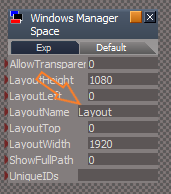
The Default Project that ships with tS76, tS761, and Rosetta has a Layout that does not exist in the library
Default Project has a none existing Layout.png
Default Project has a none existing Layout.png (10.56 KiB) Viewed 4861 times
I think it boils down to the Default.ctx getting corrupted

I remember Roman suggesting Projects be eliminated in Beta Space
I voted no, if they work! :(
User avatar
clintonman
Captain
Posts: 5659
Joined: 21 May 2009, 21:08
Type the number ten into the box: 0
Location: California

Re: trueSpace761 Workspace - Projects

Post by clintonman »

Some virgin trueSpace tests:

reset def context
load default project
create cube works
material editor - not working, click button nothing happens
default layout
create torus works
material editor works
restart ts and no crash

reset default context
save own project file
load it in
create cube works
material editor works
restart tS and no crash
Clinton Reese

http://clintons3d.com
User avatar
clintonman
Captain
Posts: 5659
Joined: 21 May 2009, 21:08
Type the number ten into the box: 0
Location: California

Re: trueSpace761 Workspace - Projects

Post by clintonman »

some UU tests

reset def context
save own project
load project - Bitmaps-Texture and Materials-DX9 panels open
create cube works
material editor works
restart tS and CRASH, and title page stuck, kill with task manager


delete default.ctx
start tS
load project
primitives not working
material editor works
gold toolbar and restore - primitives work again
restart tS and CRASH same as before


delete default.ctx
start tS
load project
set state to unload for rsx plugins
restart tS and no crash
reactivate plugins
restart tS and no crash
Clinton Reese

http://clintons3d.com
User avatar
trueBlue
Captain
Posts: 5548
Joined: 06 Jul 2009, 22:50
Type the number ten into the box: 10

Re: trueSpace761 Workspace - Projects

Post by trueBlue »

tS761.8
I unloaded the plugins
restart tS761.8 so the plugins unload
Loaded my new Default Project
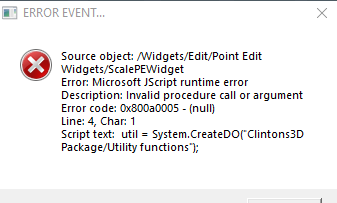
I am getting this error
util error.png
util error.png (10.94 KiB) Viewed 4850 times
Common issue revolves around Watch Dog Events hooked up to scripts
User avatar
clintonman
Captain
Posts: 5659
Joined: 21 May 2009, 21:08
Type the number ten into the box: 0
Location: California

Re: trueSpace761 Workspace - Projects

Post by clintonman »

trueBlue wrote: 01 Mar 2022, 02:13 tS761.8
I unloaded the plugins
restart tS761.8 so the plugins unload
Loaded my new Default Project
I am getting this error
util error.png

Common issue revolves around Watch Dog Events hooked up to scripts
You can't create utility functions if the rsx isn't loaded.
Clinton Reese

http://clintons3d.com
User avatar
trueBlue
Captain
Posts: 5548
Joined: 06 Jul 2009, 22:50
Type the number ten into the box: 10

Re: trueSpace761 Workspace - Projects

Post by trueBlue »

I know, just trying to figure out a solution
I added:

Code: Select all

	if(typeof(Clintons3dPlugin) == "undefined") {
	System.Alert("Clintons3dPlugin is Required!\n\nInstall the Clintons3dPlugin.rsx in the Package Manager");
	params.SetTerminationFlag()
	return;
	}
Still did not resolve the error
Edit:
What do you mean by set state?
set state to unload for rsx plugins
I believe the Primitive tools do not work because they are setup to use the Guard script

Code: Select all

Error: Microsoft JScript runtime error Description: Invalid procedure call or argument Error code: 0x800a0005 - (null) Line: 1, Char: 20 Script text:  RsApp.SendCustomEvent("Scripts/CustomCommands/Guard", {Cmd:"RsTool.AddPrimitive('/Widgets/Tools/Primitives/Primitive tool','{EEC8FEE8-EB12-4e12-8ED0-D71CAA2886FD}(/Preferences/Primitives/Matrix manager){C89E0C6B-3F82-4fe2-A232-FB1A7B7F6190}(/Preferences/Primitives/Factory preferences){/Preferences/Primitives/Preferences}','/Preferences/Primitives/Cube');"});Activity.Run("Scripts/CustomCommands/Guard");;} 
tS76 UU4 does not have any issues with Projects
User avatar
clintonman
Captain
Posts: 5659
Joined: 21 May 2009, 21:08
Type the number ten into the box: 0
Location: California

Re: trueSpace761 Workspace - Projects

Post by clintonman »

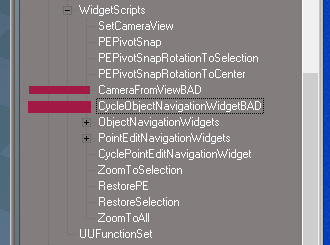
ProjectCrashClue.jpg
ProjectCrashClue.jpg (46.63 KiB) Viewed 3130 times


Did a bunch of tests and renaming those 2 files prevented the context file corruption.

Without renaming and changing those 2 to just return, still caused corruption.
Whatever is calling them is causing the corruption.
Clinton Reese

http://clintons3d.com
User avatar
trueBlue
Captain
Posts: 5548
Joined: 06 Jul 2009, 22:50
Type the number ten into the box: 10

Re: trueSpace761 Workspace - Projects

Post by trueBlue »

So, is it the scripts (the way they are written) that is causing the problems?
The only way that those scripts run, is by gestures or toolbar commands, with user interaction
Suggestions?
User avatar
clintonman
Captain
Posts: 5659
Joined: 21 May 2009, 21:08
Type the number ten into the box: 0
Location: California

Re: trueSpace761 Workspace - Projects

Post by clintonman »

trueBlue wrote: 21 Mar 2022, 19:17 So, is it the scripts (the way they are written) that is causing the problems?
The only way that those scripts run, is by gestures or toolbar commands, with user interaction
Suggestions?
No, the 2 scripts aren't the problem. The problem is whatever is calling the scripts. If you replace the entire script with "return" it still crashes, so it's not the 2 scripts.

Suggestions? , Nope, if I had a suggestion I would have mentioned it. More investigation is needed. This is just a place to start looking for the actual problem.
Clinton Reese

http://clintons3d.com
User avatar
trueBlue
Captain
Posts: 5548
Joined: 06 Jul 2009, 22:50
Type the number ten into the box: 10

Re: trueSpace761 Workspace - Projects

Post by trueBlue »

How did you find this issue?
Rosetta.Log?
User avatar
clintonman
Captain
Posts: 5659
Joined: 21 May 2009, 21:08
Type the number ten into the box: 0
Location: California

Re: trueSpace761 Workspace - Projects

Post by clintonman »

trueBlue wrote: 21 Mar 2022, 19:50 How did you find this issue?
Rosetta.Log?
No, wild guess, the log didn't have anything useful. I figured it must be caused by some automatic process and widgets have gotten a lot of changes over the months. So I started by replacing the widgets with the tS default Widgets.RsObj and then restored the UU widgets file and started by removing the WidgetScripts and WidgetUtilitiesFunctionSet, then renamed the scripts until loading the project didn't cause a crash on reload.

One thing I forgot to mention is that when loading the project a command terminal flashed on the screen twice, too quickly to see what it said. The flashing screen stopped when the 2 command nodes were renamed. and when the default context is corrupted it's size increases by a lot., from about 19 it increases to about 28Mb.
Clinton Reese

http://clintons3d.com
User avatar
trueBlue
Captain
Posts: 5548
Joined: 06 Jul 2009, 22:50
Type the number ten into the box: 10

Re: trueSpace761 Workspace - Projects

Post by trueBlue »

Cross post
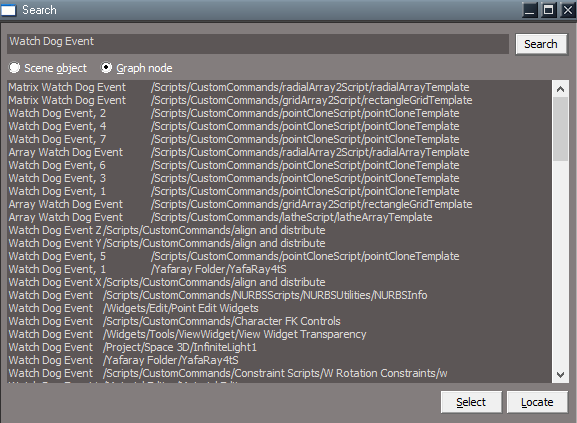
I searched for key word, Watch Dog Event
I do not know if this is anything, but do you notice the space between the end of the key word and /
Most have it, some do not
Odd
Search Watch Dog Event.png
User avatar
trueBlue
Captain
Posts: 5548
Joined: 06 Jul 2009, 22:50
Type the number ten into the box: 10

Re: trueSpace761 Workspace - Projects

Post by trueBlue »

clintonman wrote: 21 Mar 2022, 21:24
trueBlue wrote: 21 Mar 2022, 19:50 How did you find this issue?
Rosetta.Log?
No, wild guess, the log didn't have anything useful. I figured it must be caused by some automatic process and widgets have gotten a lot of changes over the months. So I started by replacing the widgets with the tS default Widgets.RsObj and then restored the UU widgets file and started by removing the WidgetScripts and WidgetUtilitiesFunctionSet, then renamed the scripts until loading the project didn't cause a crash on reload.

One thing I forgot to mention is that when loading the project a command terminal flashed on the screen twice, too quickly to see what it said. The flashing screen stopped when the 2 command nodes were renamed. and when the default context is corrupted it's size increases by a lot., from about 19 it increases to about 28Mb.
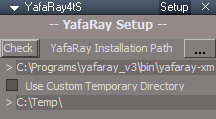
It is YafaRay4tS
Screenshot (26).png
This only shows once in a day
User avatar
clintonman
Captain
Posts: 5659
Joined: 21 May 2009, 21:08
Type the number ten into the box: 0
Location: California

Re: trueSpace761 Workspace - Projects

Post by clintonman »

trueBlue wrote: 21 Mar 2022, 21:30
clintonman wrote: 21 Mar 2022, 21:24
trueBlue wrote: 21 Mar 2022, 19:50 How did you find this issue?
Rosetta.Log?
No, wild guess, the log didn't have anything useful. I figured it must be caused by some automatic process and widgets have gotten a lot of changes over the months. So I started by replacing the widgets with the tS default Widgets.RsObj and then restored the UU widgets file and started by removing the WidgetScripts and WidgetUtilitiesFunctionSet, then renamed the scripts until loading the project didn't cause a crash on reload.

One thing I forgot to mention is that when loading the project a command terminal flashed on the screen twice, too quickly to see what it said. The flashing screen stopped when the 2 command nodes were renamed. and when the default context is corrupted it's size increases by a lot., from about 19 it increases to about 28Mb.
It is YafaRay4tS
Screenshot (26).png
This only shows once in a day
Nice, inching closer to a solution.

LE search spacing is just because of tab locations, if the node name is long enough it "skips" to the next tab location.
Clinton Reese

http://clintons3d.com
User avatar
trueBlue
Captain
Posts: 5548
Joined: 06 Jul 2009, 22:50
Type the number ten into the box: 10

Re: trueSpace761 Workspace - Projects

Post by trueBlue »

Found a solution :mrgreen:
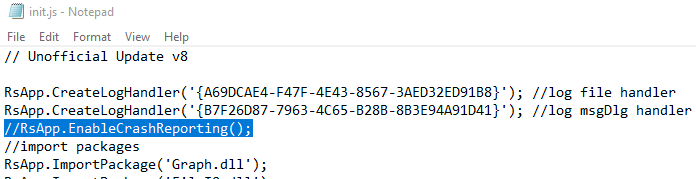
Commit out RsApp.EnableCrashReporting() in the init.js
Disable RsApp EnableCrashReporting.png
User avatar
clintonman
Captain
Posts: 5659
Joined: 21 May 2009, 21:08
Type the number ten into the box: 0
Location: California

Re: trueSpace761 Workspace - Projects

Post by clintonman »

trueBlue wrote: 21 Mar 2022, 21:49 Found a solution :mrgreen:
Commit out RsApp.EnableCrashReporting() in the init.js
Disable RsApp EnableCrashReporting.png
I guess that would be a good bandaid if we can't find the reason for the crash. Even if we do it might be good to disable it since there's no one to send a crash report to anyway.
Clinton Reese

http://clintons3d.com
User avatar
trueBlue
Captain
Posts: 5548
Joined: 06 Jul 2009, 22:50
Type the number ten into the box: 10

Re: trueSpace761 Workspace - Projects

Post by trueBlue »

The only downside, is not being able to recover the scene.RsScn
But I have heard (Paul Ashington?) that the scene would not be trustworthy
User avatar
clintonman
Captain
Posts: 5659
Joined: 21 May 2009, 21:08
Type the number ten into the box: 0
Location: California

Re: trueSpace761 Workspace - Projects

Post by clintonman »

trueBlue wrote: 21 Mar 2022, 22:01 The only downside, is not being able to recover the scene.RsScn
But I have heard (Paul Ashington?) that the scene would not be trustworthy
Is the open scene saved somewhere on crashes?
Clinton Reese

http://clintons3d.com
User avatar
trueBlue
Captain
Posts: 5548
Joined: 06 Jul 2009, 22:50
Type the number ten into the box: 10

Re: trueSpace761 Workspace - Projects

Post by trueBlue »

clintonman wrote: 21 Mar 2022, 22:03
trueBlue wrote: 21 Mar 2022, 22:01 The only downside, is not being able to recover the scene.RsScn
But I have heard (Paul Ashington?) that the scene would not be trustworthy
Is the open scene saved somewhere on crashes?
If the Crash Report dialog shows, you can save it
But...
Primitive creation does not work :bananasad:
Silent error from the log
Line: 1, Char: 20 Script text: RsApp.SendCustomEvent("Scripts/CustomCommands/Guard", {Cmd:"RsTool.AddPrimitive('/Widgets/Tools/Primitives/Primitive tool','{EEC8FEE8-EB12-4e12-8ED0-D71CAA2886FD}(/Preferences/Primitives/Matrix manager){C89E0C6B-3F82-4fe2-A232-FB1A7B7F6190}(/Preferences/Primitives/Factory preferences){/Preferences/Primitives/Preferences}','/Preferences/Primitives/Cube');"});Activity.Run("Scripts/CustomCommands/Guard");;}
Edit:
After loading a Project, I notice the following in the Rosetta.Log
Space.AutoRunActivities()

Edit 2:
Rosetta.Log after Run time error
Last entry:

Code: Select all

15:13:56.689 INFO  Clintons3d ViewPlugin Package imported                                                               0x00000000  [RsPluginManager.cpp(494)]
Delete context
Open trueSpace

Rosetta.Log
Next two entries that is missing from above

Code: Select all

15:20:43.583 INFO  Clintons3d ViewPlugin Package imported                                                               0x00000000  [RsPluginManager.cpp(494)]
15:20:43.929 INFO  Library thread running.                                                                              0x00000000  [RnLibraryPlace.cpp(264)]
User avatar
trueBlue
Captain
Posts: 5548
Joined: 06 Jul 2009, 22:50
Type the number ten into the box: 10

Re: trueSpace761 Workspace - Projects

Post by trueBlue »

clintonman wrote: 21 Mar 2022, 21:36
trueBlue wrote: 21 Mar 2022, 21:30
clintonman wrote: 21 Mar 2022, 21:24

No, wild guess, the log didn't have anything useful. I figured it must be caused by some automatic process and widgets have gotten a lot of changes over the months. So I started by replacing the widgets with the tS default Widgets.RsObj and then restored the UU widgets file and started by removing the WidgetScripts and WidgetUtilitiesFunctionSet, then renamed the scripts until loading the project didn't cause a crash on reload.

One thing I forgot to mention is that when loading the project a command terminal flashed on the screen twice, too quickly to see what it said. The flashing screen stopped when the 2 command nodes were renamed. and when the default context is corrupted it's size increases by a lot., from about 19 it increases to about 28Mb.
It is YafaRay4tS
Screenshot (26).png
This only shows once in a day
Nice, inching closer to a solution.

LE search spacing is just because of tab locations, if the node name is long enough it "skips" to the next tab location.
Not sure if YafaRay4tS is the cause of the crash, only a Watch Dog Event issue
The new Vray for trueSpace 7.61 Standalone Update has YafaRay4tS and no issue with a crash, only a Watch Dog Event issue
User avatar
clintonman
Captain
Posts: 5659
Joined: 21 May 2009, 21:08
Type the number ten into the box: 0
Location: California

Re: trueSpace761 Workspace - Projects

Post by clintonman »

Looks like my testing was flawed. Renaming those 2 files didn't help at all.
The latest test show that if D3D_Render_Grp is removed from CustomCommands opening the default project and restarting doesn't crash.
Clinton Reese

http://clintons3d.com
User avatar
trueBlue
Captain
Posts: 5548
Joined: 06 Jul 2009, 22:50
Type the number ten into the box: 10

Re: trueSpace761 Workspace - Projects

Post by trueBlue »

Great, you found the culprit!
I can confirm this using the current UU8 for trueSpace76.1B8
Needs more testing, but so far it seems to solve this odd issue

Any ideas why?
Maybe you could use this process for your D3D_Render_Grp
viewt ... =12&t=6258
User avatar
clintonman
Captain
Posts: 5659
Joined: 21 May 2009, 21:08
Type the number ten into the box: 0
Location: California

Re: trueSpace761 Workspace - Projects

Post by clintonman »

Still drilling down to the actual problem.
Problem is inside D3D_Render_Grp/D3D_Render/Open Model/ModelFrameWindow

If I empty the contents of that node there is no crash.
Clinton Reese

http://clintons3d.com
User avatar
clintonman
Captain
Posts: 5659
Joined: 21 May 2009, 21:08
Type the number ten into the box: 0
Location: California

Re: trueSpace761 Workspace - Projects

Post by clintonman »

I think I found a fix.
Remove the 3 D3DSceneLayer nodes and the load project restart crashing is gone. It looks like open model view still works without them.
Clinton Reese

http://clintons3d.com
User avatar
trueBlue
Captain
Posts: 5548
Joined: 06 Jul 2009, 22:50
Type the number ten into the box: 10

Re: trueSpace761 Workspace - Projects

Post by trueBlue »

Hummm... not sure that would be okay
I removed all of the Model nodes and scripts and left the Render to File scripts
Edit:
Selecting the Workspace tab in the Model widow crashes trueSpace
User avatar
clintonman
Captain
Posts: 5659
Joined: 21 May 2009, 21:08
Type the number ten into the box: 0
Location: California

Re: trueSpace761 Workspace - Projects

Post by clintonman »

Yep, I see it too. Press setup to open model frame, click workspace tab and crash.

Try this, reset the RootNode on the ModelFrameWindow clears the value and don't get the "load project restart crash" and can still press setup button and click on workspace tab without crashing.
Clinton Reese

http://clintons3d.com
User avatar
trueBlue
Captain
Posts: 5548
Joined: 06 Jul 2009, 22:50
Type the number ten into the box: 10

Re: trueSpace761 Workspace - Projects

Post by trueBlue »

Perfecto!
So glad you found and resolved this issue :bananathumb:
User avatar
clintonman
Captain
Posts: 5659
Joined: 21 May 2009, 21:08
Type the number ten into the box: 0
Location: California

Re: trueSpace761 Workspace - Projects

Post by clintonman »

It took a lot of work and it's crazy that something so insignificant could cause a crash.
I think there should be a default project for the UU. Maybe rename the current one to "Original Default Project".
Clinton Reese

http://clintons3d.com
User avatar
trueBlue
Captain
Posts: 5548
Joined: 06 Jul 2009, 22:50
Type the number ten into the box: 10

Re: trueSpace761 Workspace - Projects

Post by trueBlue »

clintonman wrote: 22 Mar 2022, 19:17 It took a lot of work and it's crazy that something so insignificant could cause a crash.
I think there should be a default project for the UU. Maybe rename the current one to "Original Default Project".
So appreciate your help with this
I can not rename the Default Project.RsPrj with the UU, but I will overwrite it using a new scene and Default layout
Actually, this is what I did when I noticed the problem :shock:
User avatar
clintonman
Captain
Posts: 5659
Joined: 21 May 2009, 21:08
Type the number ten into the box: 0
Location: California

Re: trueSpace761 Workspace - Projects

Post by clintonman »

trueBlue wrote: 22 Mar 2022, 19:58
clintonman wrote: 22 Mar 2022, 19:17 It took a lot of work and it's crazy that something so insignificant could cause a crash.
I think there should be a default project for the UU. Maybe rename the current one to "Original Default Project".
So appreciate your help with this
I can not rename the Default Project.RsPrj with the UU, but I will overwrite it using a new scene and Default layout
Actually, this is what I did when I noticed the problem :shock:
I don't understand. Just open the projects library, rmb rename the project file seems to work.
Clinton Reese

http://clintons3d.com
User avatar
trueBlue
Captain
Posts: 5548
Joined: 06 Jul 2009, 22:50
Type the number ten into the box: 10

Re: trueSpace761 Workspace - Projects

Post by trueBlue »

The UU(s) is a self-extracting file
It only replaces and adds files
Does not run any scripts or installation that renames existing files
User avatar
clintonman
Captain
Posts: 5659
Joined: 21 May 2009, 21:08
Type the number ten into the box: 0
Location: California

Re: trueSpace761 Workspace - Projects

Post by clintonman »

trueBlue wrote: 22 Mar 2022, 20:25 The UU(s) is a self-extracting file
It only replaces and adds files
Does not run any scripts or installation that renames existing files
Is this possible?
On your computer:
rename Default Project.RsPrj to Default Project Original.RsPrj
create a new Default Project.RsPrj based on your UU layout
add both to the UU installer - the installer will add the Default Project Original.RsPrj and replace the Default Project.RsPrj
Clinton Reese

http://clintons3d.com
User avatar
clintonman
Captain
Posts: 5659
Joined: 21 May 2009, 21:08
Type the number ten into the box: 0
Location: California

Re: trueSpace761 Workspace - Projects

Post by clintonman »

All watchdogs are triggering when a project is loaded, so I've decided to try to fix or remove them.
The lights and cameras are all fixed.


YafarayCheck.jpg
YafarayCheck.jpg (30.41 KiB) Viewed 4410 times
The yafaray has the lighting model watchdog fixed and the check version watchdog has been removed and replaced with a check button.


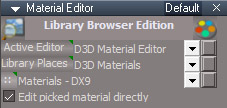
MaterialEditor_NoWatchdogs.jpg
MaterialEditor_NoWatchdogs.jpg (30.72 KiB) Viewed 4410 times
Removed the watchdogs from the material editor and added buttons. Also added the "Edit picked material directly" to the default aspect.


There are a bunch of scripts that have watchdogs too and they are all triggered by the project loading process, so I'll be fixing some of those over the days ahead.
Attachments
Lights6a54.RsObj
(2.92 MiB) Downloaded 176 times
Cameras.RsObj
(177.51 KiB) Downloaded 204 times
Yafaray Folder32f2.RsObj
(1.08 MiB) Downloaded 190 times
MaterialEditor.RsObj
(2.32 MiB) Downloaded 191 times
Clinton Reese

http://clintons3d.com
User avatar
trueBlue
Captain
Posts: 5548
Joined: 06 Jul 2009, 22:50
Type the number ten into the box: 10

Re: trueSpace761 Workspace - Projects

Post by trueBlue »

I have only noticed the Material Editor and YafaRay4tS (yafary-xml.exe) having this issue
Have you experienced these other items running?
If so, how can I confirm this?
User avatar
clintonman
Captain
Posts: 5659
Joined: 21 May 2009, 21:08
Type the number ten into the box: 0
Location: California

Re: trueSpace761 Workspace - Projects

Post by clintonman »

trueBlue wrote: 25 Mar 2022, 20:04 I have only noticed the Material Editor and YafaRay4tS having this issue
Have you experienced these other items running?
If so, how can I confirm this?
The only noticeable ones are Yafaray and material editor, but there are about 30 other scripts that are also running because of the watchdog flaw. Maybe it's not a problem or maybe they create hidden problems, in any case it's just too many for me to be comfortable ignoring. Any that I can't fix I'll ignore and leave them be.

Here's a script I used to find all the watchdogs. It just lists them to the log view.
Attachments
Export Script Dev04PlusWatchdog.RsObj
(86.35 KiB) Downloaded 189 times
Clinton Reese

http://clintons3d.com
User avatar
trueBlue
Captain
Posts: 5548
Joined: 06 Jul 2009, 22:50
Type the number ten into the box: 10

Re: trueSpace761 Workspace - Projects

Post by trueBlue »

This script does not do anything
I am guessing because the Run script is using the following at the beginning and again a few lines down
params.SetTerminationFlag();
return;
User avatar
clintonman
Captain
Posts: 5659
Joined: 21 May 2009, 21:08
Type the number ten into the box: 0
Location: California

Re: trueSpace761 Workspace - Projects

Post by clintonman »

trueBlue wrote: 25 Mar 2022, 20:49 This script does not do anything
I am guessing because the Run script is using the following at the beginning and again a few lines down
params.SetTerminationFlag();
return;
Did you open a log view?
Clinton Reese

http://clintons3d.com
User avatar
trueBlue
Captain
Posts: 5548
Joined: 06 Jul 2009, 22:50
Type the number ten into the box: 10

Re: trueSpace761 Workspace - Projects

Post by trueBlue »

Okay I see the log entries
I was looking for the exported script

I looked at the existing UU Lights and Cameras
Their Watch Dog Event's 'Change detect' attribute is not connected until a user selects the Synchronize button, so they should not be a problem

Just an idea, maybe you could add a script that connects the Watch Dog Event's 'Change detect' to your scripts making it (Interactive) instead of a button that runs a script (Manual)
User avatar
trueBlue
Captain
Posts: 5548
Joined: 06 Jul 2009, 22:50
Type the number ten into the box: 10

Re: trueSpace761 Workspace - Projects

Post by trueBlue »

The only noticeable ones are Yafaray and material editor, but there are about 30 other scripts that are also running because of the watchdog flaw. Maybe it's not a problem or maybe they create hidden problems
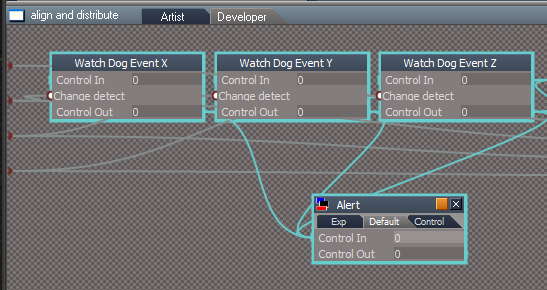
Have tried hooking up an Alert to your scripts that have Watch Dog Events to see if they run when loading a Project?

Edit:
Just tried and they do indeed run when loading a Project
Alert.png
User avatar
clintonman
Captain
Posts: 5659
Joined: 21 May 2009, 21:08
Type the number ten into the box: 0
Location: California

Re: trueSpace761 Workspace - Projects

Post by clintonman »

trueBlue wrote: 25 Mar 2022, 21:06 ...

I looked at the existing UU Lights and Cameras
Their Watch Dog Event's 'Change detect' attribute is not connected until a user selects the Synchronize button, so they should not be a problem
...
They run even when "Change detect" is not connected. That is the exact problem/bug with the Watchdogs.
Clinton Reese

http://clintons3d.com
User avatar
clintonman
Captain
Posts: 5659
Joined: 21 May 2009, 21:08
Type the number ten into the box: 0
Location: California

Re: trueSpace761 Workspace - Projects

Post by clintonman »

First script is done, "align and distribute".

http://clintons3d.com/plugins/truespace ... align.html

The changes are in the "alignment script" node and in the "axisUpdate" node.

Small note, all the new install scripts have an install button instead of running automatically.
Clinton Reese

http://clintons3d.com
User avatar
clintonman
Captain
Posts: 5659
Joined: 21 May 2009, 21:08
Type the number ten into the box: 0
Location: California

Re: trueSpace761 Workspace - Projects

Post by clintonman »

I looked at constraints and their watchdogs are not connected until they are used, so skipping it.

Grid Array, radial array and lathe tool already have a return early conditions, so no need to update them.

Going through it all and the problem isn't as bad as I thought. Several of the watchdog scripts are already set to return early or they run such small number of commands that adding a check wouldn't help or even matter. I think maybe 3 or 4 more scripts to fix and it's done.
Clinton Reese

http://clintons3d.com
User avatar
trueBlue
Captain
Posts: 5548
Joined: 06 Jul 2009, 22:50
Type the number ten into the box: 10

Re: trueSpace761 Workspace - Projects

Post by trueBlue »

Yeah, the align and distribute does not seem harmful either, even if it does run
A lot of your scripts will not run if certain conditions are not met, like if an object is selected and or has a Mesh, etc...
I just did a test and Watch Dog Events do not run in the scene level when loading a Project
User avatar
clintonman
Captain
Posts: 5659
Joined: 21 May 2009, 21:08
Type the number ten into the box: 0
Location: California

Re: trueSpace761 Workspace - Projects

Post by clintonman »

trueBlue wrote: 25 Mar 2022, 23:14 Yeah, the align and distribute does not seem harmful either, even if it does run
A lot of your scripts will not run if certain conditions are not met, like if an object is selected and or has a Mesh, etc...
I just did a test and Watch Dog Events do not run in the scene level when loading a Project
That's because they are no longer in the scene. Project replaces the scene, unless you mean a project scene has watch dogs in it and they don't run?

I did a survey and the list is short for fixes.
nurbs info
material color on particles
object widget scale
pe widget scale
Clinton Reese

http://clintons3d.com
User avatar
trueBlue
Captain
Posts: 5548
Joined: 06 Jul 2009, 22:50
Type the number ten into the box: 10

Re: trueSpace761 Workspace - Projects

Post by trueBlue »

Yes, I saved the Project with a Watch Dog Event hooked up to an Alert in the scene
I tested with the 'Change detect' connected and not connected, neither runs the Alert when loading a Project
You would think it would be the opposite, runs in the scene and not anywhere else
Funky! :bananadevil:
User avatar
clintonman
Captain
Posts: 5659
Joined: 21 May 2009, 21:08
Type the number ten into the box: 0
Location: California

Re: trueSpace761 Workspace - Projects

Post by clintonman »

Weird and unpredictable. Never would have guessed that.

NURBSInfo watchdog is ok, no change needed.
material color on particles - just making a single 16x16 image so, no need for change
Clinton Reese

http://clintons3d.com
User avatar
clintonman
Captain
Posts: 5659
Joined: 21 May 2009, 21:08
Type the number ten into the box: 0
Location: California

Re: trueSpace761 Workspace - Projects

Post by clintonman »

Here are the last 2 changes. The widget scripts are setting several values so I added the "nothing really changed" so return early.

I think the big ones were the material editor and yafaray flashing terminal and then next biggest was all the lights and cameras trying to sync with model. Everything else was mostly doing a bunch of unnecessary actions.
Attachments
Point Edit Widgets.RsObj
(272.02 KiB) Downloaded 197 times
Object Navigation Widgets81ff.RsObj
(62.22 KiB) Downloaded 191 times
Clinton Reese

http://clintons3d.com
User avatar
trueBlue
Captain
Posts: 5548
Joined: 06 Jul 2009, 22:50
Type the number ten into the box: 10

Re: trueSpace761 Workspace - Projects

Post by trueBlue »

I want to add a couple of changes to the Synchronize scripts for Cameras and Lights

Code: Select all

	var selCount = Node.SelectedCount()
	var inputNode = Node.LinkedInputNode(System.ThisName(), " Control In", 0)

	if(Node.ConExists(inputNode, "Change detect")) {
		if(Node.LinkedInputNodeCount(inputNode, "Change detect") == 0)
			return;
	}

	if(selCount > 1) {
		return
	}

	OBJ = System.ThisOwner()
	try{tSBridge.SynchronizeObject(OBJ)}catch(error){}
Also, I want to disconnect the Watch Dog Event from the Synchronize script
Change the Synchronize button script accordingly

If you have made all of these changes to your installation, please try and Load a Project from the File menu
Do you see any issues?
Watch for an empty File menu toolbar
User avatar
clintonman
Captain
Posts: 5659
Joined: 21 May 2009, 21:08
Type the number ten into the box: 0
Location: California

Re: trueSpace761 Workspace - Projects

Post by clintonman »

Yes, loading a project from the file menu is a failure. Get blank/empty menu until reset.
I tried setting things back to their virgin state for toolbars, lights, cameras, widgets and removed customcommands - nothing made any difference.
Clinton Reese

http://clintons3d.com
User avatar
trueBlue
Captain
Posts: 5548
Joined: 06 Jul 2009, 22:50
Type the number ten into the box: 10

Re: trueSpace761 Workspace - Projects

Post by trueBlue »

Did you try a new saved Project with the mods?

Also, does trueSpace switch to Panels after the Project loads?
User avatar
clintonman
Captain
Posts: 5659
Joined: 21 May 2009, 21:08
Type the number ten into the box: 0
Location: California

Re: trueSpace761 Workspace - Projects

Post by clintonman »

trueBlue wrote: 26 Mar 2022, 03:17 Did you try a new saved Project with the mods?
Yep, no joy.
Clinton Reese

http://clintons3d.com
User avatar
clintonman
Captain
Posts: 5659
Joined: 21 May 2009, 21:08
Type the number ten into the box: 0
Location: California

Re: trueSpace761 Workspace - Projects

Post by clintonman »

Can you try by removing the tiny toolbars from the 3d view and le view? That's the only thing I thought of but didn't try.
Clinton Reese

http://clintons3d.com
User avatar
trueBlue
Captain
Posts: 5548
Joined: 06 Jul 2009, 22:50
Type the number ten into the box: 10

Re: trueSpace761 Workspace - Projects

Post by trueBlue »

Here is a project/layout without aspect toolbars
Attachments
Camera special.zip
(1.79 MiB) Downloaded 207 times
User avatar
clintonman
Captain
Posts: 5659
Joined: 21 May 2009, 21:08
Type the number ten into the box: 0
Location: California

Re: trueSpace761 Workspace - Projects

Post by clintonman »

trueBlue wrote: 26 Mar 2022, 03:40 Here is a project/layout without aspect toolbars
Still no go.
Clinton Reese

http://clintons3d.com
User avatar
trueBlue
Captain
Posts: 5548
Joined: 06 Jul 2009, 22:50
Type the number ten into the box: 10

Re: trueSpace761 Workspace - Projects

Post by trueBlue »

I am not sure that I want to include the Material Editor with the manual buttons
I did include a script that removes the Material Editor temporarily which could be used prior to loading a Project
The YafaRay4tS Lighting Methods still has a Watch Dog Event hooked up and several other scripts do as well

I am wondering if something else could be done with the Watch Dog Event(s)?
Maybe a script that connects/disconnects the Watch Dog Event dynamically?

Overall, the biggest issue with trueSpace crashing has been solved, when loading a Project!
User avatar
clintonman
Captain
Posts: 5659
Joined: 21 May 2009, 21:08
Type the number ten into the box: 0
Location: California

Re: trueSpace761 Workspace - Projects

Post by clintonman »

trueBlue wrote: 27 Mar 2022, 03:46 I am not sure that I want to include the Material Editor with the manual buttons
...
Fine with me. The only thing I would miss is the "edit directly" copied to the main aspect, but I can just add it to the UU4Clinton.
trueBlue wrote: 27 Mar 2022, 03:46 ...
The YafaRay4tS Lighting Methods still has a Watch Dog Event hooked up and several other scripts do as well

I am wondering if something else could be done with the Watch Dog Event(s)?
Maybe a script that connects/disconnects the Watch Dog Event dynamically?

...
I don't see how that would work. Sounds like you would need some kind of watchdog to connect the watchdogs. I ignored a lot of them because the scripts called by the watchdogs were not doing very much. The only one I removed was one of the watchdogs inside Yafaray, all the others I made it so they could return early.
trueBlue wrote: 27 Mar 2022, 03:46 Overall, the biggest issue with trueSpace crashing has been solved, when loading a Project!
That's for sure!
Clinton Reese

http://clintons3d.com
User avatar
trueBlue
Captain
Posts: 5548
Joined: 06 Jul 2009, 22:50
Type the number ten into the box: 10

Re: trueSpace761 Workspace - Projects

Post by trueBlue »

Fine with me. The only thing I would miss is the "edit directly" copied to the main aspect, but I can just add it to the UU4Clinton.
For a lack of understanding, why would a user want to Uncheck 'Edit picked material directly'?

I have been stumped before when it was unchecked...
The 'Edit DX material in the Link Editor' button/icon does not work
Edit DX material in the Link Editor.png
Edit DX material in the Link Editor.png (26.75 KiB) Viewed 4179 times
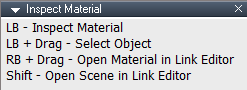
And the Inspect Widget RB + Drag shortcut
Inspect Material RB + Drag shortcut.png
Inspect Material RB + Drag shortcut.png (3.42 KiB) Viewed 4178 times
User avatar
clintonman
Captain
Posts: 5659
Joined: 21 May 2009, 21:08
Type the number ten into the box: 0
Location: California

Re: trueSpace761 Workspace - Projects

Post by clintonman »

Uncheck to make new materials based on existing materials.

Paint a face with a new material based on the existing material. If checked you have to save the material to the library, deselect and then load from the library and now you can make a new material based on the old material and then paint the face.

If using scene instanced and you edit directly it will change the material for all items in the scene that have that material. Unchecked and you can change the material and assign it to an object or face.
Clinton Reese

http://clintons3d.com
User avatar
trueBlue
Captain
Posts: 5548
Joined: 06 Jul 2009, 22:50
Type the number ten into the box: 10

Re: trueSpace761 Workspace - Projects

Post by trueBlue »

When you say, 'existing materials', do you mean the current 'Active Material'?

Sorry, having a dense moment trying to understand what 'Edit picked material directly' means, does, and does not do

Using your example, I can Inspect an object's material, which makes it the Active Material, then paint another object's face using the Active Material. 'Edit picked material directly' checked or unchecked did not make any difference

Nevertheless, I will add it to the Default aspect
User avatar
clintonman
Captain
Posts: 5659
Joined: 21 May 2009, 21:08
Type the number ten into the box: 0
Location: California

Re: trueSpace761 Workspace - Projects

Post by clintonman »

trueBlue wrote: 27 Mar 2022, 17:21 When you say, 'existing materials', do you mean the current 'Active Material'?

Sorry, having a dense moment trying to understand what 'Edit picked material directly' means, does, and does not do

Using your example, I can Inspect an object's material, which makes it the Active Material, then paint another object's face using the Active Material. 'Edit picked material directly' checked or unchecked did not make any difference

Nevertheless, I will add it to the Default aspect
'Edit picked material directly' means when you edit the material it changes on the object. When unchecked you edit a copy of the material so it doesn't change the original object.

Thanks, I appreciate it, it is super inconvenient having to change aspects just the check and uncheck it.
Clinton Reese

http://clintons3d.com
User avatar
trueBlue
Captain
Posts: 5548
Joined: 06 Jul 2009, 22:50
Type the number ten into the box: 10

Re: trueSpace761 Workspace - Projects

Post by trueBlue »

Okay, thank you!
It looks like 'Edit picked material directly', checked, and using 'Edit DX material in the Link Editor', navigates to the selected object's material within the object
Unchecked, navigates to the Active Material, which is not within the selected object, it is within the Material Editor

Swithing back forth does not seem reliable all of the time

Return to “Bugs and Workarounds”