Hi all
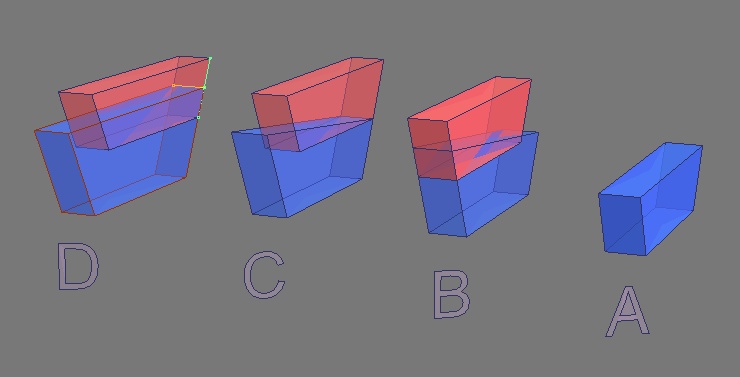
sometimes need rescaling an object mantaining some angular characteristics (i.e. for use in subctract boolean without coincident edges that may crashing MSide) and the only way i know in tSp is illustrated in attached screen-capture...
Is there a simplest way to obtain same result (A to D object) without jumping through all the commands ("copy obj" "point-edit" "edge-snap" "point-snap" etc.) nedeed?
Scaling objects mantaining angles
-
the_ant

- Chief Petty Officer
- Posts: 155
- Joined: 02 Jun 2009, 09:26
- Type the number ten into the box: 0
- Location: Perugia - Italy
Scaling objects mantaining angles
- Attachments
-
-
trueBlue

- Captain
- Posts: 5548
- Joined: 06 Jul 2009, 22:50
- Type the number ten into the box: 10
Re: Scaling objects mantaining angles
Are you referring to Workspace Booleans?
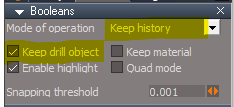
If so, have you tried Checking "Keep drill object" and "Keep history"?
Right click the Booleans icon for the above Settings
If so, have you tried Checking "Keep drill object" and "Keep history"?
- Keep History.png (5.99 KiB) Viewed 18 times
-
the_ant
- Chief Petty Officer
- Posts: 155
- Joined: 02 Jun 2009, 09:26
- Type the number ten into the box: 0
- Location: Perugia - Italy
Re: Scaling objects mantaining angles
Hi Trueblue
thanks for WS booleans options...but i referred to booleans in ModelSpace that don't likes coincident edges (expecially in subtract option)
in any case having a function or a plugin that scales an object through some directions instead of others (not necessary along xyz) could be very useful...
my attached image shows a trapezoidal solid scaled in z direction maintaining oblique faces position and angles and same base...if could be possible set new z measure obtaining the new solid D starting from solid A ....would be very happy...
thanks for WS booleans options...but i referred to booleans in ModelSpace that don't likes coincident edges (expecially in subtract option)
in any case having a function or a plugin that scales an object through some directions instead of others (not necessary along xyz) could be very useful...
my attached image shows a trapezoidal solid scaled in z direction maintaining oblique faces position and angles and same base...if could be possible set new z measure obtaining the new solid D starting from solid A ....would be very happy...