Hello folks.
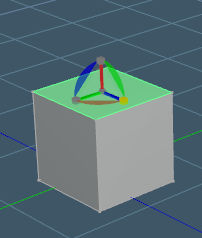
Anyone have any idea why my PE widget scale cubes no longer work?
I can't scale faces or anything with it any more.
The other parts of the widget still work.
Any help would be appreciated.
I'm using Standalone with the unofficial updates.
Scale Problem with WS PE widget
-
Peter
- Senior Chief Petty Officer
- Posts: 170
- Joined: 18 Apr 2010, 15:18
- Type the number ten into the box: 0
- Location: Texas
Scale Problem with WS PE widget
- Attachments
-
- clip.jpg (7.56 KiB) Viewed 3285 times
a day without orange juice is like... a day without orange juice
-
trueBlue

- Captain
- Posts: 5548
- Joined: 06 Jul 2009, 22:50
- Type the number ten into the box: 10
Re: Scale Problem with WS PE widget
Can you Load this script to see if it fixes this problem?
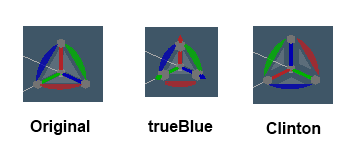
It is important that you change to another PE Widget first, other then the Original by selecting your keyboard's Shift key and selecting the PE Widget and exiting Point Editing before running this script.
This problem exist in the tS7.61 update as well for the Original PE Widget.
Point Edit Widgets
It is important that you change to another PE Widget first, other then the Original by selecting your keyboard's Shift key and selecting the PE Widget and exiting Point Editing before running this script.
This problem exist in the tS7.61 update as well for the Original PE Widget.
Point Edit Widgets
- Capture1.PNG (6.53 KiB) Viewed 3259 times
- Attachments
-
- PE Widget Fix.zip
- (36.34 KiB) Downloaded 285 times
-
Peter
- Senior Chief Petty Officer
- Posts: 170
- Joined: 18 Apr 2010, 15:18
- Type the number ten into the box: 0
- Location: Texas
Re: Scale Problem with WS PE widget
Thank you sir!
all fixed.
all fixed.
a day without orange juice is like... a day without orange juice
-
trueBlue
- Captain
- Posts: 5548
- Joined: 06 Jul 2009, 22:50
- Type the number ten into the box: 10