Wind generator
-
rjeff

- Master Chief Petty Officer
- Posts: 462
- Joined: 21 May 2009, 18:26
Wind generator
Ok I was playing around with the physics last night, and I can't seem to get the local wind..to well make wind. I had a cloth set up and I wanted the wind to toss it about and no matter how high I set the value up to, nothing. What do I need to do?
-
Steinie

- Captain
- Posts: 2958
- Joined: 21 May 2009, 17:38
- Type the number ten into the box: 10
Re: Wind generator
Did you use the Start/Stop Physics tool? It looks like a tire with a blue arrow through it.
-
rjeff
- Master Chief Petty Officer
- Posts: 462
- Joined: 21 May 2009, 18:26
Re: Wind generator
oh yeah..everything else worked...ie I had the cloth on two fixiation points and it drooped down when the physics started...then nada.
-
clintonman

- Captain
- Posts: 5659
- Joined: 21 May 2009, 21:08
- Type the number ten into the box: 0
- Location: California
Re: Wind generator
Does your cloth have 2 sides? The wind won't have any influence on the back side of a polygon.
-
rjeff
- Master Chief Petty Officer
- Posts: 462
- Joined: 21 May 2009, 18:26
Re: Wind generator
I will check that out. I know I was setting it to single sided to see if it drapped better over objects.
-
rjeff
- Master Chief Petty Officer
- Posts: 462
- Joined: 21 May 2009, 18:26
Re: Wind generator
Ok I re did this scene. I added a plane, made sure it was double sided and add the wind. Nothing. I have the wind set to 300 and nada.
-
Steinie
- Captain
- Posts: 2958
- Joined: 21 May 2009, 17:38
- Type the number ten into the box: 10
Re: Wind generator
You didn't mean "plane" correct? You would want a
thin cube instead. Also you aimed the fan right?
I know this might seem obvious but...
Maybe I'll create a scene with a working fan.
Let me know.
A plane is one sided.
thin cube instead. Also you aimed the fan right?
I know this might seem obvious but...
Maybe I'll create a scene with a working fan.
Let me know.
A plane is one sided.
-
clintonman
- Captain
- Posts: 5659
- Joined: 21 May 2009, 21:08
- Type the number ten into the box: 0
- Location: California
-
rjeff
- Master Chief Petty Officer
- Posts: 462
- Joined: 21 May 2009, 18:26
Re: Wind generator
Ok here ya go. This is just a "playing around with it" scene. noting serious.
- Attachments
-
- Plane.zip
- (354.49 KiB) Downloaded 320 times
-
clintonman
- Captain
- Posts: 5659
- Joined: 21 May 2009, 21:08
- Type the number ten into the box: 0
- Location: California
Re: Wind generator
Here's a couple of things you can do. You can move the local wind closer to the cloth and down closer to the bottom edge of the cloth or use a global wind instead. I think local wind has some kind of falloff built in to it so it only reaches so far.rjeff wrote:Ok here ya go. This is just a "playing around with it" scene. noting serious.
-
rjeff
- Master Chief Petty Officer
- Posts: 462
- Joined: 21 May 2009, 18:26
Re: Wind generator
Ok I added the global wind. That did have some affect on the cloth, howerver I am not getting the flapping motion I would have hoped to get. I guess I need to edit some of the cloth properties.
-
MikomDude

- Captain
- Posts: 1930
- Joined: 04 Oct 2010, 11:12
- Type the number ten into the box: 0
- Location: The Hague, Netherlands
Re: Wind generator
Interesting, I never got the wind generator to work either but I'll give this a try, sounds fun 
-
rjeff
- Master Chief Petty Officer
- Posts: 462
- Joined: 21 May 2009, 18:26
Re: Wind generator
yeah Mikom it is fun to play with it..if you set the cloth up right it will actually flap..but I am not sure how to do that.
-
MikomDude
- Captain
- Posts: 1930
- Joined: 04 Oct 2010, 11:12
- Type the number ten into the box: 0
- Location: The Hague, Netherlands
Re: Wind generator
I've been playing around a bit with that the past hour, it works, yes but it doesn't look that good yet. I'm just going to keep on experimenting. Try decreasing the density though, that might work better.
-
trueBlue

- Captain
- Posts: 5548
- Joined: 06 Jul 2009, 22:50
- Type the number ten into the box: 10
Re: Wind generator
Perhaps these tid bits from the tS7 Physics Developer can help:
Workspace Cloth attributes
The most important cloth attributes that impact behavior of cloth are stretching, bending and damping parameters- values of these parameters should fall into the interval 0.0 - 1.0, where 0.0 means that no effect is present (no stretch, no bend or no damp), 1.0 means full effect (maximum stretch, maximum bend or maximum damp allowed).
In general, stretching determines how distance between neighbouring points from cloth's mesh can be changed (stretched) during simulation, if you set 0.0, the solver try to keep distance constant, when you use higher value than 0.0, the distance constraint is not absolute and can be changed or stretched according forces acting on the cloth.
Bending determines how orientation of neighbouring triangles from cloth's mesh can be changed over simulation, if you set value 1.0, bending is fully allowed, but when you set value 0.0, the solver tries to keep orientation of neighbouring triangles constant over simulation - so object is more rigid.
Damping sets the extent of damp for all points in cloth mesh, the effect is calculated or derived from kinematic parameters of all points in cloth mesh - bascially it determines how movement of one point depends on the movement of the rest of points. If damping is 1.0, the behavior of cloth should be similar to behaviour of solid object.
Workspace Cloth attributes
The most important cloth attributes that impact behavior of cloth are stretching, bending and damping parameters- values of these parameters should fall into the interval 0.0 - 1.0, where 0.0 means that no effect is present (no stretch, no bend or no damp), 1.0 means full effect (maximum stretch, maximum bend or maximum damp allowed).
In general, stretching determines how distance between neighbouring points from cloth's mesh can be changed (stretched) during simulation, if you set 0.0, the solver try to keep distance constant, when you use higher value than 0.0, the distance constraint is not absolute and can be changed or stretched according forces acting on the cloth.
Bending determines how orientation of neighbouring triangles from cloth's mesh can be changed over simulation, if you set value 1.0, bending is fully allowed, but when you set value 0.0, the solver tries to keep orientation of neighbouring triangles constant over simulation - so object is more rigid.
Damping sets the extent of damp for all points in cloth mesh, the effect is calculated or derived from kinematic parameters of all points in cloth mesh - bascially it determines how movement of one point depends on the movement of the rest of points. If damping is 1.0, the behavior of cloth should be similar to behaviour of solid object.
-
rjeff
- Master Chief Petty Officer
- Posts: 462
- Joined: 21 May 2009, 18:26
Re: Wind generator
Thanks blue. Can you answer. One thing I can't seem to figure out is how to kepp from boucing around. It seem to react to much and it is just to "bouncey".
-
trueBlue
- Captain
- Posts: 5548
- Joined: 06 Jul 2009, 22:50
- Type the number ten into the box: 10
Re: Wind generator
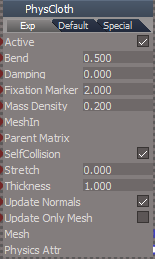
I suppose it depends on your example and or how it will be used. Damping seems to be the most logical attribute to consider would be my guess. There is a 3 Flag scene located in C:\trueSpace761\tS\PDFMan\resources\chapter10\3_Flags when you install the Manual.
In that example you will notice 3 Local Wind objects and the Cloth attributes are as follows:
In that example you will notice 3 Local Wind objects and the Cloth attributes are as follows:
- Attachments
-
- Capture.PNG (8.15 KiB) Viewed 4885 times
-
rjeff
- Master Chief Petty Officer
- Posts: 462
- Joined: 21 May 2009, 18:26
Re: Wind generator
Is there a place to get the manual? I don't have it and I would like it very much.
Also my cloth physic tab does not look like that. I do not have the exp setting. I do have default and speical but they are not listed out like that.
Also my cloth physic tab does not look like that. I do not have the exp setting. I do have default and speical but they are not listed out like that.
-
trueBlue
- Captain
- Posts: 5548
- Joined: 06 Jul 2009, 22:50
- Type the number ten into the box: 10
Re: Wind generator
Try here:
vi ... 577#p15577"
If you look at the Cloth panel inside your object within the Link Editor you will see the Exp aspect.
However all of the usefull attributes are exposed in the other aspects.
Care to share your soft body settings?
vi ... 577#p15577"
If you look at the Cloth panel inside your object within the Link Editor you will see the Exp aspect.
However all of the usefull attributes are exposed in the other aspects.
Care to share your soft body settings?
-
rjeff
- Master Chief Petty Officer
- Posts: 462
- Joined: 21 May 2009, 18:26
Re: Wind generator
Sure! There is no real secret to it. Every object reacts to the cloth settings differently. The default settings work fine. Really it is just a simulated softbody. I whish is were true soft body, but you can still have fun with it!