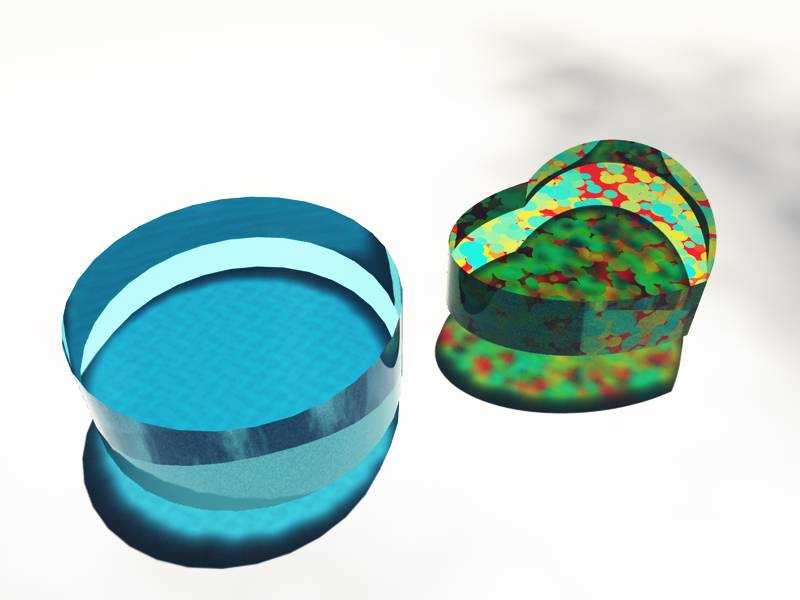
I tried to assign DX materials to some objects.
Now I noticed something weird.
The texture is cut along edges.
Here an example:
I made a cylinder.
Deleted the half of it by subtract-booling a cube.
Then I mirrored the cut face to get a whole cylinder again.
Now you can see the cut line in the texture.
I used the shiny metal shader
How can I prevent this, and how can I correct it again?
Texture problem
-
Wigand
- Senior Chief Petty Officer
- Posts: 204
- Joined: 21 May 2009, 17:38
Texture problem
- Attachments
-

-
spacekdet

- Captain
- Posts: 1810
- Joined: 27 May 2009, 15:00
- Type the number ten into the box: 10
- Location: On the day shift at the Utility Muffin Research Kitchen
Re: Texture problem
Re-apply UV mapping.
No way to prevent it, booleans always disrupt UV maps/ textures anyway.
Should be fairly simple, just apply cylindrical UV map to rounded areas, planar to flat ends.
No way to prevent it, booleans always disrupt UV maps/ textures anyway.
Should be fairly simple, just apply cylindrical UV map to rounded areas, planar to flat ends.
-
Wigand
- Senior Chief Petty Officer
- Posts: 204
- Joined: 21 May 2009, 17:38
Re: Texture problem
Sorry don't workspacekdet wrote:Re-apply UV mapping.

- Attachments
-

-
v3rd3
- Lieutenant Commander
- Posts: 1191
- Joined: 21 May 2009, 20:04
Re: Texture problem
I have not spent a lot of time on this ... yet ... but it does appear that there is no way to use the mirror tool and define a new piece of geometry. Instead the mirrored object will always be the sum of parts.
According to the manual flattening construction history is the step to take when you have finished your geometry but the "centre line" in the geometry seems to remain.
I tried the cylindrical mapping you described and got basically the same result.
If you are using materials without refraction (I should say refraction < 0) or without any bump the join is not obvious.
Interesting issue I will dig deeper after the holidays.
According to the manual flattening construction history is the step to take when you have finished your geometry but the "centre line" in the geometry seems to remain.
I tried the cylindrical mapping you described and got basically the same result.
If you are using materials without refraction (I should say refraction < 0) or without any bump the join is not obvious.
Interesting issue I will dig deeper after the holidays.
-
Wigand
- Senior Chief Petty Officer
- Posts: 204
- Joined: 21 May 2009, 17:38
Re: Texture problem
Maybe it is a shader problem. The orientation of the
triangles of the objects seem to influence the shaders.
triangles of the objects seem to influence the shaders.
-
Steinie

- Captain
- Posts: 2958
- Joined: 21 May 2009, 17:38
- Type the number ten into the box: 10
Re: Texture problem
It isn't the cylinder mapping that would fix this but the planner mapping to the ends
that was already suggested by SpaceKDet.
If that doesn't fix it then the model itself needs to be fixed. In this case creating a new
cylinder with flat ends would be much easier.
that was already suggested by SpaceKDet.
If that doesn't fix it then the model itself needs to be fixed. In this case creating a new
cylinder with flat ends would be much easier.
-
Wigand
- Senior Chief Petty Officer
- Posts: 204
- Joined: 21 May 2009, 17:38
Re: Texture problem
That are bad news. I created some complicated objects with boolean and other (mirror) technics.
It is nearly not possible to do this once again.
It is nearly not possible to do this once again.
-
Tiles

- Master Chief Petty Officer
- Posts: 401
- Joined: 27 May 2009, 08:34
Re: Texture problem
Have you tried to switch between the used Normals methods? You can choose between Facet Normals, Auto Facet Normals and Smooth Normals. Maybe you can fix it by applying faceted Normals to the faces in question. Another autofacet angle can also help in some cases. And as a last option that could help, you could optimize triangulation in the point edit tools.
This doesn`t help with your mirror problem though. The mapping is mirrored then too. And you would definitely need to map these faces again.
Stichwort Unwrapping
This doesn`t help with your mirror problem though. The mapping is mirrored then too. And you would definitely need to map these faces again.
Stichwort Unwrapping
Free Gamegraphics, Freeware Games http://reinerstilesets.de
-
RAYMAN

- Captain
- Posts: 2547
- Joined: 21 May 2009, 18:56
Re: Texture problem
Stichwort : Polygon modeler Murks !!!
Using Booleans in polygon modelers causes headaches wirthout end.
Its not just a Truespace related problem its a systematic problem.
it comes up again and again and again.............
If you guys want to do these kind of operations you got to use nurbs - booleans
they dont have any of these limitations.
Theres also a misconception that nurbs applications dont give you clean meshes when you export
which only depends on you mesher.....
Here i did the same oertions you did with half a cylinder and then with an elyptical cylinder shape that was cut diangonaly and mirrored and booleaned together
You see the UV mapping is intact and there is no problem !
Using Booleans in polygon modelers causes headaches wirthout end.
Its not just a Truespace related problem its a systematic problem.
it comes up again and again and again.............
If you guys want to do these kind of operations you got to use nurbs - booleans
they dont have any of these limitations.
Theres also a misconception that nurbs applications dont give you clean meshes when you export
which only depends on you mesher.....
Here i did the same oertions you did with half a cylinder and then with an elyptical cylinder shape that was cut diangonaly and mirrored and booleaned together
You see the UV mapping is intact and there is no problem !
- Attachments
-