Attached is my ugly solution to the windows 7 link editor problem. This object installs a button. When you left click the button any undocked link editor windows are quickly sized down then up again. This makes for a kind of crude refresh for the LE window. Push the button again to stop the refresh cycle. If you right click a panel will display in the panel view where you can control the amount of pause between refreshes.
This only works with floating LE windows. If you convert a floating window like a 3d view to a LE view it still won't refresh. The floating window has to start out as a LE window.
win7 LE workaround
-
clintonman

- Captain
- Posts: 5659
- Joined: 21 May 2009, 21:08
- Type the number ten into the box: 0
- Location: California
win7 LE workaround
- Attachments
-
- install win7 LE refresher Button.zip
- (37.96 KiB) Downloaded 395 times
-
froo
- Captain
- Posts: 2554
- Joined: 22 May 2009, 12:13
Re: win7 LE workaround
Hey good job clintonman!
It may be ugly but it's a start!
It may be ugly but it's a start!
-
trueBlue

- Captain
- Posts: 5548
- Joined: 06 Jul 2009, 22:50
- Type the number ten into the box: 10
Re: win7 LE workaround
Hey Clinton?
Just curious if this included RefreshWindowID script works in WIN7 for tS761.
If not does shrinking and expanding the split window work?
Just curious if this included RefreshWindowID script works in WIN7 for tS761.
If not does shrinking and expanding the split window work?
- Attachments
-
- RefreshWindowID.zip
- (2.99 KiB) Downloaded 321 times
-
trueBlue
- Captain
- Posts: 5548
- Joined: 06 Jul 2009, 22:50
- Type the number ten into the box: 10
Re: win7 LE workaround
If the previous posted script does not work here is a simular script that uses your method. The idea here is that it works in Docked Windows too. HTH
- Attachments
-
- RefreshWindowID2.zip
- (2.99 KiB) Downloaded 326 times
-
clintonman
- Captain
- Posts: 5659
- Joined: 21 May 2009, 21:08
- Type the number ten into the box: 0
- Location: California
Re: win7 LE workaround
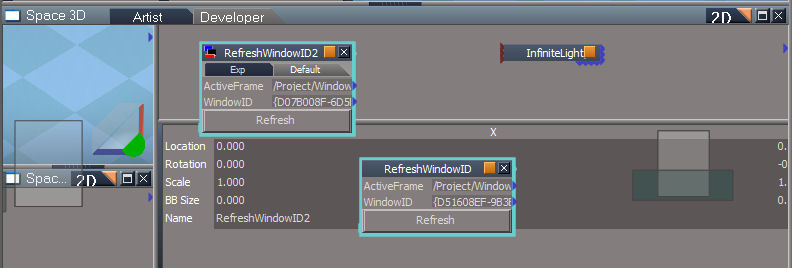
The first one doesn't make any difference. The second one makes the whole screen flash and leaves a messy LE. I had this in the original but docked windows look terrible with the resize/refresh method. Image shows how it picks up whatever was under the window.
-
trueBlue
- Captain
- Posts: 5548
- Joined: 06 Jul 2009, 22:50
- Type the number ten into the box: 10
Re: win7 LE workaround
Bummer, thanks for checking it out Clinton.
-
spacekdet

- Captain
- Posts: 1810
- Joined: 27 May 2009, 15:00
- Type the number ten into the box: 10
- Location: On the day shift at the Utility Muffin Research Kitchen
Re: win7 LE workaround
Help me out here... was this issue ever resolved?
-
trueBlue
- Captain
- Posts: 5548
- Joined: 06 Jul 2009, 22:50
- Type the number ten into the box: 10
Re: win7 LE workaround
Here is the direct link:
http://www.dawdolman.com/GamesDev/TrueSpace761.aspx"
http://www.dawdolman.com/GamesDev/TrueSpace761.aspx"
-
ajmrowland
- Seaman Recruit
- Posts: 3
- Joined: 10 Feb 2010, 00:33
Re: win7 LE workaround
Thanks, this really helped.
However, It still wont let me load the Viperfish into the Link Editor.
However, It still wont let me load the Viperfish into the Link Editor.
-
ajmrowland
- Seaman Recruit
- Posts: 3
- Joined: 10 Feb 2010, 00:33
Re: win7 LE workaround
im waiting
-
Steinie

- Captain
- Posts: 2958
- Joined: 21 May 2009, 17:38
- Type the number ten into the box: 10
Re: win7 LE workaround
I think your question is puzzling. Can you be more specific?
You also might want to start a new thread regarding your problem so that your
problem can be better focused on.
You also might want to start a new thread regarding your problem so that your
problem can be better focused on.
-
Fatist
- Seaman Recruit
- Posts: 3
- Joined: 14 May 2010, 06:11
Re: win7 LE workaround
hey, i've tried all of your solutions. nothing. here's what's happening: for some reason the 2d window (mounted as default at bottom of screen, containing light sources) is freezing. I just stated following the organics course videos and cant get past this problem. the window itself freezes independently and leaves trails. I've reinstalled which did nothing. wondering if there's something else i can do to fix it. maybe running it in in unix?
-
Saul
- Senior Chief Petty Officer
- Posts: 308
- Joined: 22 May 2009, 16:50
Re: win7 LE workaround
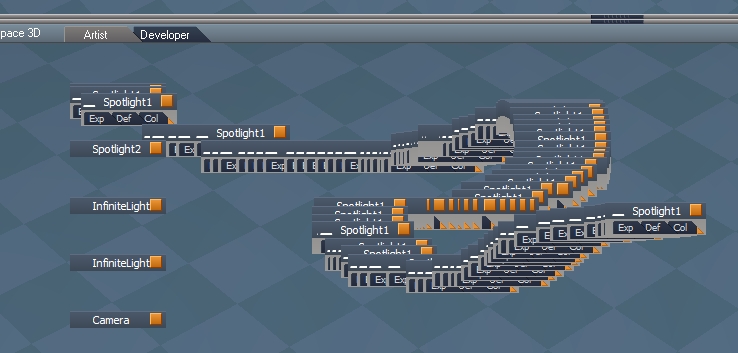
Haven't had this happen for years but after latest unofficial update, WIN 7:
-
trueBlue
- Captain
- Posts: 5548
- Joined: 06 Jul 2009, 22:50
- Type the number ten into the box: 10
Re: win7 LE workaround
The Unofficial Update(s) do NOT do anything to trueSpace7.61 to cause this!Saul wrote: 14 Dec 2019, 17:42 Haven't had this happen for years but after latest unofficial update, WIN 7:
ScreenHunter 03.jpg

-
Saul
- Senior Chief Petty Officer
- Posts: 308
- Joined: 22 May 2009, 16:50
Re: win7 LE workaround
Ok. Any ideas as to how to fix it? The dawdolman link is broken.
-
stan
- Master Chief Petty Officer
- Posts: 584
- Joined: 21 May 2009, 17:20
Re: win7 LE workaround
Not sure if this is what you are looking for Saul?
I downloaded it years ago but didn't need it when I got a win7 pc, as I haven't had any LE problems.
I downloaded it years ago but didn't need it when I got a win7 pc, as I haven't had any LE problems.
-
Saul
- Senior Chief Petty Officer
- Posts: 308
- Joined: 22 May 2009, 16:50
Re: win7 LE workaround
That's it! Thanks - again - Stan.