The freeze transform script is for setting the location to (0,0,0), rotation to (0,0,0) and scale to (1,1,1,) without changing the appearance of the mesh. I just discovered that the commands it uses don't take shear into account. I added an option to set shear to (0,0,0). This option only works with single mesh objects not groups like the other 3 options.
Found on the utilities page
http://www.clintons3d.com/plugins/trues ... tml#freeze
Update:
added shear option
automatic installer
new snowflake icon
Fixed shear option
Freeze Transform Script Update
-
clintonman

- Captain
- Posts: 5659
- Joined: 21 May 2009, 21:08
- Type the number ten into the box: 0
- Location: California
Freeze Transform Script Update
Last edited by clintonman on 13 Sep 2019, 20:39, edited 1 time in total.
-
MikomDude

- Captain
- Posts: 1930
- Joined: 04 Oct 2010, 11:12
- Type the number ten into the box: 0
- Location: The Hague, Netherlands
Re: Freeze Transform Script Update
Useful tool, only problem could be/is that undo doesn't seem to work after. Are you planning on making a version allowing the action to be undone? It would make the tool less final.
-
clintonman
- Captain
- Posts: 5659
- Joined: 21 May 2009, 21:08
- Type the number ten into the box: 0
- Location: California
Re: Freeze Transform Script Update
Well, in a word...no. It can be undone by pressing the undo button several times to get back to the original state. The only way to make a proper 1 step undo would be to recode the script into C++ using the SDK. This is true of all scripts. Only plugins can have undo built in to them.MikomDude wrote:Useful tool, only problem could be/is that undo doesn't seem to work after. Are you planning on making a version allowing the action to be undone? It would make the tool less final.
-
MikomDude
- Captain
- Posts: 1930
- Joined: 04 Oct 2010, 11:12
- Type the number ten into the box: 0
- Location: The Hague, Netherlands
Re: Freeze Transform Script Update
Ah, that's a shame. I'll try pressing the undo button a couple of times and see if that undos the move, if so I can start using this tool more often 
-
trueBlue

- Captain
- Posts: 5548
- Joined: 06 Jul 2009, 22:50
- Type the number ten into the box: 10
Re: Freeze Transform Script Update
The Translation attribute, checked or unchecked does not seem to be working.
Both move the Pivot to the World origin.
Both move the Pivot to the World origin.
-
clintonman
- Captain
- Posts: 5659
- Joined: 21 May 2009, 21:08
- Type the number ten into the box: 0
- Location: California
Re: Freeze Transform Script Update
I see,trueBlue wrote: 12 Sep 2019, 06:36 The Translation attribute, checked or unchecked does not seem to be working.
Both move the Pivot to the World origin.
Looks like shear is overriding the unchecked translate.
-
clintonman
- Captain
- Posts: 5659
- Joined: 21 May 2009, 21:08
- Type the number ten into the box: 0
- Location: California
Re: Freeze Transform Script Update
Fixed shear portion of the script. Added defaults of "checked" for all the checkbox options.
-
trueBlue
- Captain
- Posts: 5548
- Joined: 06 Jul 2009, 22:50
- Type the number ten into the box: 10
Re: Freeze Transform Script Update
Less I am missing something, I do not think this part of your script is necessary:
As soon as you run this command:
The Pivot (Axis) is created.
The difference that I am seeing, is you do not get this message:
And it does not have to be converted to an Editable mesh!
Code: Select all
//	ScriptObject.RunCmd("mesh modifiers package/apply pivot transform to mesh",
// "ConntrolIn", 0, "Selection", "");Code: Select all
ScriptObject.RunCmd("tools package/show axes", "Selection", "");The difference that I am seeing, is you do not get this message:

- Freeze1.PNG (7.3 KiB) Viewed 4567 times
-
clintonman
- Captain
- Posts: 5659
- Joined: 21 May 2009, 21:08
- Type the number ten into the box: 0
- Location: California
Re: Freeze Transform Script Update
Part of the process of fully freezing transforms is to alter the mesh forcing it into an editable mesh form. It's pretty much the whole point of the tool, especially when exporting meshes out of truespace, they end up not where you expect when importing to the destination. If truespace treated pivots like all other 3d programs then the command to bake the transform into the vertices wouldn't exist or even be needed.trueBlue wrote: 03 Feb 2020, 19:40 Less I am missing something, I do not think this part of your script is necessary:As soon as you run this command:Code: Select all
// ScriptObject.RunCmd("mesh modifiers package/apply pivot transform to mesh", // "ConntrolIn", 0, "Selection", "");The Pivot (Axis) is created.Code: Select all
ScriptObject.RunCmd("tools package/show axes", "Selection", "");
The difference that I am seeing, is you do not get this message:
Freeze1.PNG
And it does not have to be converted to an Editable mesh!
-
trueBlue
- Captain
- Posts: 5548
- Joined: 06 Jul 2009, 22:50
- Type the number ten into the box: 10
Re: Freeze Transform Script Update
Okay, thank you for the explanation!
-
trueBlue
- Captain
- Posts: 5548
- Joined: 06 Jul 2009, 22:50
- Type the number ten into the box: 10
Re: Freeze Transform Script Update
Noticed that if a user selects No on the Warning dialog, the Freeze script still applies a Pivot and is not converted to an Editable Mesh.

- Editable Mesh Warning.png (8.39 KiB) Viewed 2727 times
-
clintonman
- Captain
- Posts: 5659
- Joined: 21 May 2009, 21:08
- Type the number ten into the box: 0
- Location: California
Re: Freeze Transform Script Update
Don't see any way around that. There's no way for the script to catch that situation and act on it.trueBlue wrote: 20 Aug 2020, 18:08 Noticed that if a user selects No on the Warning dialog, the Freeze script still applies a Pivot and is not converted to an Editable Mesh.
Editable Mesh Warning.png
-
trueBlue
- Captain
- Posts: 5548
- Joined: 06 Jul 2009, 22:50
- Type the number ten into the box: 10
Re: Freeze Transform Script Update
There is a way by unchecking Convert to editable mesh.
Be aware though, trueSpace does not install the Dialog Settings until a user enters into Point Editing.
Be aware though, trueSpace does not install the Dialog Settings until a user enters into Point Editing.

- Covert to edible mesh.png (10.46 KiB) Viewed 2723 times
-
clintonman
- Captain
- Posts: 5659
- Joined: 21 May 2009, 21:08
- Type the number ten into the box: 0
- Location: California
Re: Freeze Transform Script Update
So it would have to make sure it exists, read it, then uncheck it, run the rest of the script and finish by restoring it's original state.
I think that process gave me trouble in another script. It's something to think about though.
I think that process gave me trouble in another script. It's something to think about though.
-
trueBlue
- Captain
- Posts: 5548
- Joined: 06 Jul 2009, 22:50
- Type the number ten into the box: 10
Re: Freeze Transform Script Update
Yes, except add, if it does not exist, activate/deactivate PE mode to create the Dialog settings panel first.clintonman wrote: 21 Aug 2020, 06:34 So it would have to make sure it exists, read it, then uncheck it, run the rest of the script and finish by restoring it's original state.
I think that process gave me trouble in another script. It's something to think about though.
Yep! trueSpace's undefined check box state.clintonman wrote: 21 Aug 2020, 06:34 I think that process gave me trouble in another script. It's something to think about though.

Have to set the check box on first then off.
I also noticed that the Warning will still show, but selecting No does not stop the process using the above modifications
Also think that Translation should be better defined as World 0 0 0 or Normalize Translation, and the Default should be Unchecked
-
clintonman
- Captain
- Posts: 5659
- Joined: 21 May 2009, 21:08
- Type the number ten into the box: 0
- Location: California
Re: Freeze Transform Script Update
I disagree, but it will keep whatever the user last selected.trueBlue wrote: 21 Aug 2020, 14:49 ...
Also think that Translation should be better defined as World 0 0 0 or Normalize Translation, and the Default should be Unchecked
-
trueBlue
- Captain
- Posts: 5548
- Joined: 06 Jul 2009, 22:50
- Type the number ten into the box: 10
Re: Freeze Transform Script Update
Your not going to like this version because I am not restoring user's preferences.
Not sure how to do this part yet and it does not create the Dialog settings panel, so this is for the Unofficial Updates only because the Dialog settings panel is included.
IMHO the above is more important then when a user selects No to the Warnings and the freeze process does not work.
Some where you mentioned that it was important that you Flatten the Axis
So in this version:
Overrides the Warnings Yes or No and sets the Dialog settings attributes. UGH...unreliable or inconsistent.
Flattens the Axis
Removes the Pivot
Flattens the Mesh
Not sure how to do this part yet and it does not create the Dialog settings panel, so this is for the Unofficial Updates only because the Dialog settings panel is included.
IMHO the above is more important then when a user selects No to the Warnings and the freeze process does not work.
Some where you mentioned that it was important that you Flatten the Axis
So in this version:
Overrides the Warnings Yes or No and sets the Dialog settings attributes. UGH...unreliable or inconsistent.
Flattens the Axis
Removes the Pivot
Flattens the Mesh
-
clintonman
- Captain
- Posts: 5659
- Joined: 21 May 2009, 21:08
- Type the number ten into the box: 0
- Location: California
Re: Freeze Transform Script Update
I think it would be easier to just not run it if the Dialog Settings doesn't exist.trueBlue wrote: 21 Aug 2020, 17:14 Your not going to like this version because I am not restoring user's preferences.
Not sure how to do this part yet and it does not create the Dialog settings panel, so this is for the Unofficial Updates only because the Dialog settings panel is included.
IMHO the above is more important then when a user selects No to the Warnings and the freeze process does not work.
Some where you mentioned that it was important that you Flatten the Axis
So in this version:
Overrides the Warnings Yes or No and sets the Dialog settings attributes
Flattens the Axis
Removes the Pivot
Flattens the Mesh
-
trueBlue
- Captain
- Posts: 5548
- Joined: 06 Jul 2009, 22:50
- Type the number ten into the box: 10
Re: Freeze Transform Script Update
Okay, I think I have a solution.
Probably could eliminate the Alert.
What do you think about adding an optional Flatten Axis?
Code: Select all
	for(var seli=0;seli<selcount;seli++)
	{
		selName = Node.Selected(seli);
		if(!Node.Exists(selName + "/Editable shape"))
System.Alert(Node.ShortName(selName) + " was not converted to an Editable Mesh and was not processed")
		Node.Disconnect(selName + "/Transform", "WldMatrix", selName + "/Pivot", "OwnerMatrix")
		Node.Disconnect(selName + "/Pivot", "Pivot", selName, "Pivot")
		Node.ConRemove(selName, "Pivot")
		Node.Delete(selName + "/Pivot")
	}
What do you think about adding an optional Flatten Axis?
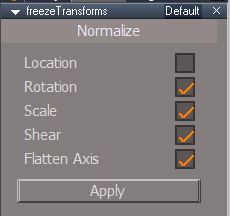
- Flatten Axis.png (5.95 KiB) Viewed 2682 times
-
clintonman
- Captain
- Posts: 5659
- Joined: 21 May 2009, 21:08
- Type the number ten into the box: 0
- Location: California
Re: Freeze Transform Script Update
I don't get it. Flatten Axis is like the heart of the whole freezing concept, so why make it optional? If you do it should definitely be checked by default.trueBlue wrote: 22 Aug 2020, 14:18 Okay, I think I have a solution.Probably could eliminate the Alert.Code: Select all
	for(var seli=0;seli<selcount;seli++)
	{
		selName = Node.Selected(seli);
		if(!Node.Exists(selName + "/Editable shape"))
System.Alert(Node.ShortName(selName) + " was not converted to an Editable Mesh and was not processed")
		Node.Disconnect(selName + "/Transform", "WldMatrix", selName + "/Pivot", "OwnerMatrix")
		Node.Disconnect(selName + "/Pivot", "Pivot", selName, "Pivot")
		Node.ConRemove(selName, "Pivot")
		Node.Delete(selName + "/Pivot")
	}
What do you think about adding an optional Flatten Axis?
Flatten Axis.png
-
trueBlue
- Captain
- Posts: 5548
- Joined: 06 Jul 2009, 22:50
- Type the number ten into the box: 10
Re: Freeze Transform Script Update
Looking to you for your expert opinion.clintonman wrote: 22 Aug 2020, 14:54I don't get it. Flatten Axis is like the heart of the whole freezing concept, so why make it optional? If you do it should definitely be checked by default.trueBlue wrote: 22 Aug 2020, 14:18 Okay, I think I have a solution.Probably could eliminate the Alert.Code: Select all
	for(var seli=0;seli<selcount;seli++)
	{
		selName = Node.Selected(seli);
		if(!Node.Exists(selName + "/Editable shape"))
System.Alert(Node.ShortName(selName) + " was not converted to an Editable Mesh and was not processed")
		Node.Disconnect(selName + "/Transform", "WldMatrix", selName + "/Pivot", "OwnerMatrix")
		Node.Disconnect(selName + "/Pivot", "Pivot", selName, "Pivot")
		Node.ConRemove(selName, "Pivot")
		Node.Delete(selName + "/Pivot")
	}
What do you think about adding an optional Flatten Axis?
Flatten Axis.png

Your current version does not Flatten the Axis which is why I was asking you if it should be included.
I'll make it non optional and remove the above Alert.
-
clintonman
- Captain
- Posts: 5659
- Joined: 21 May 2009, 21:08
- Type the number ten into the box: 0
- Location: California
Re: Freeze Transform Script Update
It does flatten the axis. Maybe the confusion comes from this, I know I was confused.trueBlue wrote: 22 Aug 2020, 15:06
Looking to you for your expert opinion.
Your current version does not Flatten the Axis which is why I was asking you if it should be included.
I'll make it non optional and remove the above Alert.
Code: Select all
	ScriptObject.RunCmd("mesh modifiers package/apply pivot transform to mesh",
"ConntrolIn", 0, "Selection", "");Code: Select all
MeshModifiers.FlattenAxes('');Edit: Wow, this thing is old. First version was from December 2009, no wonder I didn't know about MeshModifiers stuff.
-
trueBlue
- Captain
- Posts: 5548
- Joined: 06 Jul 2009, 22:50
- Type the number ten into the box: 10
Re: Freeze Transform Script Update
I figured you were running ScriptObject so that it ran immediately.
Which brings me to question the order of the commands.
Shouldn't the Normalize and Flatten Axis run after Point Editing/Shear part?
Which brings me to question the order of the commands.
Shouldn't the Normalize and Flatten Axis run after Point Editing/Shear part?
-
clintonman
- Captain
- Posts: 5659
- Joined: 21 May 2009, 21:08
- Type the number ten into the box: 0
- Location: California
Re: Freeze Transform Script Update
Here's 2 comments from the script.trueBlue wrote: 22 Aug 2020, 15:53 I figured you were running ScriptObject so that it ran immediately.
Which brings me to question the order of the commands.
Shouldn't the Normalize and Flatten Axis run after Point Editing/Shear part?
"June 2012 - discovered that shear is ignored by the built in normalize tools"
"September 2019 - direct shear freeze, no longer effects translation, scale and rotation"
May be saying that if you do shear first it would mess things up. Only way to know is to try changing the order and see what happens.