In terms of coders that still visit this site trueblue and clintonman have forgotten more than the rest of us will ever know.....
there was another forum set up for ppl interested in coding TS .... http://www.truespaceplugins.com...
no real updates for quite some time but it is a repository of some good information.
Custom Buttons
-
v3rd3
- Lieutenant Commander
- Posts: 1191
- Joined: 21 May 2009, 20:04
Re: Custom Buttons
-
Draise

- Captain
- Posts: 3200
- Joined: 21 Sep 2009, 19:33
- Type the number ten into the box: 0
- Location: Bogota, Colombia
Re: Custom Buttons
Shame.... But atleast it isn't hard and weird like Blender!!!
Check these buttons out!!!!
I took the following "tools" and turned them into buttons. The right click closes the floating menu. When I find other tools, I'll make those buttons also.
So then I made buttons, using trueblues little code, and a peice of prior code located in the button, made a right click to callback the tool. I made the icons just for fun, and then using the toolbar manager, created the new buttons. I saved them off, and have the plugins in the Main Library as extra tools. I can share both Libraries so you can pull those menus if you want!
Try out my new buttons!
1. Copy the files to the Rs Main Library.
2. Using the Custom Toolbar plugin, open the button container
3. From the Buttons - Custom library, drag and drop my new buttons
4. Save and enjoy!
I have also included some toolbars that can be placed in clintons Toolbar Manager container for some organized and nifty toolbar I also created.
1. In the toolbar manager, under the first menu, go to Open Toolbar Store
2. From the Objects - UserToolbars, drag and place the toolbars
3. In the toolbar manager, under the first menu, go to Refreash Toolbar Menu
4. Enjoy my toolbars!
Check these buttons out!!!!
I took the following "tools" and turned them into buttons. The right click closes the floating menu. When I find other tools, I'll make those buttons also.
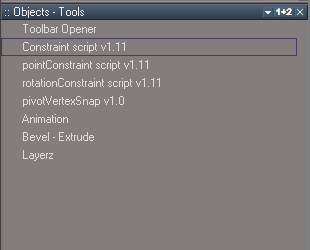
- Captura2.PNG (5.65 KiB) Viewed 615 times

1. Copy the files to the Rs Main Library.
2. Using the Custom Toolbar plugin, open the button container
3. From the Buttons - Custom library, drag and drop my new buttons
4. Save and enjoy!
I have also included some toolbars that can be placed in clintons Toolbar Manager container for some organized and nifty toolbar I also created.

2. From the Objects - UserToolbars, drag and place the toolbars
3. In the toolbar manager, under the first menu, go to Refreash Toolbar Menu
4. Enjoy my toolbars!
-
Draise
- Captain
- Posts: 3200
- Joined: 21 Sep 2009, 19:33
- Type the number ten into the box: 0
- Location: Bogota, Colombia
-
froo
- Captain
- Posts: 2554
- Joined: 22 May 2009, 12:13
Re: Custom Buttons
Maybe I can change that, now that some things are out of the way. My mind is now finally clear of, well, Iv3rd3 wrote:In terms of coders that still visit this site trueblue and clintonman have forgotten more than the rest of us will ever know.....
there was another forum set up for ppl interested in coding TS .... http://www.truespaceplugins.com...
no real updates for quite some time but it is a repository of some good information.
better end the sentence before it degrades into something nasty.

Any, yeah lots of cool scripts out there.
Excellent to see you getting the hang of scripting Draise. Wow. You catch on quick!
-
spacekdet

- Captain
- Posts: 1810
- Joined: 27 May 2009, 15:00
- Type the number ten into the box: 10
- Location: On the day shift at the Utility Muffin Research Kitchen
Re: Custom Buttons
Somewhere, Roman is smiling.
-
Draise
- Captain
- Posts: 3200
- Joined: 21 Sep 2009, 19:33
- Type the number ten into the box: 0
- Location: Bogota, Colombia
Re: Custom Buttons
Figured out how to run scripts from buttons, AND figured out how to have scripts stored away. So I've switched back tot he TS7.61 beta 8, along with 6.6 Model Side. I am still adding more features to TSmainly focussing on workspace. But it's coming a long.Draise wrote: SUCCESS, I also tried the popup manipulator in the thread. It makes sense. I simulated it with other encapsulated objects. Thanks!
I think I'll have to try find a custom button that has a "run/activate script", and figure out how to install custom scripts so the button doesn't have to load the object to run it.
!But I couldn't do this with a single script (non capsulated object), like clintons "freeze transforms".
They often have a "start"/"activate" button then a 1D script.
So to make a button that runs a script, well find the script activity comman, copy and paste it into the button, and like magic it does the trick.
This is fun!
-
clintonman

- Captain
- Posts: 5659
- Joined: 21 May 2009, 21:08
- Type the number ten into the box: 0
- Location: California
Re: Custom Buttons
Hi, Draise
I got your email and I'm back in town, but it looks like you got it figured out.
Here's a few more notes for button creation:
The button image can be a 32 bit bmp or tga file size 26x26 pixels with an alpha channel so it can highlight when selected or active. The image background is generally close to a gray color of (118,118,118). I usually set the button index to -1 so truespace assigns an index automatically when it gets added to a toolbar.
The TagAlias can be used to control when a button can be used. It has values like polyh, pe, tp, chrc and bone along with a "#" sign that separates the values just mentioned from paths to widgets and maybe command nodes or something. I don't understand it, but it's helpful to copy buttons from the same family that you intend to use. That way if you make some kind of point edit script and the button is copied from some other point edit button the new button will only be active in point edit mode.
You can find many commands that can be assigned to buttons by looking in the sdk documentation. Topics that start with "IRi" can be run directly from a button.
For example MeshModifiers.FlipFacesNormals('');
found in doc topic IRiMeshModifiers - /sdk_tS761B8/Doc/structIRiMeshModifiers.html
Call on scripts you create by using the Activity.Run command and to open a panel for your scripts in the stack use something like
UserInterface.OpenToolPanelViewEx2("" , "" ,"Scripts/CustomCommands/ase object export", 4,1,0)
4 is the index of the panel to open, 1 means force open in stack, 0 only one copy allowed in the stack view
I open a floating window for a script by copy of some pre-existing floating window created by control dragging something out of the stack view. You can find it in the scene view as the last item under Project/Windows Manager Space/. This results in a frame node with a panel node inside it. Change panel node to point to some aspect of a script and save the frame node somewhere that you can find it. To make it appear copy it into Windows Manager Space and run 2 commands to make the new panel appear:
WindowsManager.Activate();
WindowsManager.UpdateWindowsStructure();
I got your email and I'm back in town, but it looks like you got it figured out.
Here's a few more notes for button creation:
The button image can be a 32 bit bmp or tga file size 26x26 pixels with an alpha channel so it can highlight when selected or active. The image background is generally close to a gray color of (118,118,118). I usually set the button index to -1 so truespace assigns an index automatically when it gets added to a toolbar.
The TagAlias can be used to control when a button can be used. It has values like polyh, pe, tp, chrc and bone along with a "#" sign that separates the values just mentioned from paths to widgets and maybe command nodes or something. I don't understand it, but it's helpful to copy buttons from the same family that you intend to use. That way if you make some kind of point edit script and the button is copied from some other point edit button the new button will only be active in point edit mode.
You can find many commands that can be assigned to buttons by looking in the sdk documentation. Topics that start with "IRi" can be run directly from a button.
For example MeshModifiers.FlipFacesNormals('');
found in doc topic IRiMeshModifiers - /sdk_tS761B8/Doc/structIRiMeshModifiers.html
Call on scripts you create by using the Activity.Run command and to open a panel for your scripts in the stack use something like
UserInterface.OpenToolPanelViewEx2("" , "" ,"Scripts/CustomCommands/ase object export", 4,1,0)
4 is the index of the panel to open, 1 means force open in stack, 0 only one copy allowed in the stack view
I open a floating window for a script by copy of some pre-existing floating window created by control dragging something out of the stack view. You can find it in the scene view as the last item under Project/Windows Manager Space/. This results in a frame node with a panel node inside it. Change panel node to point to some aspect of a script and save the frame node somewhere that you can find it. To make it appear copy it into Windows Manager Space and run 2 commands to make the new panel appear:
WindowsManager.Activate();
WindowsManager.UpdateWindowsStructure();
-
Draise
- Captain
- Posts: 3200
- Joined: 21 Sep 2009, 19:33
- Type the number ten into the box: 0
- Location: Bogota, Colombia
Re: Custom Buttons
That's great bits of code. I haven't had time to experiment YET, but It looks good! I have found an alteranative to using popout floating panels, with a call to the library where the panel lies, usings another script within the script to which makes a floating menu when loaded. I have the right mouse button that calls it back, or deletes the called script, thus closing the popup window. =P
I think your little call code should work better once I figure out where to store the frame!
I did the same thing to your layers2 plugin, this time I know it was you that made it! But I think your method should be better for calling it as a floating panel.
Thanks for coming back online Clinton, your scripts work really well. Do work on other software too?
I think your little call code should work better once I figure out where to store the frame!
I did the same thing to your layers2 plugin, this time I know it was you that made it! But I think your method should be better for calling it as a floating panel.
Thanks for coming back online Clinton, your scripts work really well. Do work on other software too?
-
clintonman
- Captain
- Posts: 5659
- Joined: 21 May 2009, 21:08
- Type the number ten into the box: 0
- Location: California
Re: Custom Buttons
Can't wait to see what you come up with.
Most of my coding has been for truespace, but I made some Unreal plugins for Carrara and Lightwave, a few other Lightwave scripts and a plugin for After Effects and few scripts to support it. I've also taken a few video courses that used mel, maxscript and hscript for Maya, 3DSMax and Houdini. I did one script for Blender, but I'm still in the process of learning Blender basics before I can really program for it.
Most of my coding has been for truespace, but I made some Unreal plugins for Carrara and Lightwave, a few other Lightwave scripts and a plugin for After Effects and few scripts to support it. I've also taken a few video courses that used mel, maxscript and hscript for Maya, 3DSMax and Houdini. I did one script for Blender, but I'm still in the process of learning Blender basics before I can really program for it.