What the?
-
rjeff

- Master Chief Petty Officer
- Posts: 462
- Joined: 21 May 2009, 18:26
What the?
Ok I am trying to do, what I considered a simple boolean subtraction. I have the bottom hole cut out of it, now I want to cut out the windows on the side. As you can see from the images, when I cut them out it does cut the hole out of the roof, but then it adds the other part of the drill. I don't get it. It does it on both sides, and "keep drill" is turned off. In fact instead of deleting geomotery it is actually adding geomotery. I can go in to that section that has been added and select the faces and manipulate them.
- Attachments
-
-
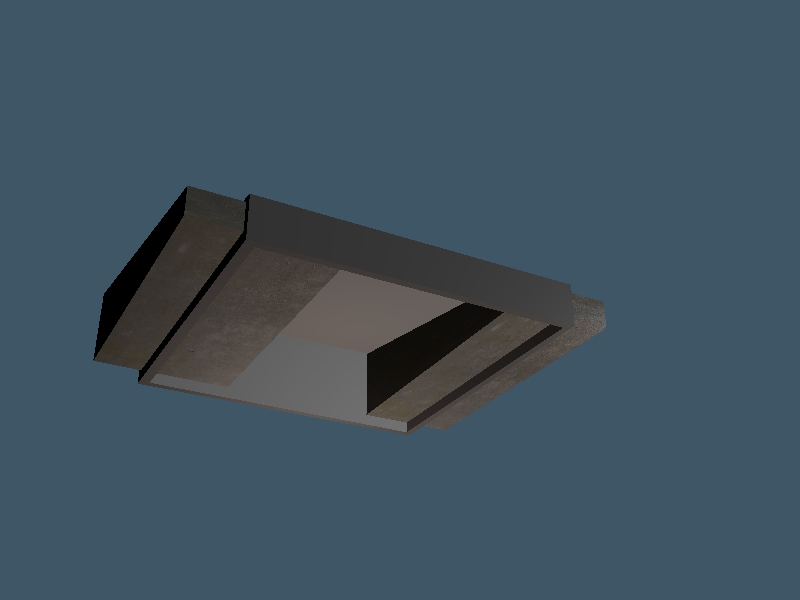
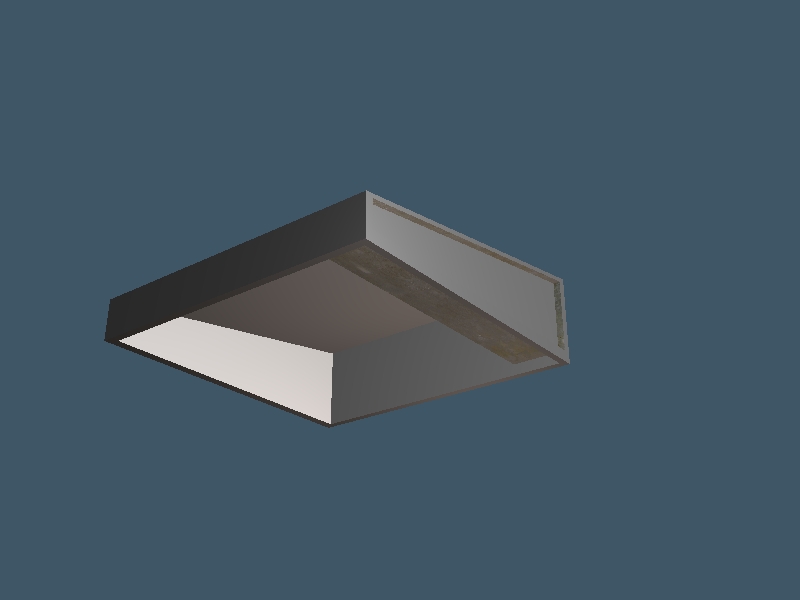
-
Breech Block

- Master Chief Petty Officer
- Posts: 482
- Joined: 13 Jun 2009, 20:31
Re: What the?
I think you'll find that happens when you have a flipped normal. Try erasing and then adding the problem face in PE mode and then re-try the Boolean Operation. HTH.

-
rjeff
- Master Chief Petty Officer
- Posts: 462
- Joined: 21 May 2009, 18:26
Re: What the?
hmm...ok here is where I fall way short..how do I know which one is the problem face?
-
clintonman

- Captain
- Posts: 5659
- Joined: 21 May 2009, 21:08
- Type the number ten into the box: 0
- Location: California
Re: What the?
You should post the scene so others can see and reproduce the problem.
-
spacekdet

- Captain
- Posts: 1810
- Joined: 27 May 2009, 15:00
- Type the number ten into the box: 10
- Location: On the day shift at the Utility Muffin Research Kitchen
Re: What the?
Drill it all in one operation.
In other words, construct as one object/ boolean add your two drills together first and then subtract them from the object in one fell swoop.
Hitting Quad divide a couple times first on the faces that are to be drilled probably wouldn't hurt either.
In other words, construct as one object/ boolean add your two drills together first and then subtract them from the object in one fell swoop.
Hitting Quad divide a couple times first on the faces that are to be drilled probably wouldn't hurt either.
-
LeonRegis

- Captain
- Posts: 1946
- Joined: 18 Aug 2009, 17:36
- Type the number ten into the box: 0
- Location: Brazil/Earth/Orion Arm/Milky Way/4th Dimension/This Universe/Multiverse???/Singularity???
Re: What the?
Booleans operations work better in workspace...
Be the change you want to see in the world. - Mohandas Gandhi
-
Breech Block
- Master Chief Petty Officer
- Posts: 482
- Joined: 13 Jun 2009, 20:31
Re: What the?
The way I set about testing an object for flipped normals is:rjeff wrote:hmm...ok here is where I fall way short..how do I know which one is the problem face?
In Draw Object As Solid Mode, paint the whole object bright red.
Change the colour shader to green, then use the Paint Face tool to check for errors.
If i find a face that doesn't change colour (because I have actually just painted the reverse side), I know that face is flipped.
But as Spacekdet says in his post, the best option is to carry out a single subtraction.
HTH.
-
rjeff
- Master Chief Petty Officer
- Posts: 462
- Joined: 21 May 2009, 18:26
Re: What the?
Ok I went to add the .scn file and it will not let me? What must I do.
-
clintonman
- Captain
- Posts: 5659
- Joined: 21 May 2009, 21:08
- Type the number ten into the box: 0
- Location: California
Re: What the?
If you zip the file the forum will accept it.rjeff wrote:Ok I went to add the .scn file and it will not let me? What must I do.
-
Finis

- Captain
- Posts: 5410
- Joined: 21 May 2009, 18:26
- Type the number ten into the box: 0
- Location: America!
Re: What the?
TS 7.6 model side. Here I made a cube, flipped the normal of the top center face, and viewed it with DX solid with wire mode. The flipped face is visible as a hole.
- Attachments
-
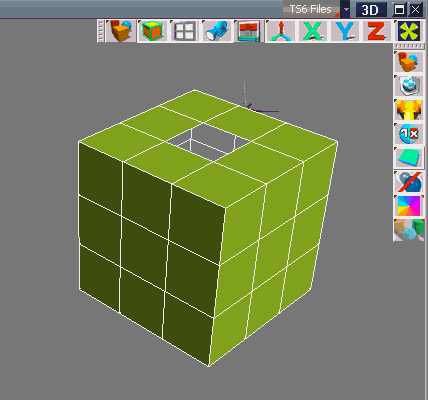
- FlippedNormal.gif (11.25 KiB) Viewed 5854 times
I prefer dangerous freedom over peaceful servitude. -- Thomas Jefferson/Jean Jacques Rousseau
-
rjeff
- Master Chief Petty Officer
- Posts: 462
- Joined: 21 May 2009, 18:26
-
marcel

- Captain
- Posts: 2247
- Joined: 21 May 2009, 19:52
- Type the number ten into the box: 0
- Location: paris - France
Re: What the?
No problem. I know why it can't work 
Here is the correction:
Here is the correction:
- Attachments
-
- result.zip
- (2.66 KiB) Downloaded 213 times
Design - illustration - Animation
http://www.crea-vision.fr
http://www.crea-vision.fr
-
marcel
- Captain
- Posts: 2247
- Joined: 21 May 2009, 19:52
- Type the number ten into the box: 0
- Location: paris - France
Re: What the?
You can see i added some vertex to avoid the error. When you do a hole tangent to another hole TS create bad thing. To avoid the tangent i reduced the size of the object used to do the holes (very very little). It is why you have the news vertex inside. It change anything for the render. But it is not the good method.
Next time you do that, it is better to union before 2 objects used to create the holes then substract in one time. The result would be better without these news vertex but i could not do that with your object because the first hole was done. too late to do better.
Also I added vertex at the corner to keep quad (not necessary for your problem but better if you need to export the model).
Next time you do that, it is better to union before 2 objects used to create the holes then substract in one time. The result would be better without these news vertex but i could not do that with your object because the first hole was done. too late to do better.
Also I added vertex at the corner to keep quad (not necessary for your problem but better if you need to export the model).
Design - illustration - Animation
http://www.crea-vision.fr
http://www.crea-vision.fr
-
rjeff
- Master Chief Petty Officer
- Posts: 462
- Joined: 21 May 2009, 18:26
Re: What the?
Tell ya what marcel. I will send you the object without the hole, then you can show me what would be the best way to prepare the object for drilling. I will get it to you in a bit.
-
clintonman
- Captain
- Posts: 5659
- Joined: 21 May 2009, 21:08
- Type the number ten into the box: 0
- Location: California
Re: What the?
It looks like the cutting objects are too close to the walls of the hollow box. You can get a better result by setting the boolean identity value from the default of 50 down to a low number like 5 or 1. You still get some bad geometry because of the cutter sizes/placement but it is an improvement.rjeff wrote:Ok here it is...
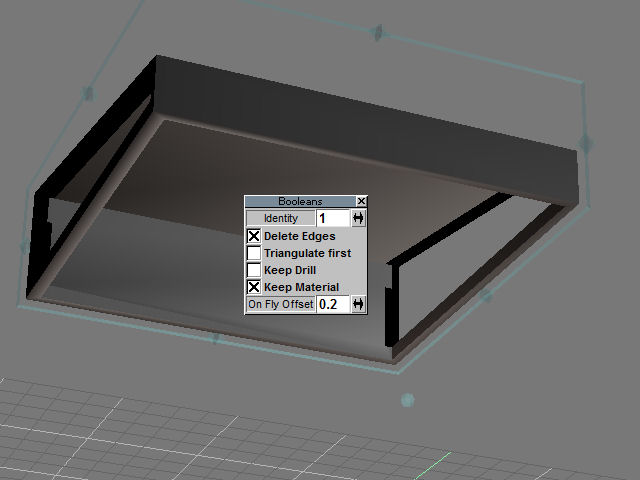
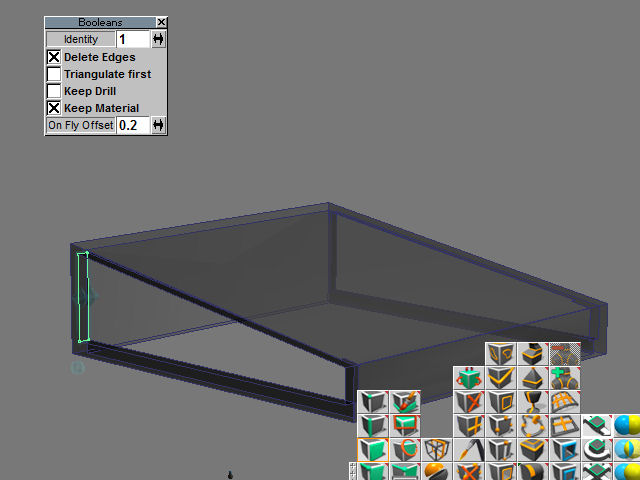
It's kind of hard to explain. Hope this helps.
-
rjeff
- Master Chief Petty Officer
- Posts: 462
- Joined: 21 May 2009, 18:26
Re: What the?
Ok here is the scene with the roof (red) and the window cutout's as well as hollowing out the top (green) and the base cut out to open to the floor below (blue). Now nothing has been done. So please show me how you would set up the roof to be cut up.
- Attachments
-
- test.rar
- (3.89 KiB) Downloaded 224 times
-
marcel
- Captain
- Posts: 2247
- Joined: 21 May 2009, 19:52
- Type the number ten into the box: 0
- Location: paris - France
Re: What the?
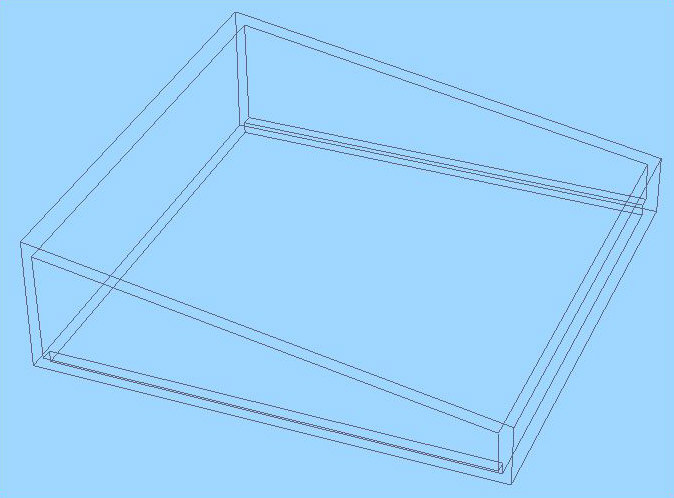
Here is a good object to use the subtraction in one time. The result is correct. No extra edge added.
No real comment for how to do that. Just see the green object on the zip above.
No real comment for how to do that. Just see the green object on the zip above.
- Attachments
-
-
-
- test55ec.zip
- (2.51 KiB) Downloaded 271 times

Design - illustration - Animation
http://www.crea-vision.fr
http://www.crea-vision.fr
-
rjeff
- Master Chief Petty Officer
- Posts: 462
- Joined: 21 May 2009, 18:26
Re: What the?
Quite odd how you had to do that, but it works and I think you for it!
-
marcel
- Captain
- Posts: 2247
- Joined: 21 May 2009, 19:52
- Type the number ten into the box: 0
- Location: paris - France
Re: What the?
90% of tangent faces or tangent edge cause problem with booleen. when you avoid this you have a clean subtraction with TS. Maybe that need to explain with more detail and images. I see most of problem the users have with subtraction are the same like this.
Design - illustration - Animation
http://www.crea-vision.fr
http://www.crea-vision.fr
-
Finis
- Captain
- Posts: 5410
- Joined: 21 May 2009, 18:26
- Type the number ten into the box: 0
- Location: America!
Re: What the?
Yes, lets see a picture of the tangent edges that cause problems.
I prefer dangerous freedom over peaceful servitude. -- Thomas Jefferson/Jean Jacques Rousseau
-
marcel
- Captain
- Posts: 2247
- Joined: 21 May 2009, 19:52
- Type the number ten into the box: 0
- Location: paris - France
Re: What the?
rjeff use objects 1 and 2 to create holes. 1 and 2 have superposed surface (red arrow) and cause alway problem with the second hole. I do the object 3 with an union of 1 and 2 before do the holes. You can see how TS work with both method. No comment.
- Attachments
-
-
-


Design - illustration - Animation
http://www.crea-vision.fr
http://www.crea-vision.fr
-
Finis
- Captain
- Posts: 5410
- Joined: 21 May 2009, 18:26
- Type the number ten into the box: 0
- Location: America!
Re: What the?
Thanks Marcel.
Looking forward to seeing more RJeff.
Looking forward to seeing more RJeff.
I prefer dangerous freedom over peaceful servitude. -- Thomas Jefferson/Jean Jacques Rousseau