OBJ Importer/Exporter Plug-in Oddities
-
danperk
OBJ Importer/Exporter Plug-in Oddities
Hi Jason,
I realize that your plug-in has been out quite a while now and it's probably not
a going concern for you but..., I have done some testing and I'm getting strange
results on the Import into tS 761 workspace with the OBJ Importer.
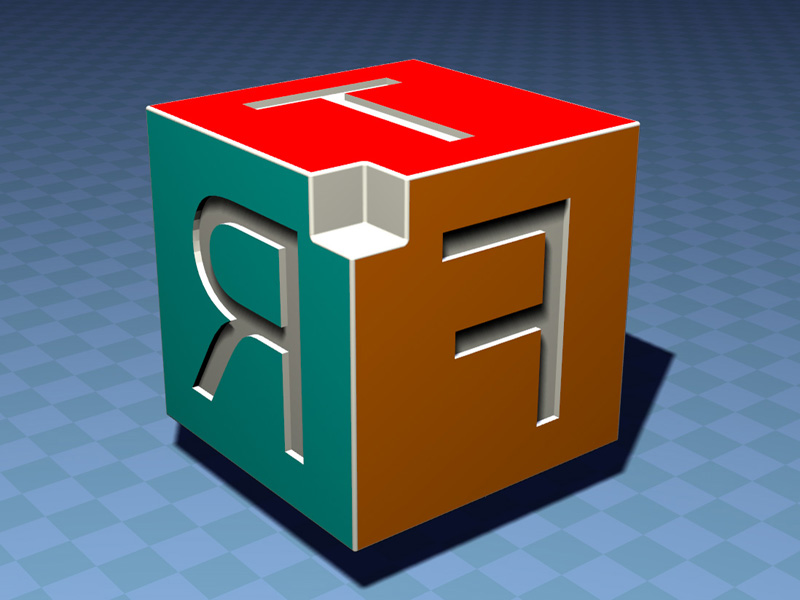
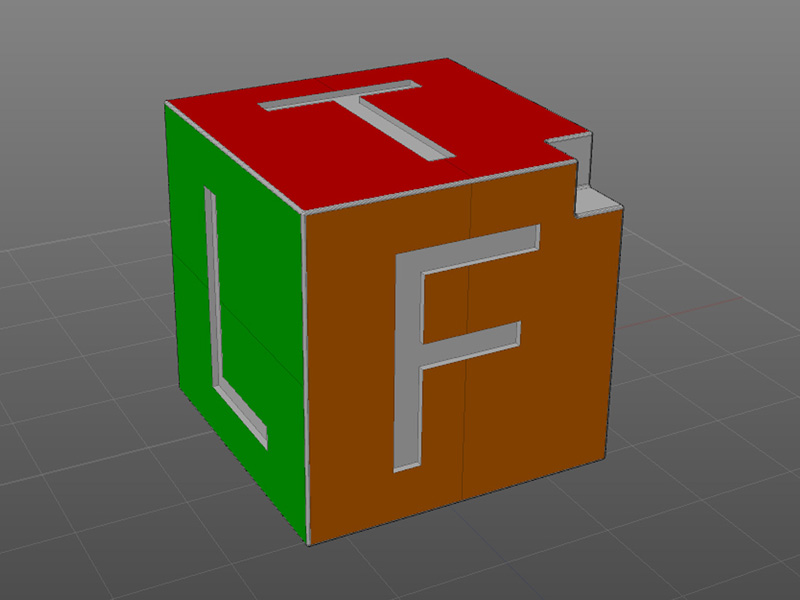
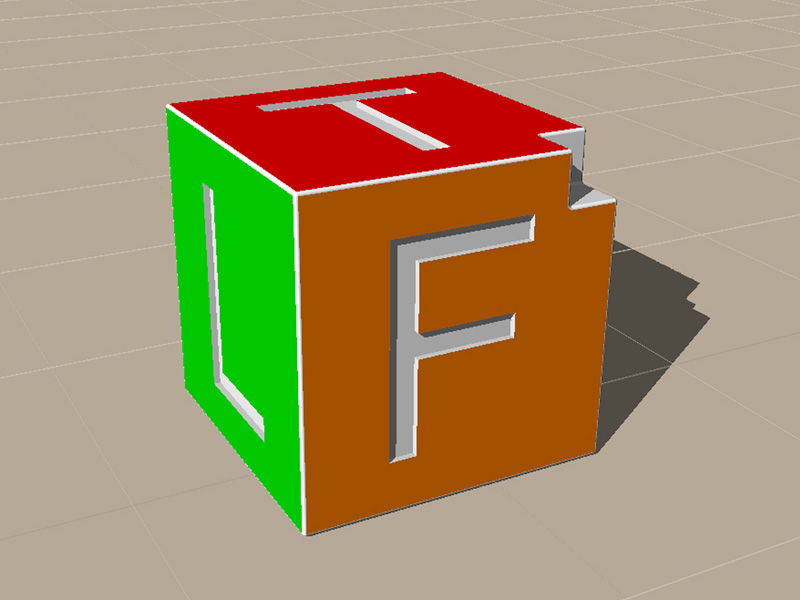
The first image shows the test cube in MoI where it's created and exported as OBJ: Next screen capture shows cube in tS 761 using the Object Importer, I tried both
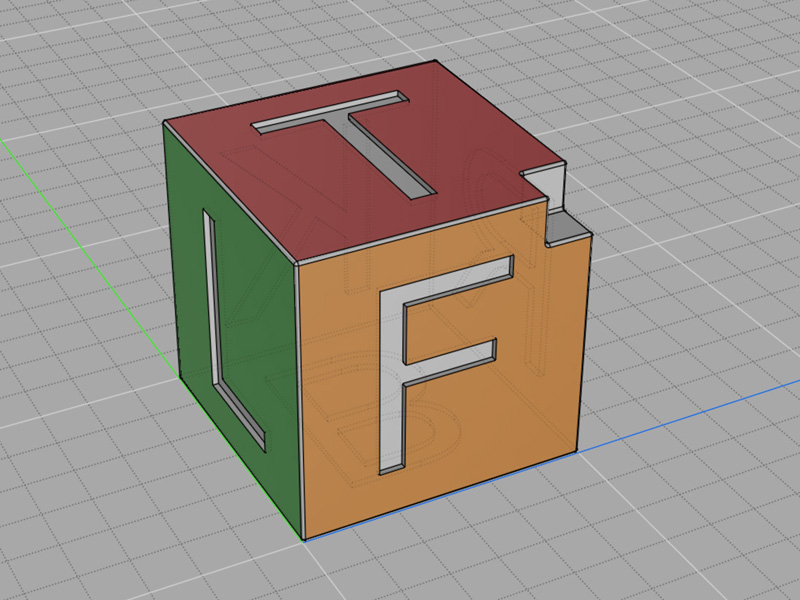
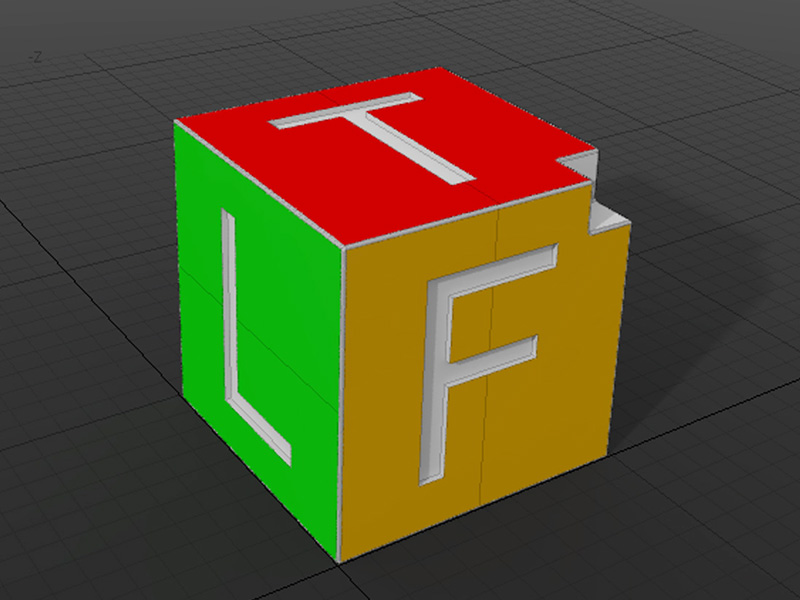
with and without Daz Import checked: Next image shows cube imported with Luuv on model side and then I switched to Workspace 761:
I realize that your plug-in has been out quite a while now and it's probably not
a going concern for you but..., I have done some testing and I'm getting strange
results on the Import into tS 761 workspace with the OBJ Importer.
The first image shows the test cube in MoI where it's created and exported as OBJ: Next screen capture shows cube in tS 761 using the Object Importer, I tried both
with and without Daz Import checked: Next image shows cube imported with Luuv on model side and then I switched to Workspace 761:
-
danperk
Re: OBJ Importer/Exporter Plug-in Oddities
Next 3 images show same MoI obj exported cube imported into Vue Studio 8.5, Silo 2.2 & Modo 501:
So the point is that these other apps. seem to load the MoI created OBJ without turning it inside out.
Although, to be fair Modo had some flipped faces but MoI has a Lightwave export that works better for
Modo.
Can anyone else with this plug-in confirm this behavior? Was Object Import for trueSpace tested?
So the point is that these other apps. seem to load the MoI created OBJ without turning it inside out.
Although, to be fair Modo had some flipped faces but MoI has a Lightwave export that works better for
Modo.
Can anyone else with this plug-in confirm this behavior? Was Object Import for trueSpace tested?
-
froo
- Captain
- Posts: 2554
- Joined: 22 May 2009, 12:13
Re: OBJ Importer/Exporter Plug-in Oddities
Hi Dan. Yes, OBJ import was tested.
Could you send me that OBJ object file and any associated materials
so I can have a look?
Thanks
Jason
Could you send me that OBJ object file and any associated materials
so I can have a look?
Thanks
Jason
-
danperk
Re: OBJ Importer/Exporter Plug-in Oddities
Hi Jason,
Attached Zip file contains the OBJ file and associated MTL file.
Thanks for looking into this!
Attached Zip file contains the OBJ file and associated MTL file.
Thanks for looking into this!
-
danperk
Re: OBJ Importer/Exporter Plug-in Oddities
Also, I tried importing original OBJ file with Luuv and exporting
with the tS OBJ Exporter and then importing into Vue & Modo and
this is the result: If I export that same Luuv imported file with tS OBJ Exporter and Import with tS OBJ Importer
the file comes into tS correctly.(what??)
edit: in other words the plug-in is in sync with itself.
with the tS OBJ Exporter and then importing into Vue & Modo and
this is the result: If I export that same Luuv imported file with tS OBJ Exporter and Import with tS OBJ Importer
the file comes into tS correctly.(what??)
edit: in other words the plug-in is in sync with itself.
-
froo
- Captain
- Posts: 2554
- Joined: 22 May 2009, 12:13
Re: OBJ Importer/Exporter Plug-in Oddities
If anyone else is having problems with the OBJ package can you please report them here,
along with a sample obj file? I can't fix it if I don't know it's broke!
thanks!
Jason
along with a sample obj file? I can't fix it if I don't know it's broke!
thanks!
Jason
-
Steinie
- Captain
- Posts: 2958
- Joined: 21 May 2009, 17:38
- Type the number ten into the box: 10
Re: OBJ Importer/Exporter Plug-in Oddities
Froo,
Has this problem been fixed?
I can send examples if you need them or put up examples of the same problem already discussed here.
Has this problem been fixed?
I can send examples if you need them or put up examples of the same problem already discussed here.
-
Steinie
- Captain
- Posts: 2958
- Joined: 21 May 2009, 17:38
- Type the number ten into the box: 10
Re: OBJ Importer/Exporter Plug-in Oddities
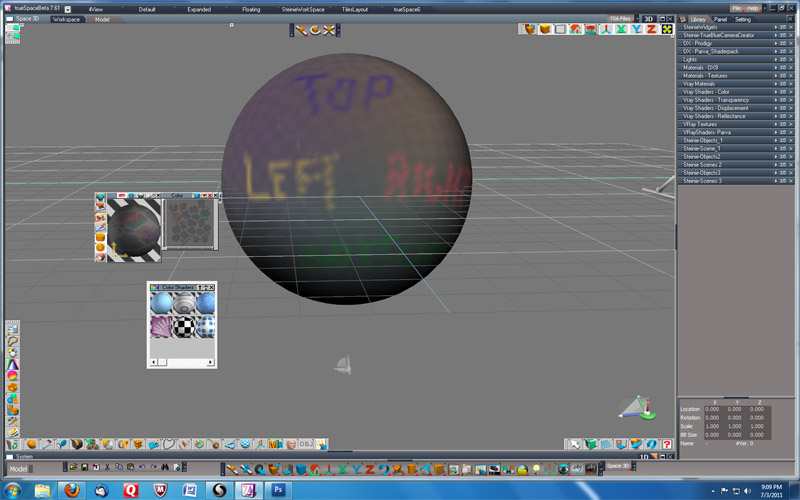
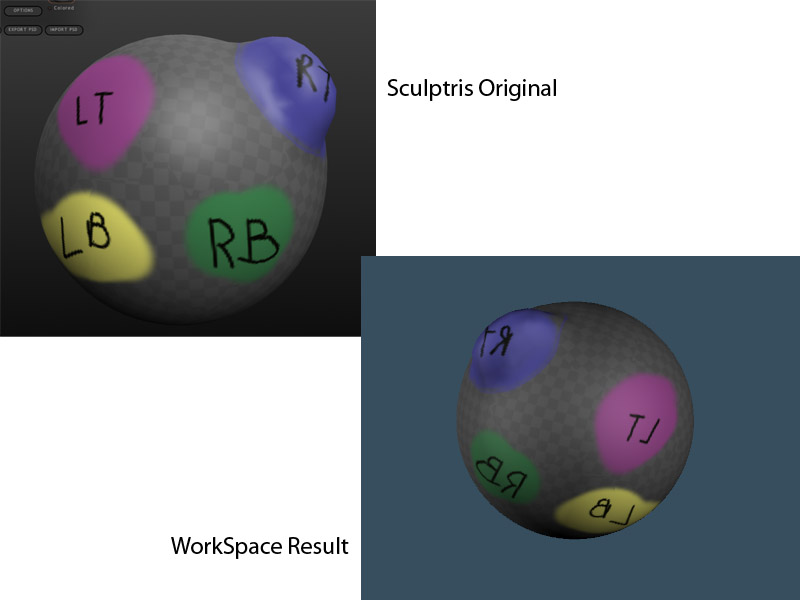
First Screen Capture:
I created a sphere in Sculptris and applied colored text. I then saved the sphere as an sphere.obj and the
texture as a texturemap.png Second Screen Capture:
In trueSpace Modeler I loaded the sphere.obj with Luvv and applied the texture map in Modeler. Third Screen Capture:
In trueSpace Workspace I loaded the sphere.obj with Froo's Object Importer and applied the texture map in WorkSpace.
I created a sphere in Sculptris and applied colored text. I then saved the sphere as an sphere.obj and the
texture as a texturemap.png Second Screen Capture:
In trueSpace Modeler I loaded the sphere.obj with Luvv and applied the texture map in Modeler. Third Screen Capture:
In trueSpace Workspace I loaded the sphere.obj with Froo's Object Importer and applied the texture map in WorkSpace.
-
Steinie
- Captain
- Posts: 2958
- Joined: 21 May 2009, 17:38
- Type the number ten into the box: 10
Re: OBJ Importer/Exporter Plug-in Oddities
This test I modified the Sphere so that you can tell that the Object itself is being flipped when imported.
-
froo
- Captain
- Posts: 2554
- Joined: 22 May 2009, 12:13
Re: OBJ Importer/Exporter Plug-in Oddities
Ok. I'll check into it guys.
Sorry for the looong delay in checking this.
Honestly I didn't think anyone was actually using it.
Sorry for the looong delay in checking this.
Honestly I didn't think anyone was actually using it.
-
froo
- Captain
- Posts: 2554
- Joined: 22 May 2009, 12:13
Re: OBJ Importer/Exporter Plug-in Oddities
I still have to look at the code, but it appears both the
exporter and importer are performing a 'flip', since WorkSpace
is a left-handed coordinate system.
I'll have to check my code and comments, notes, conversations,
etc. because, I recall I had this concern for awhile, about
handedness, and how to deal with it. I may very well have
mis-handled it. It may be, that dealing with handedness is not
necessary at all. Another possibility is to see if I can determin
the 'winding' of the vertices, prior to processing. The winding
will tell me the handedness. I'll get it done.
exporter and importer are performing a 'flip', since WorkSpace
is a left-handed coordinate system.
I'll have to check my code and comments, notes, conversations,
etc. because, I recall I had this concern for awhile, about
handedness, and how to deal with it. I may very well have
mis-handled it. It may be, that dealing with handedness is not
necessary at all. Another possibility is to see if I can determin
the 'winding' of the vertices, prior to processing. The winding
will tell me the handedness. I'll get it done.
-
pugman 1
- Captain
- Posts: 1555
- Joined: 21 May 2009, 19:26
- Type the number ten into the box: 0
- Location: Germany
Re: OBJ Importer/Exporter Plug-in Oddities
Hi froo,when you have this sorted iwould like to get it.dont make yourself
crazy with it like you do with your triangles
-
froo
- Captain
- Posts: 2554
- Joined: 22 May 2009, 12:13
Re: OBJ Importer/Exporter Plug-in Oddities
Sounds good pugman.
I scanned through the code to remember what I was doing, and why.
There were some problems with the triangle count being correct, while
the data was being imported. I still don't know why this was the case.
But, if I loaded the triangles in the reverse order to the triangulator, the
count was correct. A valid triangle count is required. Otherwise tS crashes.
It is either my code, or a bug in the triangulator. Even Tomas stated, 'I shouldn't
have to do that', referring to ordering the triangle edges in reverse order to 'get
it to work'. Well, that's what I had to do.
I scanned through the code to remember what I was doing, and why.
There were some problems with the triangle count being correct, while
the data was being imported. I still don't know why this was the case.
But, if I loaded the triangles in the reverse order to the triangulator, the
count was correct. A valid triangle count is required. Otherwise tS crashes.
It is either my code, or a bug in the triangulator. Even Tomas stated, 'I shouldn't
have to do that', referring to ordering the triangle edges in reverse order to 'get
it to work'. Well, that's what I had to do.
-
froo
- Captain
- Posts: 2554
- Joined: 22 May 2009, 12:13
Re: OBJ Importer/Exporter Plug-in Oddities
Found the header file I modified which includes the GUIDs for the 'texture' connectors:
Alpha, Color, etc. With that, I should be able to compile and debug. Find out what the
hell is wrong with this thing.
Let's see... I think Clinton made some model importers too. Maybe I can ask him how
he did it, in script/plugin.
Alpha, Color, etc. With that, I should be able to compile and debug. Find out what the
hell is wrong with this thing.
Let's see... I think Clinton made some model importers too. Maybe I can ask him how
he did it, in script/plugin.
-
clintonman
- Captain
- Posts: 5659
- Joined: 21 May 2009, 21:08
- Type the number ten into the box: 0
- Location: California
Re: OBJ Importer/Exporter Plug-in Oddities
You can askfroo wrote:...
Let's see... I think Clinton made some model importers too. Maybe I can ask him how
he did it, in script/plugin.
-
froo
- Captain
- Posts: 2554
- Joined: 22 May 2009, 12:13
Re: OBJ Importer/Exporter Plug-in Oddities
ah ok Clinton.
Do you have to handle orientation of the application (left vs. right handedness) on import?
-
froo
- Captain
- Posts: 2554
- Joined: 22 May 2009, 12:13
Re: OBJ Importer/Exporter Plug-in Oddities
Thanks for those pics also Steinie.
Looks like there is a 'mirror effect' going on. The sign of each vertex x-coordinate
is wrong, so it looks like we are looking at the object from the opposite side.
For what that's worth.
I'll check it.
Looks like there is a 'mirror effect' going on. The sign of each vertex x-coordinate
is wrong, so it looks like we are looking at the object from the opposite side.
For what that's worth.
I'll check it.
-
Steinie
- Captain
- Posts: 2958
- Joined: 21 May 2009, 17:38
- Type the number ten into the box: 10
Re: OBJ Importer/Exporter Plug-in Oddities
Well I sure hope you can find a solution because it really is one of my most used plugins.
Thanks for putting in the effort for us Froo!
-
clintonman
- Captain
- Posts: 5659
- Joined: 21 May 2009, 21:08
- Type the number ten into the box: 0
- Location: California
Re: OBJ Importer/Exporter Plug-in Oddities
Yep, pretty much. In a lot of cases I end up taking the negative of the X positions. I think a lot depends on where it's coming from too. Y-up vs Z-up, right vs left handed. In fact I think there may be something weird with trueSpace in the handedness area. I tried to figure it out once but something was backward.froo wrote:ah ok Clinton.![]()
Do you have to handle orientation of the application (left vs. right handedness) on import?
-
froo
- Captain
- Posts: 2554
- Joined: 22 May 2009, 12:13
Re: OBJ Importer/Exporter Plug-in Oddities
No problem Bob.
I am very sorry that I didn't get to this sooner.
For testing, I did this:
While processing / reading the OBJ file, I multiply the x coordinate by -1.
That seems to work, but now each face of danperk's cube is facing the wrong
way. The good thing is, each letter is facing the right direction.
Sonofabitch. I just did what clinton did. haha!
I am very sorry that I didn't get to this sooner.
For testing, I did this:
While processing / reading the OBJ file, I multiply the x coordinate by -1.
That seems to work, but now each face of danperk's cube is facing the wrong
way. The good thing is, each letter is facing the right direction.
Sonofabitch. I just did what clinton did. haha!
-
froo
- Captain
- Posts: 2554
- Joined: 22 May 2009, 12:13
Re: OBJ Importer/Exporter Plug-in Oddities
Yeah; I believe Workspace is left handed.
-
froo
- Captain
- Posts: 2554
- Joined: 22 May 2009, 12:13
Re: OBJ Importer/Exporter Plug-in Oddities
Well, I think we can get this to work, in a two step process for now,
while I solve the other part of the problem. BTW; I may need to add
a checkbox for this, to the dialog. Depends.
Import the file, enter edit mode to convert to editable mesh, then without selecting any verts/faces/triangles, select: Flip Selected Faces.
while I solve the other part of the problem. BTW; I may need to add
a checkbox for this, to the dialog. Depends.
Import the file, enter edit mode to convert to editable mesh, then without selecting any verts/faces/triangles, select: Flip Selected Faces.
-
froo
- Captain
- Posts: 2554
- Joined: 22 May 2009, 12:13
Re: OBJ Importer/Exporter Plug-in Oddities
Ok; looks like it is working ok now, at least for the test cube danperk posted.
Please test this. If other objects are imported 'inverted/reversed/inside out/whatever',
please post them in a zip file here. That may mean, I need to make this 'inversion' optional
in the dialog.
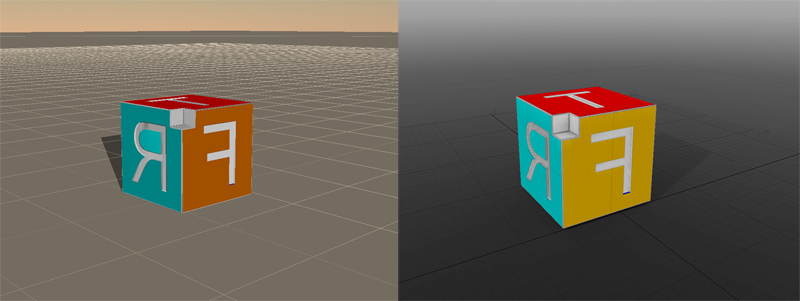
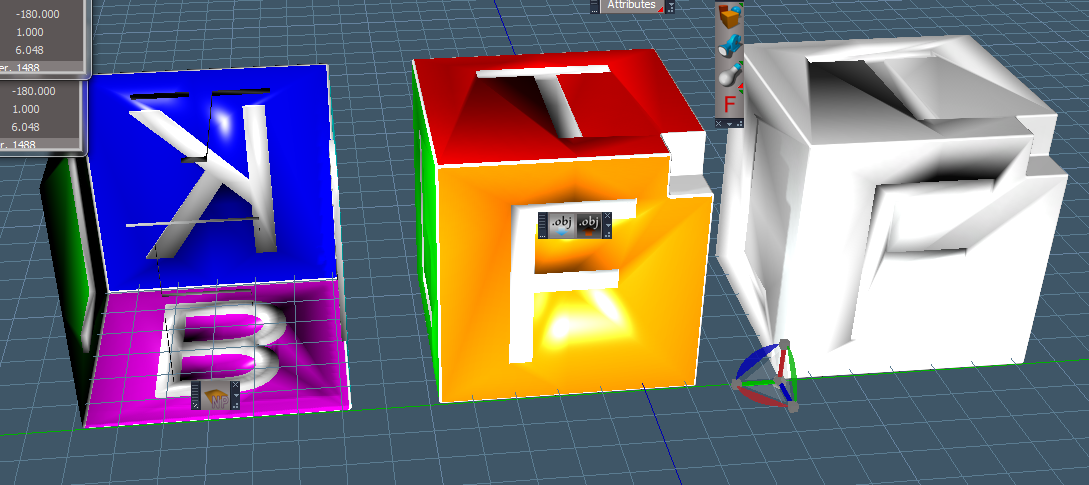
Attached is a picture showing, from left to right:
1) the imported file
2) the imported file after converting to editable mesh and flipping selected faces (no faces selected,
so all faces are flipped)
3) #2, exported from tS, then reimported to tS using the obj importer.
Yes, I know the textures are missing from the imported file.
If that's really a problem let me know. I am not sure if it's worth debugging that, to be honest.
The reason I say that is, most folks do their texturing in the final-destination application anyway.
At least I've heard.
Please test this. If other objects are imported 'inverted/reversed/inside out/whatever',
please post them in a zip file here. That may mean, I need to make this 'inversion' optional
in the dialog.
Attached is a picture showing, from left to right:
1) the imported file
2) the imported file after converting to editable mesh and flipping selected faces (no faces selected,
so all faces are flipped)
3) #2, exported from tS, then reimported to tS using the obj importer.
Yes, I know the textures are missing from the imported file.
If that's really a problem let me know. I am not sure if it's worth debugging that, to be honest.
The reason I say that is, most folks do their texturing in the final-destination application anyway.
At least I've heard.
-
Steinie
- Captain
- Posts: 2958
- Joined: 21 May 2009, 17:38
- Type the number ten into the box: 10
Re: OBJ Importer/Exporter Plug-in Oddities
Thanks Froo!
I'll test it out and let you know.
-
froo
- Captain
- Posts: 2554
- Joined: 22 May 2009, 12:13
Re: OBJ Importer/Exporter Plug-in Oddities
Excellent! Thanks Steinie!
I can try to find out why the textures/materials are not loading correctly,
from the exported object.
I can try to find out why the textures/materials are not loading correctly,
from the exported object.
-
BNG
- Chief Warrant Officer
- Posts: 684
- Joined: 16 Oct 2009, 03:26
- Type the number ten into the box: 0
- Location: Texas
Re: OBJ Importer/Exporter Plug-in Oddities
Thanks Froo. I haven't done much with the OBJ importer, but it may come in handy down the road.froo wrote:Here is the release version of the OBJ package.
If you already have a version of this, Please make a backup copy of it
and keep it in a safe place before installing this version.
That way you can revert to your original version if you don't like this version.
Casual Truespace 3D modeling hobbyist. My Truespace blog and simple 3d Modeling Tutorials for Casual Model Makers.
-
froo
- Captain
- Posts: 2554
- Joined: 22 May 2009, 12:13
Re: OBJ Importer/Exporter Plug-in Oddities
Welcome BNG. 
-
froo
- Captain
- Posts: 2554
- Joined: 22 May 2009, 12:13
Re: OBJ Importer/Exporter Plug-in Oddities
Package updated.
Steinie reported that textures were being imported reversed.
I think this will take care of that.
Please let me know if this works, and if it breaks anything that imported successfully before.
Remember to make a backup copy of the old version. You can just unzip this file and place it
where the old one was located.
Thanks
Froo
EDIT:
Version removed
Steinie reported that textures were being imported reversed.
I think this will take care of that.
Please let me know if this works, and if it breaks anything that imported successfully before.
Remember to make a backup copy of the old version. You can just unzip this file and place it
where the old one was located.
Thanks
Froo
EDIT:
Version removed
-
Steinie
- Captain
- Posts: 2958
- Joined: 21 May 2009, 17:38
- Type the number ten into the box: 10
Re: OBJ Importer/Exporter Plug-in Oddities
Thanks for working on this one Froo!
With this version the object and texture are both reversed. I sent you an
example by email.
Your getting closer!
I guess the confusion is describing an object where it is visually backwards or an object that you can see into with the
faces flipped. I believe in this build the faces are flipped so after applying the texture and flipping
the faces the object and texture is perfect.
See what you can do with the object and texture I sent you.
With this version the object and texture are both reversed. I sent you an
example by email.
Your getting closer!
I guess the confusion is describing an object where it is visually backwards or an object that you can see into with the
faces flipped. I believe in this build the faces are flipped so after applying the texture and flipping
the faces the object and texture is perfect.
See what you can do with the object and texture I sent you.
-
froo
- Captain
- Posts: 2554
- Joined: 22 May 2009, 12:13
Re: OBJ Importer/Exporter Plug-in Oddities
Ok; try this one on for size.
When I import, the object does not need to be converted to an editable shape,
nor does it require its faces to be flipped.
Since I am not well versed with textures, that part still needs to be tested.
This is what I did:
import danperk's testcube.
Result: imported just fine
No conversion to editable shape required.
No face flipping required.
exported danperk's testcube and reimported.
Result: no textures, but object imported correctly.
No conversion to editable shape required.
No face flipping required.
When I import, the object does not need to be converted to an editable shape,
nor does it require its faces to be flipped.
Since I am not well versed with textures, that part still needs to be tested.
This is what I did:
import danperk's testcube.
Result: imported just fine
No conversion to editable shape required.
No face flipping required.
exported danperk's testcube and reimported.
Result: no textures, but object imported correctly.
No conversion to editable shape required.
No face flipping required.
- Attachments
-
- OBJImporter.zip
- (163.31 KiB) Downloaded 425 times
-
Steinie
- Captain
- Posts: 2958
- Joined: 21 May 2009, 17:38
- Type the number ten into the box: 10
Re: OBJ Importer/Exporter Plug-in Oddities
Jason, drum roll please, tatatatatatatadadadad...
IT WORKS!
Thank you so much for trying to make this one work properly!
I will test out other things but I feel confident you nailed it.
Thanks for your time and effort!
You might want to remove the other versions posted here if other users tell us it works for
them also.
IT WORKS!
Thank you so much for trying to make this one work properly!
I will test out other things but I feel confident you nailed it.
Thanks for your time and effort!
You might want to remove the other versions posted here if other users tell us it works for
them also.
-
froo
- Captain
- Posts: 2554
- Joined: 22 May 2009, 12:13
Re: OBJ Importer/Exporter Plug-in Oddities
AWESOME! WooHoo!
I am glad it works.
Thank you very much, Bob, for testing it!
I will remove the older versions. If no one finds any other problems with it
I will remove the older versions and post this one in its own thread. Also
would be good to add it to some plugin websites.
Phew. I was a little worried about the texturing bit.
Thanks again!
Jason
I am glad it works.
Thank you very much, Bob, for testing it!
I will remove the older versions. If no one finds any other problems with it
I will remove the older versions and post this one in its own thread. Also
would be good to add it to some plugin websites.
Phew. I was a little worried about the texturing bit.
Thanks again!
Jason