I'm trying to get the hang of Blender animating so here I share my first try.
This will be a very short fun animation. Inspired by the fun work of our illustrious Steinie who's work continues to remind me to... lighten up, I'll share most of my process, (the last shots I will show only when done so as not to lessen the impact) and hopefully some can derive some use from my trials with Blender and the animation process. Input will be greatly appreciated as Blender is relatively new to me.
Let's have some fun folks...
Birdo Short_WIP
-
Dragneye

- Lieutenant
- Posts: 906
- Joined: 02 Sep 2009, 22:09
Birdo Short_WIP
-
Dragneye
- Lieutenant
- Posts: 906
- Joined: 02 Sep 2009, 22:09
Re: Birdo Short_WIP
Ok been a while so, can I load a video directly here (and what file types are good) or do I have to link outside?
-
Steinie

- Captain
- Posts: 2958
- Joined: 21 May 2009, 17:38
- Type the number ten into the box: 10
Re: Birdo Short_WIP
This sounds like a fun and inspiring project. You could zip the file and post it here, better yet I would post it on YouTube and post the link here. That is how I do it.
-
Dragneye
- Lieutenant
- Posts: 906
- Joined: 02 Sep 2009, 22:09
Re: Birdo Short_WIP
I didn't want to post it on youtube. Steinie, can we upload any video formats on this site?
-
froo
- Captain
- Posts: 2554
- Joined: 22 May 2009, 12:13
Re: Birdo Short_WIP
I think you have to zip it and post it here, Dragneye, as a .zip file.
Looking forward to seeing it!
Looking forward to seeing it!
-
Dragneye
- Lieutenant
- Posts: 906
- Joined: 02 Sep 2009, 22:09
Re: Birdo Short_WIP
Alrighty then.
Here's the 4 first shots in raw layout/animatic form
http://youtu.be/YzqoSkh0upw"
Actually, the first step is a script (which is done. It's the guidance for the animatic, just for the record).
I set the viewing to private. Don't know what that means. Tell me if you have a problem viewing it.
Here's the 4 first shots in raw layout/animatic form
http://youtu.be/YzqoSkh0upw"
Actually, the first step is a script (which is done. It's the guidance for the animatic, just for the record).
I set the viewing to private. Don't know what that means. Tell me if you have a problem viewing it.
-
Steinie
- Captain
- Posts: 2958
- Joined: 21 May 2009, 17:38
- Type the number ten into the box: 10
Re: Birdo Short_WIP
I can't view it, says it is private.
-
Dragneye
- Lieutenant
- Posts: 906
- Joined: 02 Sep 2009, 22:09
Re: Birdo Short_WIP
Gotcha. Headin' over to change it now.
-
Finis

- Captain
- Posts: 5410
- Joined: 21 May 2009, 18:26
- Type the number ten into the box: 0
- Location: America!
Re: Birdo Short_WIP
There might be a way to make a video unlisted on youtube so it doesn't appear anywhere like searches but anyone with the link can see it. Might have that mixed up with a Wordpress thing though.
I prefer dangerous freedom over peaceful servitude. -- Thomas Jefferson/Jean Jacques Rousseau
-
Dragneye
- Lieutenant
- Posts: 906
- Joined: 02 Sep 2009, 22:09
Re: Birdo Short_WIP
It's youtube Finis. Tried it but don't have time to mess with that stuff so just made it public; it's all good.
-
froo
- Captain
- Posts: 2554
- Joined: 22 May 2009, 12:13
Re: Birdo Short_WIP
Nice job on the animatic, Dragneye. 
-
Dragneye
- Lieutenant
- Posts: 906
- Joined: 02 Sep 2009, 22:09
Re: Birdo Short_WIP
Thanks Froo.
Birdo is just a working title (found out there's some other character called Birdo on youtube; though he doesn't look like a bird. Go figure)
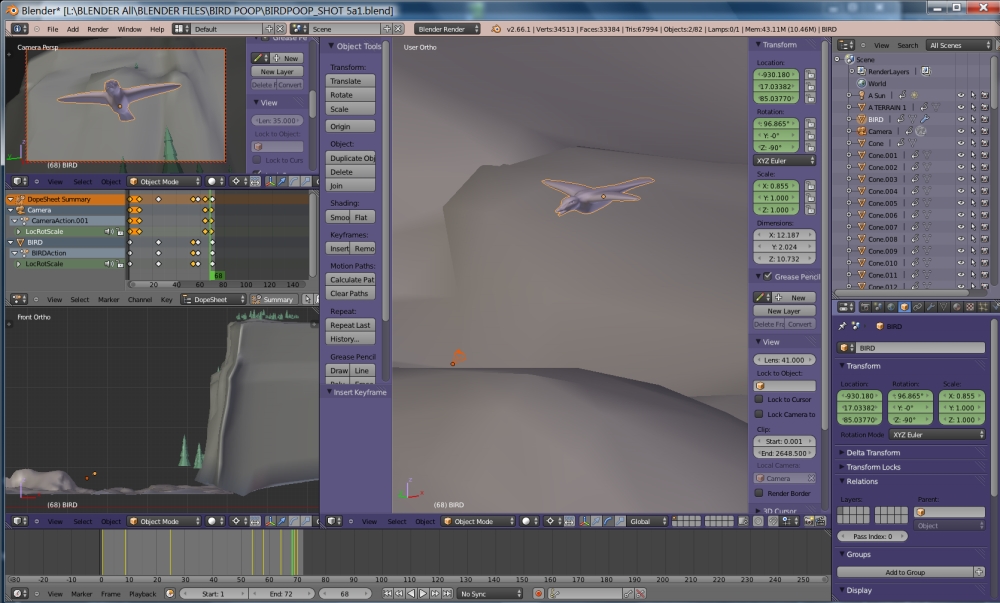
Here's a screen shot as I'm working on Shot 5. Made it a lil larger for clearer viewing.
Left upper is the Camera View, left middle is the keyframes, and left lower is a side view of the whole scene.
Birdo is just a working title (found out there's some other character called Birdo on youtube; though he doesn't look like a bird. Go figure)
Here's a screen shot as I'm working on Shot 5. Made it a lil larger for clearer viewing.
-
pugman 1
- Captain
- Posts: 1555
- Joined: 21 May 2009, 19:26
- Type the number ten into the box: 0
- Location: Germany
Re: Birdo Short_WIP
Nice animation looking good so far ,keep it up .
maybe you teach me some day .
maybe you teach me some day .
-
Dragneye
- Lieutenant
- Posts: 906
- Joined: 02 Sep 2009, 22:09
Re: Birdo Short_WIP
Hey Pugman. Been thinking abt putting together a 'if only I had this in the beginning' type notes for new users to Blender like myself. Interested?
Though I think you've been using Blender for a bit, right?
Though I think you've been using Blender for a bit, right?
-
Steinie
- Captain
- Posts: 2958
- Joined: 21 May 2009, 17:38
- Type the number ten into the box: 10
Re: Birdo Short_WIP
I'd be interested in any helpful notes about Blender.
-
Dragneye
- Lieutenant
- Posts: 906
- Joined: 02 Sep 2009, 22:09
Re: Birdo Short_WIP
-
pugman 1
- Captain
- Posts: 1555
- Joined: 21 May 2009, 19:26
- Type the number ten into the box: 0
- Location: Germany
Re: Birdo Short_WIP
That would be a great idea and yes i have blender about 3 years but never got into it
i thought modo would be better but i was wrong. Now i learn blender for about half a year
intensly .i watch as many vids as i can and try all the different methods .once you learn to use the
keybord blender becoms enjoyable and easy to use ,and it is better than modo..
i thought modo would be better but i was wrong. Now i learn blender for about half a year
intensly .i watch as many vids as i can and try all the different methods .once you learn to use the
keybord blender becoms enjoyable and easy to use ,and it is better than modo..
-
jamesmc
- Captain
- Posts: 1776
- Joined: 08 Jul 2009, 15:35
Re: Birdo Short_WIP
Loved the bird soaring through the scene.
Wish I could do that! (except for the fart part - I mastered that many ears ago)

Wish I could do that! (except for the fart part - I mastered that many ears ago)
Walk by faith, not by sight.
-
Dragneye
- Lieutenant
- Posts: 906
- Joined: 02 Sep 2009, 22:09
Re: Birdo Short_WIP

-
Dragneye
- Lieutenant
- Posts: 906
- Joined: 02 Sep 2009, 22:09
Re: Birdo Short_WIP
These are some small tips I wish I knew right from the start when using Blender. Hopefully they help you all.
** You have to get used to using the keyboard. I hated using the keyboard but now find it very useful. The pros do it for a reason; from all the time they have Already spent finding the most efficient way (saved time is useful time), we can benefit.
As long as it stays simple.
So I compromised;
1. No more than 2 keys for the function otherwise I'll look for the tab for it.
2. It has to be on the left side of the keyboard (since I'm a righty, left hand is for keyboard)
**...
** Change from right click to left click as the main mouse button. Blender is oriented towards the right mouse button as the main one. I found hardly any problems changing it to the left one, like most other programs.
FILE / USER PREFERENCES / INPUT / SELECT WITH / LEFT -- (While there, also try: ORBIT STYLE / ... See which one you prefer)
** You have to get used to using the keyboard. I hated using the keyboard but now find it very useful. The pros do it for a reason; from all the time they have Already spent finding the most efficient way (saved time is useful time), we can benefit.
As long as it stays simple.
So I compromised;
1. No more than 2 keys for the function otherwise I'll look for the tab for it.
2. It has to be on the left side of the keyboard (since I'm a righty, left hand is for keyboard)
**...

** Change from right click to left click as the main mouse button. Blender is oriented towards the right mouse button as the main one. I found hardly any problems changing it to the left one, like most other programs.
FILE / USER PREFERENCES / INPUT / SELECT WITH / LEFT -- (While there, also try: ORBIT STYLE / ... See which one you prefer)
-
froo
- Captain
- Posts: 2554
- Joined: 22 May 2009, 12:13
Re: Birdo Short_WIP
Looks like you haven't quite mastered the 'keybord' there, pugman (you misspelled: keyboard)pugman 1 wrote:once you learn to use the
keybord blender becoms enjoyable and easy to use ,and it is better than modo..

-
Dragneye
- Lieutenant
- Posts: 906
- Joined: 02 Sep 2009, 22:09
Re: Birdo Short_WIP
Froo....
You made me laugh
Thanks dude
You made me laugh
Thanks dude
-
Unavailableartist
- Petty Officer First Class
- Posts: 58
- Joined: 31 Mar 2013, 19:50
- Type the number ten into the box: 10
Re: Birdo Short_WIP
I was tempted to press the like button. Good Job!
I can do animations, however... I probably couldn't make them so life like... lol.
I can do animations, however... I probably couldn't make them so life like... lol.
-
Dragneye
- Lieutenant
- Posts: 906
- Joined: 02 Sep 2009, 22:09
Re: Birdo Short_WIP
lol
Wait till I get to rigging. That'll be a trip.
For the record, since I started working with Blender, it has not crashed, and the very few hiccups, I knew Exactly why it freaked out. I'm sure I'll test its limits soon as soon as rigging and textures come in to play but for now I am ecstatic with the stability.
Wait till I get to rigging. That'll be a trip.
For the record, since I started working with Blender, it has not crashed, and the very few hiccups, I knew Exactly why it freaked out. I'm sure I'll test its limits soon as soon as rigging and textures come in to play but for now I am ecstatic with the stability.
-
Unavailableartist
- Petty Officer First Class
- Posts: 58
- Joined: 31 Mar 2013, 19:50
- Type the number ten into the box: 10
Re: Birdo Short_WIP
I know how to "insert key frames" that's about it. I did a submarine, not my idea though it was a tutorial.
Right now I'm reading a how-to on building a castle (it goes over rendering and a few other blender stuff). Then afterwards I'll build my own castle... my style -- thinking of something reminiscent of LOTR or something (I was thinking of mimicking Saruman's tower).
I haven't had Blender blow up on me either, well once but I think it was the OS-I-was-using's fault. It crashed when I tried to resize the screen so I could read a PDF and Model at the same time (it's not doing that anymore).
Truespace 7.6 is way, way more buggy. lol
Anyways looking forward to your rigged version. I might post my castle when I finish it, but I need to learn a little more about rendering.
Right now I'm reading a how-to on building a castle (it goes over rendering and a few other blender stuff). Then afterwards I'll build my own castle... my style -- thinking of something reminiscent of LOTR or something (I was thinking of mimicking Saruman's tower).
I haven't had Blender blow up on me either, well once but I think it was the OS-I-was-using's fault. It crashed when I tried to resize the screen so I could read a PDF and Model at the same time (it's not doing that anymore).
Truespace 7.6 is way, way more buggy. lol
Anyways looking forward to your rigged version. I might post my castle when I finish it, but I need to learn a little more about rendering.
-
Dragneye
- Lieutenant
- Posts: 906
- Joined: 02 Sep 2009, 22:09
Re: Birdo Short_WIP
-
Unavailableartist
- Petty Officer First Class
- Posts: 58
- Joined: 31 Mar 2013, 19:50
- Type the number ten into the box: 10
Re: Birdo Short_WIP
So the *winking* and *smiling*, are the morphs you adding to the bird later?
If you do are you going to tuck the wings in when it does a barrel roll?
- The birds flight pattern looks very realistic in some way.
If you do are you going to tuck the wings in when it does a barrel roll?
- The birds flight pattern looks very realistic in some way.
-
Dragneye
- Lieutenant
- Posts: 906
- Joined: 02 Sep 2009, 22:09
Re: Birdo Short_WIP
Correct Unavailableartist. I'm trying to emphasize the key points in the short through visuals (and motion I guess) with this animatic. (Eventually sound comes into play also but other than the music score there ain't much talkin' in this one) Next come refinements so the details of each shot is clear to anyone I'm showing it to. Since this is a team of one, I know what the whole story is so I skipped the storyboard which would have been Step 2
The way I'm approaching this is:
Concept
Storyboard (I cheated)
Animatic
Models/Rigging
Refinement/Integration All
Lighting
Refinement All
Rendering
As for the flight, That's really what I want to nail (not nececelery accurate, but dynamic); if I can get the viewer to 'feel' the flying, the bird's 'free-soul' attitude... if I can get you all to feel lighter and smile with this part of the short, I will have done my job.
The barrel roll gave me a hard time, mainly because I did the object keying backwards I'd say. I placed the camera keys first and tried to work the bird's movement around that. I think it would have been easier the other way around. Lesson learned... I think. This way did work well for Shot 2 though, so...
The way I'm approaching this is:
Concept
Storyboard (I cheated)
Animatic
Models/Rigging
Refinement/Integration All
Lighting
Refinement All
Rendering
As for the flight, That's really what I want to nail (not nececelery
accurate, but dynamic); if I can get the viewer to 'feel' the flying, the bird's 'free-soul' attitude... if I can get you all to feel lighter and smile with this part of the short, I will have done my job.The barrel roll gave me a hard time, mainly because I did the object keying backwards I'd say. I placed the camera keys first and tried to work the bird's movement around that. I think it would have been easier the other way around. Lesson learned... I think. This way did work well for Shot 2 though, so...
-
Dragneye
- Lieutenant
- Posts: 906
- Joined: 02 Sep 2009, 22:09
Re: Birdo Short_WIP
-
Dragneye
- Lieutenant
- Posts: 906
- Joined: 02 Sep 2009, 22:09
Re: Birdo Short_WIP
I just discovered 'Dynamic Topology' (under the Sculpting tab)!! Awesome!
The trick to keeping the polycount down is, use 'Dynamic Topology' only where you need extra verts for detail.
Start with a basic mesh, after a bit of sculpting, turn Dyntopo on and create a stroke or two over the specific area you want to add more vertices, turn it off and continue sculpting. Repeat as needed.
PS: Dyntopo ruins the topology (turns nice pretty, orderly, polygons into a mess, so you most likely have to retopologize the whole model when done, but you can sculpt exactly what you want. And, unlike zbrush, by using it sparingly, you don't double and triple the poly count whenever you need more detail. With this it's much more controllable. (yes, you can mask off areas in zb, but I still find this more efficient)
The trick to keeping the polycount down is, use 'Dynamic Topology' only where you need extra verts for detail.
Start with a basic mesh, after a bit of sculpting, turn Dyntopo on and create a stroke or two over the specific area you want to add more vertices, turn it off and continue sculpting. Repeat as needed.
PS: Dyntopo ruins the topology (turns nice pretty, orderly, polygons into a mess, so you most likely have to retopologize the whole model when done, but you can sculpt exactly what you want. And, unlike zbrush, by using it sparingly, you don't double and triple the poly count whenever you need more detail. With this it's much more controllable. (yes, you can mask off areas in zb, but I still find this more efficient)