Forum Software Updated Aug 2018
-
clintonman

- Captain
- Posts: 5659
- Joined: 21 May 2009, 21:08
- Type the number ten into the box: 0
- Location: California
Forum Software Updated Aug 2018
The forum software has been updated to the latest release. The whole process took a little bit over 1 hour. If you encounter any problems report them here.
-
Steinie

- Captain
- Posts: 2958
- Joined: 21 May 2009, 17:38
- Type the number ten into the box: 10
Re: Forum Software Updated Aug 2018
That explains why my "Board Style" changed back to default.
-
trueBlue

- Captain
- Posts: 5548
- Joined: 06 Jul 2009, 22:50
- Type the number ten into the box: 10
Re: Forum Software Updated Aug 2018
Thank you Clinton!
I found a link that might help with the internal links issue.
Looks like you need to edit the .htaccess file to redirect http:// to https://
https://www.phpbb.com/community/viewtop ... &t=2480526
And this link:
https://www.phpbb.com/community/viewtop ... &t=2478161
Add a Icon:
https://www.phpbb.com/support/docs/en/3 ... a-favicon/
I found a link that might help with the internal links issue.
Looks like you need to edit the .htaccess file to redirect http:// to https://
https://www.phpbb.com/community/viewtop ... &t=2480526
Re: change all http:// to https://
Quote
Post
by david63 » Sat Jul 28, 2018 10:04 am
snakesman wrote: ↑
Sat Jul 28, 2018 8:34 am
how can i change at once this string http:// to https:// in my forum?
If you are referring to links within your board then, as far as I am aware, the only way to do it "at a stroke" is to do a find and replace in the posts table of your database - but unless you know exactly what you are doing there are many dangers with that - and remember that not all links that have been posted on your board will be internal and not all of those may be https.
By far the easiest method is to leave them as they are and have a redirect in your .htaccess file.
And this link:
https://www.phpbb.com/community/viewtop ... &t=2478161
Add a Icon:

- Capture.PNG (700 Bytes) Viewed 7680 times
- Attachments
-
- favicon9b83.zip
- (635 Bytes) Downloaded 319 times
-
trueBlue
- Captain
- Posts: 5548
- Joined: 06 Jul 2009, 22:50
- Type the number ten into the box: 10
 Re: Forum Software Updated Aug 2018
Since this latest update I am no longer able to remove a previous attachment (File).
If I go do a previous post an edit it, the file that is present in the post does not show in the Attachments.
Uploaded images show (some not all) but not files.
If I go do a previous post an edit it, the file that is present in the post does not show in the Attachments.
Uploaded images show (some not all) but not files.
-
Draise

- Captain
- Posts: 3200
- Joined: 21 Sep 2009, 19:33
- Type the number ten into the box: 0
- Location: Bogota, Colombia
Re: Forum Software Updated Aug 2018
The U3DA cubes theme has quotes tile the quote icon over the div - looks kinda weird.
- Attachments
-

-
clintonman
- Captain
- Posts: 5659
- Joined: 21 May 2009, 21:08
- Type the number ten into the box: 0
- Location: California
Re: Forum Software Updated Aug 2018
Fixed. You may have to press the shift key while resetting the page to get it.Draise wrote: 21 Aug 2018, 01:42 The U3DA cubes theme has quotes tile the quote icon over the div - looks kinda weird.
-
clintonman
- Captain
- Posts: 5659
- Joined: 21 May 2009, 21:08
- Type the number ten into the box: 0
- Location: California
Re: Forum Software Updated Aug 2018
Problem with the forums is "https://" vs "https://www"trueBlue wrote: 07 Aug 2018, 17:25 Thank you Clinton!
I found a link that might help with the internal links issue.
Looks like you need to edit the .htaccess file to redirect http:// to https://
https://www.phpbb.com/community/viewtop ... &t=2480526
Re: change all http:// to https://
Quote
Post
by david63 » Sat Jul 28, 2018 10:04 am
snakesman wrote: ↑
Sat Jul 28, 2018 8:34 am
how can i change at once this string http:// to https:// in my forum?
If you are referring to links within your board then, as far as I am aware, the only way to do it "at a stroke" is to do a find and replace in the posts table of your database - but unless you know exactly what you are doing there are many dangers with that - and remember that not all links that have been posted on your board will be internal and not all of those may be https.
By far the easiest method is to leave them as they are and have a redirect in your .htaccess file.
And this link:
https://www.phpbb.com/community/viewtop ... &t=2478161
Add a Icon:Capture.PNG
https://www.phpbb.com/support/docs/en/3 ... a-favicon/
Already is set to do https to the best of our abilities.
Did favicon using butterfly png file that was already in the forums folder for that purpose.
-
trueBlue
- Captain
- Posts: 5548
- Joined: 06 Jul 2009, 22:50
- Type the number ten into the box: 10
Re: Forum Software Updated Aug 2018
Not sure if you understood what I was reffering to.clintonman wrote: 24 Aug 2018, 03:40 Problem with the forums is "https://" vs "https://www"
Already is set to do https to the best of our abilities.
What I was hoping for was a redirect from http to https
Meaning that it adds an s to http if that is possible.
We have 9 years of links that do not work anymore.
More importantly though, editing prior post with attachments is really messed up since the update.
There may be a clue to what is wrong. Notice the i in between the M and B and the K and B?
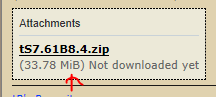
- Missing File Attachments MiB.PNG (3.16 KiB) Viewed 7241 times

This post before:

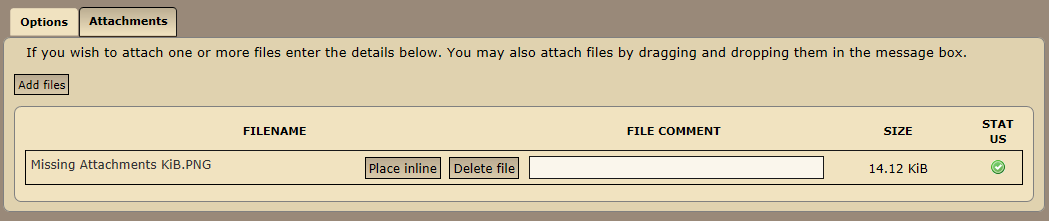
Disregard the clue, I was not familiar with MiB
The unit symbol for the mebibyte is MiB. Technically a megabyte (MB) is a power of ten, while a mebibyte (MiB) is a power of two, appropriate for binary machines.
-
clintonman
- Captain
- Posts: 5659
- Joined: 21 May 2009, 21:08
- Type the number ten into the box: 0
- Location: California
Re: Forum Software Updated Aug 2018
It would be helpful to see one of those links that don't work anymore.trueBlue wrote: 04 Sep 2018, 17:00 ...
We have 9 years of links that do not work anymore.
...
-
trueBlue
- Captain
- Posts: 5548
- Joined: 06 Jul 2009, 22:50
- Type the number ten into the box: 10
Re: Forum Software Updated Aug 2018
Select the last link in this post
viewtopic.php?t=4328#p42237
I think I found a solution to the Attachment issue:
https://www.phpbb.com/community/viewtop ... &t=2453611
Issues involving attachments not showing, or not all showing, when posts with multiple attachments are posted or previewed,
viewtopic.php?t=4328#p42237
I think I found a solution to the Attachment issue:
https://www.phpbb.com/community/viewtop ... &t=2453611
Issues involving attachments not showing, or not all showing, when posts with multiple attachments are posted or previewed,
-
clintonman
- Captain
- Posts: 5659
- Joined: 21 May 2009, 21:08
- Type the number ten into the box: 0
- Location: California
Re: Forum Software Updated Aug 2018
Works for me. Can you show a screenshot of what you see?trueBlue wrote: 04 Sep 2018, 18:40 Select the last link in this post
viewtopic.php?t=4328#p42237
...
-
trueBlue
- Captain
- Posts: 5548
- Joined: 06 Jul 2009, 22:50
- Type the number ten into the box: 10
Re: Forum Software Updated Aug 2018
Before I select the link
I am logged in and shows my theme X Creamy
After I select the link
I am logged out and shows Pro Silver theme
I am logged in and shows my theme X Creamy
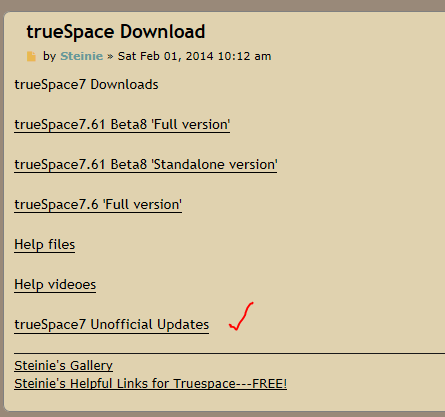
I am logged out and shows Pro Silver theme
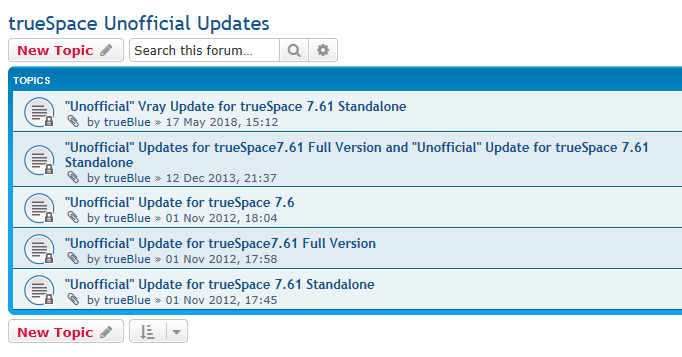
-
clintonman
- Captain
- Posts: 5659
- Joined: 21 May 2009, 21:08
- Type the number ten into the box: 0
- Location: California
Re: Forum Software Updated Aug 2018
Made the changes for "Issues involving attachments not showing"trueBlue wrote: 04 Sep 2018, 18:40 Select the last link in this post
viewtopic.php?t=4328#p42237
I think I found a solution to the Attachment issue:
https://www.phpbb.com/community/viewtop ... &t=2453611
Issues involving attachments not showing, or not all showing, when posts with multiple attachments are posted or previewed,
Let me know if it works.
-
clintonman
- Captain
- Posts: 5659
- Joined: 21 May 2009, 21:08
- Type the number ten into the box: 0
- Location: California
Re: Forum Software Updated Aug 2018
clintonman wrote: 24 Aug 2018, 03:40 ...
Problem with the forums is "https://" vs "https://www"
Already is set to do https to the best of our abilities.
...

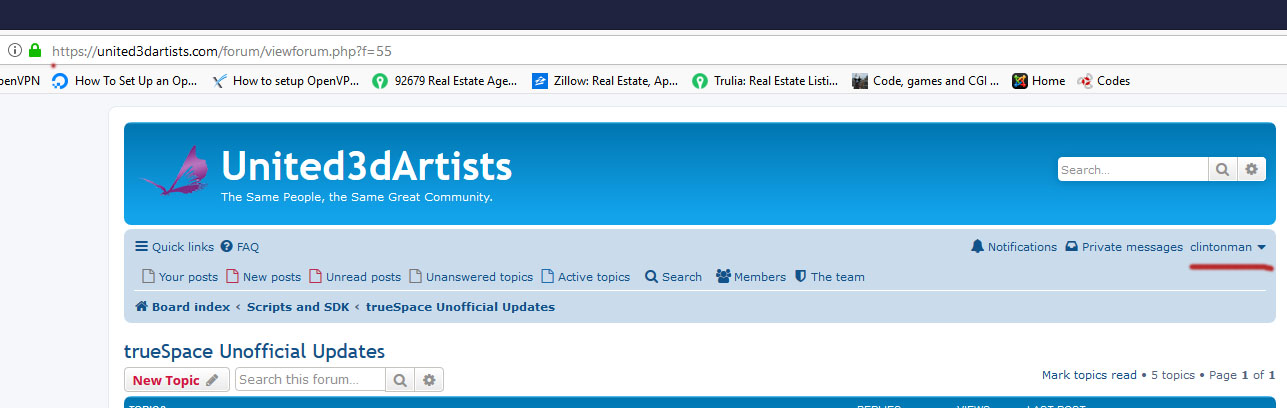
Note that both images show https already, the .htaccess files had already been edited for the https problem long ago.
The only solution I see is to directly edit the forums database and manually fix the old links.
-
trueBlue
- Captain
- Posts: 5548
- Joined: 06 Jul 2009, 22:50
- Type the number ten into the box: 10
Re: Forum Software Updated Aug 2018
Thanks Clinton.
The issue with Attachments looks like, at first glance, to be resolved. Yah!
Thanks for trying again with the http links. Was hoping it was a simple fix.
The issue with Attachments looks like, at first glance, to be resolved. Yah!
Thanks for trying again with the http links. Was hoping it was a simple fix.
-
clintonman
- Captain
- Posts: 5659
- Joined: 21 May 2009, 21:08
- Type the number ten into the box: 0
- Location: California
Re: Forum Software Updated Aug 2018
GoodtrueBlue wrote: 04 Sep 2018, 20:36 Thanks Clinton.
The issue with Attachments looks like, at first glance, to be resolved. Yah!
...
Ah, but there is a simple fix.trueBlue wrote: 04 Sep 2018, 20:36 ...
Thanks for trying again with the http links. Was hoping it was a simple fix.
 It just has to be done carefully. I tested the database change on my local copy of the forums and it worked. Info used was part of the http vs https thread you linked, which also mentioned changing the www in the links.
-
trueBlue
- Captain
- Posts: 5548
- Joined: 06 Jul 2009, 22:50
- Type the number ten into the box: 10
Re: Forum Software Updated Aug 2018
Oh cool! I was just re reading that thread again. Hope it works!
-
clintonman
- Captain
- Posts: 5659
- Joined: 21 May 2009, 21:08
- Type the number ten into the box: 0
- Location: California
Re: Forum Software Updated Aug 2018
The problem with "www.united3dartists" links has been fixed. The post text in the database was altered to use "united3dartists" instead. Now it does not log the user off when following those older links.
-
trueBlue
- Captain
- Posts: 5548
- Joined: 06 Jul 2009, 22:50
- Type the number ten into the box: 10
Re: Forum Software Updated Aug 2018
Been trying to edit a post this morning.
viewtopic.php?t=4247
Keep getting:
403
Forbidden
Access to this resource on the server is denied!
viewtopic.php?t=4247
Keep getting:
403
Forbidden
Access to this resource on the server is denied!
-
spacekdet

- Captain
- Posts: 1810
- Joined: 27 May 2009, 15:00
- Type the number ten into the box: 10
- Location: On the day shift at the Utility Muffin Research Kitchen
Re: Forum Software Updated Aug 2018
weird. Following the link you provided put me on the page in a 'signed out' state.
Searched the topic and was able to view it while in 'signed in' state; looks like I was able to edit it if I wanted to.
I see you are also online /viewing it, did you already figure it out/ are you able to edit now?
Searched the topic and was able to view it while in 'signed in' state; looks like I was able to edit it if I wanted to.
I see you are also online /viewing it, did you already figure it out/ are you able to edit now?
-
trueBlue
- Captain
- Posts: 5548
- Joined: 06 Jul 2009, 22:50
- Type the number ten into the box: 10
Re: Forum Software Updated Aug 2018
Nope 
I was able to edit the post successfully for a internal link but not external link.
Was trying to add these links:
here-> viewtopic.php?t=4328#p42237
See this post:
viewtopic.php?t=5627
I was able to edit the post successfully for a internal link but not external link.
Was trying to add these links:
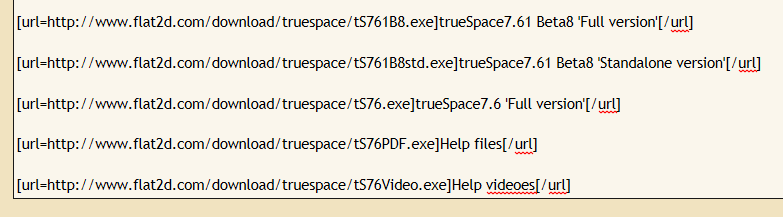
See this post:
viewtopic.php?t=5627
-
trueBlue
- Captain
- Posts: 5548
- Joined: 06 Jul 2009, 22:50
- Type the number ten into the box: 10
Re: Forum Software Updated Aug 2018
clintonman wrote: 04 Sep 2018, 20:49GoodtrueBlue wrote: 04 Sep 2018, 20:36 Thanks Clinton.
The issue with Attachments looks like, at first glance, to be resolved. Yah!
...
trueBlue wrote: 04 Sep 2018, 20:36 ...Thanks for trying again with the http links. Was hoping it was a simple fix.Did you apply this fix to the last update?clintonman wrote: 04 Sep 2018, 20:49Ah, but there is a simple fix.
-
clintonman
- Captain
- Posts: 5659
- Joined: 21 May 2009, 21:08
- Type the number ten into the box: 0
- Location: California
Re: Forum Software Updated Aug 2018
It was a one time thing. It did not change the forum software, it altered the content of old posts.trueBlue wrote: 14 Sep 2019, 00:46clintonman wrote: 04 Sep 2018, 20:49GoodtrueBlue wrote: 04 Sep 2018, 20:36 Thanks Clinton.
The issue with Attachments looks like, at first glance, to be resolved. Yah!
...
trueBlue wrote: 04 Sep 2018, 20:36 ...
Did you apply this fix to the last update?clintonman wrote: 04 Sep 2018, 20:49
-
trueBlue
- Captain
- Posts: 5548
- Joined: 06 Jul 2009, 22:50
- Type the number ten into the box: 10
Re: Forum Software Updated Aug 2018
Hummm... it's back again!
-
trueBlue
- Captain
- Posts: 5548
- Joined: 06 Jul 2009, 22:50
- Type the number ten into the box: 10
Re: Forum Software Updated Aug 2018
I discovered something about being logged out when clicking on links.
If I sign in with Remember Me and click on a http link without the www. I will not be logged out.
viewtopic.php?t=3732
If I sign in without Remember Me checked, and click on the same link, I will be logged out.
If I sign in with Remember Me and click on a http link without the www. I will not be logged out.
viewtopic.php?t=3732
If I sign in without Remember Me checked, and click on the same link, I will be logged out.
-
RAYMAN

- Captain
- Posts: 2547
- Joined: 21 May 2009, 18:56
Re: Forum Software Updated Aug 2018
Yup know that feeling!
Was a 100$ bill when I locked myself out the last time and the key was inside!!!


LOL
Was a 100$ bill when I locked myself out the last time and the key was inside!!!
LOL