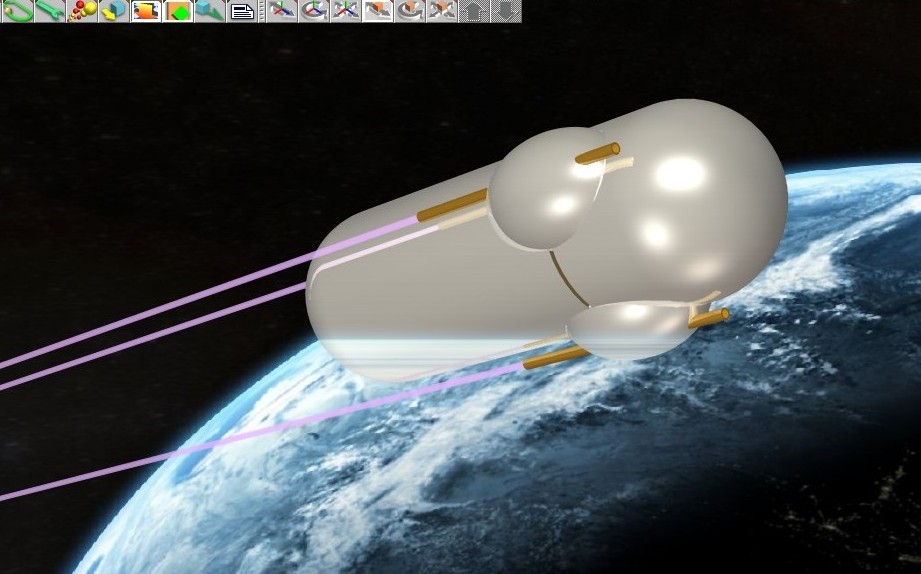
Experiencing a problem when adding a background image to scenes. Light colored or reflective objects are overlaid or "smeared" where the background is also light. Wish I knew how to insert a sample image here. Lacking that I'll try to describe the effect. Typical background is a shot of the Earth from space; planet is blue and white, space absolute black. 3D modeled spacecraft slants across the boundary between Earth and space. Render forms scanline by scanline. Spacecraft is normal so long as area immediately to its left is black. The instant that area becomes blue or white, horizontal bands of color are superimposed on the model. If the background was, say, Mars the streaks would be reddish. I'm not seeing background details. The models aren't transparent. But whatever color is to the left of the model gets dragged across like speed lines.
Obviously, this ruins the illusion. I've been forced to render with dark neutral background and then attempt to composite the image in a paint program.
Any help would be appreciated. If someone will tell me how to insert a sample image, I can do that.
Background image "streaks" across foreground objects
-
Neutrino
- Seaman
- Posts: 6
- Joined: 05 Apr 2010, 00:07
Background image "streaks" across foreground objects
-
marcel

- Captain
- Posts: 2247
- Joined: 21 May 2009, 19:52
- Type the number ten into the box: 0
- Location: paris - France
Re: Background image "streaks" across foreground objects
put an image of your render here to confirm what i think about bands. Maybe it is a problem of multithreading. In this case, just disable it.
Design - illustration - Animation
http://www.crea-vision.fr
http://www.crea-vision.fr
-
Neutrino
- Seaman
- Posts: 6
- Joined: 05 Apr 2010, 00:07
Re: Background image "streaks" across foreground objects
Ah, figured out how to attach image. Much better than trying to describe problem.
This is a screen-shot (hence icons at top) but image to file looks the same.
This is a screen-shot (hence icons at top) but image to file looks the same.
- Attachments
-
-
spacekdet

- Captain
- Posts: 1810
- Joined: 27 May 2009, 15:00
- Type the number ten into the box: 10
- Location: On the day shift at the Utility Muffin Research Kitchen
Re: Background image "streaks" across foreground objects
Is this the famous background/reflection bug?
Instead of using a background image, put the image on a large plane (whose edges lie outside the camera frame ) or a sphere.
Use the 'constant' shader, and turn off 'cast shadows' for this background object.
Instead of using a background image, put the image on a large plane (whose edges lie outside the camera frame ) or a sphere.
Use the 'constant' shader, and turn off 'cast shadows' for this background object.
-
Neutrino
- Seaman
- Posts: 6
- Joined: 05 Apr 2010, 00:07
Re: Background image "streaks" across foreground objects
Yes, that works (Thank you, Spacekdet), but it's a major headache positioning the plane so it's the right way up, the right size, position, and orthogonal to the camera (i.e. spheres are not squashed in one direction or another.)
From the way you wrote "Is this the famous background/reflection bug?", I assume I'm hardly the first user to encounter it. Caligari offer any hope of a solution? Anyone else have ideas?
From the way you wrote "Is this the famous background/reflection bug?", I assume I'm hardly the first user to encounter it. Caligari offer any hope of a solution? Anyone else have ideas?
-
marcel
- Captain
- Posts: 2247
- Joined: 21 May 2009, 19:52
- Type the number ten into the box: 0
- Location: paris - France
Re: Background image "streaks" across foreground objects
No problem to positioning the plane:
Create a new cam and a perpendicular plane. On the view cam, resize the plane to fit the windows. Select the cam and glue it with the plane. When you move the cam the plane move at the same time and fit allways the view cam.
Create a new cam and a perpendicular plane. On the view cam, resize the plane to fit the windows. Select the cam and glue it with the plane. When you move the cam the plane move at the same time and fit allways the view cam.
Design - illustration - Animation
http://www.crea-vision.fr
http://www.crea-vision.fr
-
spacekdet
- Captain
- Posts: 1810
- Joined: 27 May 2009, 15:00
- Type the number ten into the box: 10
- Location: On the day shift at the Utility Muffin Research Kitchen
Re: Background image "streaks" across foreground objects
It's actually a Lightworks render engine issue; neither Lightworks or Caligari are fixing any bugs for these older versions of the software.
-
Neutrino
- Seaman
- Posts: 6
- Joined: 05 Apr 2010, 00:07
Re: Background image "streaks" across foreground objects
I think I understand how to deal with the problem now and I appreciate the help I got from both of you.
I was afraid it would turn out to be a "that version no longer supported" issue.
Aware this is a TS6.6 board and I'm not supposed to mention other versions, but when I tried 7.6 it was so confusing that I closed it until I read the manuals somewhat. By the time I got back to it, I'd installed a new flat-panel monitor with a wider aspect-ratio. TS7.6 flatly refused to open. I followed Caligari's directions, sent them the error messages, tried the suggested fixes -- and never succeeded.
So I'm stuck with an "obsolete" program -- at least until I can afford a new machine. But at least now I can enjoy what I have until then.
Thanks again. I learned a lot today.
I was afraid it would turn out to be a "that version no longer supported" issue.
Aware this is a TS6.6 board and I'm not supposed to mention other versions, but when I tried 7.6 it was so confusing that I closed it until I read the manuals somewhat. By the time I got back to it, I'd installed a new flat-panel monitor with a wider aspect-ratio. TS7.6 flatly refused to open. I followed Caligari's directions, sent them the error messages, tried the suggested fixes -- and never succeeded.
So I'm stuck with an "obsolete" program -- at least until I can afford a new machine. But at least now I can enjoy what I have until then.
Thanks again. I learned a lot today.
-
Breech Block

- Master Chief Petty Officer
- Posts: 482
- Joined: 13 Jun 2009, 20:31
Re: Background image "streaks" across foreground objects
Occasionally, the kind of glitch you are describing can be remedied by changing the driver version of your graphics card. Or, by switching your render engine from Dirext X to Open GL.
However, it does look like spacekdet is right on this one. HTH.
However, it does look like spacekdet is right on this one. HTH.
