Instance?

Technical questions, etc..
compPanda
Senior Chief Petty Officer
Posts: 275
Joined: 21 May 2009, 21:15
Type the number ten into the box: 0

Instance?

Post by compPanda »

Hi

Can you make an instance of an object in Truespace, model or workspace?
I know that I can make a copy, but that mean a independent copy with more complexity added to a scene. :?:
User avatar
Steinie
Captain
Posts: 2958
Joined: 21 May 2009, 17:38
Type the number ten into the box: 10

Re: Instance?

Post by Steinie »

Object Instancing is not in trueSpace. It does do
Material instancing in workSpace.
User avatar
Math Path
Chief Petty Officer
Posts: 92
Joined: 22 May 2009, 18:06
Type the number ten into the box: 0
Location: Germany

Re: Instance?

Post by Math Path »

I know, it's not the same as true instancing, but in some cases you can achieve the similar effect using the Global Replace and Interactive Replace tool. (Of course only model side)
User avatar
Prodigy
Site Admin
Posts: 957
Joined: 21 May 2009, 14:46
Type the number ten into the box: 0
Location: Uruguay

Re: Instance?

Post by Prodigy »

Steinie wrote:Object Instancing is not in trueSpace.
that is not true bob, Object Instancing is on workspaces side.. you have to do some LE work but it is in there..
The bad thing is not compatible with Vray Proxy so is not optimized for rendering stuff but it works..


I'll try to do a script for that..
๑۩۞۩๑ prodigy ๑۩۞۩๑
User avatar
Steinie
Captain
Posts: 2958
Joined: 21 May 2009, 17:38
Type the number ten into the box: 10

Re: Instance?

Post by Steinie »

Prodigy wrote:
Steinie wrote:Object Instancing is not in trueSpace.
that is not true bob, Object Instancing is on workspaces side.. you have to do some LE work but it is in there..
The bad thing is not compatible with Vray Proxy so is not optimized for rendering stuff but it works..


I'll try to do a script for that..
OUCH! I never saw this mentioned anywhere before. Sorry about the misinformation. I'm real curious how this is possible using the LE.
User avatar
Prodigy
Site Admin
Posts: 957
Joined: 21 May 2009, 14:46
Type the number ten into the box: 0
Location: Uruguay

Re: Instance?

Post by Prodigy »

Here is a very fist version of the script.. have no much time to develop it so, there are some functions that are not supported now..

How it works:
Drag the script inside LE.
Rename the object that you want to copy to "master" (no capital letters or encapsulated objects are supported).. master mesh i mean the object that you want to copy..

then create cubes (or any other object) as many as you want.. select all of them and press start..

If you edit the master mesh you will see how affects other instanced objects.. if you want to stop, just unlink the mesh object and that's all..
sorry my poor explanation but i'm tired and my english it doesn't work when i'm tired :lol:
Attachments
ObjInstancy.rar
(2.95 KiB) Downloaded 277 times
๑۩۞۩๑ prodigy ๑۩۞۩๑
Cayenne
Chief Petty Officer
Posts: 119
Joined: 03 Jun 2009, 20:05
Type the number ten into the box: 0
Location: U.K.

Re: Instance?

Post by Cayenne »

hi Prodigy , I arent sure if you are trying to do the same as an object already found in the WS library Objects - Tutorial Objects , its called instance 4 x 4 .

basically you can feed a mesh into it and when you make changes to the original mesh thats "hooked" up to it the "instances" change as well.
you can also hook up matrix outputs from objects and animate the instances from the original , as far as I remember in the past.

One thing i think this object doesnt pass materials so they need to be added by painting afterwards , but I suppose adding materials may be possible to enhance it.

I dont think as well its real true instances as I believe the objects geometry may be duplicated across the scene , I never checked if this is the case.

regards
Paul
User avatar
Prodigy
Site Admin
Posts: 957
Joined: 21 May 2009, 14:46
Type the number ten into the box: 0
Location: Uruguay

Re: Instance?

Post by Prodigy »

Is the same paul, i'll show you a video how this script works..

Haa, btw.. Time when i was working on the retail center experience , i was asking about if instancing object boost performance due objects are using the same mesh etc.. and the answer was not really, but you get small scene file size.. that's another great benefit of instancing.
๑۩۞۩๑ prodigy ๑۩۞۩๑
User avatar
Prodigy
Site Admin
Posts: 957
Joined: 21 May 2009, 14:46
Type the number ten into the box: 0
Location: Uruguay

Re: Instance?

Post by Prodigy »

Ok i have a new version that support materials..

in a few minutes will be a demonstrative video on how it works.
๑۩۞۩๑ prodigy ๑۩۞۩๑
Cayenne
Chief Petty Officer
Posts: 119
Joined: 03 Jun 2009, 20:05
Type the number ten into the box: 0
Location: U.K.

Re: Instance?

Post by Cayenne »

Math Path wrote:I know, it's not the same as true instancing, but in some cases you can achieve the similar effect using the Global Replace and Interactive Replace tool. (Of course only model side)

there is a object called Interactive Replace Tool for WS side , I never used it , but it sounds to do similar to modelside tool.

its found in the Activities - My Activities library.

regards
Paul
User avatar
Prodigy
Site Admin
Posts: 957
Joined: 21 May 2009, 14:46
Type the number ten into the box: 0
Location: Uruguay

Re: Instance?

Post by Prodigy »

Thanks Paul, i saw those scripts in the past but i think this is different..

here is a small vid showing how it works

Next version will have a toolbar icon and automatic flatten object to support encapsulated objects..

btw, Try to paint the master object :)
Attachments
ObjInstancyac9b.rar
(3.05 KiB) Downloaded 253 times
๑۩۞۩๑ prodigy ๑۩۞۩๑
User avatar
trueBlue
Captain
Posts: 5548
Joined: 06 Jul 2009, 22:50
Type the number ten into the box: 10

Re: Instance?

Post by trueBlue »

I think Paul is right Augusto, this is not really Object Instancing.
A simple check on the file sizes confirms that this is just a copy of the master object.
However this could prove very useful.
I noticed with your newest version that the Material transfer corrupts the cloned object's original Material.
Try this script and see if you can gather any useful information.
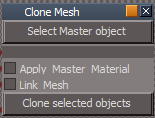
Capture.PNG
Capture.PNG (3.93 KiB) Viewed 3323 times
Instructions:
With your master object selected,
select the Select Master object button.
Note: This also enables trueSpace's
Material Inspect tool so that you can
transfer the Master object's material if the
Apply Master Material is checked.
Inspect the material of any object that you
want to transfer to the cloned objects first.

Link Mesh links the Master object's mesh to
the cloned objects if checked.
tS76 version
Clone Mesh.zip
(9.4 KiB) Downloaded 265 times
User avatar
RAYMAN
Captain
Posts: 2547
Joined: 21 May 2009, 18:56

Re: Instance?

Post by RAYMAN »

I remember in a thread a great while ago i had a chat with Tom and he confirmed that Truespace TS7xx does not have the provision
of instancing but that it would be something interesting to have.
Its always a function of the render engine and from my take from other programs there is a limit to what can be displayed.
Its sort of contradictory to the idea of a realtime display at least with the specs of machines that we have.
if you look into vue´s ecosystems you will see that it switches to billboards rather then full geometry pretty fast ......
its just not doable yet in realtime...
There is a reason why I go a different way...which is make your models and rig them and then go to a renderer that fully supports instancing..
User avatar
marcel
Captain
Posts: 2247
Joined: 21 May 2009, 19:52
Type the number ten into the box: 0
Location: paris - France

Re: Instance?

Post by marcel »

Even it is not instancing, the interest is to edit the original and see all the object modified at he same time (i think about architecture). Good work prodigy.
Another interesting thing to have would be the possibility to reduce automatically the number of polygons of an object when we move on a scene. Small object don't need a lot of polys. The object should be edited with several resolution and the resolution could change when the cam is near or far (a kind of automatic replace tool). Maybe a subject for programmers...
Design - illustration - Animation
http://www.crea-vision.fr
User avatar
nigec
Master Chief Petty Officer
Posts: 561
Joined: 21 May 2009, 18:46

Re: Instance?

Post by nigec »

RAYMAN wrote:I remember in a thread a great while ago i had a chat with Tom and he confirmed that Truespace TS7xx does not have the provision
of instancing but that it would be something interesting to have.
Its always a function of the render engine and from my take from other programs there is a limit to what can be displayed.
Its sort of contradictory to the idea of a realtime display at least with the specs of machines that we have.
if you look into vue´s ecosystems you will see that it switches to billboards rather then full geometry pretty fast ......
its just not doable yet in realtime...
There is a reason why I go a different way...which is make your models and rig them and then go to a renderer that fully supports instancing..
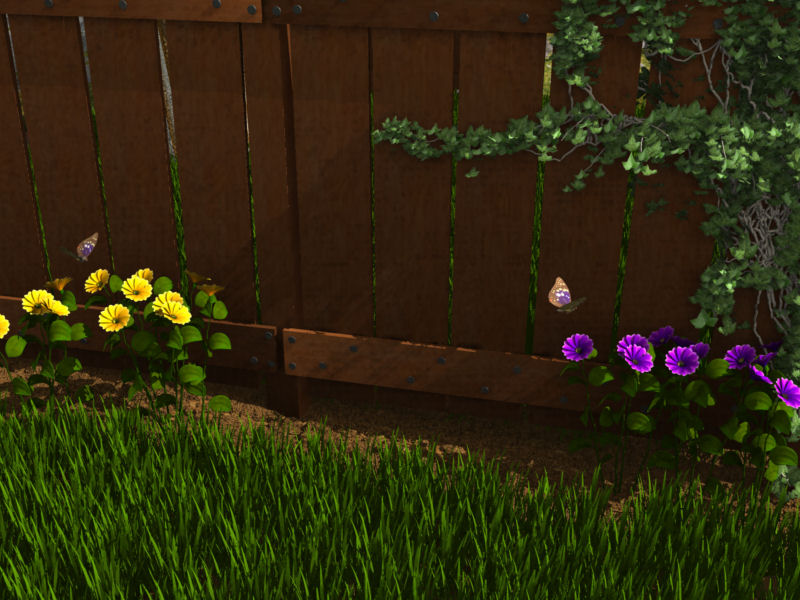
Carrara does intants very well, plus you have the option to make them solid geometry, add shader domains and so forth
my first attempt was:
grass.jpg
the grass was a low poly model done in Sketchup, the mud was also an instant

Thea's instants work very well too ;)

Return to “TechForum”