Workspace and Modeler camera not matching

Technical questions, etc..
User avatar
Emmanuel
Chief Warrant Officer
Posts: 670
Joined: 14 Jun 2009, 06:47

Workspace and Modeler camera not matching

Post by Emmanuel »

I am trying to find a way to make use of Modeler cameras in Workspace.

You may have noticed that if you create a camera in Modeler, and set a scene to match a background picture in a window frame, then move to Workspace, the camera settings are changing.
The render in Modeler does not match with the Workspace's render. That's problematic if you want to mix renders from Workspace and Modeler in Photoshop.

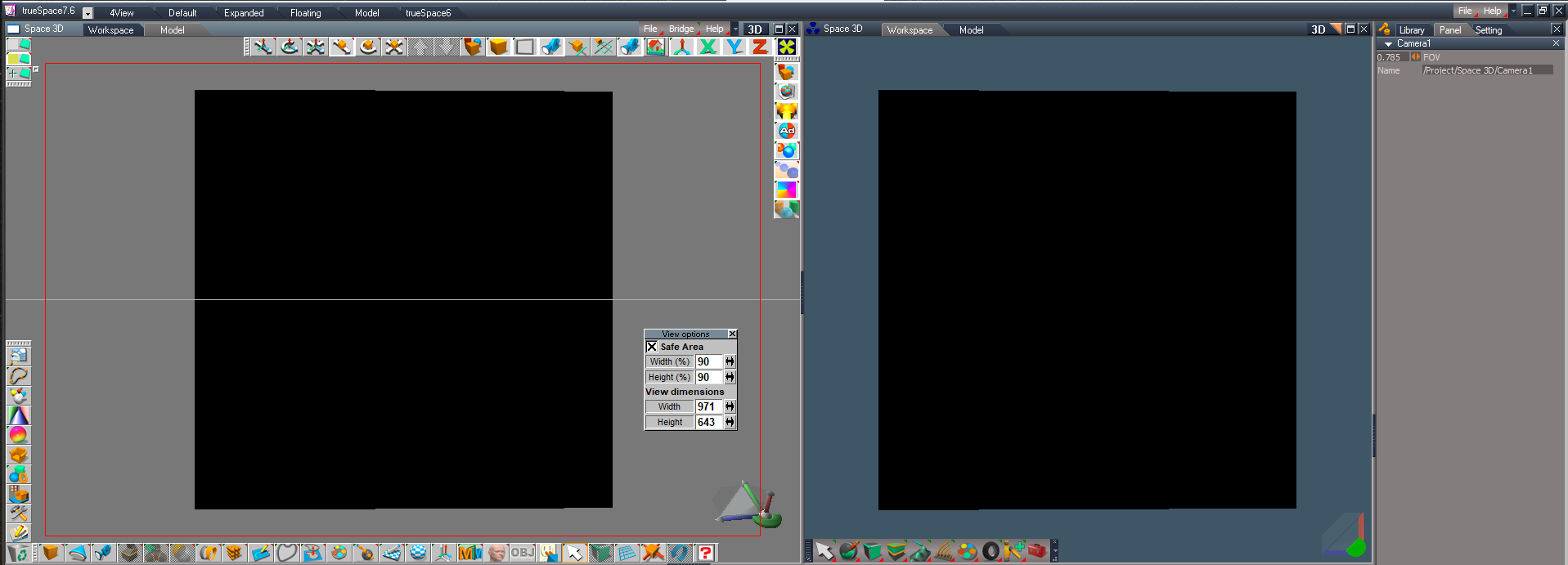
See example below : that's the same scene, same windows size, and Bridge is ON. You can see, on the left window showing the Workspace view, that the cubes are touching the left and right borders of the frame. On the right window showing the Modeler view, there is a gap between the frame and the cubes. I was wondering if there was a ratio I could apply to adjust one camera manually.

Here is my experience :

1. If you create a default camera in Modeler. Its size is X=0.5, Y=1.0, Z=1.25 and want to get the exact same view in Workspace, you must select the camera, then clic the Panel tab to see the camera's options and in the FOV field, enter 0.5225 instead of 0.5.

2. Next, if you change the camera zoom in modeler, setting Z value at =0.5, the workspace and Modeler windows won't match again.
Workspace camera's option will show a FOV setting at 1.250. To match both views, you will have to change the FOV to 1.178

3. One more test. Set camera zoom in modeler to Z=1.00, workspace FOV will show 0.625, but 0.643 will be the right setting.

To summ up :
Z=1.250 in Modeler is FOV=0.5225 in Workspace
Z=0.500 in Modeler is FOV=1.178 in Workspace
Z=1.000 in Modeler is FOV=0.643 in Workspace
There is no exact/logical relationship between these ratios... Crazy isn't it ? :o

Did anyone found a trick to make Worspace camera to match Modeler's one ?
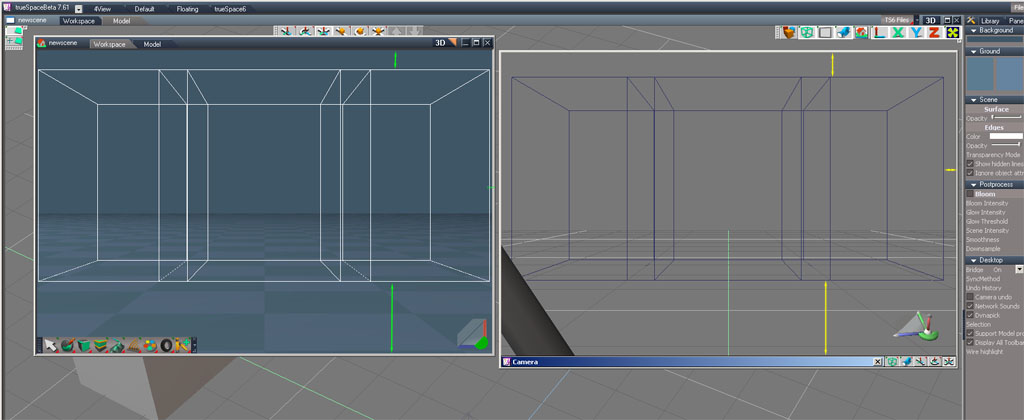
camera matching.jpg
User avatar
Emmanuel
Chief Warrant Officer
Posts: 670
Joined: 14 Jun 2009, 06:47

Re: Workspace and Modeler camera not matching

Post by Emmanuel »

Nine years have passed since that post and we are still struggling to match the angles :roll:

Clinton, trueBlue and Workspace specialists, have your discoveries in the operation of the software, over all these years, given you the key to a solution?
User avatar
trueBlue
Captain
Posts: 5548
Joined: 06 Jul 2009, 22:50
Type the number ten into the box: 10

Re: Workspace and Modeler camera not matching

Post by trueBlue »

Question is does Model's Safe Area make a difference in the actual Render to File?
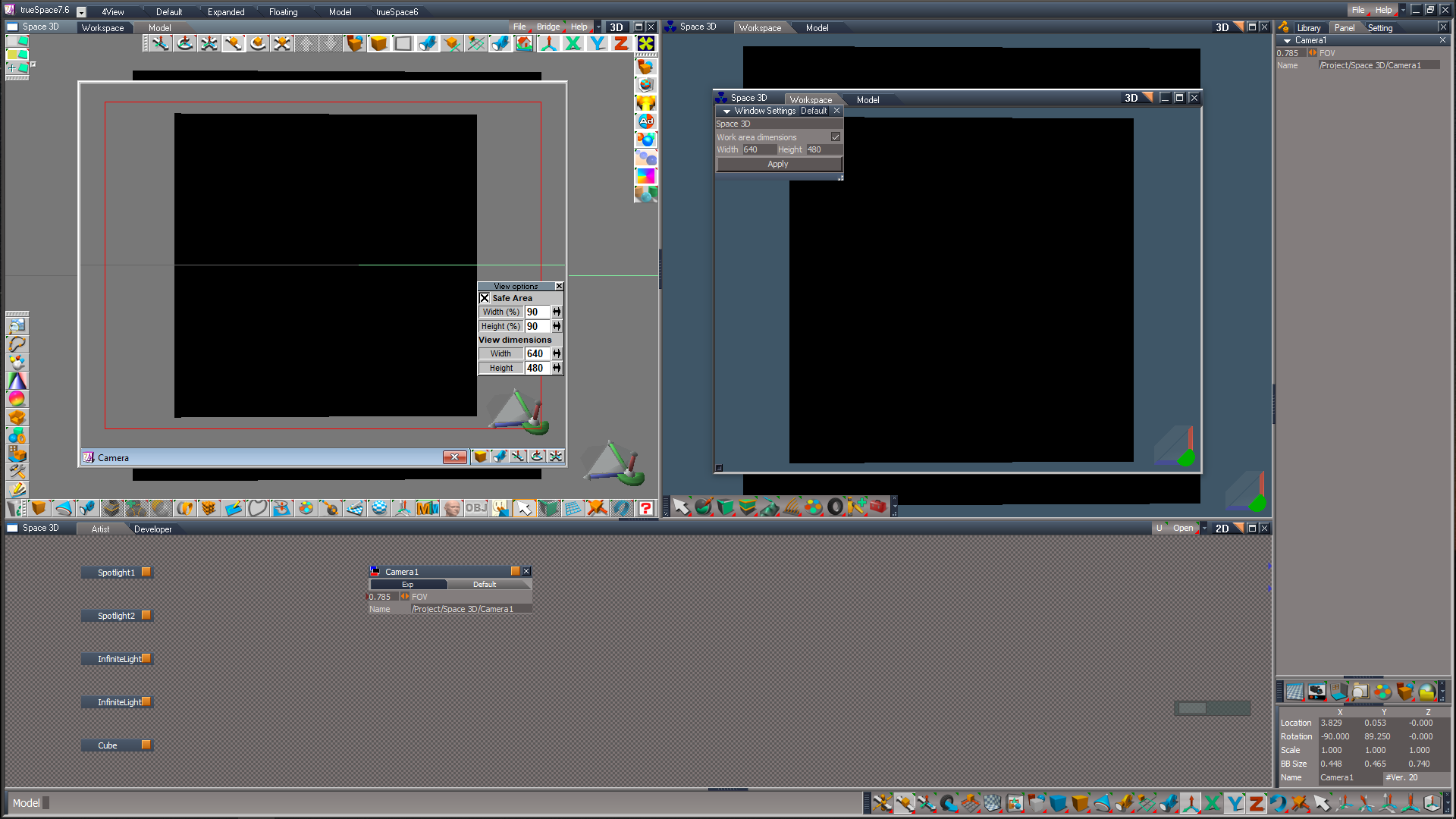
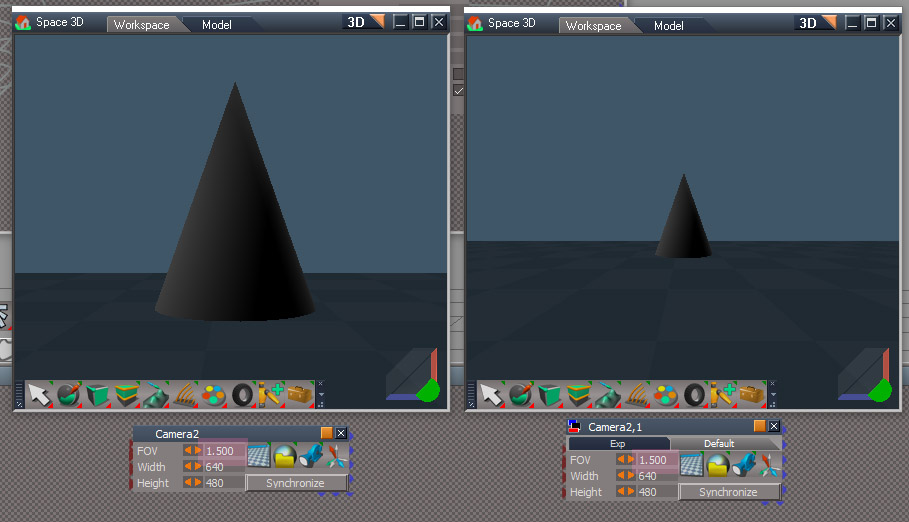
The best I can come up with is, open a Model and Workspace floating window using the same dimensions
I have both set at 640x480
In Model, select the Camera and View from Object
Use Workspace's View controls only to move the Camera

You can also have two docked windows, one for Workspace and the other set to Model
Try adjusting the docked Model window's width to match what you are viewing in Workspace

I am fairly sure Model and Workspace use the same standalone Cameras and Model's Eye (View) does not use Workspace's Eye (View) Camera
Not sure why Model changes the Camera's Size when adjusting the FOV
Changing the Camera's Size in Workspace does not seem to make a difference
Model and Workspace floating windows.png
.
Docked Windows.png
User avatar
Emmanuel
Chief Warrant Officer
Posts: 670
Joined: 14 Jun 2009, 06:47

Re: Workspace and Modeler camera not matching

Post by Emmanuel »

Thanks for the tips :)
You are right : I've made some more comparison tests and can confirm that there is no change in FOV. Cameras are the same. It is only a crop issue.

Using Modeler's safe_area guides may help in some frame ratios but not everytime.

From what I understand, Modeler window's view adjusts its content according to the width of the camera ; while the Workspace one does the exact opposite : it keeps the height and adjusts the width !
ratio issue.jpg
User avatar
trueBlue
Captain
Posts: 5548
Joined: 06 Jul 2009, 22:50
Type the number ten into the box: 10

Re: Workspace and Modeler camera not matching

Post by trueBlue »

Emmanuel wrote: 12 Dec 2022, 14:37 Thanks for the tips :)
You are right : I've made some more comparison tests and can confirm that there is no change in FOV. Cameras are the same. It is only a crop issue.

Using Modeler's safe_area guides may help in some frame ratios but not everytime.

From what I understand, Modeler window's view adjusts its content according to the width of the camera ; while the Workspace one does the exact opposite : it keeps the height and adjusts the width !

ratio issue.jpg
I think the real question is what is rendered?
When you render these examples from Model using the window's inside dimensions, does the rendered image match the Safe Area or the window?
How about the rendered image using Workspace's Render to File?
User avatar
Emmanuel
Chief Warrant Officer
Posts: 670
Joined: 14 Jun 2009, 06:47

Re: Workspace and Modeler camera not matching

Post by Emmanuel »

trueBlue wrote: 12 Dec 2022, 14:48 I think the real question is what is rendered?
When you render these examples from Model using the window's inside dimensions, does the rendered image match the Safe Area or the window?
How about the rendered image using Workspace's Render to File?
The Safe Area is just a guide that comes from old video formats times (VHS, etc...) : with cathod ray monitors there was a crop of the image so it was important to make sure nothing important was rendered within the margins.

When you render to file using the same resolution or same ratio as your view window, then there is no crop. For example, when I create animations for FullHD format 1920*1080, I always use a preview trueSpace window with this exact size or a (smaller one with same ratio, like 800*450 when working on a single monitor).
User avatar
trueBlue
Captain
Posts: 5548
Joined: 06 Jul 2009, 22:50
Type the number ten into the box: 10

Re: Workspace and Modeler camera not matching

Post by trueBlue »

I changed the Workspace Eye Camera's FOV to match the Model's View Height and it seems a little closer
User avatar
Emmanuel
Chief Warrant Officer
Posts: 670
Joined: 14 Jun 2009, 06:47

Re: Workspace and Modeler camera not matching

Post by Emmanuel »

trueBlue wrote: 12 Dec 2022, 15:51 I changed the Workspace Eye Camera's FOV to match the Model's View Height and it seems a little closer
Changing the FOV is not the solution. The issue comes from the view window behavior, which is different.
Try this : create 2 view windows, with same size, one with Workspace scene and the other one with Modeler, and place it side by side ;
now drag the bottom frame up & down and see how the view changes :
- Modeler view adds space up and down but keeps the camera framing correct.
- WS view add space on the SIDES, so the framing is changing.

Too bad I didn't reported that to Caligari team when trueSpace was still under developement... that was probably an easy fix.
User avatar
trueBlue
Captain
Posts: 5548
Joined: 06 Jul 2009, 22:50
Type the number ten into the box: 10

Re: Workspace and Modeler camera not matching

Post by trueBlue »

Emmanuel wrote: 12 Dec 2022, 16:11
trueBlue wrote: 12 Dec 2022, 15:51 I changed the Workspace Eye Camera's FOV to match the Model's View Height and it seems a little closer
Changing the FOV is not the solution. The issue comes from the view window behavior, which is different.
Try this : create 2 view windows, with same size, one with Workspace scene and the other one with Modeler, and place it side by side ;
now drag the bottom frame up & down and see how the view changes :
- Modeler view adds space up and down but keeps the camera framing correct.
- WS view add space on the SIDES, so the framing is changing.

Too bad I didn't reported that to Caligari team when trueSpace was still under developement... that was probably an easy fix.
I see, it is like the object in the view gets bigger on the Workspace view
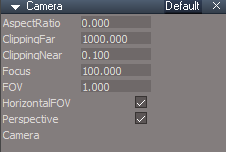
Try this, in the Link Editor, enter the Camera, select the Camera node and check HorizontalFOV
Now drag the bottom frame up and down as you said
Both view window behaviors act the same
With the Camera unselected, adjust the Camera's FOV in the top-level panel
HorizontalFOV.png
HorizontalFOV.png (5.44 KiB) Viewed 3643 times
User avatar
clintonman
Captain
Posts: 5659
Joined: 21 May 2009, 21:08
Type the number ten into the box: 0
Location: California

Re: Workspace and Modeler camera not matching

Post by clintonman »

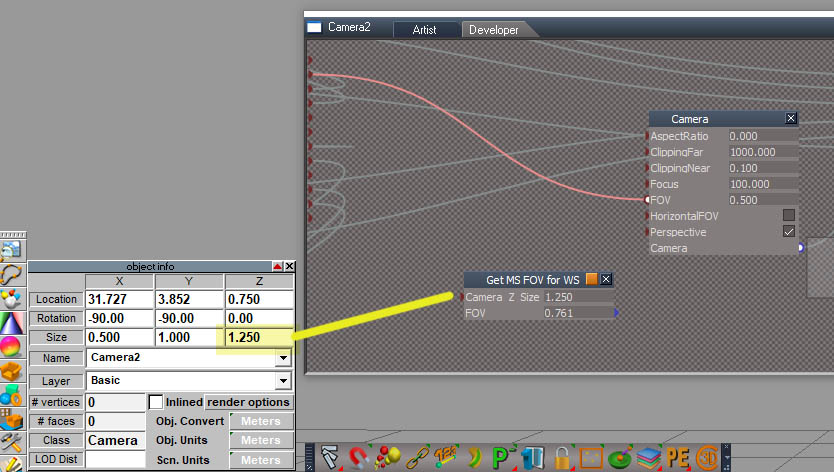
Here's the trick. Modelspace horizontal FOV is controlled by the Z size value which is the zoom. This has to be converted to a FOV value with some math. Set the FOV on the camera from the script then go inside the camera and set HorizontalFOV on/true/checked on the Camera node.
Attachments
Get MS FOV for WS.RsObj
(20.25 KiB) Downloaded 177 times
Clinton Reese

http://clintons3d.com
User avatar
trueBlue
Captain
Posts: 5548
Joined: 06 Jul 2009, 22:50
Type the number ten into the box: 10

Re: Workspace and Modeler camera not matching

Post by trueBlue »

clintonman wrote: 12 Dec 2022, 19:15 Here's the trick. Modelspace horizontal FOV is controlled by the Z size value which is the zoom. This has to be converted to a FOV value with some math. Set the FOV on the camera from the script then go inside the camera and set HorizontalFOV on/true/checked on the Camera node.
Nice
I think you mean hook it up to the Camera node?
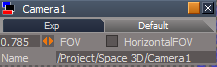
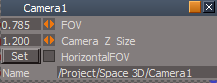
Here is a tS7.6 Camera1 with it hooked up and the HorizontalFOV exported to the top panel
Camera1.png
Camera1.png (5.66 KiB) Viewed 2508 times
Removed due to update
User avatar
clintonman
Captain
Posts: 5659
Joined: 21 May 2009, 21:08
Type the number ten into the box: 0
Location: California

Re: Workspace and Modeler camera not matching

Post by clintonman »

trueBlue wrote: 12 Dec 2022, 19:58
clintonman wrote: 12 Dec 2022, 19:15 Here's the trick. Modelspace horizontal FOV is controlled by the Z size value which is the zoom. This has to be converted to a FOV value with some math. Set the FOV on the camera from the script then go inside the camera and set HorizontalFOV on/true/checked on the Camera node.
Nice
I think you mean hook it up to the Camera node?
...
No, you have to type in the value for the camera z size to get the fov value.
Clinton Reese

http://clintons3d.com
User avatar
trueBlue
Captain
Posts: 5548
Joined: 06 Jul 2009, 22:50
Type the number ten into the box: 10

Re: Workspace and Modeler camera not matching

Post by trueBlue »

clintonman wrote: 12 Dec 2022, 20:19
trueBlue wrote: 12 Dec 2022, 19:58
clintonman wrote: 12 Dec 2022, 19:15 Here's the trick. Modelspace horizontal FOV is controlled by the Z size value which is the zoom. This has to be converted to a FOV value with some math. Set the FOV on the camera from the script then go inside the camera and set HorizontalFOV on/true/checked on the Camera node.
Nice
I think you mean hook it up to the Camera node?
...
No, you have to type in the value for the camera z size to get the fov value.
I hooked up the FOV to your script and the output to the Camera node
Isn’t that the same thing?
User avatar
clintonman
Captain
Posts: 5659
Joined: 21 May 2009, 21:08
Type the number ten into the box: 0
Location: California

Re: Workspace and Modeler camera not matching

Post by clintonman »

trueBlue wrote: 12 Dec 2022, 21:21
clintonman wrote: 12 Dec 2022, 20:19
trueBlue wrote: 12 Dec 2022, 19:58
Nice
I think you mean hook it up to the Camera node?
...
No, you have to type in the value for the camera z size to get the fov value.
I hooked up the FOV to your script and the output to the Camera node
Isn’t that the same thing?
CameraZoom.jpg
Z Size value from model space is the Zoom value
It is needed to calculate the FOV value for workspace
Hooking up Camera_Z_Size and calling it FOV isn't what's happening.

ZoomAndFOV.jpg
2 identical cameras one has zoom connected to FOV, one is just ordinary FOV, both show the same FOV value. Same FOV should look the same.

You asked if I meant to hook it up and the answer is no, I meant to just type a value in and get a value out. There's nothing to stop hooking it up, but I would make a command script instead that just sets the FOV value when needed.
Clinton Reese

http://clintons3d.com
User avatar
trueBlue
Captain
Posts: 5548
Joined: 06 Jul 2009, 22:50
Type the number ten into the box: 10

Re: Workspace and Modeler camera not matching

Post by trueBlue »

Okay, I see
Here is a new tS7.6 version that uses a jScript command
Camera1.png
Camera1.png (6.71 KiB) Viewed 2513 times
.
The Set button runs your script and sets the Camera's FOV from your script's results (FOV out)
Then you check the HorizontalFOV

But when I Set it using the Camera's Z Size, Model's Camera's Z Size changes to a different value
Have not tried rendering anything yet but visually the Model view and the Workspace view seems simi different
The window(s) behaviors seem to be working

Anyway, only wanted to create a tS7.6 version because your original script crashes tS7.6
Attachments
Camera1.RsObj
(32.47 KiB) Downloaded 127 times
User avatar
clintonman
Captain
Posts: 5659
Joined: 21 May 2009, 21:08
Type the number ten into the box: 0
Location: California

Re: Workspace and Modeler camera not matching

Post by clintonman »

trueBlue wrote: 13 Dec 2022, 00:00 ...
.
The Set button runs your script and sets the Camera's FOV from your script's results (FOV out)
Then you check the HorizontalFOV

But when I Set it using the Camera's Z Size, Model's Camera's Z Size changes to a different value
...
Oh, maybe it doesn't work well with the synchronize script.

trueBlue wrote: 13 Dec 2022, 00:00 ...

Anyway, only wanted to create a tS7.6 version because your original script crashes tS7.6
:o Do all tS7.61 scripts crash tS7.6 ?
Clinton Reese

http://clintons3d.com
User avatar
trueBlue
Captain
Posts: 5548
Joined: 06 Jul 2009, 22:50
Type the number ten into the box: 10

Re: Workspace and Modeler camera not matching

Post by trueBlue »

No synchronize scripts in tS7.6, synchronization works in tS7.6
tS7.61 objects are not backwards compatible
User avatar
clintonman
Captain
Posts: 5659
Joined: 21 May 2009, 21:08
Type the number ten into the box: 0
Location: California

Re: Workspace and Modeler camera not matching

Post by clintonman »

I did some more tests. Didn't notice before that changes in workspace or model will update the other side.
It looks like the script needs to be run with the bridge off, otherwise the bridge just sends bad values across. Which it will do again when it is turned back on.
Another option would be to remove the FOV connection from the camera.
Clinton Reese

http://clintons3d.com
User avatar
clintonman
Captain
Posts: 5659
Joined: 21 May 2009, 21:08
Type the number ten into the box: 0
Location: California

Re: Workspace and Modeler camera not matching

Post by clintonman »

trueBlue wrote: 13 Dec 2022, 00:30 No synchronize scripts in tS7.6, synchronization works in tS7.6
tS7.61 objects are not backwards compatible
Did some tests with empty scripts from 7.61 in 7.6.
Load jScript command does nothing
Load jScript object gives an error
Load jScript Function Set came in without any errors
I added some code to the jScript Function Set and it still loaded just fine.

I think the jScript object runs itself, so if it's not empty it will crash trueSpace 7.6

So it looks like only the jScript object from 7.61 will make 7.6 crash.

Technical note: The jScript object works poorly as a simple calculator in 7.6 unless the input is set to "Update on Change"
Clinton Reese

http://clintons3d.com
User avatar
Emmanuel
Chief Warrant Officer
Posts: 670
Joined: 14 Jun 2009, 06:47

Re: Workspace and Modeler camera not matching

Post by Emmanuel »

Many thanks, both of you.

Your tool Clinton does the job : Adjusting the WS FOV once for all to match the same frame is the trick. Too bad it is not stored with the scn file (I can store the right FOV setting along with an Object Note attaached to the Modeler camera though).

I wonder if we could make a special Modeler camera that sends a different Z value to the Bridge. This would do the trick from the other way : adjust the frame from Modeler side and leave the Workspace camera unchanged.

Perhaps, a tsX could handle such thing. It would handle two versions of the camera : one that displays in Modeler, and an other one (with adjustable Z value) that will send its values to the Bridge...
User avatar
trueBlue
Captain
Posts: 5548
Joined: 06 Jul 2009, 22:50
Type the number ten into the box: 10

Re: Workspace and Modeler camera not matching

Post by trueBlue »

Just discovered that the Object Scale tool adjust the Camera's FOV in Model and Workspace
Emmanuel, can you test this out and see if it resolves your issue with the Workspace and Model camera not matching?
Testing in tS7.6
Bridge is set to Auto
For this test I have docked a Model window in the main window on the left using the Default layout with Workspace on the right
Both with the same window inner dimensions
Loaded a normal Model camera and used View from Object
Also Set the same Camera in Workspace to view from
Open Model's Information panel with the Camera selected

Use the Object Scale tool adjust the Camera's FOV in Model and or Workspace
Note the Z Scale in Workspace's Information panel will update the same as Model's Size Z
Model shows X Size @ half the Workspace's X Scale
User avatar
Emmanuel
Chief Warrant Officer
Posts: 670
Joined: 14 Jun 2009, 06:47

Re: Workspace and Modeler camera not matching

Post by Emmanuel »

trueBlue, I think you don't understand the problem here.
It is not a synchronization problem. Workspace camera updates its FOV according to Modeler's Z value pretty well, but the frame is different on identical windows sizes.

See this screen capture on my 2013 post :
camera matching.jpg
You see ?
- Same camera, same windows sizes...
- But on Modeler the distance (in yellow) between the cubes and the border of the frame is different to the distance in the WS window (in green).

If I change the Z value in Modeler, it also changes the FOV in WS and there is always a difference.

Clinton's tool allows to adjust the FOV in workspace ONLY, and keep the same Z value in Modeler side. This allows to make both windows to show identical framing. :bananaclaus:

Before Clinton's tool, my workaround was to duplicate the camera, so I can have one for Modeler (say it is CAMERA 1) and one for Workspace (call it CAMERA 2) : both are at the same exact location, but the Z value was slightly different.
When creating the composition, CAMERA 1 was set as the eye in Modeler window, and CAMERA 2 as the eye in WP window. The cameras can't be glued together though, so it was not easy to handle.

Clinton's tool is for tS7.61 only though (it makes tS7.6 to crash).
User avatar
clintonman
Captain
Posts: 5659
Joined: 21 May 2009, 21:08
Type the number ten into the box: 0
Location: California

Re: Workspace and Modeler camera not matching

Post by clintonman »

Emmanuel wrote: 14 Dec 2022, 14:56 trueBlue, I think you don't understand the problem here.
It is not a synchronization problem. Workspace camera updates its FOV according to Modeler's Z value pretty well, but the frame is different on identical windows sizes.

See this screen capture on my 2013 post :

camera matching.jpg

You see ?
- Same camera, same windows sizes...
- But on Modeler the distance (in yellow) between the cubes and the border of the frame is different to the distance in the WS window (in green).

If I change the Z value in Modeler, it also changes the FOV in WS and there is always a difference.

Clinton's tool allows to adjust the FOV in workspace ONLY, and keep the same Z value in Modeler side. This allows to make both windows to show identical framing. :bananaclaus:

Before Clinton's tool, my workaround was to duplicate the camera, so I can have one for Modeler (say it is CAMERA 1) and one for Workspace (call it CAMERA 2) : both are at the same exact location, but the Z value was slightly different.
When creating the composition, CAMERA 1 was set as the eye in Modeler window, and CAMERA 2 as the eye in WP window. The cameras can't be glued together though, so it was not easy to handle.

Clinton's tool is for tS7.61 only though (it makes tS7.6 to crash).
Here's a version that won't crash tS7.6
Attachments
Get MS FOV for WS71ec.RsObj
(23.29 KiB) Downloaded 191 times
Clinton Reese

http://clintons3d.com
User avatar
trueBlue
Captain
Posts: 5548
Joined: 06 Jul 2009, 22:50
Type the number ten into the box: 10

Re: Workspace and Modeler camera not matching

Post by trueBlue »

Emmanuel wrote: 14 Dec 2022, 14:56 trueBlue, I think you don't understand the problem here.
It is not a synchronization problem. Workspace camera updates its FOV according to Modeler's Z value pretty well, but the frame is different on identical windows sizes.

See this screen capture on my 2013 post :

camera matching.jpg

You see ?
- Same camera, same windows sizes...
- But on Modeler the distance (in yellow) between the cubes and the border of the frame is different to the distance in the WS window (in green).

If I change the Z value in Modeler, it also changes the FOV in WS and there is always a difference.

Clinton's tool allows to adjust the FOV in workspace ONLY, and keep the same Z value in Modeler side. This allows to make both windows to show identical framing. :bananaclaus:

Before Clinton's tool, my workaround was to duplicate the camera, so I can have one for Modeler (say it is CAMERA 1) and one for Workspace (call it CAMERA 2) : both are at the same exact location, but the Z value was slightly different.
When creating the composition, CAMERA 1 was set as the eye in Modeler window, and CAMERA 2 as the eye in WP window. The cameras can't be glued together though, so it was not easy to handle.

Clinton's tool is for tS7.61 only though (it makes tS7.6 to crash).
I see!
I was mostly pointing out that you can adjust the FOV using the Scale tool, I did not know that
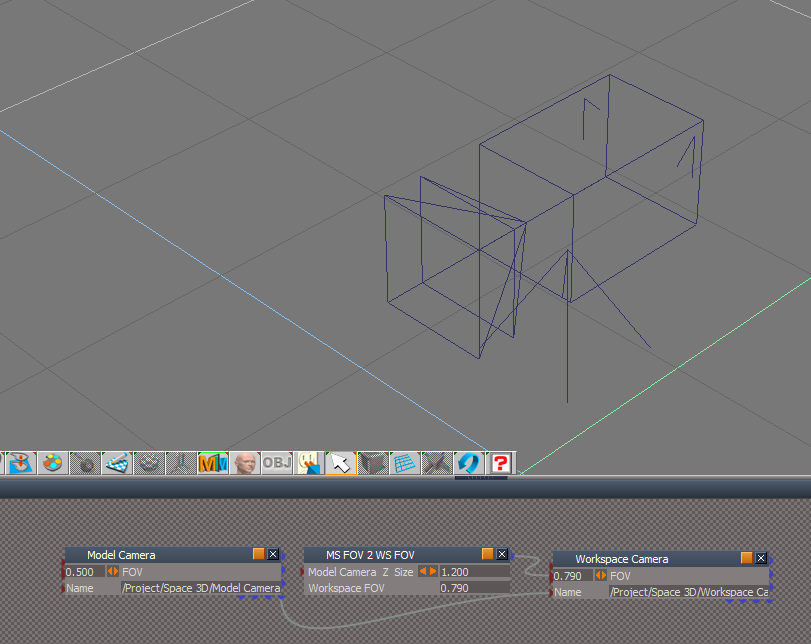
By the way, you can parent the Model Camera to the Workspace Camera at the same location if desired
Looks like Clinton's script saves with the scn too
Here is an example tS7.6 scn
Just select the Model Camera (the Parent) when moving wherever and the Workspace Camera is attached
Parented Cams.png
Attachments
MS FOV 2 WS FOV.scn
(268.6 KiB) Downloaded 123 times
User avatar
Emmanuel
Chief Warrant Officer
Posts: 670
Joined: 14 Jun 2009, 06:47

Re: Workspace and Modeler camera not matching

Post by Emmanuel »

trueBlue wrote: 14 Dec 2022, 23:27 By the way, you can parent the Model Camera to the Workspace Camera at the same location if desired
clintonman wrote: 14 Dec 2022, 16:12 Here's a version that won't crash tS7.6
You are the bosses ! :bananaclaus: :bananaguitar: :bananaclaus: :bananaguitar:

Return to “TechForum”