Hi guys...help!
I've been using TS for some uni work, and for no apparent reason this mesh has been absolutely plagued with an unknown crash error . It opened fine last night, I made no changes to the model itself and now it just won't open and my backups have come down with the same problem.
Things I've tried and have failed with the same problem
-Rescuing the model using the .bak file (had to resort to that once before)
-Opening it with Truespace 7.6 and not 6.6...to partial success, it opens...sometimes but then crashes anywhere between 1 second and 1 minute afterwards
-Fiddling about with compatability settings to no avail
For touchy policy reasons I can't upload it straight to the forum, but if anyone is up for it I'm happy to email the .scn and .bak files to them to see if they can open it and save the critical components as .obj files?
ATB
Steve
Help with a .scn recovery
-
Steve

- Master Chief Petty Officer
- Posts: 394
- Joined: 29 Jun 2009, 10:20
- Type the number ten into the box: 0
- Location: Hiding (Like a ninja)
Help with a .scn recovery
-
Steve
- Master Chief Petty Officer
- Posts: 394
- Joined: 29 Jun 2009, 10:20
- Type the number ten into the box: 0
- Location: Hiding (Like a ninja)
Re: Help with a .scn recovery
Okay so
In the last hour I discovered that I could in fact do things with it in TS 7.6, if I left it for a while, tried to open it again it would briefly providing I made no sudden movements and didn't look at it funny
Next problem is it wouldn't save as any native Truespace object or file (joy). It wouldn't open any dialogue box I accessed through a menu, so no resucing the parts as a .cob file! And bypassing the menu by hitting Ctrl+A to save it as a different scene would just come up with an error shortly followed by it keeling over and dying.
So, to get around it, it allowed me to install .tsx plugins, so I installed Luuv. Removed all subD layers, deleted all non-essential components and exported it (in record time too...I had two failed attempts where it crashed before I could complete the operation!). And blow me down it worked!
Now I'm going to try and recover the non-essential stuff as a separate object
In the last hour I discovered that I could in fact do things with it in TS 7.6, if I left it for a while, tried to open it again it would briefly providing I made no sudden movements and didn't look at it funny
Next problem is it wouldn't save as any native Truespace object or file (joy). It wouldn't open any dialogue box I accessed through a menu, so no resucing the parts as a .cob file! And bypassing the menu by hitting Ctrl+A to save it as a different scene would just come up with an error shortly followed by it keeling over and dying.
So, to get around it, it allowed me to install .tsx plugins, so I installed Luuv. Removed all subD layers, deleted all non-essential components and exported it (in record time too...I had two failed attempts where it crashed before I could complete the operation!). And blow me down it worked!
Now I'm going to try and recover the non-essential stuff as a separate object
-
Prodigy

- Site Admin
- Posts: 957
- Joined: 21 May 2009, 14:46
- Type the number ten into the box: 0
- Location: Uruguay
Re: Help with a .scn recovery
long time i no use model side.. but i remember save scenes as 6.x instead the last ones.. can't remember why but for sure was to avoid a bug or something wrong with saving scenes or cobs at the latest file format..
HTH
HTH
๑۩۞۩๑ prodigy ๑۩۞۩๑
-
BNG

- Chief Warrant Officer
- Posts: 684
- Joined: 16 Oct 2009, 03:26
- Type the number ten into the box: 0
- Location: Texas
Re: Help with a .scn recovery
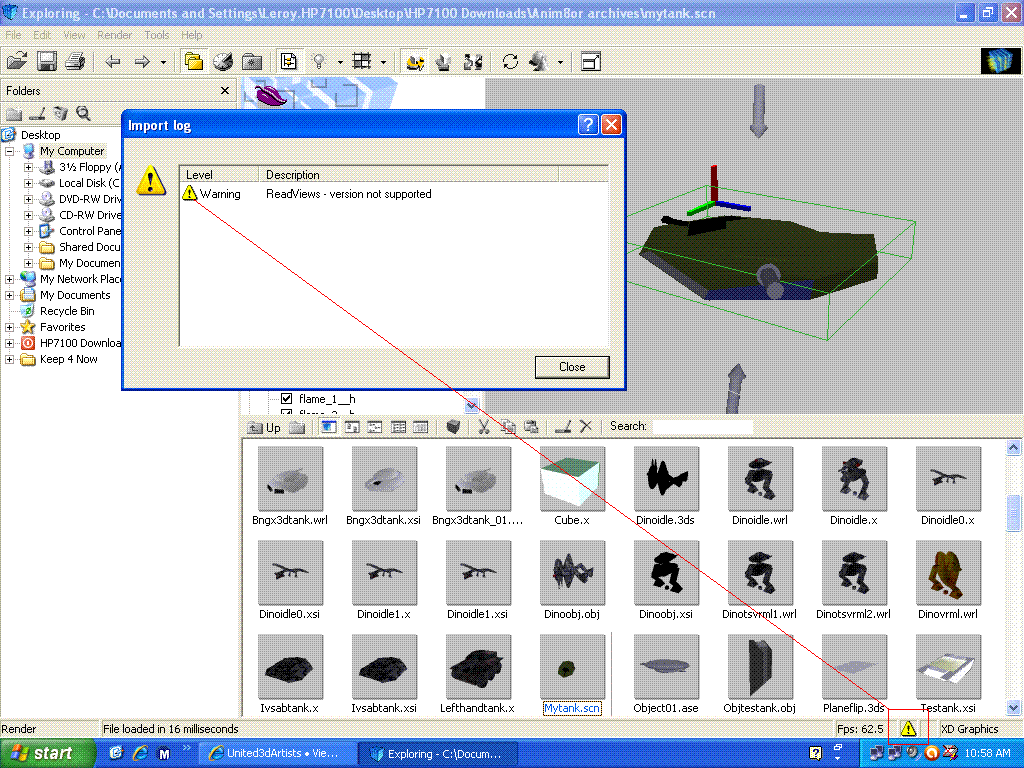
Have you tried opening it in another application like 3D Exploration? 3DEX, has an error checking utility built into the software. I use an older free version 1.5.5. 3DEX should display a small warning triangle in the lower right hand corner of 3DEX when the file is selected. Double click the Yellow triangle to open up a message box showing any errors it flagged. You can also try converting the SCN file to another format or even a COB model file. You can get several different free versions @ this link> http://www.bzscrap.org/downloads/Utilities/BZ2/3De/" Good luck. Leroy.
- Attachments
-
Casual Truespace 3D modeling hobbyist. My Truespace blog and simple 3d Modeling Tutorials for Casual Model Makers.
-
Steve
- Master Chief Petty Officer
- Posts: 394
- Joined: 29 Jun 2009, 10:20
- Type the number ten into the box: 0
- Location: Hiding (Like a ninja)
Re: Help with a .scn recovery
That's a seriously helpful link, so many bananas for you! 
It's all recovered now...though it's still crashing at silly points but then we all know how unstable TS is in reality.
I think I've traced the problem back to the shaderlab plugin I've got running on it...so it could be some direct X incompatability, who knows
It's all recovered now...though it's still crashing at silly points but then we all know how unstable TS is in reality.
I think I've traced the problem back to the shaderlab plugin I've got running on it...so it could be some direct X incompatability, who knows