I've lost the top-right toolbar, the one that controls "amount of anti-aliasing", "background color", etc. This has happened before but this time "reset toolbar layout" doesn't help.
I pulled up the "icon helper" and tried to reconstruct it, but I can only pull out individual icons, not the toolbar as a whole. Furthermore, the icons won't "nest"; i.e. "no anti-aliasing" sits NEXT to "adaptive" instead of them being stacked with only the current selection visible.
Thanks in advance for any assistance.
Retrieving a toolbar
-
Neutrino
- Seaman
- Posts: 6
- Joined: 05 Apr 2010, 00:07
Retrieving a toolbar
-
spacekdet

- Captain
- Posts: 1810
- Joined: 27 May 2009, 15:00
- Type the number ten into the box: 10
- Location: On the day shift at the Utility Muffin Research Kitchen
Re: Retrieving a toolbar
I'm guessing this is on the Model side?
Does it return when you right click the 'Render Scene to File' icon?
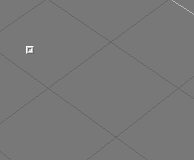
It may also be minimized... look for a tiny gray 'chiclet':
Hover over it to expand toolbar, click once to pin it open, click twice to pin it open in it's fully flown-out glory.
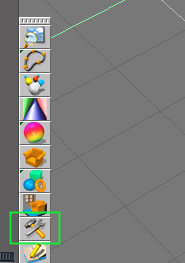
Open the Configuration Library and then try loading one of the existing configs. See if the toolbar reappears.
(Might want to save your existing layout first if you've spent a lot of time customizing it.)
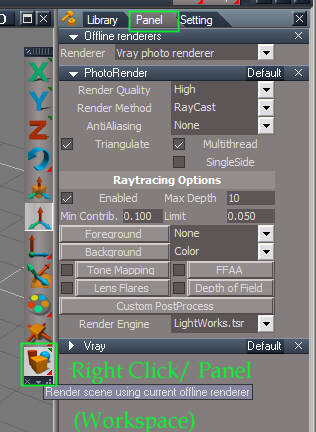
If it's Workspace side, all those settings are now in the Stack view:
Right click the render icon, open the stack, and then click Panel.
Does it return when you right click the 'Render Scene to File' icon?
It may also be minimized... look for a tiny gray 'chiclet':
Hover over it to expand toolbar, click once to pin it open, click twice to pin it open in it's fully flown-out glory.
- minimz_toolbr.jpg (2.6 KiB) Viewed 3741 times
(Might want to save your existing layout first if you've spent a lot of time customizing it.)
- config_lib_loc8.jpg (9.51 KiB) Viewed 3741 times
-
spacekdet
- Captain
- Posts: 1810
- Joined: 27 May 2009, 15:00
- Type the number ten into the box: 10
- Location: On the day shift at the Utility Muffin Research Kitchen
Re: Retrieving a toolbar
Doh. Give me an E for 'reading comprehension'... I didn't see that your question was posted under tS 6.6.
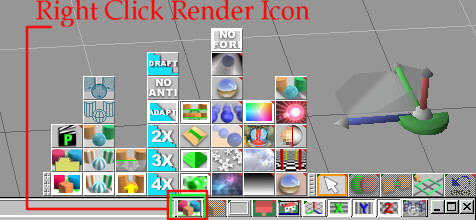
In that case...right click the render/render to file icon, the toolbar should pop back up. It might be minimized, so look for the little square.
It's not lost, it just hides until you need it. Right-click on render icon toggles visibility of rendering options toolbar.
If it's really, really gone, reloading a fresh config from the Library should bring it back.
You'll have to re-do any other customizations to other toolbars/windows, etc.
Save As your new config in the Library when you get it the way you want, then restart tS.
(If you crash out, the Library may not retain the latest changes.)
In that case...right click the render/render to file icon, the toolbar should pop back up. It might be minimized, so look for the little square.
If it's really, really gone, reloading a fresh config from the Library should bring it back.
You'll have to re-do any other customizations to other toolbars/windows, etc.
Save As your new config in the Library when you get it the way you want, then restart tS.
(If you crash out, the Library may not retain the latest changes.)
-
Jimmer
- Chief Petty Officer
- Posts: 122
- Joined: 22 May 2009, 11:54
Re: Retrieving a toolbar
ALLWAYS save YOUR layout in the Config Library. That way if you ever have a problem, just go to it, CLICK and your back at home base. I back mine up
to a memory card too with my tS6.6. Remember, before exiting tS it's also
a good idea to clear the scene. (In case theres a problem
with the scene file in some way). tS will allways start up fresh with your
current LayOut.
to a memory card too with my tS6.6. Remember, before exiting tS it's also
a good idea to clear the scene. (In case theres a problem
with the scene file in some way). tS will allways start up fresh with your
current LayOut.
-
Neutrino
- Seaman
- Posts: 6
- Joined: 05 Apr 2010, 00:07
Re: Retrieving a toolbar
Thanks, Spacekdet. The right-click restored everything except my pride. 
And thanks, Jimmer. I've saved the configuration. The horse might get out of the barn again.
And thanks, Jimmer. I've saved the configuration. The horse might get out of the barn again.