tS761 First Person Navigator
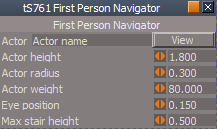
Default aspect
* Select the View button to view from it's camera.
* Once you are viewing from it's camera you can enable
the FPN from tS761 normaly.
* In Shared Space each User will have to have there own copy.
* Change the Actor name to your own name.
* Right click the FPN icon and select your name from the
Actor template's drop down menu.
Physics aspect
* Select the Anti Gravity button to activate.
* Use your keyboard keys to navigate.
Q = Down
E = Up
tS761 First Person Navigator with Anti Gravity
-
trueBlue

- Captain
- Posts: 5548
- Joined: 06 Jul 2009, 22:50
- Type the number ten into the box: 10
tS761 First Person Navigator with Anti Gravity
- Attachments
-
- tS761 First Person Navigator.zip
- (30.2 KiB) Downloaded 278 times
-
- Capture2.PNG (5.86 KiB) Viewed 1860 times