 but my d/l was from when TS first became free. Is this because i re-installed and it now has no render engine?
re-nstalled 7.6 now has no scene render
-
seppgirty

- Master Chief Petty Officer
- Posts: 354
- Joined: 22 May 2009, 03:34
- Type the number ten into the box: 0
- Location: pittsburgh Pa.
re-nstalled 7.6 now has no scene render
as the title says, i re-installed 7.6 (version with model and work side.) now when i hit render object (in both sides) it says i have no offline render engine. it always used to render for me. i know there is a version out there that doesn't support virtulite but my d/l was from when TS first became free. Is this because i re-installed and it now has no render engine?
but my d/l was from when TS first became free. Is this because i re-installed and it now has no render engine?truespace 3.2, 5.2, 6.6, ani-pack, flash plugin,........ you can check out my films athttp://www.chaosbrosfilms.com
-
BNG

- Chief Warrant Officer
- Posts: 684
- Joined: 16 Oct 2009, 03:26
- Type the number ten into the box: 0
- Location: Texas
Re: re-nstalled 7.6 now has no scene render
I noticed that same issue with 7.61 Rosetta Standalone. Install 7.61 Beta 8 and you can use the Lightworks or Virtualight renderer. You'll also have access to TS 6.6 renderer functions as well.seppgirty wrote:as the title says, i re-installed 7.6 (version with model and work side.) now when i hit render object (in both sides) it says i have no offline render engine. it always used to render for me. i know there is a version out there that doesn't support virtulite
Casual Truespace 3D modeling hobbyist. My Truespace blog and simple 3d Modeling Tutorials for Casual Model Makers.
-
trueBlue

- Captain
- Posts: 5548
- Joined: 06 Jul 2009, 22:50
- Type the number ten into the box: 10
Re: re-nstalled 7.6 now has no scene render
When rendering from Model, use the Model's rendering tools located at the top. Not the Workspace's rendering tools located at the bottom. Vray must be installed in order to use Workspace's Offline Rendering.
-
seppgirty
- Master Chief Petty Officer
- Posts: 354
- Joined: 22 May 2009, 03:34
- Type the number ten into the box: 0
- Location: pittsburgh Pa.
Re: re-nstalled 7.6 now has no scene render
wow, now when ever i hit a render button in 6.6 mode i get a FATAL ERROR REPORT and it takes my cpu up to 100% and still can't get anything working on the 7.6 side 
could this be because i have TS 6.6 installed? maybe they are butting heads
i'm running windows xp SP3 ,AMD dual core, 2048 ram, navidia Geforce 6100 built-in graphics.
i'll try another install and see what that does.
thanks guys
could this be because i have TS 6.6 installed? maybe they are butting heads
i'm running windows xp SP3 ,AMD dual core, 2048 ram, navidia Geforce 6100 built-in graphics.
i'll try another install and see what that does.
thanks guys
truespace 3.2, 5.2, 6.6, ani-pack, flash plugin,........ you can check out my films athttp://www.chaosbrosfilms.com
-
spacekdet

- Captain
- Posts: 1810
- Joined: 27 May 2009, 15:00
- Type the number ten into the box: 10
- Location: On the day shift at the Utility Muffin Research Kitchen
Re: re-nstalled 7.6 now has no scene render
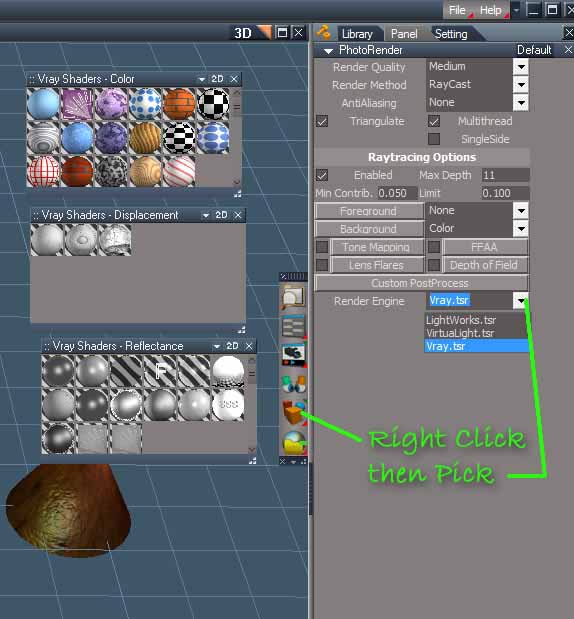
Switch to Workspace and right click render button.
In stack specify desired render engine.
Reinstall VRay via Package Manager icon if you have it.
In stack specify desired render engine.
Reinstall VRay via Package Manager icon if you have it.
- Attachments
-
-
Steinie

- Captain
- Posts: 2958
- Joined: 21 May 2009, 17:38
- Type the number ten into the box: 10
Re: re-nstalled 7.6 now has no scene render
I'm pretty sure the example you are showing doesn't work Spacekdet.
The drop down didn't work as I recall. It always used VRay if installed no matter
what you select.
The drop down didn't work as I recall. It always used VRay if installed no matter
what you select.
-
BNG
- Chief Warrant Officer
- Posts: 684
- Joined: 16 Oct 2009, 03:26
- Type the number ten into the box: 0
- Location: Texas
Re: re-nstalled 7.6 now has no scene render
Bummer, make sure you install to another directory if you have TS 6.6 installed seperately on your system.seppgirty wrote:wow, now when ever i hit a render button in 6.6 mode i get a FATAL ERROR REPORT and it takes my cpu up to 100% and still can't get anything working on the 7.6 side
could this be because i have TS 6.6 installed? maybe they are butting heads
i'm running windows xp SP3 ,AMD dual core, 2048 ram, navidia Geforce 6100 built-in graphics.
i'll try another install and see what that does.
thanks guys
Casual Truespace 3D modeling hobbyist. My Truespace blog and simple 3d Modeling Tutorials for Casual Model Makers.
-
seppgirty
- Master Chief Petty Officer
- Posts: 354
- Joined: 22 May 2009, 03:34
- Type the number ten into the box: 0
- Location: pittsburgh Pa.
Re: re-nstalled 7.6 now has no scene render
o.k.
i re-installed TS 7.6. it seems that turning BRIDGE to OFF solved the render problem on the 6.6 side of things it no longer crashes my cpu.
still trying to figure out how to render with lightworks on the 7.6 side. I DO NOT HAVE V-RAY (not yelling, just high lighting that ) Do i have to get an offline render to use with the 7.6 side?
pictures help alot for me space cadet
i just want to use my truebones bvh motions
ALSO: should i bump my ram from 2 gig to 3 gig? can you run a computer with a 2gig ram chip and a 1 gig ram chip? i've been told that your ram chips must be balanced. ....... example: two 1 gig chips, two 2 gig chips.
sorry for the long post and being a pain in the but
joe
i re-installed TS 7.6. it seems that turning BRIDGE to OFF solved the render problem on the 6.6 side of things
it no longer crashes my cpu.still trying to figure out how to render with lightworks on the 7.6 side. I DO NOT HAVE V-RAY (not yelling, just high lighting that
) Do i have to get an offline render to use with the 7.6 side?pictures help alot for me space cadet
i just want to use my truebones bvh motions
ALSO: should i bump my ram from 2 gig to 3 gig? can you run a computer with a 2gig ram chip and a 1 gig ram chip? i've been told that your ram chips must be balanced. ....... example: two 1 gig chips, two 2 gig chips.
sorry for the long post and being a pain in the but
joe
truespace 3.2, 5.2, 6.6, ani-pack, flash plugin,........ you can check out my films athttp://www.chaosbrosfilms.com
-
Steinie
- Captain
- Posts: 2958
- Joined: 21 May 2009, 17:38
- Type the number ten into the box: 10
Re: re-nstalled 7.6 now has no scene render
If the two banks of chips are different types and sizes then yes you might
be having memory problems. They should be the same.
The workSpace side still has real-time rendering which I use a lot. What you see is what
you get. I then use Photoshop to do my special effects. The end result matters most.
Lightworks on the Model side right? You can't use it on the workSpace side.
be having memory problems. They should be the same.
The workSpace side still has real-time rendering which I use a lot. What you see is what
you get. I then use Photoshop to do my special effects. The end result matters most.
Lightworks on the Model side right? You can't use it on the workSpace side.
-
seppgirty
- Master Chief Petty Officer
- Posts: 354
- Joined: 22 May 2009, 03:34
- Type the number ten into the box: 0
- Location: pittsburgh Pa.
Re: re-nstalled 7.6 now has no scene render
i have now upgraded to 7.6.1 beta8 and it seems to be running much smoother. no crashes as of yet
it's a bit upsetting that the 7.6 side doesn't have a built in render. i did find a plug-in that is supposed to let you use lightworks in the 7.6 side. it was built off of the blender fluid plug-in. i'll give it a whirl later and see if it works with 7.6.1 beta8
thanks for the info about ram chips Stenie.
is the lightworks render engine the one that was used in all the previous versions of truespace? i might be calling it by the wrong name.
it's a bit upsetting that the 7.6 side doesn't have a built in render. i did find a plug-in that is supposed to let you use lightworks in the 7.6 side. it was built off of the blender fluid plug-in. i'll give it a whirl later and see if it works with 7.6.1 beta8
thanks for the info about ram chips Stenie.
is the lightworks render engine the one that was used in all the previous versions of truespace? i might be calling it by the wrong name.
truespace 3.2, 5.2, 6.6, ani-pack, flash plugin,........ you can check out my films athttp://www.chaosbrosfilms.com
-
trueBlue
- Captain
- Posts: 5548
- Joined: 06 Jul 2009, 22:50
- Type the number ten into the box: 10
Re: re-nstalled 7.6 now has no scene render
Workspace? No but there is http://www.yafaray4ts.org/"seppgirty wrote:Do i have to get an offline render to use with the 7.6 side?
joe
-
seppgirty
- Master Chief Petty Officer
- Posts: 354
- Joined: 22 May 2009, 03:34
- Type the number ten into the box: 0
- Location: pittsburgh Pa.
Re: re-nstalled 7.6 now has no scene render
thanks guys for your help so far
i'm getting a little mixed up though with all the sides. let me see if i got this right.
WORK SPACE = the "new truespace".that uses the rossetta engine with rsn.scn and it doesn't have a built-in scene/object render engine. you need v-ray ,yafaray, or another.
model side is actually TS 6.6. so if i click on model tab or truespace 6.6 it is the same thing. and that has the built in lightworks/virtulight engines. i also see the 6.6 side is refered to as "legacey mode" in the forums
@trueblue
i will check out yafaray4ts. thanks for the info
i'm getting a little mixed up though with all the sides. let me see if i got this right.
WORK SPACE = the "new truespace".that uses the rossetta engine with rsn.scn and it doesn't have a built-in scene/object render engine. you need v-ray ,yafaray, or another.
model side is actually TS 6.6. so if i click on model tab or truespace 6.6 it is the same thing. and that has the built in lightworks/virtulight engines. i also see the 6.6 side is refered to as "legacey mode" in the forums
@trueblue
i will check out yafaray4ts. thanks for the info
truespace 3.2, 5.2, 6.6, ani-pack, flash plugin,........ you can check out my films athttp://www.chaosbrosfilms.com
-
trueBlue
- Captain
- Posts: 5548
- Joined: 06 Jul 2009, 22:50
- Type the number ten into the box: 10
Re: re-nstalled 7.6 now has no scene render
Workspace uses different formats like a scene.RsScn or an Object.RsObj among many others.seppgirty wrote:WORK SPACE = the "new truespace".that uses the rossetta engine with rsn.scn and it doesn't have a built-in scene/object render engine. you need v-ray ,yafaray, or another.
Model has new feautures and bug fixes. According to some users it is best to use tS7.6 if you want to use the Model side with the Bridge off. Use tS7.61Standalone for Workspace (It does not have the Model side)seppgirty wrote:model side is actually TS 6.6. so if i click on model tab or truespace 6.6 it is the same thing. and that has the built in lightworks/virtulight engines. i also see the 6.6 side is refered to as "legacey mode" in the forums
viewtopic.php?p=2043#p2043"
-
seppgirty
- Master Chief Petty Officer
- Posts: 354
- Joined: 22 May 2009, 03:34
- Type the number ten into the box: 0
- Location: pittsburgh Pa.
Re: re-nstalled 7.6 now has no scene render
thanks for the help guys. i am getting it figured out 
truespace 3.2, 5.2, 6.6, ani-pack, flash plugin,........ you can check out my films athttp://www.chaosbrosfilms.com