Hi Guys!
My old graphics card died and I need advice on what get. All my 3d work (20 years) is in trueSpace, so I need to know that what I get will play nice with TS. I don't use any other 3d apps so far.
I have:
Intel Core i7-870 2.93 8M 1333 with 8GB DDR3 1333MHz.
My dead card is a Gainward GeForce® GT 730 2048MB SilentFX Barcode: 426018336-3224
The store is recommending a SAPPHIRE NITRO Radeon™ R7 360 2G D5. Any comments? I have only had GeForce. I am not very savvy regarding card specs. I don't do any gaming--just graphics. My 3d work is product design---no scenes or animation.
Any advice would be GREATLY appreciated!
Janet
Graphics Cards
-
janetb
- Petty Officer Second Class
- Posts: 32
- Joined: 21 May 2009, 22:57
Graphics Cards
-
RAYMAN

- Captain
- Posts: 2547
- Joined: 21 May 2009, 18:56
Re: Graphics Cards
You probably dont need the latest greatest but I' d go forjanetb wrote:Hi Guys!
My old graphics card died and I need advice on what get. All my 3d work (20 years) is in trueSpace, so I need to know that what I get will play nice with TS. I don't use any other 3d apps so far.
I have:
Intel Core i7-870 2.93 8M 1333 with 8GB DDR3 1333MHz.
My dead card is a Gainward GeForce® GT 730 2048MB SilentFX Barcode: 426018336-3224
The store is recommending a SAPPHIRE NITRO Radeon™ R7 360 2G D5. Any comments? I have only had GeForce. I am not very savvy regarding card specs. I don't do any gaming--just graphics. My 3d work is product design---no scenes or animation.
Any advice would be GREATLY appreciated!
Janet
good Cuda support ...not for Ts but most graphics programs that render fast mostly rely on that..so thats my advice
for you! Other then that..nothing special!
If you have enough money there is one gadget to look into
its a small pad from Wacom! Its the greatest Ive used
for the last years...bare of nothing!!!!!!!!! GREATEST TS EXPERIENCE EVER !
 ....it comes with i3 up to
I7 depending on your budget..and lets you run 3d outside of your
home in any place ! You can use it as a Monitor on any computer.... if you wish its like an ipad its at weee bit bigger but you can draw and work directly
with a stylus on the screen...!!! Its the best modeling experience Ive
ever had.....

For home use there is a Version without the built in Computer for around 800 $... the model with pute starts at around 1200 $
Best prograam to use it is ie zbrush and the liking... BUT Ts is awsome with it since it has the cage and direct manipulation possibilities !!
Its like modeling with clay!
Works with most 3d programs that run on windows 8 or 10
That all just as a sidenote!
Dont spend a fortune on a super duper card or a new Computer... save up for something like I mentioned above.. !
I got mine for Christmas.... I made myself this present and I´m adicted !
http://www.wacom.com/en-us/products/pen ... ompanion-2"
Peter
Any advice would be GREATLY appreciated!
Janet[/quote]
-
Draise

- Captain
- Posts: 3200
- Joined: 21 Sep 2009, 19:33
- Type the number ten into the box: 0
- Location: Bogota, Colombia
Re: Graphics Cards
Out of experience, an ATI card will recover from a memory crash much quicker than a Geforce, and I find it more stable in general.
For software sake, I would totally invest in a CUDA card (Nvidia) because there are some very good render engines based on CUDA. But other than that, the saying goes.. ATI will give you great colour, Nvidia will give you great tech (PhysX, CUDA cores, etc). GTX980ti is my dream card (for the price it is)
But for trueSpace, anything with DirectX 11 or even 12 would be compatible. I have a 2 gig Radeon and it has lasted me nearly 4 years now, no failures, few crashes, and if any, quick recovery with no data loss.
I draw on my Note 4, I would totally love a cintiq. Or even a Surface Pro 4, similar pencil tech. Drawing directly on screen is really one of the nicest pleasurable artistic things you can do.
For software sake, I would totally invest in a CUDA card (Nvidia) because there are some very good render engines based on CUDA. But other than that, the saying goes.. ATI will give you great colour, Nvidia will give you great tech (PhysX, CUDA cores, etc). GTX980ti is my dream card (for the price it is)
But for trueSpace, anything with DirectX 11 or even 12 would be compatible. I have a 2 gig Radeon and it has lasted me nearly 4 years now, no failures, few crashes, and if any, quick recovery with no data loss.
I draw on my Note 4, I would totally love a cintiq. Or even a Surface Pro 4, similar pencil tech. Drawing directly on screen is really one of the nicest pleasurable artistic things you can do.
-
Draise
- Captain
- Posts: 3200
- Joined: 21 Sep 2009, 19:33
- Type the number ten into the box: 0
- Location: Bogota, Colombia
Re: Graphics Cards
Oh, another good thing about ATI, is it's code and tech is usually open and much better for the economy of technology and progress. They also use a 3D sync code, OpenCL (CUDA alternative and opensource - ultimatley more efficient), and an open source version of it's physics system. I personally favour that technological model over Nvidias business model, bue due to the monopoly of Nvidia and the amazing render engines that run off it (Cycles-Blender, Redshift3D, Octane, Thea, etc)... I reluctantly will probably invest more in Nvidia.
-
MikomDude

- Captain
- Posts: 1930
- Joined: 04 Oct 2010, 11:12
- Type the number ten into the box: 0
- Location: The Hague, Netherlands
Re: Graphics Cards
Yeah pretty much any modern card, preferably with Cuda support will do when running trueSpace. If that's all you do, be careful you don't over-spend. An AMD Radeon R7 260X will probably be enough.
@Draise ATI doesn't exist anymore
@Draise ATI doesn't exist anymore
-
Draise
- Captain
- Posts: 3200
- Joined: 21 Sep 2009, 19:33
- Type the number ten into the box: 0
- Location: Bogota, Colombia
Re: Graphics Cards
Oh yeah..... they got bought out by AMD right? Meh, I never manage to keep up. lol 

-
Emmanuel

- Chief Warrant Officer
- Posts: 670
- Joined: 14 Jun 2009, 06:47
Re: Graphics Cards
+1Draise wrote:Out of experience, an ATI card will recover from a memory crash much quicker than a Geforce, and I find it more stable in general.
For software sake, I would totally invest in a CUDA card (Nvidia) because there are some very good render engines based on CUDA. But other than that, the saying goes.. ATI will give you great colour, Nvidia will give you great tech (PhysX, CUDA cores, etc). GTX980ti is my dream card (for the price it is)
But for trueSpace, anything with DirectX 11 or even 12 would be compatible. I have a 2 gig Radeon and it has lasted me nearly 4 years now, no failures, few crashes, and if any, quick recovery with no data loss.
AMD/ATI is my choice also, for the same reasons.
TrueSpace'Modeler side relies a lot on CPU even for real-time display. So any recent graphic card would fit.
Things may change if you are using Workspace side, and especially Workspace's real-time renderer to produce hi-resolution pictures (like 8000x8000 pixels) : here the maximum rendering resolution will depend on the graphic card memory : the more memory the larger image.
In Modeler side you can render up to 8000x8000 though (and more using Johny's arender plugin) with no regards to the graphic card specs.
-
BNG

- Chief Warrant Officer
- Posts: 684
- Joined: 16 Oct 2009, 03:26
- Type the number ten into the box: 0
- Location: Texas
Re: Graphics Cards
How old is your system? If it's pretty old then you might also consider just getting a newer PC/laptop. If the card died then other components may also in jeopardy of failing as well. I upgraded from XP to Windows 7 and the laptop I replaced it with already had better a better graphics card (Intel I think) then the old system and it had more memory to boot. Just food for thought though. Leroy.
Casual Truespace 3D modeling hobbyist. My Truespace blog and simple 3d Modeling Tutorials for Casual Model Makers.
-
janetb
- Petty Officer Second Class
- Posts: 32
- Joined: 21 May 2009, 22:57
Re: Graphics Cards
First of all, thanks to everyone who responded!
I find it difficult to compare specs because terminology is not consistent and numbers are not always in the same units.... .... Is there some article somewhere which shows equivalents (like "Core Clock" is "GPU Clockspeed")? I can sometimes see what is equivalent by the figures, but sometimes a measurement on one set of specs doesn't seem to have anything equivalent on a different card's set of specs.
This is the specs page for the Radeon:
http://www.sapphiretech.com/productdeti ... 6&lang=eng
Go to the "Specifications" button and note that there are two versions. The only diffs I find is in Memory Clock and Open GL version. Ironically, the one with the higher clockspeed seems to support a lower version of OpenGL...??
The GeForce GT730's are at: http://www. ... urn false;
CUDA isn't mention anywhere on the Radeon specs. Does that mean they are not good cards for 3d??
Thanks again,
Janet
I find it difficult to compare specs because terminology is not consistent and numbers are not always in the same units....
.... Is there some article somewhere which shows equivalents (like "Core Clock" is "GPU Clockspeed")? I can sometimes see what is equivalent by the figures, but sometimes a measurement on one set of specs doesn't seem to have anything equivalent on a different card's set of specs. This is the specs page for the Radeon:
http://www.sapphiretech.com/productdeti ... 6&lang=eng
Go to the "Specifications" button and note that there are two versions. The only diffs I find is in Memory Clock and Open GL version. Ironically, the one with the higher clockspeed seems to support a lower version of OpenGL...??
The GeForce GT730's are at: http://www. ... urn false;
CUDA isn't mention anywhere on the Radeon specs. Does that mean they are not good cards for 3d??
Thanks again,
Janet
-
RAYMAN
- Captain
- Posts: 2547
- Joined: 21 May 2009, 18:56
Re: Graphics Cards
I would go for nvidia Any better card will do!
Most apps for 3d now are cuda enhenced even the ones for Blender..
Apps like 3d coat rely on it etc.!
Most apps for 3d now are cuda enhenced even the ones for Blender..
Apps like 3d coat rely on it etc.!
-
Finis

- Captain
- Posts: 5410
- Joined: 21 May 2009, 18:26
- Type the number ten into the box: 0
- Location: America!
Re: Graphics Cards
Hi Janetb,
The AMD/ATI cards are great for gamers. The Nvidia based cards are better for CG artists since the fast GPU renders use cuda which is an Nvidia technology. TS doesn't use cuda but why not get a card that gives you the option of using the modern fast GPU boosted renders? For TS model side any cheap card is fine. Workspace real time render needs a recent enough version of DirectX and enough memory for your renders. For model side (or earlier versions of TS) the solid display also needs DirectX.
So the card stats that are most relevant are:
- DirectX 11 or higher (others please correct me if that's not the right version)
- Plenty of memory if you do very large renders (product design, I'm guessing you do)
- Many cuda cores so you are ready to render with modern GPU boosted software (high speed photo-realistic renders would be good for your line of work)
Clock speed and other stats are mostly of concern for gamers seeking high performance to avoid lags and artifacts in games. More is better but those stats are not so important for CG artists.
One version of the GT 730 you listed has 384 cuda cores, which is ok but not many, and 2048 MB (2GB) of memory which fairly standard. That version looks like a good choice to me. My card is similar and I am happy with its speed in GPU rendering (Iray).
The AMD/ATI cards are great for gamers. The Nvidia based cards are better for CG artists since the fast GPU renders use cuda which is an Nvidia technology. TS doesn't use cuda but why not get a card that gives you the option of using the modern fast GPU boosted renders? For TS model side any cheap card is fine. Workspace real time render needs a recent enough version of DirectX and enough memory for your renders. For model side (or earlier versions of TS) the solid display also needs DirectX.
So the card stats that are most relevant are:
- DirectX 11 or higher (others please correct me if that's not the right version)
- Plenty of memory if you do very large renders (product design, I'm guessing you do)
- Many cuda cores so you are ready to render with modern GPU boosted software (high speed photo-realistic renders would be good for your line of work)
Clock speed and other stats are mostly of concern for gamers seeking high performance to avoid lags and artifacts in games. More is better but those stats are not so important for CG artists.
One version of the GT 730 you listed has 384 cuda cores, which is ok but not many, and 2048 MB (2GB) of memory which fairly standard. That version looks like a good choice to me. My card is similar and I am happy with its speed in GPU rendering (Iray).
I prefer dangerous freedom over peaceful servitude. -- Thomas Jefferson/Jean Jacques Rousseau
-
janetb
- Petty Officer Second Class
- Posts: 32
- Joined: 21 May 2009, 22:57
Re: Graphics Cards
1. On the Radeon specs linked in my last letter, it doesn't seem to say anything about CUDA... So how would I know that it is supported??
2. What is Graphics Core Next (GCN)?
3. Why don't the Radeon specs list rpms?
4. How does 128 bit Memory Bus with DDR3 compare to 64 bit Memory Bus with GDDR5?
I would be grateful if someone knows how the strengths and weaknesses of different cards balance out could compare the specs. I will attach them here to make this easier:
To compare to what I had up till now, here's the defunct GeForce GTS 450 specs:
Thanks so much!!!
2. What is Graphics Core Next (GCN)?
3. Why don't the Radeon specs list rpms?
4. How does 128 bit Memory Bus with DDR3 compare to 64 bit Memory Bus with GDDR5?
I would be grateful if someone knows how the strengths and weaknesses of different cards balance out could compare the specs. I will attach them here to make this easier:
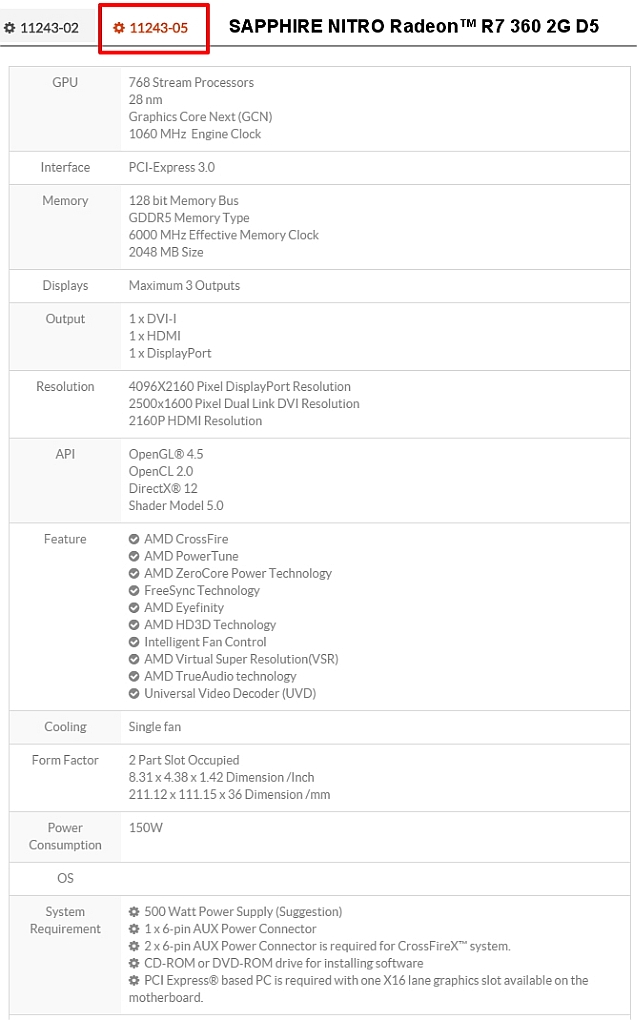


-
seppgirty

- Master Chief Petty Officer
- Posts: 354
- Joined: 22 May 2009, 03:34
- Type the number ten into the box: 0
- Location: pittsburgh Pa.
Re: Graphics Cards
I use a ASUS AMD RADEON graphics card HD 6670
1GB GDDR5 Dx 11 and have no problem using TS. (both sides)
I also game and have no problems.
Check out http://www.newegg.com they have great prices.
1GB GDDR5 Dx 11 and have no problem using TS. (both sides)
I also game and have no problems.
Check out http://www.newegg.com they have great prices.
truespace 3.2, 5.2, 6.6, ani-pack, flash plugin,........ you can check out my films athttp://www.chaosbrosfilms.com
-
janetb
- Petty Officer Second Class
- Posts: 32
- Joined: 21 May 2009, 22:57
Re: Graphics Cards
Still hoping to get responses to the 4 questions in my last post... ...
...
5. How important is the diff between GDDR5 and DDR3 relative to the other specs?
...5. How important is the diff between GDDR5 and DDR3 relative to the other specs?
-
Finis
- Captain
- Posts: 5410
- Joined: 21 May 2009, 18:26
- Type the number ten into the box: 0
- Location: America!
Re: Graphics Cards
Sometimes the stats aren't directly comparable since the different companies use different technologies/designs/architectures.
I'll try to answer your specific concerns and then review the card's specs for a "balance out" opinion. No expert here so give detailed tech info/analysis from others more weight than mine.
1. On the Radeon specs linked in my last letter, it doesn't seem to say anything about CUDA... So how would I know that it is supported??
Only cards using chips from Nvidia have cuda. These cards mostly have "GT", "GTX", or "Geforce" in the name. If it doesn't mention cuda in the specs then it doesn't have it. Radeon cards use AMD/ATI chips which don't have cuda.
2. What is Graphics Core Next (GCN)?
This is AMD's competitor for Nvidia's cuda technology. Programs that can use OpenCL can use GCN cards the way others use cuda. Currently the major gpu rendering programs are just for cuda.
3. Why don't the Radeon specs list rpms?
I don't know.
4. How does 128 bit Memory Bus with DDR3 compare to 64 bit Memory Bus with GDDR5?
This is a question of "slow in A and fast in B, fast in A and slow in B?". I would look at the memory bandwidth to measure this.
5. How important is the diff between GDDR5 and DDR3 relative to the other specs?
GDDR5 is much faster than DDR3 but 128 vs. 64 bits is too. Use memory bandwidth to compare memory performance of cards. Relative to other specs, great if you can get it (with the Radeon card you do) but more memory might be more important than faster for TS.
On Balance:
(GT 730 with gddr5 mem. for comparisons)
By their stats, on balance the Radeon R7 360 is much superior to the GT 730 and roughly twice as mighty as your GTS 450. The GT 730 is equal to or possibly a bit slower than your old card.
This is confirmed by benchmarks from here.
Overall performance (higher = better):
GTS 450 = 1546
GT 730 = 928
Radeon R7 360 = 3169
Value performance per dollar (higher = better):
GTS 450 = 24
GT 730 = 17
Radeon R7 360 = 30
So I revise my previous recommendation: If cuda or gpu rendering is not important to you get the Radeon. If it is then get the GT 730 or better.
Other:
The stats presented for the GTS and the GT 730 for clock speeds are not directly comparable but I think your old one is slightly faster. Its memory bandwidth is higher.
The Radeon needs a PCI-E 3.0 slot while the GT 730 fits in the same as your old one. Unlikely to be a problem but check that mobo for slots.
I'll try to answer your specific concerns and then review the card's specs for a "balance out" opinion. No expert here so give detailed tech info/analysis from others more weight than mine.
1. On the Radeon specs linked in my last letter, it doesn't seem to say anything about CUDA... So how would I know that it is supported??
Only cards using chips from Nvidia have cuda. These cards mostly have "GT", "GTX", or "Geforce" in the name. If it doesn't mention cuda in the specs then it doesn't have it. Radeon cards use AMD/ATI chips which don't have cuda.
2. What is Graphics Core Next (GCN)?
This is AMD's competitor for Nvidia's cuda technology. Programs that can use OpenCL can use GCN cards the way others use cuda. Currently the major gpu rendering programs are just for cuda.
3. Why don't the Radeon specs list rpms?
I don't know.
4. How does 128 bit Memory Bus with DDR3 compare to 64 bit Memory Bus with GDDR5?
This is a question of "slow in A and fast in B, fast in A and slow in B?". I would look at the memory bandwidth to measure this.
5. How important is the diff between GDDR5 and DDR3 relative to the other specs?
GDDR5 is much faster than DDR3 but 128 vs. 64 bits is too. Use memory bandwidth to compare memory performance of cards. Relative to other specs, great if you can get it (with the Radeon card you do) but more memory might be more important than faster for TS.
On Balance:
(GT 730 with gddr5 mem. for comparisons)
By their stats, on balance the Radeon R7 360 is much superior to the GT 730 and roughly twice as mighty as your GTS 450. The GT 730 is equal to or possibly a bit slower than your old card.
This is confirmed by benchmarks from here.
Overall performance (higher = better):
GTS 450 = 1546
GT 730 = 928
Radeon R7 360 = 3169
Value performance per dollar (higher = better):
GTS 450 = 24
GT 730 = 17
Radeon R7 360 = 30
So I revise my previous recommendation: If cuda or gpu rendering is not important to you get the Radeon. If it is then get the GT 730 or better.
Other:
The stats presented for the GTS and the GT 730 for clock speeds are not directly comparable but I think your old one is slightly faster. Its memory bandwidth is higher.
The Radeon needs a PCI-E 3.0 slot while the GT 730 fits in the same as your old one. Unlikely to be a problem but check that mobo for slots.
I prefer dangerous freedom over peaceful servitude. -- Thomas Jefferson/Jean Jacques Rousseau
-
janetb
- Petty Officer Second Class
- Posts: 32
- Joined: 21 May 2009, 22:57
Re: Graphics Cards
Our letters are crossing....Finis wrote:Hi Janetb,
The AMD/ATI cards are great for gamers. The Nvidia based cards are better for CG artists since the fast GPU renders use cuda which is an Nvidia technology. TS doesn't use cuda but why not get a card that gives you the option of using the modern fast GPU boosted renders? For TS model side any cheap card is fine. Workspace real time render needs a recent enough version of DirectX and enough memory for your renders. For model side (or earlier versions of TS) the solid display also needs DirectX.
So the card stats that are most relevant are:
- DirectX 11 or higher (others please correct me if that's not the right version)
- Plenty of memory if you do very large renders (product design, I'm guessing you do)
- Many cuda cores so you are ready to render with modern GPU boosted software (high speed photo-realistic renders would be good for your line of work)
Clock speed and other stats are mostly of concern for gamers seeking high performance to avoid lags and artifacts in games. More is better but those stats are not so important for CG artists.
One version of the GT 730 you listed has 384 cuda cores, which is ok but not many, and 2048 MB (2GB) of memory which fairly standard. That version looks like a good choice to me. My card is similar and I am happy with its speed in GPU rendering (Iray).
.... Instead of rewriting the letter below, which took me a long time to put together, I'm going to send it out as is.… You can respond accordingly. Would be very happy for others to chime in as well........Thanks Finis--that is useful info, and you are correct about in your assessments about what features I need and don't need.. Some questions (which will show my ignorance)

a. What is the difference between CUDA and non-CUDA cores? Are processors = cores?Are the Radeon's "768 Stream Processors" non-CUDA cores? Isn't 768 of those better than the GT730's (only) 384 CUDA cores? What is GCN (Graphic Core Next)?
b. If the Radeon has almost twice the cores AND twice the bits, isn't that better?
c. Will higher versions of DirectX which were created only after TS stopped development be problematic, or is DirectX always backward compatible?
d. Of the 64-bit GT730's, one has 1.8 memory speed/clock and 2048MB while the other has 5.0 memory speed/clock and 1024MB. How does this compare?
e. So far I have only used the Modeling side of TS, but I figured I should really eventually learn the Workspace side. One of the reasons I got TS way back when was because you could get a really nice look (I'm a goldsmith) of shiny metals without having to render--just by a good use of materials and lighting. But on more complicated pieces (with materials and lights), it was sometimes hard to move objects--there was a lag and you had to kind of wait, and then it would jump into place. So I had assumed it wasn't doing its calculations fast enough and that 'speed' would be important...
Bye for now,
Janet
-
Draise
- Captain
- Posts: 3200
- Joined: 21 Sep 2009, 19:33
- Type the number ten into the box: 0
- Location: Bogota, Colombia
Re: Graphics Cards
The Radeon you showed is definately bettr than the Nvidia cards you are looking into. Yes, more cores and a larger bus rate and faster clock speed will mostly definately make the card twice as fast - even if the memory size is the same or similar. Price for value is usually better with AMD cards. Unless you plan to use modern software that would rely on CUDA programing architecture, then don't worry too much about Nvidia.
A simple rule for buying a good card:
Cores (CUDA or GPU cores, "cores" is the key word): higher values are better - the architecture is not important for trueSpace. CUDA is just a programming architecture that is propriety to Nvidia used to calculate visual stuff. OpenCL - or GCN - is the alternative on AMD cards - opensource. Adobe uses OpenCL, most modern software uses CUDA. Gaming engines don't rely on CUDA. The trueSpace WS does not need CUDA. Direct X is backwards compatible.
GPU clock speed: the higher the hertz, the better.
Memory Bus rate: best at 128-256 bit. The higher the better (faster handling of memory) - if you have this low, though the memory is large - your card will still be relatively slow in data crunching.
Memory Size: Irrelevant unless you have large geometry or video caching issues. Important only for large scenes or render distances, or large data sets. 2-4 gig is adequate.
Memory type: Relevant, the latest technology can swap out data much quicker. So a 1 gig DDR3 will lag behind a 1 gig DDR5 card.
Memory speed: also relevant. A faster speed in the memory means you can use all your VRAM quicker. The size of the VRAM is irrelevant unless you have large data sets to work with.
RPM: This is for the fan, how fast it can go - to keep your card at optimum temperatures.
The ultimate question is: Are you a WYSIWYG rendering workflow type person (like me) with viewport shaders and game like lighting techniques? (Unreal for example, is free and works best on a great video card) - if that is the case. The card needs to just be GOOD and within your budget. AMD is good for that.
OR:
Are you rendering using a biased/unbiased ratraycing solution? If that is the case, the video card won't be of much help - and it's more about the CPU clock speed. ALSO, If the latter is the case - do you need a GPU accelerated raytracing solution? If that is the case, then you would need a CUDA (Nvidia) card.
A simple rule for buying a good card:
Cores (CUDA or GPU cores, "cores" is the key word): higher values are better - the architecture is not important for trueSpace. CUDA is just a programming architecture that is propriety to Nvidia used to calculate visual stuff. OpenCL - or GCN - is the alternative on AMD cards - opensource. Adobe uses OpenCL, most modern software uses CUDA. Gaming engines don't rely on CUDA. The trueSpace WS does not need CUDA. Direct X is backwards compatible.
GPU clock speed: the higher the hertz, the better.
Memory Bus rate: best at 128-256 bit. The higher the better (faster handling of memory) - if you have this low, though the memory is large - your card will still be relatively slow in data crunching.
Memory Size: Irrelevant unless you have large geometry or video caching issues. Important only for large scenes or render distances, or large data sets. 2-4 gig is adequate.
Memory type: Relevant, the latest technology can swap out data much quicker. So a 1 gig DDR3 will lag behind a 1 gig DDR5 card.
Memory speed: also relevant. A faster speed in the memory means you can use all your VRAM quicker. The size of the VRAM is irrelevant unless you have large data sets to work with.
RPM: This is for the fan, how fast it can go - to keep your card at optimum temperatures.
The ultimate question is: Are you a WYSIWYG rendering workflow type person (like me) with viewport shaders and game like lighting techniques? (Unreal for example, is free and works best on a great video card) - if that is the case. The card needs to just be GOOD and within your budget. AMD is good for that.
OR:
Are you rendering using a biased/unbiased ratraycing solution? If that is the case, the video card won't be of much help - and it's more about the CPU clock speed. ALSO, If the latter is the case - do you need a GPU accelerated raytracing solution? If that is the case, then you would need a CUDA (Nvidia) card.
-
jamesmc
- Captain
- Posts: 1776
- Joined: 08 Jul 2009, 15:35
Re: Graphics Cards
My Old card NVIDIA GTX 660 (cuda) serves me well. No complaints and it works on Windows 10.
My rule of thumb is Intel CPUs and NVidia GPUS
My rule of thumb is Intel CPUs and NVidia GPUS
Walk by faith, not by sight.
-
bitkar

- Captain
- Posts: 2089
- Joined: 16 Mar 2010, 07:14
- Type the number ten into the box: 0
- Location: Czech Republic
Re: Graphics Cards
Support competetion, dont make nvidia a monopoly, buy AMD! :)
(+ I think its a better value for money)
(+ I think its a better value for money)
Michal aka bitkar
tS freak since tS2 (1998) and forever (tS7.61 modeler)
tS freak since tS2 (1998) and forever (tS7.61 modeler)
-
Finis
- Captain
- Posts: 5410
- Joined: 21 May 2009, 18:26
- Type the number ten into the box: 0
- Location: America!
Re: Graphics Cards
Goldsmith! Really cool!
If you are not on a micro-budget you could stop worrying about the minute details of these cheap cards and get a big but affordable one like this. That covers all the bases for a reasonable price.
There are bargains to be had but at the price of closing the door to some good rendering options. So decide if you want to keep that door open to try fast photo-realistic renderers. The photo-looking physically accurate renderers would have obvious benefits in the product design business but sometimes art is better than realism. Marcel is a professional freelance designer (perfume bottles and such) who uses TS and his artist's talent to make images that are more real and more appealing than truly photo-real ones.
Of course you can use many photo-real renderers with cpu only. No cuda or GCN needed. The gpu renderers are much much faster but the resulting image is not better or worse.
If you are not on a micro-budget you could stop worrying about the minute details of these cheap cards and get a big but affordable one like this. That covers all the bases for a reasonable price.
There are bargains to be had but at the price of closing the door to some good rendering options. So decide if you want to keep that door open to try fast photo-realistic renderers. The photo-looking physically accurate renderers would have obvious benefits in the product design business but sometimes art is better than realism. Marcel is a professional freelance designer (perfume bottles and such) who uses TS and his artist's talent to make images that are more real and more appealing than truly photo-real ones.
Of course you can use many photo-real renderers with cpu only. No cuda or GCN needed. The gpu renderers are much much faster but the resulting image is not better or worse.
I prefer dangerous freedom over peaceful servitude. -- Thomas Jefferson/Jean Jacques Rousseau
-
RAYMAN
- Captain
- Posts: 2547
- Joined: 21 May 2009, 18:56
Re: Graphics Cards
Its all a question what programs do I use and what hardware !
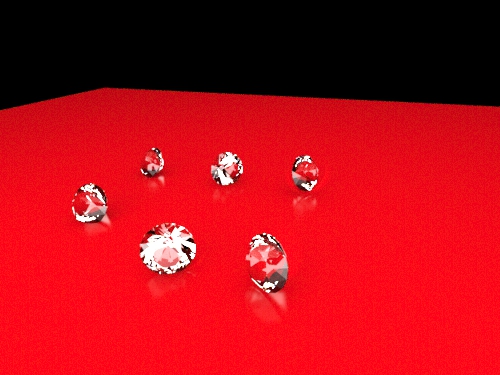
Regarding this test Scene ! Well ist an old test scene I made a few years ago and its still in the Kerkythea forums
for download ... but this takes just about one second to render in the preview at the size I enclose here !
This is a 3 year old Geforce GTX 460 SE ! OLD OLD OLD !! only 1024mb
Renders in 1 second !!! almost realtime.....
Download the demo.. ist full Version only it has watermarks in the render..
Enclosed is the test scene ! Enjoy !
Regarding this test Scene ! Well ist an old test scene I made a few years ago and its still in the Kerkythea forums
for download ... but this takes just about one second to render in the preview at the size I enclose here !
This is a 3 year old Geforce GTX 460 SE ! OLD OLD OLD !! only 1024mb
Renders in 1 second !!! almost realtime.....
Download the demo.. ist full Version only it has watermarks in the render..
Enclosed is the test scene ! Enjoy !
- Attachments
-
-
- Test scene.zip
- (555.27 KiB) Downloaded 278 times
-
janetb
- Petty Officer Second Class
- Posts: 32
- Joined: 21 May 2009, 22:57
Re: Graphics Cards
Hi! Are you the original Rayman from TS 4 days?!?!RAYMAN wrote: Regarding this test Scene !
This is a 3 year old Geforce GTX 460 SE ! OLD OLD OLD !! only 1024mb
Renders in 1 second !!! almost realtime.....
Download the demo.. ist full Version only it has watermarks in the render..
Enclosed is the test scene ! Enjoy !
Your file is strangely titled "diamonds.scn.thea". I removed the ".thea", but got an "Error opening file" window. But it did open, but with no objects. Or maybe it didn't open and I was just seeing my default lighting.
-
janetb
- Petty Officer Second Class
- Posts: 32
- Joined: 21 May 2009, 22:57
Re: Graphics Cards
That is what I was wondering. What sort of time differences are we talking about? My first renders way back when took a few days....Finis wrote: Of course you can use many photo-real renderers with cpu only. No cuda or GCN needed. The gpu renderers are much much faster but the resulting image is not better or worse.
....!! So are we talking seconds, minutes, or hours with cpu vs gpu renderers? Do all work equally well with TS?I'm really torn now. The Radeon sounds a much better value, but one of my main uses for 3d is/could be realistic renders. Over the past 20 years, I ended up spending much more time on photography and Photoshop when I saw TS was going more in the direction of animation and less in the direction of product design. Then when it collapsed, I was disheartened. I'm quite good at shooting jewelry now (shiny and reflective surfaces) and feel it would take A LOT of learning to get down the needed materials and lighting for realistic renders. Especially in an unsupported/non developing app such as TS..... On the other hand, my lighting knowledge is very useful and perhaps if the rendering was in real time (is it?) it would not be too difficult. The opportunity to check it out would be nice. But like I said, the Radeon seems to be a much better deal. Maybe I should take the advice of the poster who suggesting biting the bullet, paying the $ and getting a better CUDA card. What would be an Nvidia card comparable to the Radeon card?
-
janetb
- Petty Officer Second Class
- Posts: 32
- Joined: 21 May 2009, 22:57
Re: Graphics Cards
I didn't realize this was the fan speed.… Now I know why it doesn't list rpms--this particular GT730 has no fan!!! It is just about 2x3 inches! This is what made me suspicious at first, but I figured maybe the technology had changed. It was hard to find an image of this physically small GT730 on the internet--most of the pics looked like my old one which is about 8x4 and has a fan. Could this have something to do with the fact that I am in a 220V country?Finis wrote: 3. Why don't the Radeon specs list rpms?
I don't know.
-
RAYMAN
- Captain
- Posts: 2547
- Joined: 21 May 2009, 18:56
Re: Graphics Cards
Hi JanetB ! Yes ! I´m the Rayman from the old Forums !
With modern cuda cards we are talking about combined cpu and gpu rendering that are finished in seconds rather the minutes !!!
A good Cuda Card is good enough ! Dont get a headache over the specs.. ! Ist a difference between the Cards of seconds of rendertimes wit big files...not more
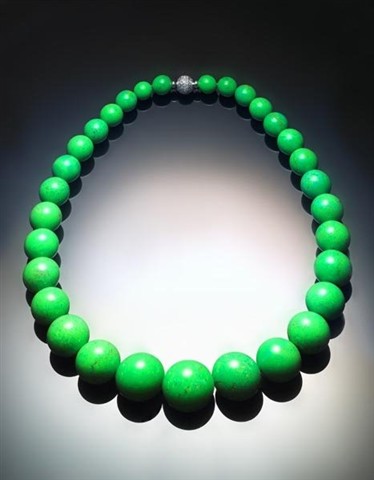
My profession is photography ! I´m a product and fashion PHotographerer !
Here are some samples..
With modern cuda cards we are talking about combined cpu and gpu rendering that are finished in seconds rather the minutes !!!
A good Cuda Card is good enough ! Dont get a headache over the specs.. ! Ist a difference between the Cards of seconds of rendertimes wit big files...not more
My profession is photography ! I´m a product and fashion PHotographerer !
Here are some samples..
- Attachments
-
-
-


-
RAYMAN
- Captain
- Posts: 2547
- Joined: 21 May 2009, 18:56
Re: Graphics Cards
Here are some more.....
- Attachments
-
-


-
Finis
- Captain
- Posts: 5410
- Joined: 21 May 2009, 18:26
- Type the number ten into the box: 0
- Location: America!
Re: Graphics Cards
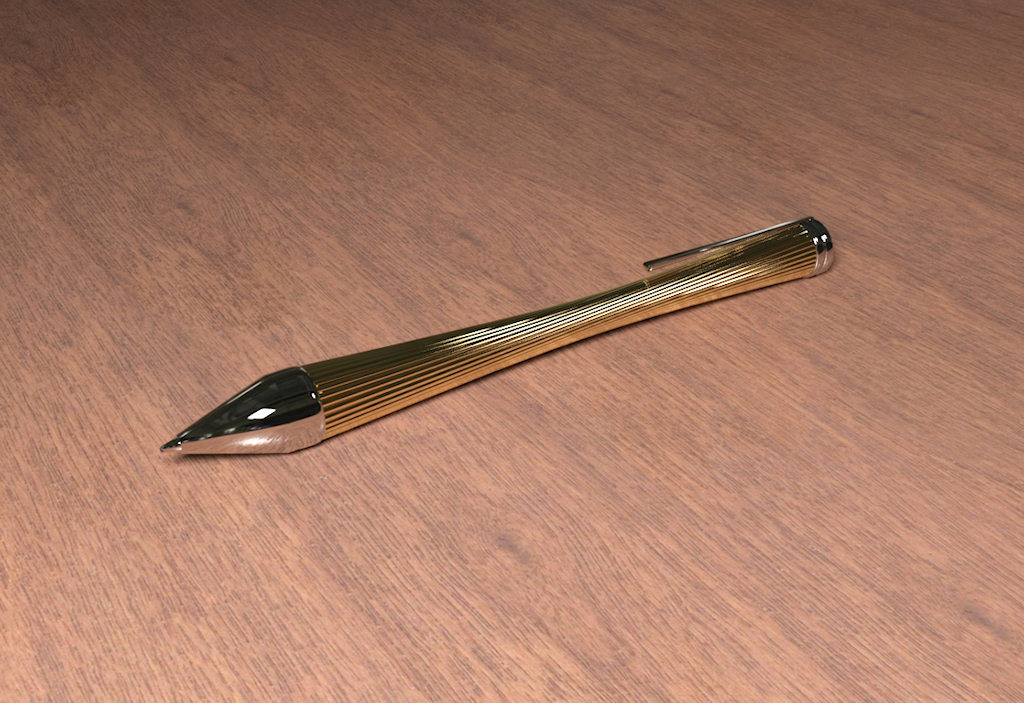
Here's a speed test rendering the attached picture. CPU: AMD FX 8320 = 3.5GHz quad core, GPU: Geforce GT 640 = slightly faster than the GT 730 DDR3 384 cores you noted. Rendered with Iray in Daz Studio. Pen modeled in TS, exported as obj and imported to Daz. Stock gold, platinum, and wood shaders applied in Daz. No post processing except resize from 1148 wide to 1024 for the forum. Daz Studio with Iray is free. DS is for posing human models. You could put your jewelry on them.janetb wrote:What sort of time differences are we talking about?
GPU only: 9 min 42 sec
CPU only: 35 min 16 sec
CPU + GPU: 8 min 12 sec
A card that is about the same as the Radeon 360 is this one. I'd get the GTX 960 I linked to earlier unless price is really a problem ...janetb wrote:What would be an Nvidia card comparable to the Radeon card?
Overall performance (higher = better):
Radeon R7 360 = 3169
GTX 960 = 5,958
Value performance per dollar (higher = better):
Radeon R7 360 = 30
GTX 960 = 30.25
These newer cards might need more power. Check your power supply.
Here is gpu rendering in action (link). (With $2000 of cards.)
- Attachments
-

I prefer dangerous freedom over peaceful servitude. -- Thomas Jefferson/Jean Jacques Rousseau
-
bitkar
- Captain
- Posts: 2089
- Joined: 16 Mar 2010, 07:14
- Type the number ten into the box: 0
- Location: Czech Republic
Re: Graphics Cards
its not about cuda.. with a little support from sw developers, it can do any graphics card, not only nvidia. The standard (not a proprietary solution like nvidia) is called "OpenCL". I hate nvidia for not using standards to force ppl buy their graphics card.
Michal aka bitkar
tS freak since tS2 (1998) and forever (tS7.61 modeler)
tS freak since tS2 (1998) and forever (tS7.61 modeler)
-
Finis
- Captain
- Posts: 5410
- Joined: 21 May 2009, 18:26
- Type the number ten into the box: 0
- Location: America!
Re: Graphics Cards
What did you get?
I prefer dangerous freedom over peaceful servitude. -- Thomas Jefferson/Jean Jacques Rousseau
-
janetb
- Petty Officer Second Class
- Posts: 32
- Joined: 21 May 2009, 22:57
Re: Graphics Cards
I didn't forget you guys--I just sort of gave up and have been limping along with what I have..... A friend HIGHLY recommended moving over to a Mac........So I was really looking into that. He worked on Macs and PC's and was just SOOO happy to come back to Mac.… But I gave up on that--too big a change for me at this particular point in time--I have way too much other stuff I have to deal with right now.
But my HD watcher has been giving me alerts, so I really need to make some change--at least to get back the GDDR5 I had before. So things are as follows:
1. My computer place says Nvidia GeForce tends to be better than AMD's in terms of putting a newer card in an older system--much better chance of compatibility and not having to get a new motherboard....
2. They can get the GTX 750 TI 2GB ONLY from Gigabyte here--none of the other companies! The GT 730 they had put in my system was Gainward, but they said the GTX 750 TI was only available from Gigabyte. I have just read a few posts which said that Gigabyte was better quality in general. All my video cards have been Gainward. If the Gainward it perhaps now available, which is preferable (for graphics). Is Gigabyte better quality?
3. The GTX 750 TI is $170 here! I see that is slightly more than the EVGA GeForce GTX 960 4GB GDDR5 SSC some of you are recommending I spring for!!!! It's a whole other price world here. My brother is visiting in the States, so I could get it there and have him bring it back, but what if it doesn't play nice with my present system? Then I would be stuck. I got my WD Caviar Black HD from the US, but I'm afraid to take a chance with a video card. I don't even know if I have the right connections for these cards.....
Thanks again to all of you who participated in this thread!
....So I was really looking into that. He worked on Macs and PC's and was just SOOO happy to come back to Mac.… But I gave up on that--too big a change for me at this particular point in time--I have way too much other stuff I have to deal with right now.But my HD watcher has been giving me alerts, so I really need to make some change--at least to get back the GDDR5 I had before. So things are as follows:
1. My computer place says Nvidia GeForce tends to be better than AMD's in terms of putting a newer card in an older system--much better chance of compatibility and not having to get a new motherboard....
2. They can get the GTX 750 TI 2GB ONLY from Gigabyte here--none of the other companies! The GT 730 they had put in my system was Gainward, but they said the GTX 750 TI was only available from Gigabyte. I have just read a few posts which said that Gigabyte was better quality in general. All my video cards have been Gainward. If the Gainward it perhaps now available, which is preferable (for graphics). Is Gigabyte better quality?
3. The GTX 750 TI is $170 here! I see that is slightly more than the EVGA GeForce GTX 960 4GB GDDR5 SSC some of you are recommending I spring for!!!! It's a whole other price world here. My brother is visiting in the States, so I could get it there and have him bring it back, but what if it doesn't play nice with my present system? Then I would be stuck. I got my WD Caviar Black HD from the US, but I'm afraid to take a chance with a video card. I don't even know if I have the right connections for these cards.....
Thanks again to all of you who participated in this thread!
-
Finis
- Captain
- Posts: 5410
- Joined: 21 May 2009, 18:26
- Type the number ten into the box: 0
- Location: America!
Re: Graphics Cards
Did you get one yet? What did you get?
Remember that the fancy cards are only needed if you are going to use a gpu renderer. If you intend to do that then consider which one(s) and how they fit in to your work flow too. I export models as obj and import into Daz for texturing and rendering (Daz with Iray is free). There are plugins for TS to use various renderers. Consider moving to Blender with its Cycles renderer for your CG work. Blender is free. Can Cycles the AMD cards which are cheaper?
Remember that the fancy cards are only needed if you are going to use a gpu renderer. If you intend to do that then consider which one(s) and how they fit in to your work flow too. I export models as obj and import into Daz for texturing and rendering (Daz with Iray is free). There are plugins for TS to use various renderers. Consider moving to Blender with its Cycles renderer for your CG work. Blender is free. Can Cycles the AMD cards which are cheaper?
I prefer dangerous freedom over peaceful servitude. -- Thomas Jefferson/Jean Jacques Rousseau