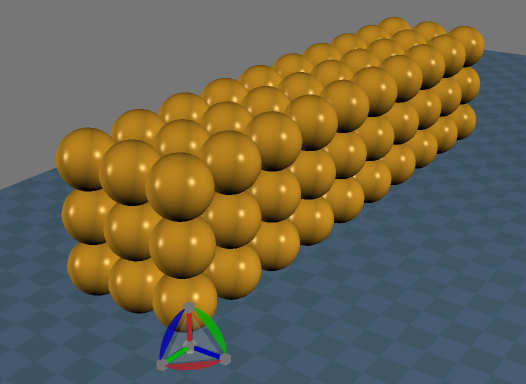
http://www.clintons3d.com/plugins/trues ... index.html"
Grid Array Script
-
clintonman

- Captain
- Posts: 5659
- Joined: 21 May 2009, 21:08
- Type the number ten into the box: 0
- Location: California
Grid Array Script
Interactive script for creating 3D or 2D rectangular or 1D linear arrays in workspace. It works by copy of the selection to the point locations of an invisible cube.
http://www.clintons3d.com/plugins/trues ... index.html"
http://www.clintons3d.com/plugins/trues ... index.html"
-
Tiles

- Master Chief Petty Officer
- Posts: 401
- Joined: 27 May 2009, 08:34
Re: Grid Array Script
Cool. Can this be redone to become a Workspace version of the Point Clone Object? This object places predefined objects at selected vertices of a target object 
Free Gamegraphics, Freeware Games http://reinerstilesets.de
-
LeonRegis

- Captain
- Posts: 1946
- Joined: 18 Aug 2009, 17:36
- Type the number ten into the box: 0
- Location: Brazil/Earth/Orion Arm/Milky Way/4th Dimension/This Universe/Multiverse???/Singularity???
Re: Grid Array Script
That great, and the circular array? I really love that one
Be the change you want to see in the world. - Mohandas Gandhi
-
clintonman
- Captain
- Posts: 5659
- Joined: 21 May 2009, 21:08
- Type the number ten into the box: 0
- Location: California
Re: Grid Array Script
You guys are reading my mind. I think I just figured a way to do radial a few minutes ago. Wish me luck.
I think I just figured a way to do radial a few minutes ago. Wish me luck.-
Tiles
- Master Chief Petty Officer
- Posts: 401
- Joined: 27 May 2009, 08:34
-
LeonRegis
- Captain
- Posts: 1946
- Joined: 18 Aug 2009, 17:36
- Type the number ten into the box: 0
- Location: Brazil/Earth/Orion Arm/Milky Way/4th Dimension/This Universe/Multiverse???/Singularity???
Re: Grid Array Script
Good Luck! 
Be the change you want to see in the world. - Mohandas Gandhi
-
clintonman
- Captain
- Posts: 5659
- Joined: 21 May 2009, 21:08
- Type the number ten into the box: 0
- Location: California
Re: Grid Array Script
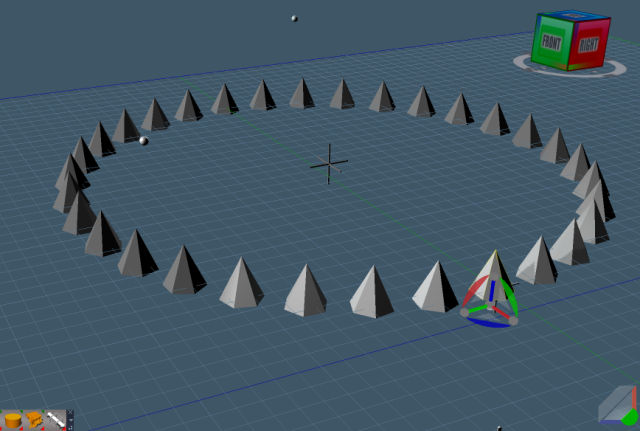
The radial array is looking good. It will create an array in the x,y or z directions and it's interactive like the grid array script. It needs some improvements since it's jumpy and I'd like to add some of the modelside features to it.
I've finally figured out how to work with the pivot node which was necessary for this to work the way I wanted it to(interactively without having to resort to c ). To program for the pivots you have to save the pivot world position before rotating and then get the difference between the old pivot and the new pivot positions after the rotation. Then apply the difference in position to the Matrix translation.
Forum Tip: Always preview your message before adding any attachments. The forum asks a security question and then doesn't upload. If you preview it asks the question and then it won't ask again during the upload phase.
Forum Tip: Always preview your message before adding any attachments. The forum asks a security question and then doesn't upload. If you preview it asks the question and then it won't ask again during the upload phase.
-
clintonman
- Captain
- Posts: 5659
- Joined: 21 May 2009, 21:08
- Type the number ten into the box: 0
- Location: California
Re: Grid Array Script
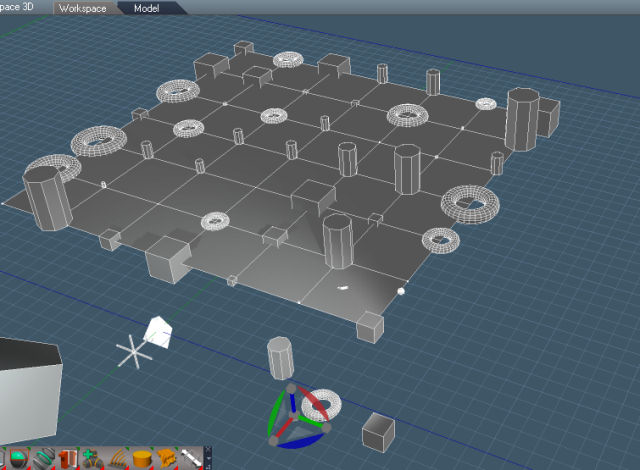
Right now it will copy with a random object from the selection and randomly scale the copies.
-
Tiles
- Master Chief Petty Officer
- Posts: 401
- Joined: 27 May 2009, 08:34

-
clintonman
- Captain
- Posts: 5659
- Joined: 21 May 2009, 21:08
- Type the number ten into the box: 0
- Location: California
Re: Grid Array Script
-
Tiles
- Master Chief Petty Officer
- Posts: 401
- Joined: 27 May 2009, 08:34
Re: Grid Array Script
Learning is never wasted time 
Looking forward to the finished version
Looking forward to the finished version
Free Gamegraphics, Freeware Games http://reinerstilesets.de
-
clintonman
- Captain
- Posts: 5659
- Joined: 21 May 2009, 21:08
- Type the number ten into the box: 0
- Location: California
Re: Grid Array Script
Update:
copy original object instead of moving it into the array
replace with selection button
name of grid taken from the original selected mesh
UI cleanup
http://clintons3d.com/plugins/truespace ... array.html"
copy original object instead of moving it into the array
replace with selection button
name of grid taken from the original selected mesh
UI cleanup
http://clintons3d.com/plugins/truespace ... array.html"
-
clintonman
- Captain
- Posts: 5659
- Joined: 21 May 2009, 21:08
- Type the number ten into the box: 0
- Location: California
Re: Grid Array Script
Update September 2019
new version "Grid Array 2"
works pretty much the same way, most changes are internal making it more responsive and reliable and fixing one minor error that can occur
Replace Object renamed to Replace Array Element
new Select Array Element combined with Open in Link Editor buttons for interactively changing the orientation of the base mesh
Select Control Mesh renamed to Select Array Rotator
new Reset Array Rotation to zero out the Array Rotator rotations
new select all but one option for Disband Array which selects all the array elements as a first step to boolean merge them into a single mesh
http://clintons3d.com/plugins/truespace ... array.html
the old version was moved to here:
http://clintons3d.com/plugins/truespace ... y_old.html
new version "Grid Array 2"
works pretty much the same way, most changes are internal making it more responsive and reliable and fixing one minor error that can occur
Replace Object renamed to Replace Array Element
new Select Array Element combined with Open in Link Editor buttons for interactively changing the orientation of the base mesh
Select Control Mesh renamed to Select Array Rotator
new Reset Array Rotation to zero out the Array Rotator rotations
new select all but one option for Disband Array which selects all the array elements as a first step to boolean merge them into a single mesh
http://clintons3d.com/plugins/truespace ... array.html
the old version was moved to here:
http://clintons3d.com/plugins/truespace ... y_old.html
-
trueBlue

- Captain
- Posts: 5548
- Joined: 06 Jul 2009, 22:50
- Type the number ten into the box: 10
Re: Grid Array Script
In the process of checking out...
I notice that your installer does not removed the old version.
I incorporated it into the update here:
viewtopic.php?t=3732
I notice that your installer does not removed the old version.

- Capture.PNG (12.3 KiB) Viewed 4607 times
viewtopic.php?t=3732
-
clintonman
- Captain
- Posts: 5659
- Joined: 21 May 2009, 21:08
- Type the number ten into the box: 0
- Location: California
Re: Grid Array Script
Yep, that's true. When I started it didn't have all the capabilities of the old version and then it suddenly did almost by accident.trueBlue wrote: 25 Sep 2019, 20:12 In the process of checking out...
I notice that your installer does not removed the old version.
...
FYI I started the same style of update for the Radial Array script and the conversion is going faster than expected (so far).
-
trueBlue
- Captain
- Posts: 5548
- Joined: 06 Jul 2009, 22:50
- Type the number ten into the box: 10
Re: Grid Array Script
Okay, let me know and I will add it.
-
trueBlue
- Captain
- Posts: 5548
- Joined: 06 Jul 2009, 22:50
- Type the number ten into the box: 10
Re: Grid Array Script
At your website:
Unintended use but if you select Select Array Element and Replace Array Element, you will get an error.
How would you use Select Array Element?
Do you mean Make Default verses Reset?After conversion to a group object you can right click the nodes title bar to enter panel edit and immediately right click again and choose Reset.
Unintended use but if you select Select Array Element and Replace Array Element, you will get an error.
How would you use Select Array Element?
-
clintonman
- Captain
- Posts: 5659
- Joined: 21 May 2009, 21:08
- Type the number ten into the box: 0
- Location: California
Re: Grid Array Script
Reset, otherwise you end up with a bunch of crap that doesn't do anything.trueBlue wrote: 11 Oct 2019, 21:03 At your website:Do you mean Make Default verses Reset?After conversion to a group object you can right click the nodes title bar to enter panel edit and immediately right click again and choose Reset.
Unintended use but if you select Select Array Element and Replace Array Element, you will get an error.
How would you use Select Array Element?
"Unintended use", that' funny. If I update/fix in the future I'll take that into account.
After Select Array Element, you rotate or scale and all the copies follow. It uses a watch dog so "Open in Link Editor" may be needed.
-
trueBlue
- Captain
- Posts: 5548
- Joined: 06 Jul 2009, 22:50
- Type the number ten into the box: 10
Re: Grid Array Script
Okay now I see Reset, you have to be in the Default aspect and not in the Exp aspect or Minimized state.
If you do as you say and right click the title bar, Reset is not available.
If you do as you say and right click the title bar, Reset is not available.
-
clintonman
- Captain
- Posts: 5659
- Joined: 21 May 2009, 21:08
- Type the number ten into the box: 0
- Location: California
Re: Grid Array Script
For the changes you made to the script I would say convert from icon to minimized, then choose the default aspect, then "right click the nodes title bar to enter panel edit and immediately right click again and choose Reset"trueBlue wrote: 12 Oct 2019, 01:31 Okay now I see Reset, you have to be in the Default aspect and not in the Exp aspect or Minimized state.
If you do as you say and right click the title bar, Reset is not available.
On my version the extra first 2 steps aren't needed because it doesn't start with an icon appearance.
-
trueBlue
- Captain
- Posts: 5548
- Joined: 06 Jul 2009, 22:50
- Type the number ten into the box: 10

-
Saul
- Senior Chief Petty Officer
- Posts: 308
- Joined: 22 May 2009, 16:50
Re: Grid Array Script
I am having problems with Grid Array and look At.
Reset Default Context
Load Cube and Cone
Make grid array of Cone, 2 x X.
Have array Look At Cube.
Array move follows Target, Target move follows Array.
Delete array
Make Grid Array of Cone, 2 x X, 2 x Y
Have array Look At Cube.
One Cone stays put, Array/Target move correctly
Delete Array
Have original Cone Look At Cube
Make Grid Array of Cone, 2 x X, 2 x Z
Cones are arrayed correctly and moving them follows Target
Move Target and only the original Cone follows
I am trying to set up a Light Grid Array to follow a Character, i was hoping to automate it with Look At.
Reset Default Context
Load Cube and Cone
Make grid array of Cone, 2 x X.
Have array Look At Cube.
Array move follows Target, Target move follows Array.
Delete array
Make Grid Array of Cone, 2 x X, 2 x Y
Have array Look At Cube.
One Cone stays put, Array/Target move correctly
Delete Array
Have original Cone Look At Cube
Make Grid Array of Cone, 2 x X, 2 x Z
Cones are arrayed correctly and moving them follows Target
Move Target and only the original Cone follows
I am trying to set up a Light Grid Array to follow a Character, i was hoping to automate it with Look At.
-
clintonman
- Captain
- Posts: 5659
- Joined: 21 May 2009, 21:08
- Type the number ten into the box: 0
- Location: California
Re: Grid Array Script
I see it, but it's not a problem with the array script. You just found a trueSpace bug. 3D groups don't work properly with look at. Some kind of bug fix is needed for it...Saul wrote: 20 Apr 2023, 14:52 I am having problems with Grid Array and look At.
Reset Default Context
Load Cube and Cone
Make grid array of Cone, 2 x X.
Have array Look At Cube.
Array move follows Target, Target move follows Array.
Delete array
Make Grid Array of Cone, 2 x X, 2 x Y
Have array Look At Cube.
One Cone stays put, Array/Target move correctly
Delete Array
Have original Cone Look At Cube
Make Grid Array of Cone, 2 x X, 2 x Z
Cones are arrayed correctly and moving them follows Target
Move Target and only the original Cone follows
I am trying to set up a Light Grid Array to follow a Character, i was hoping to automate it with Look At.
-
trueBlue
- Captain
- Posts: 5548
- Joined: 06 Jul 2009, 22:50
- Type the number ten into the box: 10
Re: Grid Array Script
Look At does not work for groups
But you can Disconnect & Connect the OwnerMatrix from the Transform to the LookAt2
Seems kind of wonky though!
Seems best to not use LookAt on a group as it only works with one object.
So, I would use LookAt for each light individually before grouping.
Then group the Lights.
If you want the grouped lights to follow the object, hook up the object's WldMatrix to the grouped light's OwnerMatrix
Here is an example:
But you can Disconnect & Connect the OwnerMatrix from the Transform to the LookAt2
Seems kind of wonky though!
Seems best to not use LookAt on a group as it only works with one object.
So, I would use LookAt for each light individually before grouping.
Then group the Lights.
If you want the grouped lights to follow the object, hook up the object's WldMatrix to the grouped light's OwnerMatrix
Here is an example:
- Attachments
-
- Targeted Light setup.RsObj
- (241.4 KiB) Downloaded 85 times
-
clintonman
- Captain
- Posts: 5659
- Joined: 21 May 2009, 21:08
- Type the number ten into the box: 0
- Location: California
Re: Grid Array Script
A little update.
I investigated the Look At tool and it is not possible to fix it. However it can be fixed after the fact. I've tested a script that will work with group objects and multiple selections. It would need to be run after the look at tool completes it's operations. So if a group or multi-selection is detected a panel will need to open so the script can be run by a button press. No way to automatically do it. The script will not work with the grid or radial array objects. They would need to be disbanded into ordinary groups.
One note about group object is that the origin needs to be moved to the middle of the group. The Origin tool takes care of that.
The Un Look At is mostly done. The script works with multiple selections and it now also works with parented objects. Last thing is to make it work with group objects.
I investigated the Look At tool and it is not possible to fix it. However it can be fixed after the fact. I've tested a script that will work with group objects and multiple selections. It would need to be run after the look at tool completes it's operations. So if a group or multi-selection is detected a panel will need to open so the script can be run by a button press. No way to automatically do it. The script will not work with the grid or radial array objects. They would need to be disbanded into ordinary groups.
One note about group object is that the origin needs to be moved to the middle of the group. The Origin tool takes care of that.
The Un Look At is mostly done. The script works with multiple selections and it now also works with parented objects. Last thing is to make it work with group objects.
-
clintonman
- Captain
- Posts: 5659
- Joined: 21 May 2009, 21:08
- Type the number ten into the box: 0
- Location: California
Re: Grid Array Script
Enhanced Look At scripts.
Works with group objects.
Works with multiple selections.
Does not work with array objects. Disband them first.
If a group or multiple items are selected when starting the look at, the look at panel will open.
Select the target like normal, but
Then press the "Fix Group/Multi - Selection" button
Un look at will also work with multiple selections and groups.
Replace the node found here:
"/Scripts/UUCommands/Look At - Utilities"
Reset Default Context to revert to the old look at.
Works with group objects.
Works with multiple selections.
Does not work with array objects. Disband them first.
If a group or multiple items are selected when starting the look at, the look at panel will open.
Select the target like normal, but
Then press the "Fix Group/Multi - Selection" button
Un look at will also work with multiple selections and groups.
Replace the node found here:
"/Scripts/UUCommands/Look At - Utilities"
Reset Default Context to revert to the old look at.
- Attachments
-
- Look At - Utilities.RsObj
- (51.97 KiB) Downloaded 90 times
-
clintonman
- Captain
- Posts: 5659
- Joined: 21 May 2009, 21:08
- Type the number ten into the box: 0
- Location: California
Re: Grid Array Script
Updated to be compatible with UU widget based lookat scripts.
Replace the node found here:
"/Scripts/UUCommands/Look At - Utilities" with "Look At - Utilities108"
Replace "/Widgets/Tools/Look At" with "Look At102"
The Post process fix is automatic now, so no need to press a button or open a panel to complete the look at process.
Replace the node found here:
"/Scripts/UUCommands/Look At - Utilities" with "Look At - Utilities108"
Replace "/Widgets/Tools/Look At" with "Look At102"
The Post process fix is automatic now, so no need to press a button or open a panel to complete the look at process.
- Attachments
-
- Look At102.RsObj
- (33.81 KiB) Downloaded 95 times
-
- Look At - Utilities108.RsObj
- (71.57 KiB) Downloaded 92 times
-
clintonman
- Captain
- Posts: 5659
- Joined: 21 May 2009, 21:08
- Type the number ten into the box: 0
- Location: California
Re: Grid Array Script
Changed to prevent a user from attempting to have an object look at itself.
- Attachments
-
- Look At - Utilities110.RsObj
- (72.37 KiB) Downloaded 90 times