OD_CopyPaste for trueSpace
-
clintonman
- Captain
- Posts: 5659
- Joined: 21 May 2009, 21:08
- Type the number ten into the box: 0
- Location: California
OD_CopyPaste for trueSpace
mesh "copied" from from Blender and "pasted" into trueSpace modelside(tS6)
note that the fancy cube mesh pasted in with all sorts of flipped faces, but the monkey and torus came in without any trouble
TODO:
handle material ids
uvs
delete and replace action
and make the copy portion of the script
made of a few pieces
open source info for copypaste
really it reads/writes a temp file not a true copy and paste to the clipboard
https://github.com/heimlich1024/OD_CopyPasteExternal"
python mesher from
https://www.quantumchamaeleon.com/Mesher/mesher.html"
python source code for the parts missing from trueSpace
https://www.python.org/download/releases/1.5/"
note that the fancy cube mesh pasted in with all sorts of flipped faces, but the monkey and torus came in without any trouble
TODO:
handle material ids
uvs
delete and replace action
and make the copy portion of the script
made of a few pieces
open source info for copypaste
really it reads/writes a temp file not a true copy and paste to the clipboard
https://github.com/heimlich1024/OD_CopyPasteExternal"
python mesher from
https://www.quantumchamaeleon.com/Mesher/mesher.html"
python source code for the parts missing from trueSpace
https://www.python.org/download/releases/1.5/"
-
Draise
- Captain
- Posts: 3200
- Joined: 21 Sep 2009, 19:33
- Type the number ten into the box: 0
- Location: Bogota, Colombia
Re: OD_CopyPaste for trueSpace
This is black magic. Too much. Clinton! Slow down!!
Awesome work.
Awesome work.
-
clintonman
- Captain
- Posts: 5659
- Joined: 21 May 2009, 21:08
- Type the number ten into the box: 0
- Location: California
Re: OD_CopyPaste for trueSpace
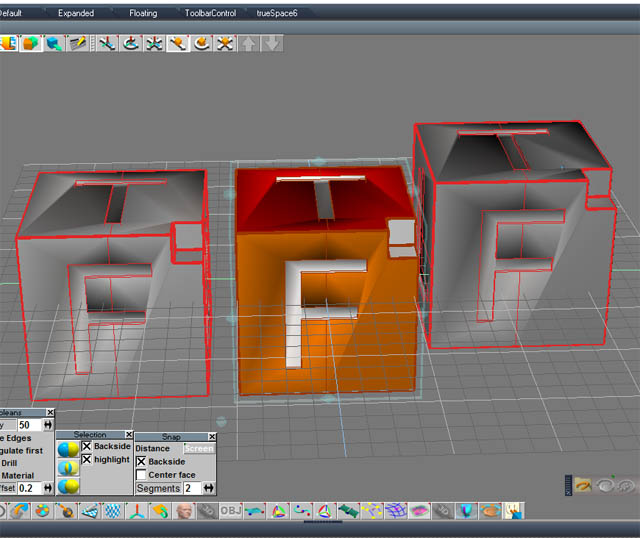
original mesh and round trip result from Blender and Lightwave
The meshes from both Blender and Lightwave had the appearance of flipped faces. Going into PE mode and the flipped look disappeared on it's own.
It does not export uvs. No way to read them with python. It does import uvs.
Python delete doesn't work so a new mesh is created instead of replaced
No material import because Mesher doesn't support it. Python material creation is also buggy and does not read material for a face so, no material support
Mesher supports 1 uv map
Only way to get mesh size to match is to freeze truespace mesh scale in workspace:
1 axis tool, 2 normalize scale, 3 exit axis tool, 4 flatten axis => no scale and applied to vertices of the mesh
Does anyone know of a "freeze scale" for modelspace(ts6) ?
Is scale available in modelspace? Size isn't the same thing as scale.
The meshes from both Blender and Lightwave had the appearance of flipped faces. Going into PE mode and the flipped look disappeared on it's own.
It does not export uvs. No way to read them with python. It does import uvs.
Python delete doesn't work so a new mesh is created instead of replaced
No material import because Mesher doesn't support it. Python material creation is also buggy and does not read material for a face so, no material support
Mesher supports 1 uv map
Only way to get mesh size to match is to freeze truespace mesh scale in workspace:
1 axis tool, 2 normalize scale, 3 exit axis tool, 4 flatten axis => no scale and applied to vertices of the mesh
Does anyone know of a "freeze scale" for modelspace(ts6) ?
Is scale available in modelspace? Size isn't the same thing as scale.
-
clintonman
- Captain
- Posts: 5659
- Joined: 21 May 2009, 21:08
- Type the number ten into the box: 0
- Location: California
Re: OD_CopyPaste for trueSpace
Forgot to mention, I think the mesh results will be better with more normal meshes. This sample has all sorts of complex polygon shapes.
I'll put together a package soon...
Edit: Also forgot to say the autofix by pe mode only works if done immediately. I took one model into workspace first and it got a little messy.
I'll put together a package soon...
Edit: Also forgot to say the autofix by pe mode only works if done immediately. I took one model into workspace first and it got a little messy.
-
stan
- Master Chief Petty Officer
- Posts: 584
- Joined: 21 May 2009, 17:20
Re: OD_CopyPaste for trueSpace
TSXAPIFN CtsxTxmx3f * tsxPolyhGetVxTxmx (tsxPOLYHEDRON *pPolyh, CtsxTxmx3f *pTxmx)
Get the Vertex Transformation Matrix. Returns pTxmx, if valid operation. Note: This matrix includes scaling and shearing terms, so it is not guaranteed to be orthogonal. Use `tsxUnMatrix3f' before inverting.
TSXAPIFN void tsxPolyhSetVxTxmx (tsxPOLYHEDRON *pPolyh, CtsxTxmx3f *pTxmx)
ptr to Array. May be 0. Copies a new Vertex Transformation Matrix into pPolyh.
TSXAPIFN void tsxUnMatrix3f (const CtsxTxmx3f &Txmx, CtsxTxmx3f &Rot, float *pScaleShear=0)
Extract the pure rotation matrix (Rot) and scaling/shearing factors from a Transformation Matrix (Txmx). If specified, pScaleShear must be float[6], and is assigned as follows: { Sx, Sy, Sz, Sxy, Sxz, Syz }.
Clinton, there is scale in the modelside ts66 api
Does anyone know of a "freeze scale" for modelspace(ts6) ?
you might be able to make a ts66 version.
Get the Vertex Transformation Matrix. Returns pTxmx, if valid operation. Note: This matrix includes scaling and shearing terms, so it is not guaranteed to be orthogonal. Use `tsxUnMatrix3f' before inverting.
TSXAPIFN void tsxPolyhSetVxTxmx (tsxPOLYHEDRON *pPolyh, CtsxTxmx3f *pTxmx)
ptr to Array. May be 0. Copies a new Vertex Transformation Matrix into pPolyh.
TSXAPIFN void tsxUnMatrix3f (const CtsxTxmx3f &Txmx, CtsxTxmx3f &Rot, float *pScaleShear=0)
Extract the pure rotation matrix (Rot) and scaling/shearing factors from a Transformation Matrix (Txmx). If specified, pScaleShear must be float[6], and is assigned as follows: { Sx, Sy, Sz, Sxy, Sxz, Syz }.
Clinton, there is scale in the modelside ts66 api
Does anyone know of a "freeze scale" for modelspace(ts6) ?
you might be able to make a ts66 version.
-
clintonman
- Captain
- Posts: 5659
- Joined: 21 May 2009, 21:08
- Type the number ten into the box: 0
- Location: California
Re: OD_CopyPaste for trueSpace
Thanks for that. Looks like the only way for perfect operation is to create a plugin instead of a script.
-
clintonman
- Captain
- Posts: 5659
- Joined: 21 May 2009, 21:08
- Type the number ten into the box: 0
- Location: California
Re: OD_CopyPaste for trueSpace
Attached is a working package.
unzip and copy the Lib folder and the trueSpace_CopyPasteExternal.py file into the trueSpace folder. For tS76 that would be "C:\trueSpace761\tS\". Should work with versions 5,6,7. For tS4 you would have to get the older Mesher version made for it.
- Attachments
-
- OD_CopyPaste.zip
- (54.52 KiB) Downloaded 306 times
-
seppgirty
- Master Chief Petty Officer
- Posts: 354
- Joined: 22 May 2009, 03:34
- Type the number ten into the box: 0
- Location: pittsburgh Pa.
Re: OD_CopyPaste for trueSpace
I know this is a little late but this package contains "scale normalizer" for TS 6.6
- Attachments
-
- 20040831_gameSpaceTorqueProject596c.zip
- (94.23 KiB) Downloaded 264 times
truespace 3.2, 5.2, 6.6, ani-pack, flash plugin,........ you can check out my films athttp://www.chaosbrosfilms.com
-
clintonman
- Captain
- Posts: 5659
- Joined: 21 May 2009, 21:08
- Type the number ten into the box: 0
- Location: California
Re: OD_CopyPaste for trueSpace
That's a good/only option for a tS6 and earlier user or someone who doesn't want to use workspace to normalize the scale. Just have to avoid the shearing bug.
I'm half way done with a workspace version of the copy/paste. It supports material indices, a second uv and will be able to replace the selected mesh when pasting. I did the modelspace first because the original code was in python and modelspace has proper support for polygons via the Mesher.dll making it possible to create a mesh in trueSpace python. Workspace disadvantage is poor polygon support in script and plugins. If the polygon triangulation code didn't already exist in my fbx plugin source code I wouldn't do it or the copypaste would be limited to triangles and quads.
-
stan
- Master Chief Petty Officer
- Posts: 584
- Joined: 21 May 2009, 17:20
Re: OD_CopyPaste for trueSpace
https://www.quantumchamaeleon.com/tsPython/"
I put this link here ..it shows how to add functionality to ts python.
-
clintonman
- Captain
- Posts: 5659
- Joined: 21 May 2009, 21:08
- Type the number ten into the box: 0
- Location: California
Re: OD_CopyPaste for trueSpace
Yep, that's the source of the Mesher addon.
-
clintonman
- Captain
- Posts: 5659
- Joined: 21 May 2009, 21:08
- Type the number ten into the box: 0
- Location: California
Re: OD_CopyPaste for trueSpace
I got a working copy/paste in workspace. It works with polygons and vertices. No uv's yet. I still have a few things to do. If you want to try it you can get it here:
http://clintons3d.com/plugins/wip/downloads/"
copy script
http://clintons3d.com/plugins/wip/downl ... aste.RsObj"
paste script
http://clintons3d.com/plugins/wip/downl ... aste.RsObj"
rsx plugin contains polygon to triangles code and triangle neighbors code
http://clintons3d.com/plugins/wip/downl ... Plugin.rsx"
There's no buttons, installers or any polish to it as it is now.
http://clintons3d.com/plugins/wip/downloads/"
copy script
http://clintons3d.com/plugins/wip/downl ... aste.RsObj"
paste script
http://clintons3d.com/plugins/wip/downl ... aste.RsObj"
rsx plugin contains polygon to triangles code and triangle neighbors code
http://clintons3d.com/plugins/wip/downl ... Plugin.rsx"
There's no buttons, installers or any polish to it as it is now.
-
clintonman
- Captain
- Posts: 5659
- Joined: 21 May 2009, 21:08
- Type the number ten into the box: 0
- Location: California
Re: OD_CopyPaste for trueSpace
Just got some morphs out of truespace and into blender. Next step is to go the other direction.
-
clintonman
- Captain
- Posts: 5659
- Joined: 21 May 2009, 21:08
- Type the number ten into the box: 0
- Location: California
Re: OD_CopyPaste for trueSpace
The paste function will read morphs now. It only works with new meshes at the moment. It won't update an old mesh.
-
Draise
- Captain
- Posts: 3200
- Joined: 21 Sep 2009, 19:33
- Type the number ten into the box: 0
- Location: Bogota, Colombia
Re: OD_CopyPaste for trueSpace
Holy cow, still haven't tried the system yet. But you really are honing in on the Blender/trueSpace unified workflow.
I will have to give it a try, as I have found my modling skillset has heavily rellied on the smooth and relax operators in Softimage, and the extra scultping of Blender would be really good to use with my happy comfortable modeling of trueSpace.

