I have been watching the organics course videos by Jack Edwards and while following along my copy of Truespace is acting in a way that is not intended.
At the point where the user is supposed to drag the provided constant texture onto the plane it appears tiled at first before it is remapped. On my software it is not tiled.
Later the user is supposed to CTRL drag the viperfish image onto the constant texture panel. At this point the plane on the screen should automatically update with the image of the viperfish. Mine does not. Furthermore, it appears that this action places the viperfish in not only the constant texture, but also the material. This creates a problem later on when I add primitives to the scene to create the foundation of the model. The newly created models are created with the viperfish image as their default material and have the image wrapped around them which is confusing looking and ultimately not the goal.
Is there a setting or something that I might have activated that could produce this inconvenience? I tried using the button to restore to defaults and that doesn't seem to help. Then again, the restore button does seem to restore the layout but not the settings. I noticed that one of the options related to recording camera moves for undo operations is not affected by it.
Material Settings and how they relate to the organics course
-
MrGoodfix
- Marine
- Posts: 2
- Joined: 02 Aug 2011, 03:53
- Type the number ten into the box: 9
Material Settings and how they relate to the organics course
-
spacekdet

- Captain
- Posts: 1810
- Joined: 27 May 2009, 15:00
- Type the number ten into the box: 10
- Location: On the day shift at the Utility Muffin Research Kitchen
Re: Material Settings and how they relate to the organics course
Whether or not a texture is tiled will depend on how many U repts or V repts are set in the shader panel.
Whether the object has default or a different UV Mapping applied will also change how the shaders are wrapped on the object.
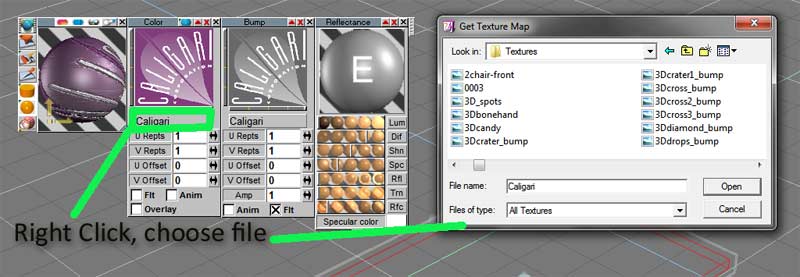
You can assign images by right clicking gray file name box in the shader panel and choosing file with standard Windows file picker:
Any new object created will inherit whatever settings are present in the Material Editor-this is normal behavior.
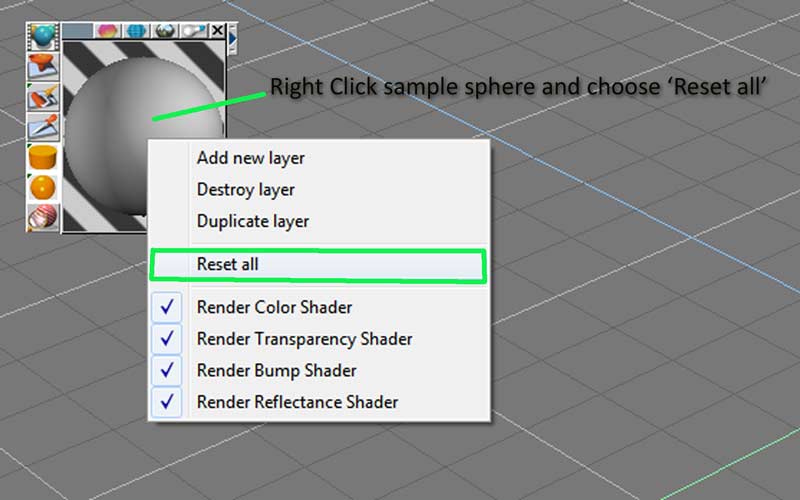
To reset the material, right click on the sample sphere in the Material Editor and choose 'Reset all':
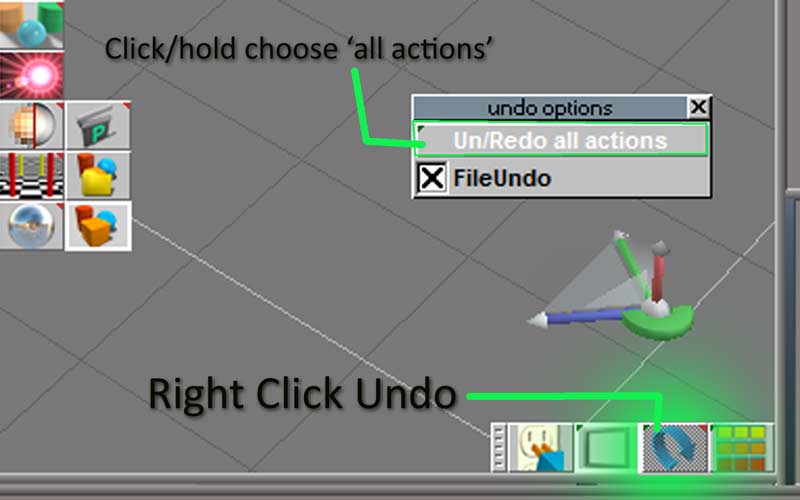
To undo camera moves along with object actions, right click on the Undo icon and choose 'Un/Re Do all actions':
Whether the object has default or a different UV Mapping applied will also change how the shaders are wrapped on the object.
You can assign images by right clicking gray file name box in the shader panel and choosing file with standard Windows file picker:
To reset the material, right click on the sample sphere in the Material Editor and choose 'Reset all':
-
clintonman

- Captain
- Posts: 5659
- Joined: 21 May 2009, 21:08
- Type the number ten into the box: 0
- Location: California
Re: Material Settings and how they relate to the organics course
I believe the lack of tiling is an improvement over truespace 7.51 which is used in the video.MrGoodfix wrote:I have been watching the organics course videos by Jack Edwards and while following along my copy of Truespace is acting in a way that is not intended.
At the point where the user is supposed to drag the provided constant texture onto the plane it appears tiled at first before it is remapped. On my software it is not tiled.
Later the user is supposed to CTRL drag the viperfish image onto the constant texture panel. At this point the plane on the screen should automatically update with the image of the viperfish. Mine does not. Furthermore, it appears that this action places the viperfish in not only the constant texture, but also the material. This creates a problem later on when I add primitives to the scene to create the foundation of the model. The newly created models are created with the viperfish image as their default material and have the image wrapped around them which is confusing looking and ultimately not the goal.
Is there a setting or something that I might have activated that could produce this inconvenience? I tried using the button to restore to defaults and that doesn't seem to help. Then again, the restore button does seem to restore the layout but not the settings. I noticed that one of the options related to recording camera moves for undo operations is not affected by it.
Before clicking with the pick material tool go to the advanced tab of the material editor and choose "Edit picked material directly" otherwise you are working on a copy.
Now when you drag the image to the texture on the material the plane's material will update.
Right click the material to clear it so it doesn't appear on new objects.
-
MrGoodfix
- Marine
- Posts: 2
- Joined: 02 Aug 2011, 03:53
- Type the number ten into the box: 9
Re: Material Settings and how they relate to the organics course
Thanks for the help! In the video dragging the image onto the tab sent it right into the plane, but in 7.61 I actually have to "paint" it to the plane primitive. Or at least I think I do.
Special thanks to Clintonman! I mistakenly thought that the material editor was looking at the plane when I dragged onto, so thanks for the tip to remove the image (clearing the material) before I move onto creating new primitives.
Special thanks to spacekdet for pointing out some of the differences between the two versions!
Special thanks to Clintonman! I mistakenly thought that the material editor was looking at the plane when I dragged onto, so thanks for the tip to remove the image (clearing the material) before I move onto creating new primitives.
Special thanks to spacekdet for pointing out some of the differences between the two versions!