
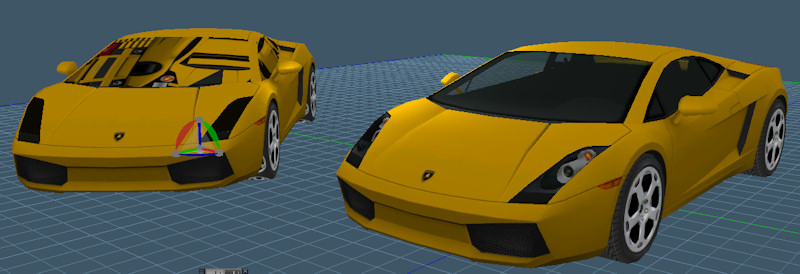
So far the results are pretty good. The 2011 sdk had bugs with wavefront obj and 3ds import formats. The obj would come in as individual polygons not attached to each other and the 3ds had some kind of problem with hierarchy transformations. So far I have the mesh import working and the results are more consistent than before. The car is an obj file and the 747 jet is a 3ds file. The bad result is from the existing plugin and the good result is from the new plugin. My plan is to try to create some kind of installer then get the skeleton and skinning info imported and finally import animation before moving on to the exporter. So far the only disadvantage to the 2013 sdk is that it will not export 3ds files.
fbx import export reboot
-
clintonman

- Captain
- Posts: 5659
- Joined: 21 May 2009, 21:08
- Type the number ten into the box: 0
- Location: California
fbx import export reboot
I've started rewriting the fbx import/export plugin from the ground up using the autodesk fbx sdk 2013.2
So far the results are pretty good. The 2011 sdk had bugs with wavefront obj and 3ds import formats. The obj would come in as individual polygons not attached to each other and the 3ds had some kind of problem with hierarchy transformations. So far I have the mesh import working and the results are more consistent than before. The car is an obj file and the 747 jet is a 3ds file. The bad result is from the existing plugin and the good result is from the new plugin. My plan is to try to create some kind of installer then get the skeleton and skinning info imported and finally import animation before moving on to the exporter. So far the only disadvantage to the 2013 sdk is that it will not export 3ds files.
So far the results are pretty good. The 2011 sdk had bugs with wavefront obj and 3ds import formats. The obj would come in as individual polygons not attached to each other and the 3ds had some kind of problem with hierarchy transformations. So far I have the mesh import working and the results are more consistent than before. The car is an obj file and the 747 jet is a 3ds file. The bad result is from the existing plugin and the good result is from the new plugin. My plan is to try to create some kind of installer then get the skeleton and skinning info imported and finally import animation before moving on to the exporter. So far the only disadvantage to the 2013 sdk is that it will not export 3ds files.
-
Draise

- Captain
- Posts: 3200
- Joined: 21 Sep 2009, 19:33
- Type the number ten into the box: 0
- Location: Bogota, Colombia
Re: fbx import export reboot
This looks very promising! The last FBX exporter I had issues with! I'm looking forward to what you come up with! If I just knew how to use the older one without it crashing my trueSpace I would have used it much more!
-
clintonman
- Captain
- Posts: 5659
- Joined: 21 May 2009, 21:08
- Type the number ten into the box: 0
- Location: California
Re: fbx import export reboot
The number one reason for crashes for me was when the "simple fan polygon" option is not checked. Basically, you can import concave ngons with that option, but it might crash trueSpace especially if you try to use it with skeletal imports. At this time the new plugin has the same problem with concave ngons import. If you have a shareable sample that crashes with the simple fan polygon checked I can take a look at it.Draise wrote:This looks very promising! The last FBX exporter I had issues with! I'm looking forward to what you come up with! If I just knew how to use the older one without it crashing my trueSpace I would have used it much more!
-
clintonman
- Captain
- Posts: 5659
- Joined: 21 May 2009, 21:08
- Type the number ten into the box: 0
- Location: California
Re: fbx import export reboot
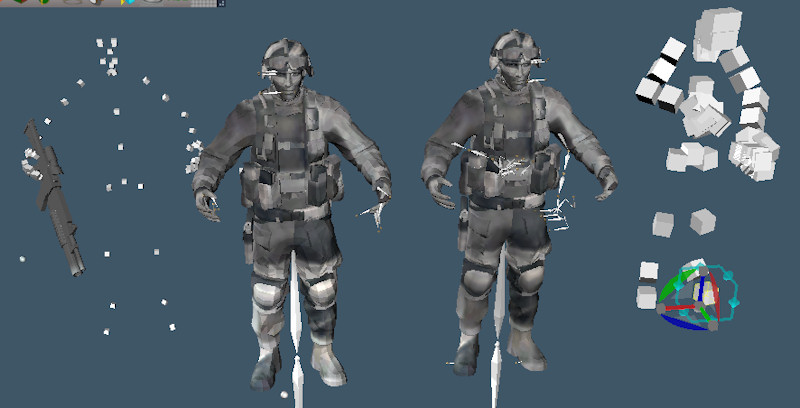
I got it to read the bind pose of imported skeletons. On the right is the old import. It shows the skeleton not matching up with the mesh because it does not read the bind pose. The new importer on the left reads the bind pose and matches the mesh. It also reads in the gun mesh that is a part of the original skeleton hierarchy. The fbx bind pose is in global space and their is a formula for converting from global to local. If I use the conversion within fbx it fails. The trick was to do the conversion in the truespace sdk instead. The next step will be to add animation import and publish what I have so far. The skinning code from the old plugin was added almost without any changes.
BTW the soldier model is from the Unity game engine.
-
RAYMAN

- Captain
- Posts: 2547
- Joined: 21 May 2009, 18:56
Re: fbx import export reboot
thats great Clintonman ! 
Peter
Peter
-
v3rd3
- Lieutenant Commander
- Posts: 1191
- Joined: 21 May 2009, 20:04
Re: fbx import export reboot
Thanks for your effort Clinton.... 
-
clintonman
- Captain
- Posts: 5659
- Joined: 21 May 2009, 21:08
- Type the number ten into the box: 0
- Location: California
Re: fbx import export reboot
I think I found a possible cause for crashes. The plugin crashes if there are floating vertices. If you make a cone it has a vertex on it's base that is not connected to any edges. The same thing happens with cylinders. The steps to get rid of the floaters:Draise wrote:This looks very promising! The last FBX exporter I had issues with! I'm looking forward to what you come up with! If I just knew how to use the older one without it crashing my trueSpace I would have used it much more!
1. select all edges on the mesh
2. convert the selection to vertices
3. invert the selection and the floating vertices will be selected
4. delete