WS - How do i turn the Spotlight invisible?

Technical questions, etc..
User avatar
Tiles
Master Chief Petty Officer
Posts: 401
Joined: 27 May 2009, 08:34

WS - How do i turn the Spotlight invisible?

Post by Tiles »

I have inserted a spotlight into my scene. Then i selected another object, and noticed that the spotlight stayed visible. No big deal i thought. I turned on the Object Render Attributes in the stack. And tried to turn it invisible here. No luck. Checkbox for invisibility is still checked. And i cannot uncheck it.
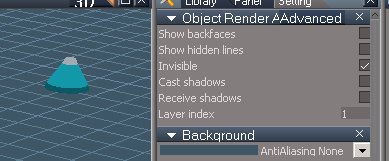
spotlight.jpg
spotlight.jpg (17.04 KiB) Viewed 3050 times
The Object Render Attributes in the LE shows the same checkbox unchecked. And i cannot check it.
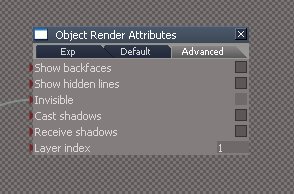
spotlight2.jpg
spotlight2.jpg (13.54 KiB) Viewed 3053 times
Is there a way to turn a Spotlight invisible? Looks a bit dumb with this bulb in the scene. I would need the light only, not the lightmesh too :)
Free Gamegraphics, Freeware Games http://reinerstilesets.de
User avatar
trueBlue
Captain
Posts: 5548
Joined: 06 Jul 2009, 22:50
Type the number ten into the box: 10

Re: WS - How do i turn the Spotlight invisible?

Post by trueBlue »

Delete the "Object Hider" node inside the Spot light.
Not sure what is for but I'll guess it has something to do with the Model side.
HTH
User avatar
Tiles
Master Chief Petty Officer
Posts: 401
Joined: 27 May 2009, 08:34

Re: WS - How do i turn the Spotlight invisible?

Post by Tiles »

Excellent. By deleting the Object Hider the Object render attributes checkbox for invisibility becomes available again. Many thanks :)
Free Gamegraphics, Freeware Games http://reinerstilesets.de
stan
Master Chief Petty Officer
Posts: 584
Joined: 21 May 2009, 17:20

Re: WS - How do i turn the Spotlight invisible?

Post by stan »

object hider just hides object's mesh when widget is on.

Return to “TechForum”