OK, I am now going to ask a really (and I mean really!) stupid question.
The background.
I needed to bring some work home with me as my home computer renders about 10x faster than the one at work (go figure).
First I tried the upgraded 7.61 beta8 and the direct X was all over the place. I suspect latest ATI drivers for my graphics card. Vue8 required latest drivers (they said) to fix a problem (not true, in fact it was just a problem with a display default). Anyway, I guess I have to roll back to earlier drivers to fix this. Interestingly, enough tS7.6 is fine!
So change to tS7.6. Suddenly my scene seems to have lost its light emitting object feature on the render. Then I realize it is rendering with Vray. Strange, I thought Vray was Workspace side only and I am working in model side with bridge switched off!
It renders fine in model side with Vray by the way???
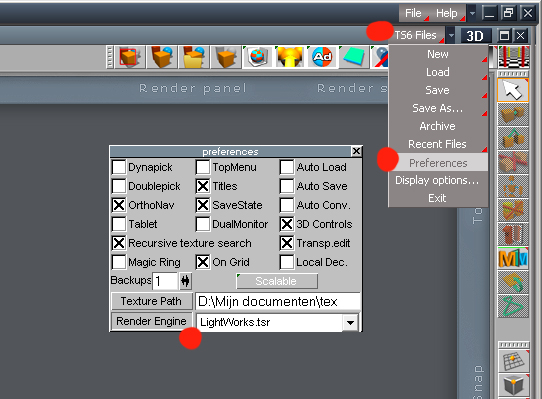
So I need to change render to lightworks so I can get back my light emitting objects...and here it comes, yes its this stupid...
How do I change from Vray to Lightworks. I remember there used to be a panel to do this, but for the life of me I cannot find it and the manual is no help either, except the quickview item in the manual displays the panel I want, but I have no clue how to get to it.
If somebody could help me out with any of the above, and especially the last aspect, I would be very grateful
Chris
Serious brain erosion
-
CdeB

- Chief Petty Officer
- Posts: 109
- Joined: 21 May 2009, 19:13
- Type the number ten into the box: 0
- Location: Scandinavia!
Serious brain erosion
-
Buzz

- Chief Petty Officer
- Posts: 150
- Joined: 05 Jul 2009, 12:46
- Type the number ten into the box: 0
- Location: Netherlands
Re: Serious brain erosion
There you go. Piece of cake.
- Attachments
-
-
CdeB
- Chief Petty Officer
- Posts: 109
- Joined: 21 May 2009, 19:13
- Type the number ten into the box: 0
- Location: Scandinavia!
Re: Serious brain erosion
Thanks very much Buzz,
As you say piece of cake when you remember!
Just as a follow on, has anybody else noticed problems with direct X display when upgrading catalyst drivers for ATI Radeon cards? Its strange it affects tS7.61 but not tS7.6.
Now I am just waiting for the render which is very slow (on a Core i7, I suspect something else is wrong now, hey ho! (its off to work we go, with a shovel and pick and walking stick, hey ho, hey ho, hey ho) -too late at night for me...
PS check this website out -its a brother of a friend with a new fluid solver that's getting a good uptake in the high end of our industry
http://www.exoticmatter.com"
As you say piece of cake when you remember!
Just as a follow on, has anybody else noticed problems with direct X display when upgrading catalyst drivers for ATI Radeon cards? Its strange it affects tS7.61 but not tS7.6.
Now I am just waiting for the render which is very slow (on a Core i7, I suspect something else is wrong now, hey ho! (its off to work we go, with a shovel and pick and walking stick, hey ho, hey ho, hey ho) -too late at night for me...
PS check this website out -its a brother of a friend with a new fluid solver that's getting a good uptake in the high end of our industry
http://www.exoticmatter.com"
-
marcel

- Captain
- Posts: 2247
- Joined: 21 May 2009, 19:52
- Type the number ten into the box: 0
- Location: paris - France
Re: Serious brain erosion
Vray on model side have the advantage to use the same panel than ligthwork for the shader. Some shader are for vray only and some shader are for lightwork only. it is easier to see what shader is for lightwork or vray or both render engine: if you can't use a shader for the selected render engine the icon is grey. that all.
i use standard shader like phong for modeling with Lightwork because the render is faster than Vray. When i want to try some feature like global illumination i change to vray. No need to change my texture. It is useful to create. when my scene is finished. i create a copy and use texture for vray (fresnel, ssd) if i choose vray. Or i use advanced texture for lightwork if i choose ligthwork for the final render. Another trick is to use 2 layers and duplicate the object that need vray texture. with the same scene you can do a render with ligthwork or vray, just hide or unhide the layer to render only the layer adapted to the selected render engine. to do this you need another layer with light, cam and all part of the scene useful for both render engine.
my choose for the render engine is:
-lightwork for hdri, animation (faster)
-vray for global illumination, caustic
For still image of design presentation i like to do 2 render (ligthwork with hdri + vray with caustic). then i merge both image with photo editor. the effect can be very interesting.
i use standard shader like phong for modeling with Lightwork because the render is faster than Vray. When i want to try some feature like global illumination i change to vray. No need to change my texture. It is useful to create. when my scene is finished. i create a copy and use texture for vray (fresnel, ssd) if i choose vray. Or i use advanced texture for lightwork if i choose ligthwork for the final render. Another trick is to use 2 layers and duplicate the object that need vray texture. with the same scene you can do a render with ligthwork or vray, just hide or unhide the layer to render only the layer adapted to the selected render engine. to do this you need another layer with light, cam and all part of the scene useful for both render engine.
my choose for the render engine is:
-lightwork for hdri, animation (faster)
-vray for global illumination, caustic
For still image of design presentation i like to do 2 render (ligthwork with hdri + vray with caustic). then i merge both image with photo editor. the effect can be very interesting.
Design - illustration - Animation
http://www.crea-vision.fr
http://www.crea-vision.fr
-
CdeB
- Chief Petty Officer
- Posts: 109
- Joined: 21 May 2009, 19:13
- Type the number ten into the box: 0
- Location: Scandinavia!
Re: Serious brain erosion
Thanks Marcel for the helpful comments and instructions.
Despite the fact that the screen was flashing on and off throughout the rendering today (and the fact that Vista was telling me -presumably due to the screen/direct x hiccoughs- that trueSpace was not responding and I should close the unresponsive program) trueSpace carried on despite rumours of its demise and the full psd file it generated now has been mailed to my work computer -and it looks good.
Now to try and roll back the Video drivers to a point that Vue and trueSpace are both happy, ho hum...
Despite the fact that the screen was flashing on and off throughout the rendering today (and the fact that Vista was telling me -presumably due to the screen/direct x hiccoughs- that trueSpace was not responding and I should close the unresponsive program) trueSpace carried on despite rumours of its demise
and the full psd file it generated now has been mailed to my work computer -and it looks good.Now to try and roll back the Video drivers to a point that Vue and trueSpace are both happy, ho hum...