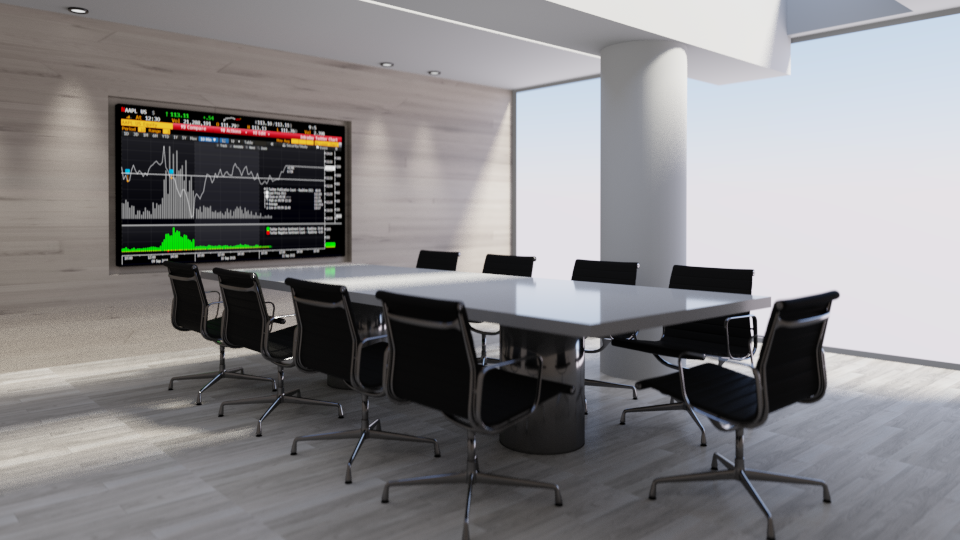
First Cycles Blender render..

User avatar
Prodigy
Site Admin
Posts: 957
Joined: 21 May 2009, 14:46
Type the number ten into the box: 0
Location: Uruguay

First Cycles Blender render..

Post by Prodigy »

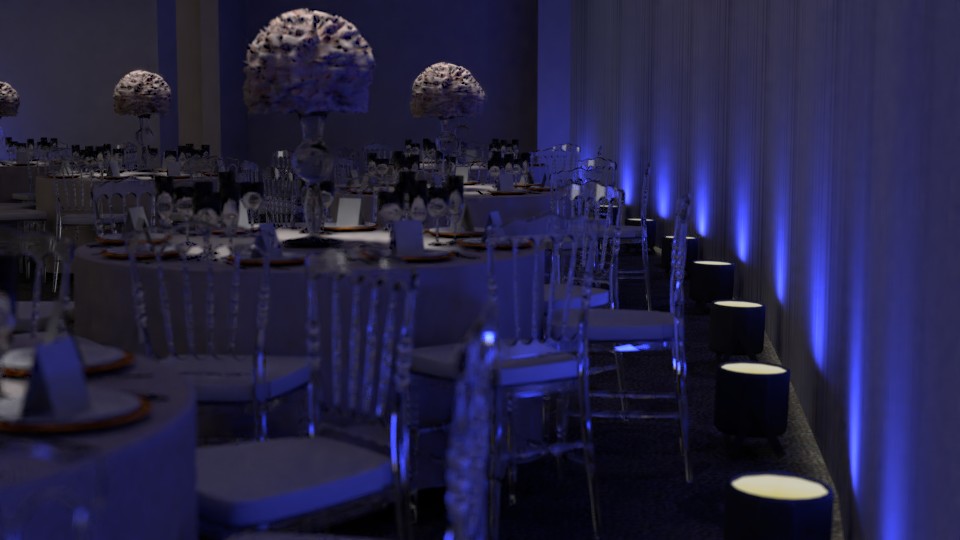
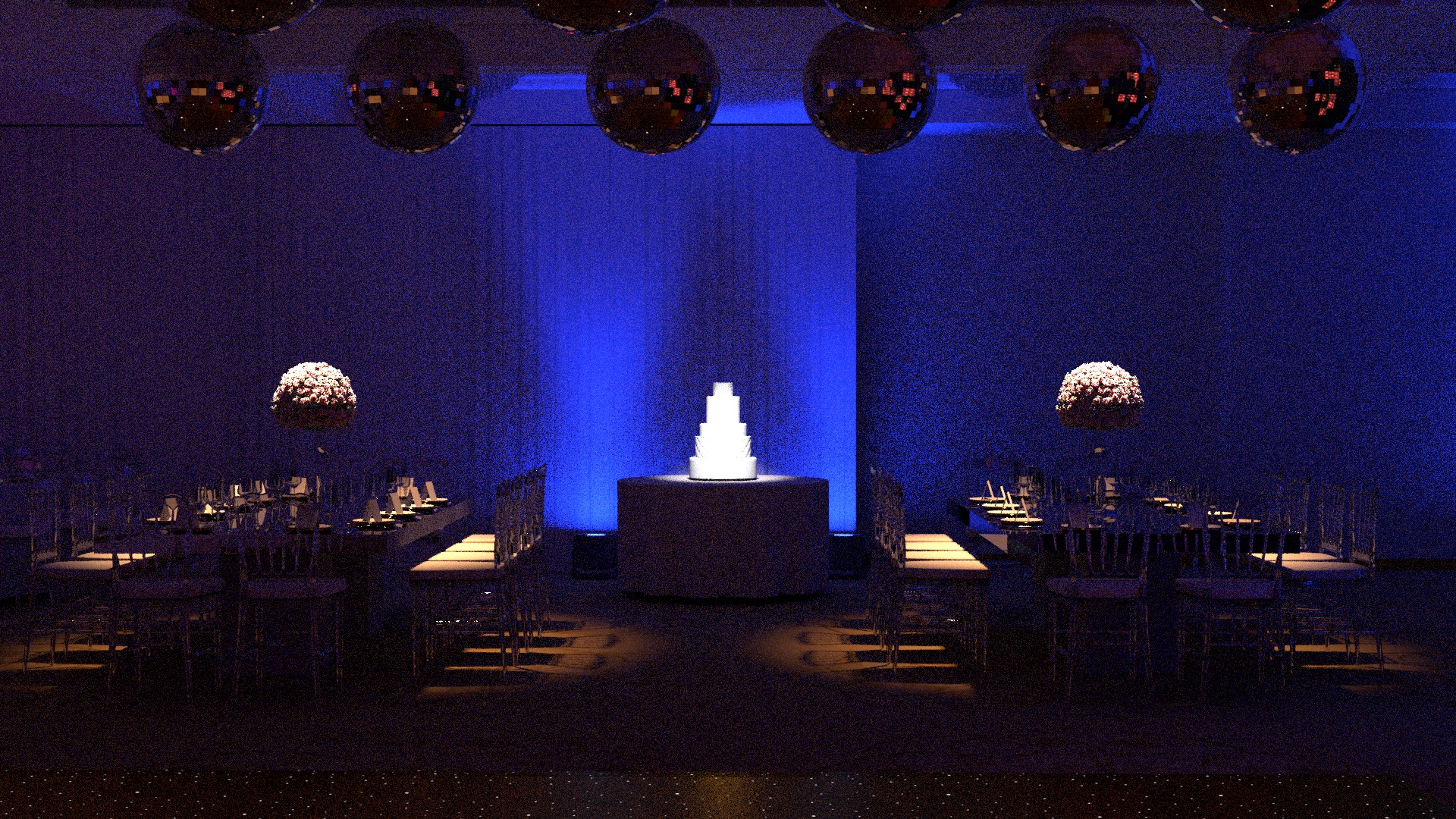
Well, since i'm fell more and more confortable with blender, i have to say Cycles is the way to go..

I still working with Truespace for modeling, then i export the model in collada and then imported in blender..

This is a work in progress but i'm very happy with the result.. Vray is quicker i think and cleanest than cycles but hey! It's free!!! :bananadrum:
prueba2.jpg
๑۩۞۩๑ prodigy ๑۩۞۩๑
User avatar
Prodigy
Site Admin
Posts: 957
Joined: 21 May 2009, 14:46
Type the number ten into the box: 0
Location: Uruguay

Re: First Cycles Blender render..

Post by Prodigy »

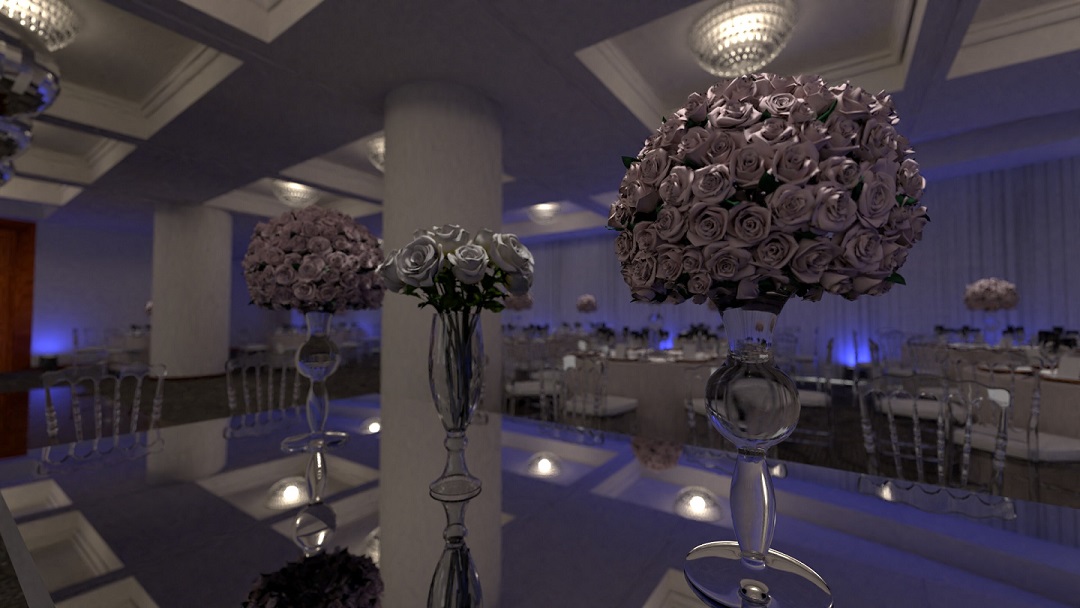
Btw, this is a work in progress not final render, so i was learning on instanceing objects to optimize the scene, now will try to make realistic flowers for the vase because looks like !#%!$" but that works for truespace in the past :D
A texture attached to a sphere and then apply a displacement mapping.. but since blender is 64bits i have no mem problem, so will make a high-poly model in pro of a better looking render..
๑۩۞۩๑ prodigy ๑۩۞۩๑
User avatar
Finis
Captain
Posts: 5410
Joined: 21 May 2009, 18:26
Type the number ten into the box: 0
Location: America!

Re: First Cycles Blender render..

Post by Finis »

Looks good. The chairs are like a photo. As they are the flowers could be sculptures or lamps.

I don't use TS any more but I do miss it.

I'm learning Blender in the bits of free time I have lately. Still a beginner. I played with instances, particles, to make 10,000 grass clumps. 1,300,000 polygons. Cycles rendered in about 3min 40sec (gtx 1060). Looking forward to eevee in Blender.

The Cycles denoising feature, which is on the render layers thing, can really speed up renders. Turn it on and reduce the render samples.

Iray is another PBR renderer I like. It is integrated in Daz Studio which is free. I think it is faster than Cycles, the images are very good, and of course the Daz interface is better designed than Blender.
I prefer dangerous freedom over peaceful servitude. -- Thomas Jefferson/Jean Jacques Rousseau
User avatar
clintonman
Captain
Posts: 5659
Joined: 21 May 2009, 21:08
Type the number ten into the box: 0
Location: California

Re: First Cycles Blender render..

Post by clintonman »

At first I thought the flowers were brains. :lol:
Clinton Reese

http://clintons3d.com
User avatar
bitkar
Captain
Posts: 2089
Joined: 16 Mar 2010, 07:14
Type the number ten into the box: 0
Location: Czech Republic

Re: First Cycles Blender render..

Post by bitkar »

there must be more free renderers for blender... isnt it?
Michal aka bitkar
tS freak since tS2 (1998) and forever (tS7.61 modeler)
User avatar
Draise
Captain
Posts: 3200
Joined: 21 Sep 2009, 19:33
Type the number ten into the box: 0
Location: Bogota, Colombia

Re: First Cycles Blender render..

Post by Draise »

clintonman wrote: 25 Feb 2018, 18:58 At first I thought the flowers were brains. :lol:
Me too! I knew I wasn't the only one.
User avatar
Prodigy
Site Admin
Posts: 957
Joined: 21 May 2009, 14:46
Type the number ten into the box: 0
Location: Uruguay

Re: First Cycles Blender render..

Post by Prodigy »

a Brain... :bananasad: hahahahaha

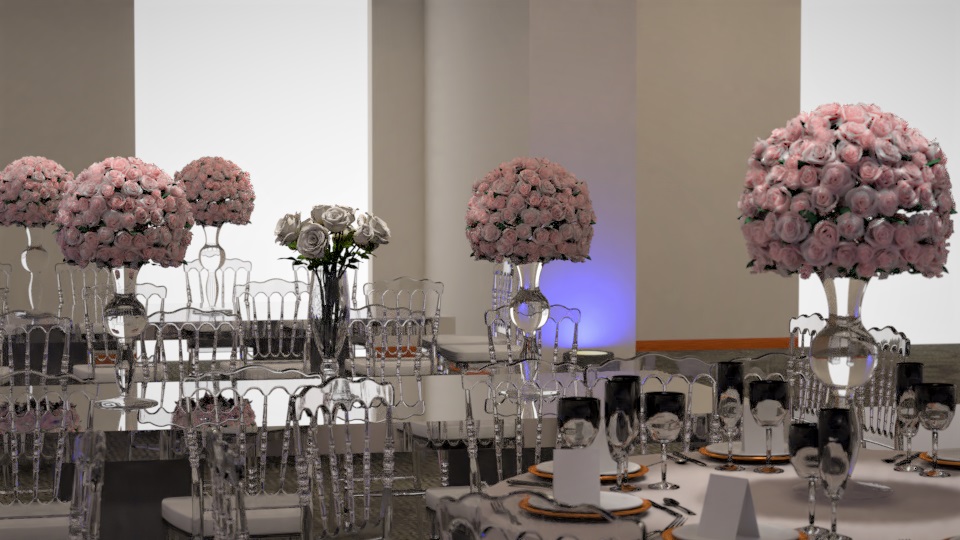
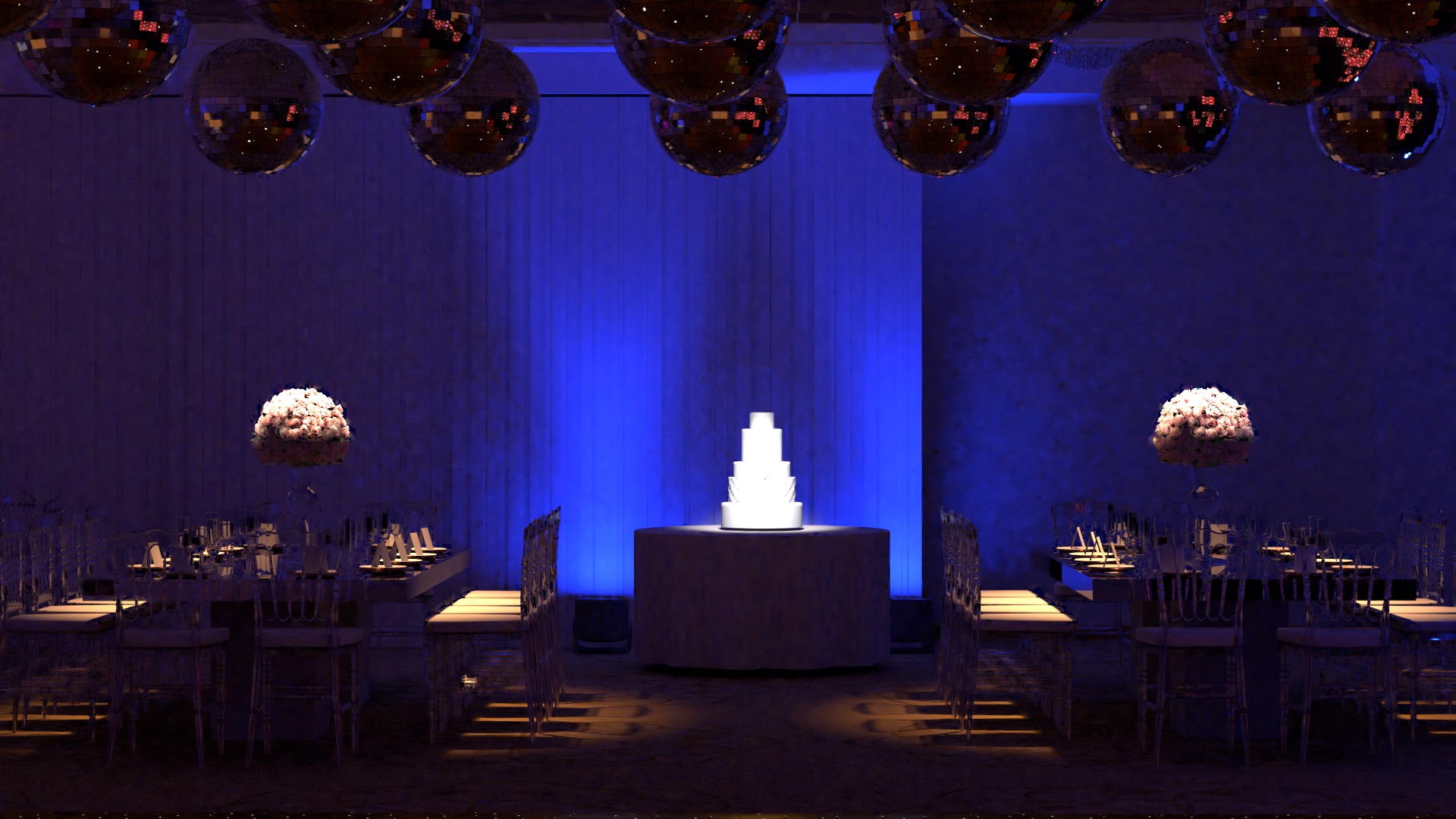
Well.. Roses are red... in fact.. light pink! :lol:

Rendertime 21 minutes..
prueba3.jpg
New Update
I saw the roses were too solid, so i added SSS to the material.. and now looks more realistic. (i think) :roll:
Have to work on those weird glasses, make a new more detiled model.. hope will fix that black thing..
prueba4.jpg
๑۩۞۩๑ prodigy ๑۩۞۩๑
User avatar
bitkar
Captain
Posts: 2089
Joined: 16 Mar 2010, 07:14
Type the number ten into the box: 0
Location: Czech Republic

Re: First Cycles Blender render..

Post by bitkar »

roses look very well now...
Michal aka bitkar
tS freak since tS2 (1998) and forever (tS7.61 modeler)
User avatar
Prodigy
Site Admin
Posts: 957
Joined: 21 May 2009, 14:46
Type the number ten into the box: 0
Location: Uruguay

Re: First Cycles Blender render..

Post by Prodigy »

Thanks! at home will share some new renders..

How many are inerested to see my workflow on truespace and blender?
๑۩۞۩๑ prodigy ๑۩۞۩๑
User avatar
Finis
Captain
Posts: 5410
Joined: 21 May 2009, 18:26
Type the number ten into the box: 0
Location: America!

Re: First Cycles Blender render..

Post by Finis »

I want to see workflow.
I prefer dangerous freedom over peaceful servitude. -- Thomas Jefferson/Jean Jacques Rousseau
User avatar
trueBlue
Captain
Posts: 5548
Joined: 06 Jul 2009, 22:50
Type the number ten into the box: 10

Re: First Cycles Blender render..

Post by trueBlue »

Sure!
User avatar
bitkar
Captain
Posts: 2089
Joined: 16 Mar 2010, 07:14
Type the number ten into the box: 0
Location: Czech Republic

Re: First Cycles Blender render..

Post by bitkar »

i also wanted to ask you for a video or something to show how much work it is to model in tS and render in blender.
Michal aka bitkar
tS freak since tS2 (1998) and forever (tS7.61 modeler)
User avatar
Steinie
Captain
Posts: 2958
Joined: 21 May 2009, 17:38
Type the number ten into the box: 10

Re: First Cycles Blender render..

Post by Steinie »

Heck Prodigy even a workflow showing you iron a shirt would be cool! :lol:
Welcome back!
User avatar
Dragneye
Lieutenant
Posts: 906
Joined: 02 Sep 2009, 22:09

Re: First Cycles Blender render..

Post by Dragneye »

Hey there Prodigy :bananahi:

Nice work.
Is the black reflecting the foreground (where you might have nothing to reflect, thus it renders black)? like where the camera is and behind it?
User avatar
Prodigy
Site Admin
Posts: 957
Joined: 21 May 2009, 14:46
Type the number ten into the box: 0
Location: Uruguay

Re: First Cycles Blender render..

Post by Prodigy »

Ok!! seems every wants a tutorial of "how to iron a shirt"!!

Let's doit! :bananamouse:
๑۩۞۩๑ prodigy ๑۩۞۩๑
User avatar
Prodigy
Site Admin
Posts: 957
Joined: 21 May 2009, 14:46
Type the number ten into the box: 0
Location: Uruguay

Re: First Cycles Blender render..

Post by Prodigy »

In the tutorial Section, Inside Blender you will find my truespaceKeyMap for Blender..

It mimics most of the truespace Mouse movements.. :bananatyping:

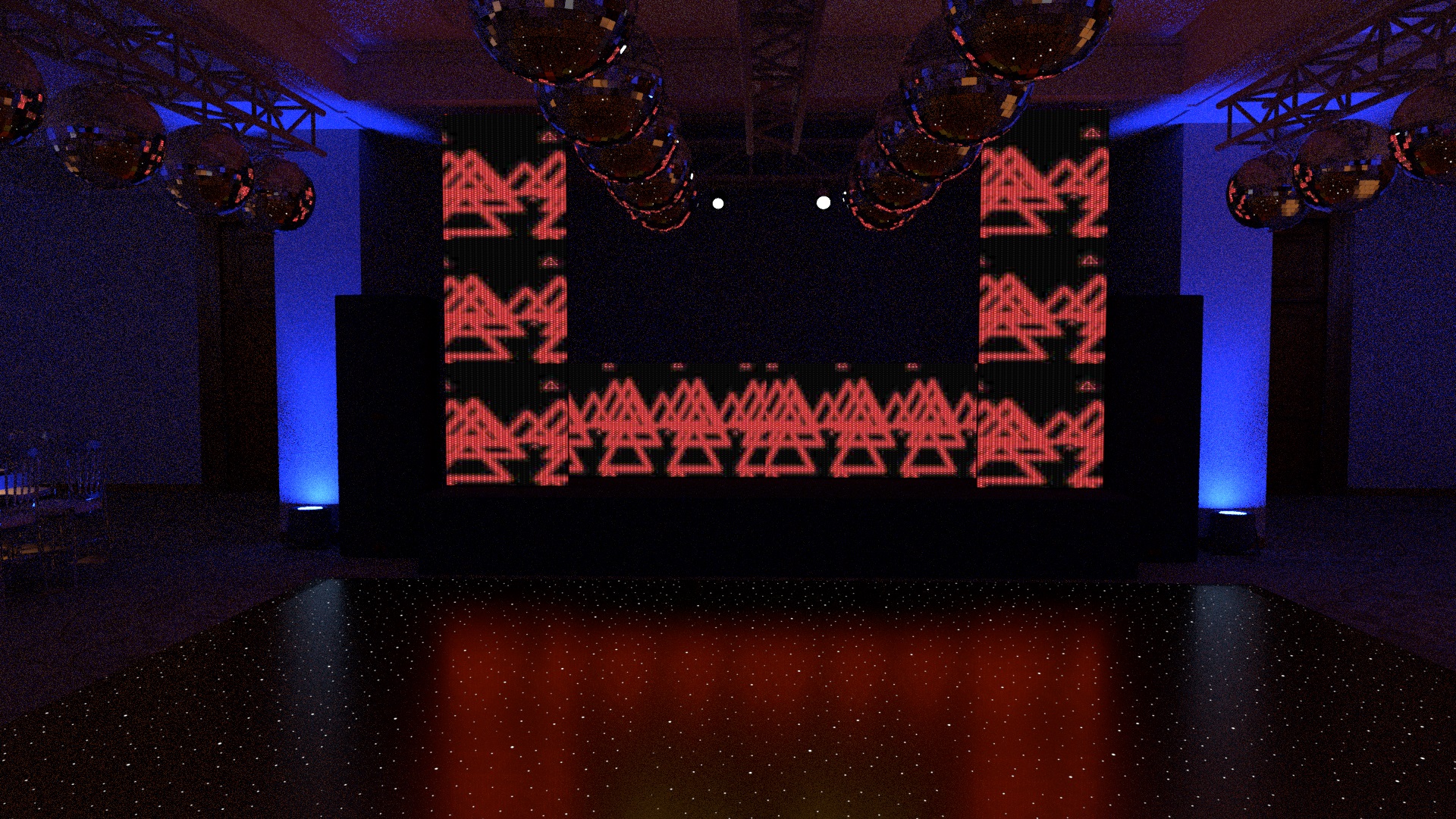
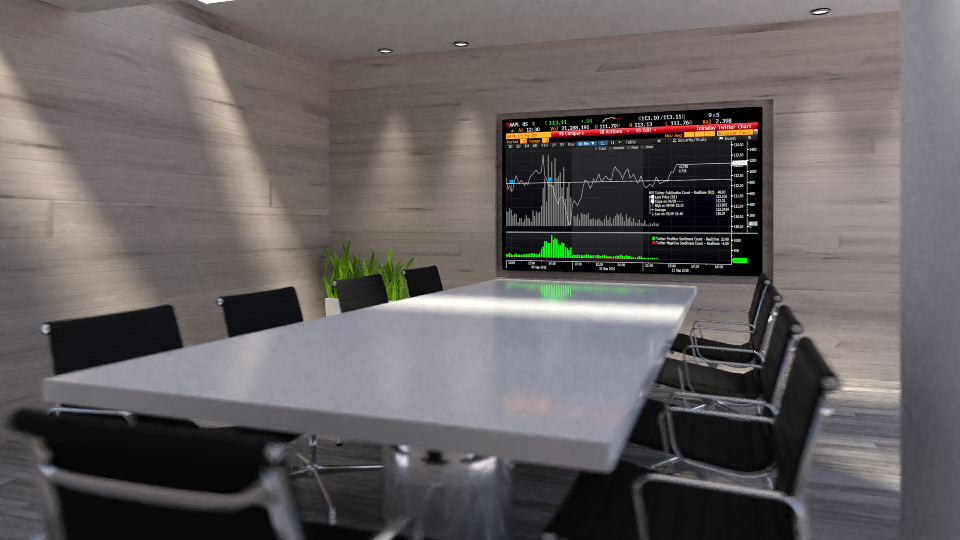
Another cycle render.. i have to admit that cycles is amazing but not THAT amazing like vray.. you get excellent results but for some reason the grain on the scene is killing me.. this render took 2 hours and a half.. and the grain still visible.. in vray will take a fraction of the time to looks much more amazing.. but hey.. all is not bad.. Cycles is free, and 64bit.. can't complain that much.. :worship:
Attachments
render17-8.jpg
render17-7.jpg
render17.jpg
๑۩۞۩๑ prodigy ๑۩۞۩๑
User avatar
Draise
Captain
Posts: 3200
Joined: 21 Sep 2009, 19:33
Type the number ten into the box: 0
Location: Bogota, Colombia

Re: First Cycles Blender render..

Post by Draise »

Are you using the denoiser? Found 256 samples with denoiser at like half gets rid of most noise for HD shots (external I must admit).

Tip: Use ray clamps, define ray counts on seperate passes, don't render a beauty pass and composite together later (render each pass with lower settings, like AO with high denoiser). I can drop a 45 minute frame to 10 minutes without loosing much quality that way.
User avatar
Finis
Captain
Posts: 5410
Joined: 21 May 2009, 18:26
Type the number ten into the box: 0
Location: America!

Re: First Cycles Blender render..

Post by Finis »

Use the denoiser for cycles. It is on the Render Layers panel. It will get rid of grain and fireflies. The denoiser has many settings so you can avoid reducing quality and control what it changes. You can use fewer samples and speed up rendering.

... Ah Draise said it.

Lighting and mood looks good.
I prefer dangerous freedom over peaceful servitude. -- Thomas Jefferson/Jean Jacques Rousseau
User avatar
bitkar
Captain
Posts: 2089
Joined: 16 Mar 2010, 07:14
Type the number ten into the box: 0
Location: Czech Republic

Re: First Cycles Blender render..

Post by bitkar »

ya, looks pretty harsh, like my old DSLR on iso 12800
Michal aka bitkar
tS freak since tS2 (1998) and forever (tS7.61 modeler)
User avatar
Prodigy
Site Admin
Posts: 957
Joined: 21 May 2009, 14:46
Type the number ten into the box: 0
Location: Uruguay

Re: First Cycles Blender render..

Post by Prodigy »

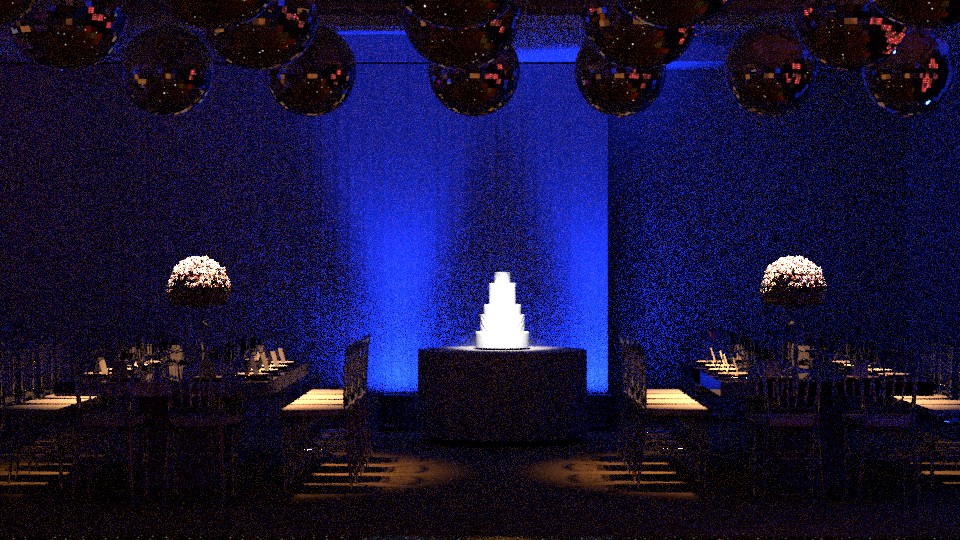
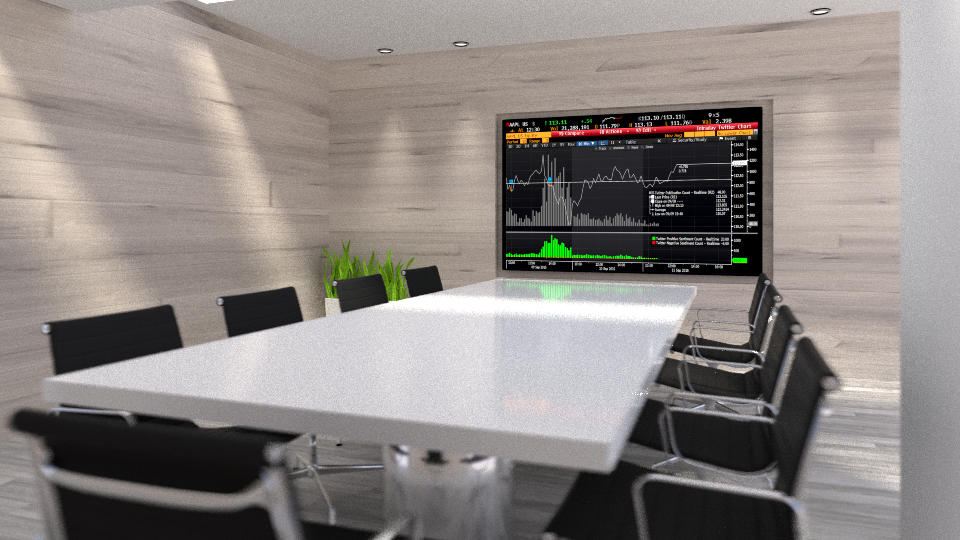
Hi guys,thanks for the feedback. Denoise was the first thing i've tested... but the results are far from my quality expectations.. Seems it works nice on bright scenes but in this particular, the effect is not acceptable at all.. :bananasad:
denoise.jpg
This render tooks 46minutes.. and Yaiks!!
Also, it seems that adding more samples didn't help on the render.. it take hours and the noise still present.. so to me is almost a showstopper.. :(
๑۩۞۩๑ prodigy ๑۩۞۩๑
User avatar
Finis
Captain
Posts: 5410
Joined: 21 May 2009, 18:26
Type the number ten into the box: 0
Location: America!

Re: First Cycles Blender render..

Post by Finis »

The denoiser with default settings is low quality or splotchy in some scenes. For high quality renders you have to change its settings to have a weaker effect. Not so strong and smaller radius. Still might not be good enough.

Dark scenes have always been a problem in CG. Low quality, loooooong render time.

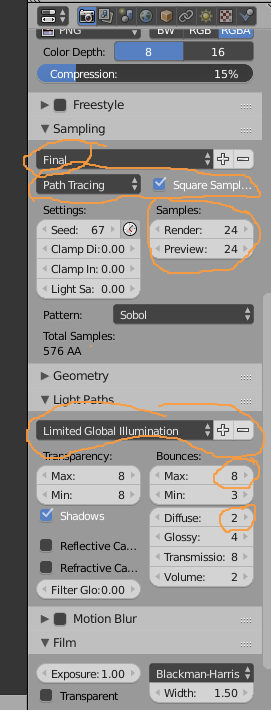
Try setting the light bounces to a high number in Render->Light Paths.. Then more light can reach into the very dark parts and fill in the grain. I use the Full Global Illumination preset there for final render but you could set bounces even higher. I also turn off caustics there to make it faster unless I really need it. Lights also have bounce property which is high by default.

Old tricks for dark scene:
- render the scene with brighter light and then darken it in paint shop or compositor. Doesn't look quite right but often good enough.
- increase the exposure for the camera

Another thought. Not 100% sure but I think Cycles has a cut off for very dim light rays. Below a certain brightness the light ray isn't considered anymore since it makes little difference to the image. Set that so it never cuts off and maybe more light will bounce to the grainy areas.

Maybe there is a tutorial for dark scenes with Cycles.
I prefer dangerous freedom over peaceful servitude. -- Thomas Jefferson/Jean Jacques Rousseau
User avatar
Prodigy
Site Admin
Posts: 957
Joined: 21 May 2009, 14:46
Type the number ten into the box: 0
Location: Uruguay

Re: First Cycles Blender render..

Post by Prodigy »

Good advice Finis thanks! :worship:
๑۩۞۩๑ prodigy ๑۩۞۩๑
User avatar
Finis
Captain
Posts: 5410
Joined: 21 May 2009, 18:26
Type the number ten into the box: 0
Location: America!

Re: First Cycles Blender render..

Post by Finis »

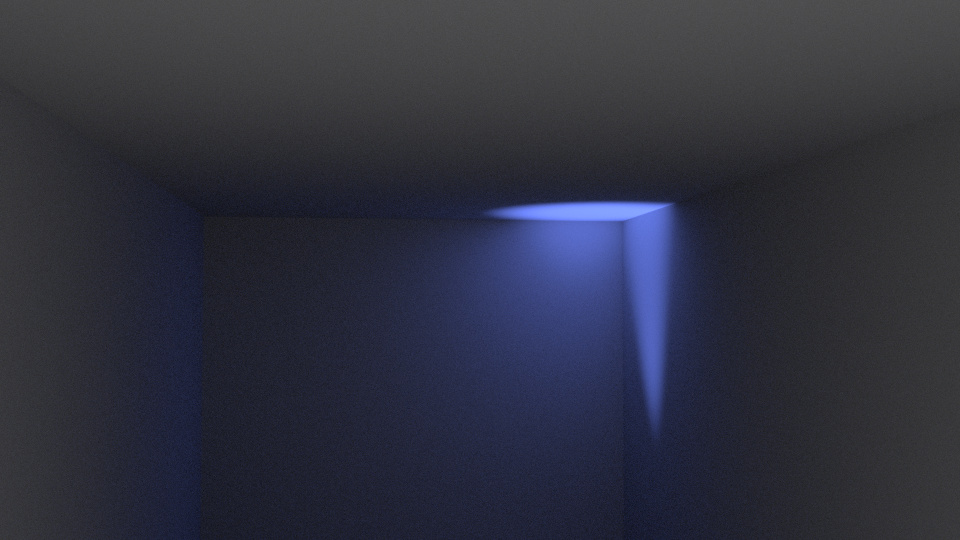
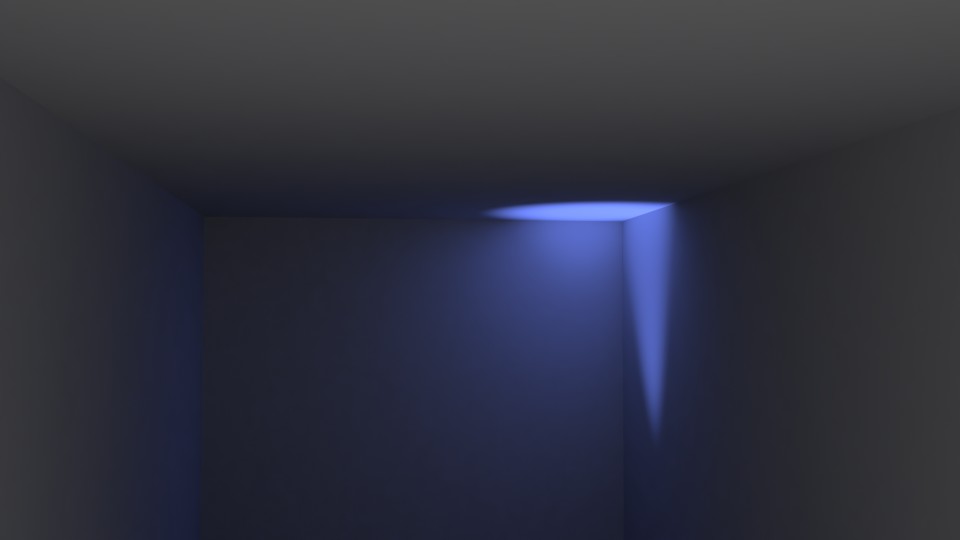
Thanks Prodigy! But ... Just now I tested these things in a simple scene of a deep box with one sun light. Only indirect light would reach the dark interior of the box. Although some of my suggestions are done using other renderers my tests showed them to have little effect in Cycles.

1024 bounces with 500 minimum took much longer and made some difference but still unacceptable grain and unacceptable denoiser performance. It won't let me set it higher than 1024. Camera exposure made it brighter but no change in grain. Low effect settings for denoiser was still quite blotchy. I found the low brightness ray cut off but it made no difference. I used branched path tracing to set just the diffuse to high bounces and that crashed the program at 200. Brighter light improved it but even really bright still had grain which implies the grain is associated with indirect light.

Time to search for tutorials.

Render speed: This sounds dumb but it is the type of mistake we all make sometimes. Did you set your user preferences and Render panel to use your GPU?
I prefer dangerous freedom over peaceful servitude. -- Thomas Jefferson/Jean Jacques Rousseau
User avatar
Finis
Captain
Posts: 5410
Joined: 21 May 2009, 18:26
Type the number ten into the box: 0
Location: America!

Re: First Cycles Blender render..

Post by Finis »

Ah ha! 33 seconds no deniose.
box.jpg
screen.jpg
More diffuse bounces makes it better. More samples = better but longer render.
I prefer dangerous freedom over peaceful servitude. -- Thomas Jefferson/Jean Jacques Rousseau
User avatar
Prodigy
Site Admin
Posts: 957
Joined: 21 May 2009, 14:46
Type the number ten into the box: 0
Location: Uruguay

Re: First Cycles Blender render..

Post by Prodigy »

Square samples means 24x24 = 576 samples ;)

Render With your settings
testFinis.jpg
Finis, please add a blue light in a corner.. i think the problem is the blend of 2 lights..
๑۩۞۩๑ prodigy ๑۩۞۩๑
User avatar
Finis
Captain
Posts: 5410
Joined: 21 May 2009, 18:26
Type the number ten into the box: 0
Location: America!

Re: First Cycles Blender render..

Post by Finis »

I'm out of ammo now. Just some guesses. Maybe Draise has a passes/layers/composite thing to do.

With blue spot light.
box.jpg
With denoiser radius 8 both strengths 0.05 apply only to diffuse indirect.
box-denoised.jpg
Your render with those settings looks like there is just no light reaching some spots. So there is no data there and can't be brightened or anything. Use more max bounces and diffuse bounces and see if it gets better. Maybe a lot more. Try the full global illumination preset.

Hack trick that may help: Set the walls in the dark part to emit a small amount of light. Similar: if they are black change to almost black.

Set your chairs etc. to invisible in render for your graininess tests so it is fast. Be sure there is a wall behind the camera, close the room, so light doesn't get out.

Be sure your lights have 1024 bounces in the light's properties.

I have to go to work now.

Test scene Blender file with denoiser on.
Attachments
test485d.zip
(70.92 KiB) Downloaded 331 times
I prefer dangerous freedom over peaceful servitude. -- Thomas Jefferson/Jean Jacques Rousseau
User avatar
Prodigy
Site Admin
Posts: 957
Joined: 21 May 2009, 14:46
Type the number ten into the box: 0
Location: Uruguay

Re: First Cycles Blender render..

Post by Prodigy »

Thanks Finis for your time :bananathumb: keep in touch
๑۩۞۩๑ prodigy ๑۩۞۩๑
User avatar
Finis
Captain
Posts: 5410
Joined: 21 May 2009, 18:26
Type the number ten into the box: 0
Location: America!

Re: First Cycles Blender render..

Post by Finis »

Did you solve this?

A big factor for render speed in cycles is tile size. Small tiles, 16x16, are good for cpu renders. Larger tiles are good for gpu renders. I find that 256 x 256 is often best for gpu. Try the automatic tile size plugin. It doesn't pick the best one for you but it makes it easy to try different ones and it adjusts them to be the same size.

An idea for the speckles. Try scaling the whole scene to be bigger or smaller. Select everything and scale.
I prefer dangerous freedom over peaceful servitude. -- Thomas Jefferson/Jean Jacques Rousseau
User avatar
bitkar
Captain
Posts: 2089
Joined: 16 Mar 2010, 07:14
Type the number ten into the box: 0
Location: Czech Republic

Re: First Cycles Blender render..

Post by bitkar »

a little workaround, which would be maybe also time consuming for render but... if you render the image bigger and scale it down, the noise should be less visible. But it also sucks i guess :D But it can provide some more quality. If you combine in with denoiser in photoshop like Noiseware plugin...
Michal aka bitkar
tS freak since tS2 (1998) and forever (tS7.61 modeler)
User avatar
Prodigy
Site Admin
Posts: 957
Joined: 21 May 2009, 14:46
Type the number ten into the box: 0
Location: Uruguay

Re: First Cycles Blender render..

Post by Prodigy »

Hi guys.. thanks for the advices.. still not getting clean results on my renders..

Finis: Yes i 64x64 for cpu and 256x256 for gpu runs the best for my setup..Thanks!

Here is another scene i'm working with.. again Denoise is not giving me the results i expect.. this render has 500 samples.
rendertest.png
Without denoise looks much better IMO..
rendertest.png
Yeah Bitkar, that is an old trick i used in the past to make sharp renders.. so is not a bad option.. :bananathumb:

I found a nice "workaround" for daylight interiors, and it's using AO (Ambient Occlussion) it lights up the scene and the noise is less visible...
The problem it doesnt work for dark scenes.. :|

Same Samples but AO activated.
rendertest.png
๑۩۞۩๑ prodigy ๑۩۞۩๑
User avatar
Finis
Captain
Posts: 5410
Joined: 21 May 2009, 18:26
Type the number ten into the box: 0
Location: America!

Re: First Cycles Blender render..

Post by Finis »

Are you using Filmic? Try it.
I prefer dangerous freedom over peaceful servitude. -- Thomas Jefferson/Jean Jacques Rousseau
User avatar
bitkar
Captain
Posts: 2089
Joined: 16 Mar 2010, 07:14
Type the number ten into the box: 0
Location: Czech Republic

Re: First Cycles Blender render..

Post by bitkar »

another workaround (theory): also maybe rendering the dark parts (whole scene anyway) again and lighten up the image (even when the image will overexpose). So the dark parts become lighter = having less noise (and even more detail). And using PS or PSP to make an HDR merge (or manual via layers) and tweak the settings to make the dark areas dark again (but without noise this time)
Last edited by bitkar on 20 Apr 2018, 07:18, edited 1 time in total.
Michal aka bitkar
tS freak since tS2 (1998) and forever (tS7.61 modeler)
User avatar
Prodigy
Site Admin
Posts: 957
Joined: 21 May 2009, 14:46
Type the number ten into the box: 0
Location: Uruguay

Re: First Cycles Blender render..

Post by Prodigy »

Thanks for the tips.. i didn't know about filmic! :bananathumb:

check this render..2000 samples and filmic ;)

and the left side lights still noisy.. :?
rendertest.png
Keep making tests.
๑۩۞۩๑ prodigy ๑۩۞۩๑
User avatar
RAYMAN
Captain
Posts: 2547
Joined: 21 May 2009, 18:56

Re: First Cycles Blender render..

Post by RAYMAN »

Have You used a light potal ?
User avatar
Draise
Captain
Posts: 3200
Joined: 21 Sep 2009, 19:33
Type the number ten into the box: 0
Location: Bogota, Colombia

Re: First Cycles Blender render..

Post by Draise »

Prodigy wrote: 19 Apr 2018, 11:58 Thanks for the tips.. i didn't know about filmic! :bananathumb:

check this render..2000 samples and filmic ;)

and the left side lights still noisy.. :?
rendertest.png

Keep making tests.
Me gusta. Nice come back!
User avatar
Prodigy
Site Admin
Posts: 957
Joined: 21 May 2009, 14:46
Type the number ten into the box: 0
Location: Uruguay

Re: First Cycles Blender render..

Post by Prodigy »

Thanks guys, yes, i've used portals.. :bananathumb:
๑۩۞۩๑ prodigy ๑۩۞۩๑
User avatar
RAYMAN
Captain
Posts: 2547
Joined: 21 May 2009, 18:56

Re: First Cycles Blender render..

Post by RAYMAN »

Best workflow is always very relative!
Depends on what one is doing!
Ive had very very good results with Okino!
Its probably the only way at the moment to get instances FROM Blender TO..Truespace..!
Collada was always a good way to export from WS!
Had very good results even with animations..!

For Blender renders I had better results with Thea and with Prorender!
I do cleaning in Lightroom!
Plus there is another good trick that comes from astronomy..combine 2 or more noisy renders into one good one! That also cancels noise!
User avatar
Finis
Captain
Posts: 5410
Joined: 21 May 2009, 18:26
Type the number ten into the box: 0
Location: America!

Re: First Cycles Blender render..

Post by Finis »

Hi Prodigy,

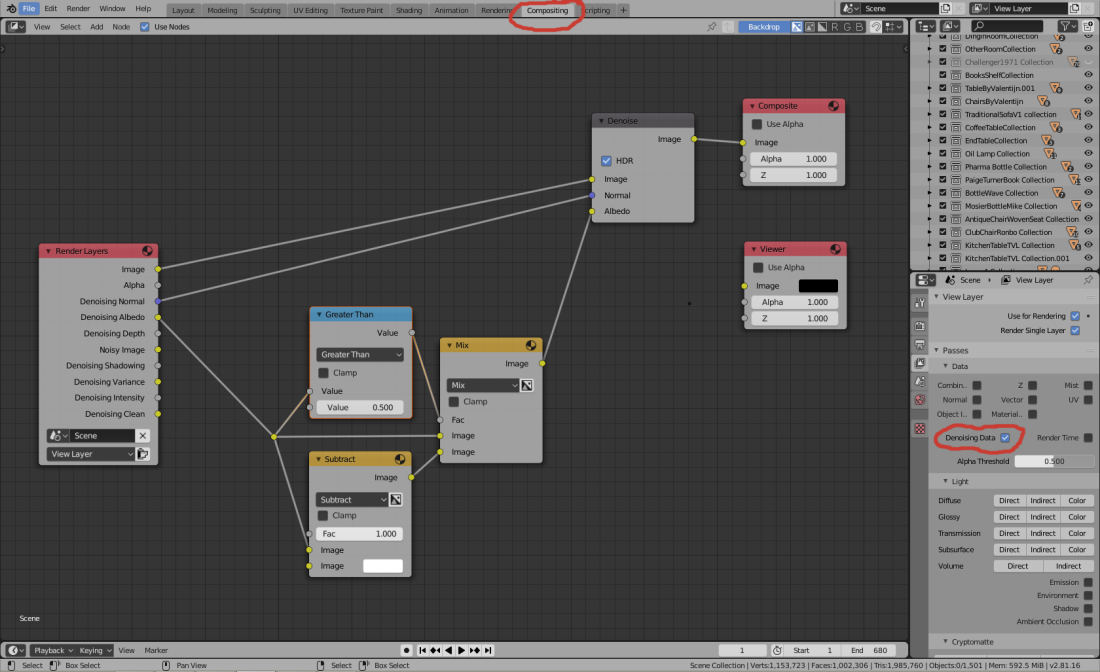
Here is a denoising Blender compositor set up that works well. Cycles. It is great for dark scenes like your restaurant and works well for bright ones. The denoiser node takes a bit of time but lower samples are ok so the finished picture can be much faster. The node uses much memory and large pictures like 4K can use a lot of ram. Credit for the set up to someone on BlenderArtists.

Finis
denoisenode.jpg
I prefer dangerous freedom over peaceful servitude. -- Thomas Jefferson/Jean Jacques Rousseau
User avatar
Prodigy
Site Admin
Posts: 957
Joined: 21 May 2009, 14:46
Type the number ten into the box: 0
Location: Uruguay

Re: First Cycles Blender render..

Post by Prodigy »

Thanks Finis, will make some tests and then share the results! :bananathumb:
๑۩۞۩๑ prodigy ๑۩۞۩๑

Return to “Prodigy's Projects”