I would like to sign my creations, and for that I would like to have a good default signature that looks hand made or be really hand made... So guys, how do you do your signature?
Thanks in Advance
Signature
-
LeonRegis

- Captain
- Posts: 1946
- Joined: 18 Aug 2009, 17:36
- Type the number ten into the box: 0
- Location: Brazil/Earth/Orion Arm/Milky Way/4th Dimension/This Universe/Multiverse???/Singularity???
Signature
Be the change you want to see in the world. - Mohandas Gandhi
-
froo
- Captain
- Posts: 2554
- Joined: 22 May 2009, 12:13
Re: Signature
hmm well, maybe you could use a nice thick black 'Sharpie' type magic marker, sign your name on a
clean white sheet of paper a couple times; Pick the best one,
scan it to an image, then you can trim it. Then you can make this an alpha map, I think,
so the white background can be 'invisible', and the signature can be changed to whatever color you want.
clean white sheet of paper a couple times; Pick the best one,
scan it to an image, then you can trim it. Then you can make this an alpha map, I think,
so the white background can be 'invisible', and the signature can be changed to whatever color you want.
-
Steinie

- Captain
- Posts: 2958
- Joined: 21 May 2009, 17:38
- Type the number ten into the box: 10
Re: Signature
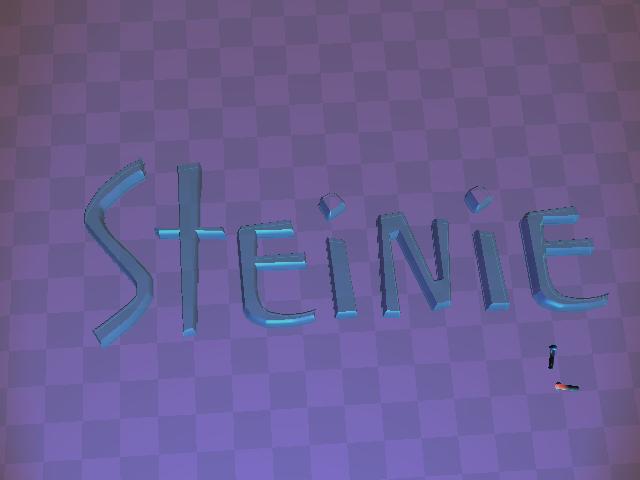
Why not use trueSpace? Just use the text tools and create your own custom
signature.
signature.
- Attachments
-
-
Finis

- Captain
- Posts: 5410
- Joined: 21 May 2009, 18:26
- Type the number ten into the box: 0
- Location: America!
Re: Signature
I use Paint Shop Pro and a vector text item. It uses regular fonts and is not hand written. You could do that with a hand written signature as Froo said.
You could make a 3D one in TS like Steinie's but using your own hand written signature. Scan your signature from paper. Use as a texture on a plane in TS. Use the 2D shape tools to outline the letters. Then bevel or such to make it 3D.
You could make a 3D one in TS like Steinie's but using your own hand written signature. Scan your signature from paper. Use as a texture on a plane in TS. Use the 2D shape tools to outline the letters. Then bevel or such to make it 3D.
I prefer dangerous freedom over peaceful servitude. -- Thomas Jefferson/Jean Jacques Rousseau
-
spacekdet

- Captain
- Posts: 1810
- Joined: 27 May 2009, 15:00
- Type the number ten into the box: 10
- Location: On the day shift at the Utility Muffin Research Kitchen
Re: Signature
A few tuts on how to do this.
One here.
One using Gimp.
Another Gimp tut.
Use php.
Do a bunch in a batch.
If none of these appeal, try Googling " Adding signature watermark to an image "
One here.
One using Gimp.
Another Gimp tut.
Use php.
Do a bunch in a batch.
If none of these appeal, try Googling " Adding signature watermark to an image "
-
marcel

- Captain
- Posts: 2247
- Joined: 21 May 2009, 19:52
- Type the number ten into the box: 0
- Location: paris - France
Re: Signature
My best 2d vector tool for trueSpace is Adobe illustrator 10. I export an illustrator 7 file witch can be imported in trueSpace without problem. curve in illustrator 7 file need to be closed and without outline. More recent illustrator soft can't export a version 7 file. It is why I use the old version 10.
Design - illustration - Animation
http://www.crea-vision.fr
http://www.crea-vision.fr