Workspace File Menu
-
clintonman
- Captain
- Posts: 5659
- Joined: 21 May 2009, 21:08
- Type the number ten into the box: 0
- Location: California
Workspace File Menu
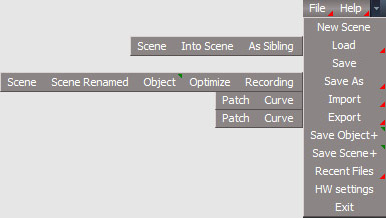
Image shows all the possible menu items.
Import and Export won't install if NURBS aren't already there.
Same for the Save Object+/Scene+ and Library Place scripts.
If not installed to the UU version of tS then the Save As Single Object and Optimize won't be included
A new file menu based on the Unofficial Updates file menu.
It adds some things, renames some things and has reordered menu items. The biggest changes are in the Load and Save As menus.
There is a "Save as Scene Renamed" which will rename the scene to match the file name chosen. So it works like the model space save as scene.
It works with the original tS installation and the Unofficial Updates.
Published a little early and I need to do one more round of testing to call it "done".
https://clintons3d.com/plugins/truespac ... emenu.html
Import and Export won't install if NURBS aren't already there.
Same for the Save Object+/Scene+ and Library Place scripts.
If not installed to the UU version of tS then the Save As Single Object and Optimize won't be included
A new file menu based on the Unofficial Updates file menu.
It adds some things, renames some things and has reordered menu items. The biggest changes are in the Load and Save As menus.
There is a "Save as Scene Renamed" which will rename the scene to match the file name chosen. So it works like the model space save as scene.
It works with the original tS installation and the Unofficial Updates.
Published a little early and I need to do one more round of testing to call it "done".
https://clintons3d.com/plugins/truespac ... emenu.html
-
trueBlue
- Captain
- Posts: 5548
- Joined: 06 Jul 2009, 22:50
- Type the number ten into the box: 10
Re: Workspace File Menu
I tried Loading a saved Group (two selected cubes) using your Save As/Object
-
clintonman
- Captain
- Posts: 5659
- Joined: 21 May 2009, 21:08
- Type the number ten into the box: 0
- Location: California
Re: Workspace File Menu
Oh
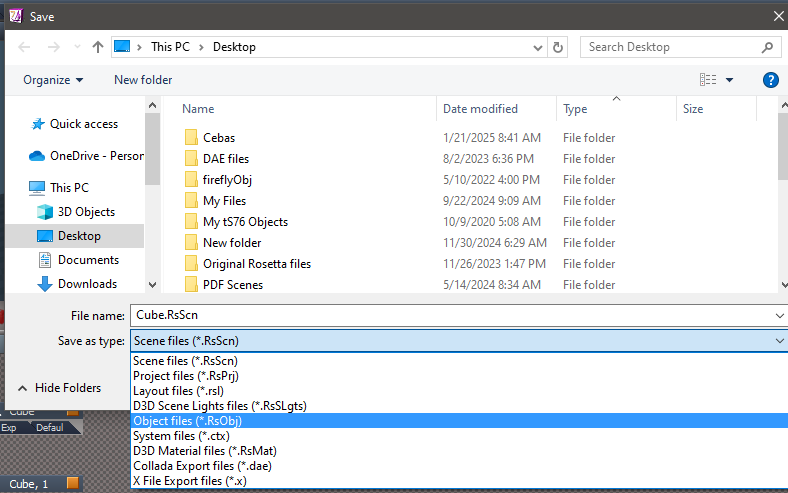
Wow, I see the error and when I try to save 2 selected cubes with the original Save button I get this:
There is no option to save RsObj with multi-selection.
I guess I just assumed it would work like model space save as.
Thanks, I'll add a restriction to it and change the names to something else.
Wow, I see the error and when I try to save 2 selected cubes with the original Save button I get this:
There is no option to save RsObj with multi-selection.
I guess I just assumed it would work like model space save as.
Thanks, I'll add a restriction to it and change the names to something else.
-
trueBlue
- Captain
- Posts: 5548
- Joined: 06 Jul 2009, 22:50
- Type the number ten into the box: 10
Re: Workspace File Menu
Try the original Save command
Library2.DlgGenericSave('', '', 3)
single quote(s) = FirstSelected()
First try with more than one selected object
Next try with one selected object
RsObj becomes available
Library2.DlgGenericSave('', '', 3)
single quote(s) = FirstSelected()
First try with more than one selected object
Next try with one selected object
RsObj becomes available
-
trueBlue
- Captain
- Posts: 5548
- Joined: 06 Jul 2009, 22:50
- Type the number ten into the box: 10
Re: Workspace File Menu
BTW... I tested this in the Standalone version
Maybe your saved Group works in the Full Version?
-
clintonman
- Captain
- Posts: 5659
- Joined: 21 May 2009, 21:08
- Type the number ten into the box: 0
- Location: California
Re: Workspace File Menu
Nope same error.trueBlue wrote: 07 Mar 2025, 15:58 BTW... I tested this in the Standalone version
Maybe your saved Group works in the Full Version?
Now trying to find good names for the Save As Object buttons.
Original: uses 3D Object icon(object as seen in the 3D view), author from when tS was installed and no description
UU: uses Library Icon(orange sofa), overrides author and adds description
-
trueBlue
- Captain
- Posts: 5548
- Joined: 06 Jul 2009, 22:50
- Type the number ten into the box: 10
Re: Workspace File Menu
I am not sure
I am thinking about updating the Save command
if(Node.SelectedCount() > 1){Node.Select(Node.FirstSelected())};Library2.DlgGenericSave('', '', 3)
I am thinking about updating the Save command
if(Node.SelectedCount() > 1){Node.Select(Node.FirstSelected())};Library2.DlgGenericSave('', '', 3)
-
clintonman
- Captain
- Posts: 5659
- Joined: 21 May 2009, 21:08
- Type the number ten into the box: 0
- Location: California
Re: Workspace File Menu
Looks like it would make it hard to tell what would be saved. It's not always clear what the first selected one is so you might save the wrong object or you think you're saving the entire selection and find out later only the 1 object was saved.trueBlue wrote: 07 Mar 2025, 16:17 I am not sure
I am thinking about updating the Save command
if(Node.SelectedCount() > 1){Node.Select(Node.FirstSelected())};Library2.DlgGenericSave('', '', 3)
-
clintonman
- Captain
- Posts: 5659
- Joined: 21 May 2009, 21:08
- Type the number ten into the box: 0
- Location: California
Re: Workspace File Menu
Update:
added restriction on multi-selection on the Save As "Object"
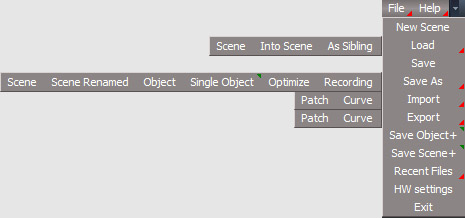
renamed Save As "Single Object" to Save As "Object+"
I still need to update the image on the website to show the change. Will wait in hopes of a finding a better name than "Object+"
added restriction on multi-selection on the Save As "Object"
renamed Save As "Single Object" to Save As "Object+"
I still need to update the image on the website to show the change. Will wait in hopes of a finding a better name than "Object+"
-
trueBlue
- Captain
- Posts: 5548
- Joined: 06 Jul 2009, 22:50
- Type the number ten into the box: 10
Re: Workspace File Menu
I am fine with you overwriting/using the Object toolbar Command with your process
Just add the RclickCommand to it
if(Node.SelectedCount() > 1){Node.Select(Node.FirstSelected())};UserInterface.OpenToolPanelViewEx2("" , "" ,"/Preferences/Save As Object/Object", 3, 0, 0)
Note: The above is different than the current UU
HelpText: Save As Object / Object Properties
Just add the RclickCommand to it
if(Node.SelectedCount() > 1){Node.Select(Node.FirstSelected())};UserInterface.OpenToolPanelViewEx2("" , "" ,"/Preferences/Save As Object/Object", 3, 0, 0)
Note: The above is different than the current UU
HelpText: Save As Object / Object Properties
-
clintonman
- Captain
- Posts: 5659
- Joined: 21 May 2009, 21:08
- Type the number ten into the box: 0
- Location: California
Re: Workspace File Menu
So if I understandtrueBlue wrote: 07 Mar 2025, 18:26 I am fine with you overwriting/using the Object toolbar Command with your process
Just add the RclickCommand to it
if(Node.SelectedCount() > 1){Node.Select(Node.FirstSelected())};UserInterface.OpenToolPanelViewEx2("" , "" ,"/Preferences/Save As Object/Object", 3, 0, 0)
Note: The above is different than the current UU
HelpText: Save As Object / Object Properties
LMB:
Error message if more than 1 object selected
Will save using the 3D Object icon which is the object as seen in the 3D viewport.
Author is taken from the value typed in during the tS installation.
Description is blank.
RMB:
Change the selection to the first selected item
Open the Panel
Press the Save As button on the object panel:
- Will save using the Library icon which is an orange chair.
- Author is taken from the Object panel.
- Description is taken from the Object panel.
-
trueBlue
- Captain
- Posts: 5548
- Joined: 06 Jul 2009, 22:50
- Type the number ten into the box: 10
-
clintonman
- Captain
- Posts: 5659
- Joined: 21 May 2009, 21:08
- Type the number ten into the box: 0
- Location: California
Re: Workspace File Menu
Update released:
moved code from the Object+ RClickCommand button into the Object button RClickCommand and removed the Object+ button
actual RMB code lives inside the function set, function SaveAsObjectPanel()
final result shown above