Yafaray Export Bug
-
clintonman

- Captain
- Posts: 5659
- Joined: 21 May 2009, 21:08
- Type the number ten into the box: 0
- Location: California
Yafaray Export Bug
I think I found a bug in the yafaray scripts. I was testing the glass material and it wasn't giving me the result I expected. I flipped all the normals of the mesh and then it was correct. Has anyone else seen this?
-
bitkar

- Captain
- Posts: 2089
- Joined: 16 Mar 2010, 07:14
- Type the number ten into the box: 0
- Location: Czech Republic
Re: Yafaray Export Bug
i was writing about some glass bug recently. As some faces were dark, did not reflect background and caustics were not colored, etc. Just the glass did not looked as it supposed to look. Which is sad, coz glass is the reason to use yafaray, coz its the only free renderer for tS that can produce caustics (and GI)
Michal aka bitkar
tS freak since tS2 (1998) and forever (tS7.61 modeler)
tS freak since tS2 (1998) and forever (tS7.61 modeler)
-
clintonman
- Captain
- Posts: 5659
- Joined: 21 May 2009, 21:08
- Type the number ten into the box: 0
- Location: California
-
clintonman
- Captain
- Posts: 5659
- Joined: 21 May 2009, 21:08
- Type the number ten into the box: 0
- Location: California
Re: Yafaray Export Bug
I also found a bug in the glass material. The "Use Absorption" checkbox wasn't hooked up to anything. Here is a fixed version.
Edit: Just found out that the glass in the test/setup scene that comes with Yafaray4ts does not have this bug. I guess a bad version got into the library at some point.
Edit: Just found out that the glass in the test/setup scene that comes with Yafaray4ts does not have this bug. I guess a bad version got into the library at some point.
- Attachments
-
- YafaRay_Glass.zip
- (23 KiB) Downloaded 245 times
-
clintonman
- Captain
- Posts: 5659
- Joined: 21 May 2009, 21:08
- Type the number ten into the box: 0
- Location: California
Re: Yafaray Export Bug
Confirmed. It is a bug.
Original Scene
Normals Flipped Scene


-
bitkar
- Captain
- Posts: 2089
- Joined: 16 Mar 2010, 07:14
- Type the number ten into the box: 0
- Location: Czech Republic
Re: Yafaray Export Bug
how to do that? i found only flip selected faces? can i t be used, selecting all faces? I dont work in roseta part too much, iam old "modeler" modeler :)clintonman wrote:Did you try flipping the mesh normals?
edit: i tried it. Flipping works, makes alot better glass.

- fliped faces

edit2: iam lame in LE and using roseta. How to use your fixed glass shader? I just imported it into yafaray mat. library, but it does not load into the D3D material editor. I tried to insert it into scene and replace the original material using 2D view on the object, but it rendered white. I wanted to know what it does :)
Michal aka bitkar
tS freak since tS2 (1998) and forever (tS7.61 modeler)
tS freak since tS2 (1998) and forever (tS7.61 modeler)
-
clintonman
- Captain
- Posts: 5659
- Joined: 21 May 2009, 21:08
- Type the number ten into the box: 0
- Location: California
Re: Yafaray Export Bug
Oops, sorry, wrong format. Attached better format here.bitkar wrote:...
But i dont get it so far, iam a little confused. Absorbtion worked and works (true is i had once problem that I checked it and found it unchecked later, but after reinstall it works). And your new glass material fix what? Do i need still to flip faces everytime with glass material or not? btw: good job, iam happy that someone gives attention to that great renderer. I can be the best for tS.
edit2: iam lame in LE and using roseta. How to use your fixed glass shader? I just imported it into yafaray mat. library, but it does not load into the D3D material editor. I tried to insert it into scene and replace the original material using 2D view on the object, but it rendered white. I wanted to know what it does

Yes, still need to flip the normals. Easiest way in workspace is the go the PE mode then just use the flip faces tool. Nothing selected is the same as all selected. The glass used on the "4" in Jack's installer scene is good, but the one in the Yafaray library has the problem with the absorption check.
- Attachments
-
- Yaf_Glass.zip
- (22 KiB) Downloaded 245 times
-
bitkar
- Captain
- Posts: 2089
- Joined: 16 Mar 2010, 07:14
- Type the number ten into the box: 0
- Location: Czech Republic
Re: Yafaray Export Bug
:D ya, yesterday later absorption stoped working for me too. I cant get it, it worked for a month or so. Reinstall was enough to fix it, but now i couldnt. I will try your glass shader, thank you very much. You rock!
edit: it works just smoooooth :) absorption is there without problems. thank you again.
edit: it works just smoooooth :) absorption is there without problems. thank you again.
Michal aka bitkar
tS freak since tS2 (1998) and forever (tS7.61 modeler)
tS freak since tS2 (1998) and forever (tS7.61 modeler)
-
clintonman
- Captain
- Posts: 5659
- Joined: 21 May 2009, 21:08
- Type the number ten into the box: 0
- Location: California
Re: Yafaray Export Bug
I'm almost done with the changes for the Yafaray scripts. Here's my latest test. It was created by exporting the scene from
Blender in Collada format, importing into trueSpace and manually recreating the materials and render settings. It's not an exact match with the Blender output but it's close enough.
Blender in Collada format, importing into trueSpace and manually recreating the materials and render settings. It's not an exact match with the Blender output but it's close enough.

-
bitkar
- Captain
- Posts: 2089
- Joined: 16 Mar 2010, 07:14
- Type the number ten into the box: 0
- Location: Czech Republic
Re: Yafaray Export Bug
great!
I found an "antibug" today :) . In yafaray help page its said that emision parmeter does not actually emit light but just makes the object bright like ilumination in lightwork. That is fortunatly not true :D Although it does not render .bmp textures, jpeg works pretty well ;) So you can emit light from textures! Those lighting features are damn nice (all the light emiting objects, caustics, etc.). Yafaray can produce it very nicely and quite fast. Only thing that I miss at yafaray is the "microdisplacement" feature which should be made in future, but it seems the project has been frozen. But that is supercool feature, that is in my wishlist. At least i can use the 3delight for this.
In every case yafaray is complete and very good quality renderer. Ppl should use it more. I can only complain, that i cannot use it in "ts6.6 modelspace", which i use all the time. I have to switch the bridge on, make the scene as iam used to and then "throw" it over the bridge to workspace and change all the materials and lights to yafaray. But anyway its very usable. The settings panel, lights and materials are very user friendly.
ps. Clinton: that image looks pretty nice even now :)
I found an "antibug" today :) . In yafaray help page its said that emision parmeter does not actually emit light but just makes the object bright like ilumination in lightwork. That is fortunatly not true :D Although it does not render .bmp textures, jpeg works pretty well ;) So you can emit light from textures! Those lighting features are damn nice (all the light emiting objects, caustics, etc.). Yafaray can produce it very nicely and quite fast. Only thing that I miss at yafaray is the "microdisplacement" feature which should be made in future, but it seems the project has been frozen. But that is supercool feature, that is in my wishlist. At least i can use the 3delight for this.

ps. Clinton: that image looks pretty nice even now :)
Michal aka bitkar
tS freak since tS2 (1998) and forever (tS7.61 modeler)
tS freak since tS2 (1998) and forever (tS7.61 modeler)
-
bitkar
- Captain
- Posts: 2089
- Joined: 16 Mar 2010, 07:14
- Type the number ten into the box: 0
- Location: Czech Republic
Re: Yafaray Export Bug
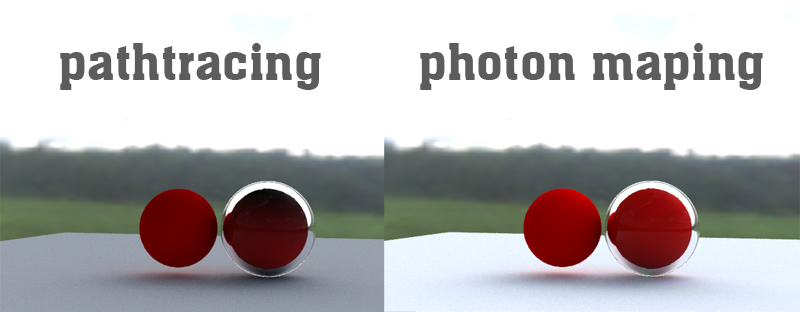
i have another glass issue. There is a red ball (shiny diffuse material) inside a substracted glass ball. The red ball does not come out red. Transparent shadows are on, photon or pathtracing render mode. Not displayed red at all, its just black. I tried the fake shadows on, lower the IOR, but nothing helps. When its inside, its just black, propably no light inside. Glass ball has reversed faces, red balll inside is not reversed. Only case when it shows red is when i turn on the emission parameter to make it shine red. and the light comes out of the glass aswell. Maybe it has something in comon with that normals bug.
edit: i tried shiny diffuse with transparency instead of that glass and this is how it is... still not red. So its not material dpendend, glass is not the problem propably...Is it a bug of yafaray? can someone try it in blender?


Michal aka bitkar
tS freak since tS2 (1998) and forever (tS7.61 modeler)
tS freak since tS2 (1998) and forever (tS7.61 modeler)
-
clintonman
- Captain
- Posts: 5659
- Joined: 21 May 2009, 21:08
- Type the number ten into the box: 0
- Location: California
Re: Yafaray Export Bug
Do you have a scene file you can share?
Never mind. I just tested one of the Blender Yafaray glass scenes and saw the same thing. Increasing the ray depth and caustics depth solved it for me. Actually, it was never a problem in my case, I just copied the values from Blender wrong and increasing to the correct values fixed it.
Never mind. I just tested one of the Blender Yafaray glass scenes and saw the same thing. Increasing the ray depth and caustics depth solved it for me. Actually, it was never a problem in my case, I just copied the values from Blender wrong and increasing to the correct values fixed it.
-
bitkar
- Captain
- Posts: 2089
- Joined: 16 Mar 2010, 07:14
- Type the number ten into the box: 0
- Location: Czech Republic
Re: Yafaray Export Bug
i made it work only with use of photon mapping rendering algorythm. Pathtracing (direct lighting aswell) does not work no matter how high parameters i use. Btw photos mapping is working with low values too now :D dont know why, I just made those depth values high, then i wanted to find the treshold value, so i lowered and lowered and it still keeps working... strange.
edit: I pressed reset to default values button and its rendering the ball even with path tracing option. But its more lit from bottom (bounce from ground plane than from sky HDRi light) I dont get it, it behaves strange.
edit2: when used photon mapping and HDRi light you need to have one more light (with power > 0) in scene, or it does not render. And sphere/probe HDRi type are swaped. Iam using probe but i have to check sphere to have it right ;) Now path tracing gives me red ball but not a proper lighting. Photon mapping works much better. I used 128 samples for path tracing and 500000 photons for ph. mapp., ray depth and bounce is default = 5. Caustics are off.
Direct lighting doesnt work for me at all.
edit: I pressed reset to default values button and its rendering the ball even with path tracing option. But its more lit from bottom (bounce from ground plane than from sky HDRi light) I dont get it, it behaves strange.
edit2: when used photon mapping and HDRi light you need to have one more light (with power > 0) in scene, or it does not render. And sphere/probe HDRi type are swaped. Iam using probe but i have to check sphere to have it right ;) Now path tracing gives me red ball but not a proper lighting. Photon mapping works much better. I used 128 samples for path tracing and 500000 photons for ph. mapp., ray depth and bounce is default = 5. Caustics are off.
Direct lighting doesnt work for me at all.
- Attachments
-
Michal aka bitkar
tS freak since tS2 (1998) and forever (tS7.61 modeler)
tS freak since tS2 (1998) and forever (tS7.61 modeler)