Has anyone run tS6.6 in Windows 7 ??? Any BAD suprises I might
run into ??? ( LayOut problems, tool stack, plug-in trouble, re-draw issues ect..).
Thinking about up-grading in the not too distant future.... Would
find it hard to live with out my 6.6.
Windows 7 and TS 6.6
-
Jimmer
- Chief Petty Officer
- Posts: 122
- Joined: 22 May 2009, 11:54
Windows 7 and TS 6.6
-
pugman 1
- Captain
- Posts: 1555
- Joined: 21 May 2009, 19:26
- Type the number ten into the box: 0
- Location: Germany
Re: Windows 7 and TS 6.6
Hi Jimmer,i have windows 7 i just checked a few things with 6.6
no prob, modelside small probs jittery and workspace
you know le is not good on the whole windows 7 is ok
no prob, modelside small probs jittery and workspace
you know le is not good on the whole windows 7 is ok
-
Jimmer
- Chief Petty Officer
- Posts: 122
- Joined: 22 May 2009, 11:54
Re: Windows 7 and TS 6.6
Thanks... Maybe the "jittery" with Windows 7 and tS7.61 Model Side
is because of WorkSpace Side running in the background ????
As long as my tS6.6 works great I'll be a Happy Camper !!!
I'm gonna find a way to TRY it out myself... And really test it !!!
I'll post any problems I have here. (I'm not up-grading for awhile).
In the mean time if anyone HAS any or KNOWS of any issues, feel free
to post here...
is because of WorkSpace Side running in the background ????
As long as my tS6.6 works great I'll be a Happy Camper !!!
I'm gonna find a way to TRY it out myself... And really test it !!!
I'll post any problems I have here. (I'm not up-grading for awhile).
In the mean time if anyone HAS any or KNOWS of any issues, feel free
to post here...
-
pugman 1
- Captain
- Posts: 1555
- Joined: 21 May 2009, 19:26
- Type the number ten into the box: 0
- Location: Germany
Re: Windows 7 and TS 6.6
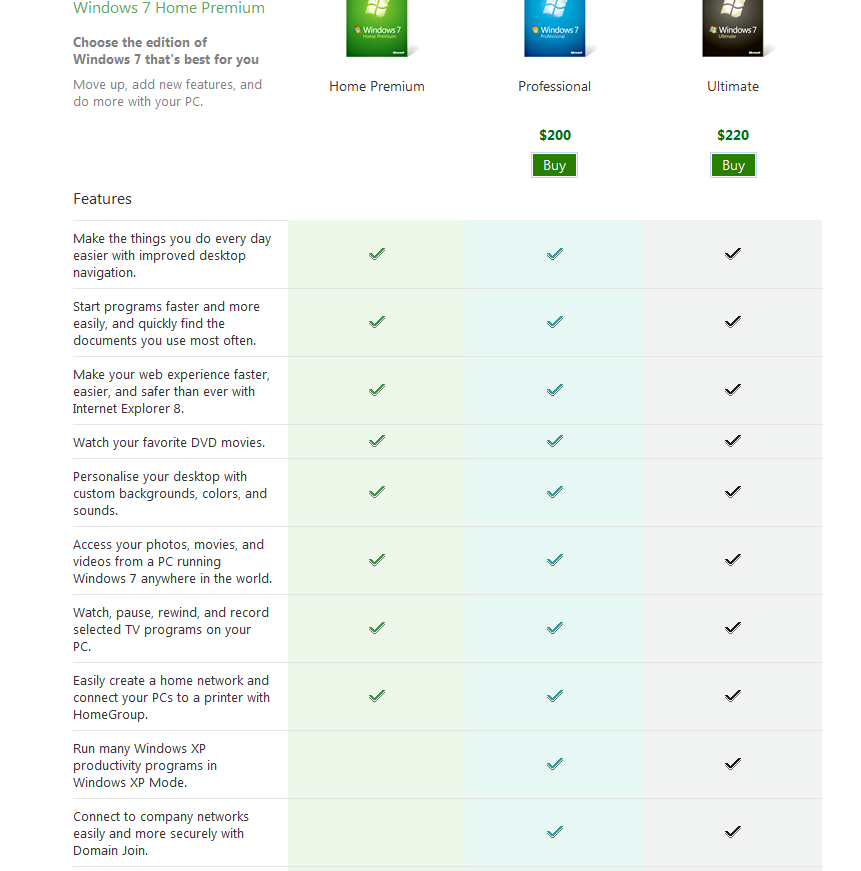
Hi just found this on my windows7 upgrade ,if you read this it shows
you can run programs in xp , but you must install the pro version
hope this is of some help
you can run programs in xp , but you must install the pro version
hope this is of some help
- Attachments
-
-
marcel

- Captain
- Posts: 2247
- Joined: 21 May 2009, 19:52
- Type the number ten into the box: 0
- Location: paris - France
Re: Windows 7 and TS 6.6
windows xp mode is not good for TS. xp mode is a virtual mode and simulate an old s3 trio video card. it have a power of a simple chipset. very bad for 3d.
Design - illustration - Animation
http://www.crea-vision.fr
http://www.crea-vision.fr
-
Jimmer
- Chief Petty Officer
- Posts: 122
- Joined: 22 May 2009, 11:54
Re: Windows 7 and TS 6.6
How about compatability mode ??? (I'm concerned about Shader Lab 2.4
and CP Glow and Toon-UP ect..). Also, Uv, texture placement and wel
EVERYTHING from mesh editing to rendering... I'm starting to get
somewhat concerned......
and CP Glow and Toon-UP ect..). Also, Uv, texture placement and wel
EVERYTHING from mesh editing to rendering... I'm starting to get
somewhat concerned......
-
pugman 1
- Captain
- Posts: 1555
- Joined: 21 May 2009, 19:26
- Type the number ten into the box: 0
- Location: Germany
Re: Windows 7 and TS 6.6
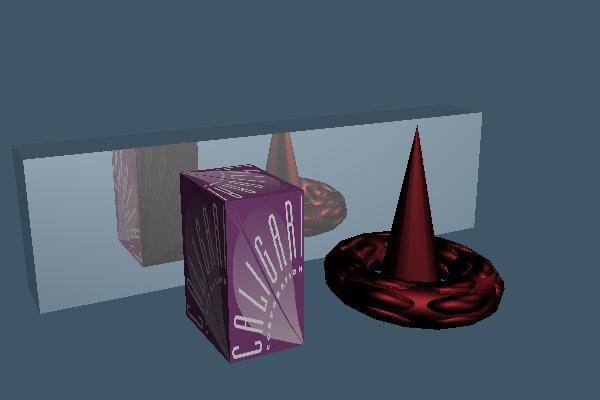
This answers two questions as for the
toon and shader lab i dont know
toon and shader lab i dont know
- Attachments
-
-
Jimmer
- Chief Petty Officer
- Posts: 122
- Joined: 22 May 2009, 11:54
Re: Windows 7 and TS 6.6
Thanks, PugMan !!! I MIGHT have access sometime this week to a Win 7
system. I'll put my addiction through it paces....
See what happens....
system. I'll put my addiction through it paces....
See what happens....
-
Steinie

- Captain
- Posts: 2958
- Joined: 21 May 2009, 17:38
- Type the number ten into the box: 10
Re: Windows 7 and TS 6.6
Jimmer, please post your findings here for us. I am very curious on what you find out.
-
Jimmer
- Chief Petty Officer
- Posts: 122
- Joined: 22 May 2009, 11:54
Re: Windows 7 and TS 6.6
Ok, will do... Can't get to a win7 system THIS week !!! But STAY TUNED !!!
It will be a week or 2 but I should have a good review of how well
6.6 works. The GOOD and BAD.!!!
It will be a week or 2 but I should have a good review of how well
6.6 works. The GOOD and BAD.!!!
-
DanX
- Senior Chief Petty Officer
- Posts: 179
- Joined: 23 May 2009, 17:53
- Type the number ten into the box: 0
- Location: Florida
Re: Windows 7 and TS 6.6
I have windows 7 64 bit home. Installed 7.6, 7.1, 6.6, just for you. Haven’t tested 5.2 or 3.2 but the 3 versions I installed work they just have some problems. I did not do a deep test and don’t plan to. But after sweeping a simple cube while in edit mode I tried to rotate the view using the widget and the program was ghosting the cube and the screen had several artifacts. but I could navigate the 3d view out of edit mode fine. I would say that It would not be worth keeping any of the 3 I tested on a windows 7 64 bit system pc. All of the same programs run fine on an almost identical machine running vista 32 bit. Don’t know if there is a 32 bit windows 7 ? but it might work better if there is. But all my other 32 bit software including poser6 runs fine on my windows 7 pc. Don’t know why TS is having problems.
-
RAYMAN

- Captain
- Posts: 2547
- Joined: 21 May 2009, 18:56
Re: Windows 7 and TS 6.6
maybe thats the reason why Ms pulled the plug ? 
-
rjeff

- Master Chief Petty Officer
- Posts: 462
- Joined: 21 May 2009, 18:26
Re: Windows 7 and TS 6.6
Yes there is a Windows 7 32 bit. I have both copies, got them free from school. I have not installed them, as I am waiting till the end of the year.
-
Jimmer
- Chief Petty Officer
- Posts: 122
- Joined: 22 May 2009, 11:54
Re: Windows 7 and TS 6.6
Ok, my initial tests (on a glitchie final Win 7 Beta) mostly went
ok. Until I can test more fully on a better sysytem I'm not going to
go into a lot of detal. To make it quick (for now).
ShaderLab 2.4 Pro seemed to work fine . Free CoolPowers post process
plug-ins "Bloom" and "Glow" fine as well. The tS Post process stuff
seemed A OK. The test scenes I made were NOT put together on a
Win 7 system. Just rendered in Win 7. Had to run tS6.6 in XP
compatability mode. TS on THIS system would not render in the
default Win 7 mode. "Render a portion" of the screen did not work right
on this system. It would render in the bounding box OK... like its
supposed to. After which everything outside the box would suddenly
render out as a smeary solid model mess. Note: I think this is a problem
with THIS system I'm using. Some one Please check and see if
"Render a Portion" of the screen works on Win7 correctly...
I'm working on access to a better Win 7 system
to test on.... Stay Tuned.......
ok. Until I can test more fully on a better sysytem I'm not going to
go into a lot of detal. To make it quick (for now).
ShaderLab 2.4 Pro seemed to work fine . Free CoolPowers post process
plug-ins "Bloom" and "Glow" fine as well. The tS Post process stuff
seemed A OK. The test scenes I made were NOT put together on a
Win 7 system. Just rendered in Win 7. Had to run tS6.6 in XP
compatability mode. TS on THIS system would not render in the
default Win 7 mode. "Render a portion" of the screen did not work right
on this system. It would render in the bounding box OK... like its
supposed to. After which everything outside the box would suddenly
render out as a smeary solid model mess. Note: I think this is a problem
with THIS system I'm using. Some one Please check and see if
"Render a Portion" of the screen works on Win7 correctly...
I'm working on access to a better Win 7 system
to test on.... Stay Tuned.......
-
Emmanuel

- Chief Warrant Officer
- Posts: 670
- Joined: 14 Jun 2009, 06:47
Re: Windows 7 and TS 6.6
I installed tS7.61 on Windows 7 Professional 32bits and encountered some issues in Modeler side. I haven't tested Workspace yet, although I can report VRay works as expected.
Issues in Modeler are about the general layout and configuration. For example if I change the layout (add/remove plugins), close and restart tS, my new layout is lost. Also I can't save the layout in the configuration library (I mean the tS6.6/Modeler library in the bottom-left toolbar) : I get a library save error message.
Next, if the default configuration shows VRay as render engine and if I set Lightworks, then restart, VRay is back as default render engine.
I wonder if these problems come from my install though. First, I tried to copy the tS folder from my XP system on the Win7 one rather than run a clean install ; this failed, I was getting the Modeler window only with no Rosetta menu/UI, so I ran the 7.61 install, then re-copied my customized tS folder.
Did anyone experienced the same issue with library/configuration on Win7 ?
Issues in Modeler are about the general layout and configuration. For example if I change the layout (add/remove plugins), close and restart tS, my new layout is lost. Also I can't save the layout in the configuration library (I mean the tS6.6/Modeler library in the bottom-left toolbar) : I get a library save error message.
Next, if the default configuration shows VRay as render engine and if I set Lightworks, then restart, VRay is back as default render engine.
I wonder if these problems come from my install though. First, I tried to copy the tS folder from my XP system on the Win7 one rather than run a clean install ; this failed, I was getting the Modeler window only with no Rosetta menu/UI, so I ran the 7.61 install, then re-copied my customized tS folder.
Did anyone experienced the same issue with library/configuration on Win7 ?
-
marcel
- Captain
- Posts: 2247
- Joined: 21 May 2009, 19:52
- Type the number ten into the box: 0
- Location: paris - France
Re: Windows 7 and TS 6.6
emmanuel: maybe the problem is not win7. i had the problems you show with TS 7.61 on vista and XP! since i work with Ts 7.6, i have not these problems. It is the same thing with the setting of the hdri witch can't be saved. Try to work with TS 7.6 on win 7 to see if that resolve these issues. It would be interesting to know.
note: the problem of setting/TS 7.61 seem to be in some config of hardware/software. if you change the OS and/or the pc, it is possible the new configuration don't like 761 modelside, but i don't think win 7 is the real problem.Too many parameters...
note: the problem of setting/TS 7.61 seem to be in some config of hardware/software. if you change the OS and/or the pc, it is possible the new configuration don't like 761 modelside, but i don't think win 7 is the real problem.Too many parameters...
Design - illustration - Animation
http://www.crea-vision.fr
http://www.crea-vision.fr
-
scapino

- Petty Officer Second Class
- Posts: 32
- Joined: 22 May 2009, 02:51
- Type the number ten into the box: 0
- Location: Portland, Oregon
Re: Windows 7 and TS 6.6
The problem with not saving your configuration is that you should run TS as administrator. (Set it to run as admin in the properties tab when you right click on the exec file.Emmanuel wrote:I installed tS7.61 on Windows 7 Professional 32bits and encountered some issues in Modeler side. I haven't tested Workspace yet, although I can report VRay works as expected.
Issues in Modeler are about the general layout and configuration. For example if I change the layout (add/remove plugins), close and restart tS, my new layout is lost. Also I can't save the layout in the configuration library (I mean the tS6.6/Modeler library in the bottom-left toolbar) : I get a library save error message.
Next, if the default configuration shows VRay as render engine and if I set Lightworks, then restart, VRay is back as default render engine.
I wonder if these problems come from my install though. First, I tried to copy the tS folder from my XP system on the Win7 one rather than run a clean install ; this failed, I was getting the Modeler window only with no Rosetta menu/UI, so I ran the 7.61 install, then re-copied my customized tS folder.
Did anyone experienced the same issue with library/configuration on Win7 ?
Kurt
-
Emmanuel
- Chief Warrant Officer
- Posts: 670
- Joined: 14 Jun 2009, 06:47
Re: Windows 7 and TS 6.6
Confirmed !scapino wrote: The problem with not saving your configuration is that you should run TS as administrator. (Set it to run as admin in the properties tab when you right click on the exec file.
Thanks for the trick Kurt

-
scapino
- Petty Officer Second Class
- Posts: 32
- Joined: 22 May 2009, 02:51
- Type the number ten into the box: 0
- Location: Portland, Oregon
Re: Windows 7 and TS 6.6
You're welcome. Glad it worked!
Kurt
Kurt
-
StOrM3
- Seaman Recruit
- Posts: 3
- Joined: 25 May 2010, 19:40
Re: Windows 7 and TS 6.6
Well GameSpace Works Perfectly under Win 7.. I can't say the same for 7.61 etc.. I get all kinds of garbage on the display during the LE Use.. I have all but decided to leave 7.61 Alone until they either fix the LE issues, and add some more of the Poly Modeling stuff back to the workspace side.. I have finally dug up my GameSpace 1.6 reg'd version, which I almost completely lost thanks to a couple of computer changes / upgrades, new harddrives, and a false backup I thought I had of it, on dvd, that turned out to be blank! I was horrified, I tore my room apart yesterday, and this morning.. and dug through every hard drive and dvd / cd I could find.. and finally when digging through the network drives for the umpteenth million time I happened to find the only backup of the original install and copy of the email that caligari sent me with my key in it! Yea! I was saved..
But I am having a harder than expected time, finding tutorials / examples / youtube vids etc.. to get me re-acquainted with the interface again.. I have been modeling for too long in MS3D and Fragmotion, that I had forgot alot, and I mean alot of things..
If anyone has any tutorial sites with either TS 6.6 stuff or GameSpace stuff, please send them my way.. I will return the favor and send the few that I've found so far..
Thankfully I found this site.. For a little help from fellow Caligari Cast Outs..
StOrM3
But I am having a harder than expected time, finding tutorials / examples / youtube vids etc.. to get me re-acquainted with the interface again.. I have been modeling for too long in MS3D and Fragmotion, that I had forgot alot, and I mean alot of things..
If anyone has any tutorial sites with either TS 6.6 stuff or GameSpace stuff, please send them my way.. I will return the favor and send the few that I've found so far..
Thankfully I found this site.. For a little help from fellow Caligari Cast Outs..
StOrM3
-
DesignDevil

- Master Chief Petty Officer
- Posts: 500
- Joined: 22 May 2009, 08:52
- Type the number ten into the box: 0
- Location: Neuruppin, Germany, Earth.
Re: Windows 7 and TS 6.6
Hi StOrM3 - you should take a look on the http://www.caligari.com" site. All video courses and tutorials are free and not all are tS7 related. It's a good starting point.
I still use TrueSpace 6.6
Link: My Youtube Channel
Link: www.DesignDevil.de - Plugins, Tutorials and more about TrueSpace 6.6
Link: My Youtube Channel
Link: www.DesignDevil.de - Plugins, Tutorials and more about TrueSpace 6.6
-
StOrM3
- Seaman Recruit
- Posts: 3
- Joined: 25 May 2010, 19:40
Re: Windows 7 and TS 6.6
Hey I just used that wayback machine thing, and I now have the 3D Buzz Quick Start free modeling videos.. Thanks alot, this forum helped me out big time..
-
froo
- Captain
- Posts: 2554
- Joined: 22 May 2009, 12:13
Re: Windows 7 and TS 6.6
hi storm3.
There's a Win7 LE fix posted here.
7.61 is no longer being developed by Caligari.
Only some good scripts and plugins that have
been developed by some of us.
There's a Win7 LE fix posted here.
7.61 is no longer being developed by Caligari.
Only some good scripts and plugins that have
been developed by some of us.
-
spacekdet

- Captain
- Posts: 1810
- Joined: 27 May 2009, 15:00
- Type the number ten into the box: 10
- Location: On the day shift at the Utility Muffin Research Kitchen
Re: Windows 7 and TS 6.6
-
Moonman

- Petty Officer First Class
- Posts: 58
- Joined: 21 May 2009, 22:15
- Type the number ten into the box: 0
Re: Windows 7 and TS 6.6
Just got a Win7 (64-bit) machine. tS 6.6 loaded, and seems to be running well.
Update: Doesn't keep my UI configuration (icon placements), or UI color choices. I have to reset them each time I start her up.
Update: Doesn't keep my UI configuration (icon placements), or UI color choices. I have to reset them each time I start her up.
-
parva
- Petty Officer Second Class
- Posts: 24
- Joined: 06 Aug 2009, 13:00
Re: Windows 7 and TS 6.6
ts 6.6 still runs great even on windows 7. It even starts faster as some of the newer programs *g*. No problems with the icon and custom config settings here...
-
Tiles

- Master Chief Petty Officer
- Posts: 401
- Joined: 27 May 2009, 08:34
Re: Windows 7 and TS 6.6
Sounds like rights hassle. In Win 7 you need a hammer to tell every software that it has to run in admin mode. Right click at its icon, run as admin. When this doesn`t help, then install it at C instead the programs folder. Programs folder is under special protection.The dumb user could be so crazy to try to work with the pc, you know. Thanks Microsoft ...Update: Doesn't keep my UI configuration (icon placements), or UI color choices. I have to reset them each time I start her up.
Free Gamegraphics, Freeware Games http://reinerstilesets.de
-
Moonman
- Petty Officer First Class
- Posts: 58
- Joined: 21 May 2009, 22:15
- Type the number ten into the box: 0
Re: Windows 7 and TS 6.6
Reinstalling tS, at the drive's top level (C:\) worked great. Seem to have full functionality.
Windows security levels are helpful and hindering at the same time.
Windows security levels are helpful and hindering at the same time.
-
v3rd3
- Lieutenant Commander
- Posts: 1191
- Joined: 21 May 2009, 20:04
Re: Windows 7 and TS 6.6
Windows is as windows does.
-
spacekdet
- Captain
- Posts: 1810
- Joined: 27 May 2009, 15:00
- Type the number ten into the box: 10
- Location: On the day shift at the Utility Muffin Research Kitchen
Re: Windows 7 and TS 6.6
...and trueSpace is like a box of chocolates.
Great tip, Tiles.
Great tip, Tiles.
-
seppgirty

- Master Chief Petty Officer
- Posts: 354
- Joined: 22 May 2009, 03:34
- Type the number ten into the box: 0
- Location: pittsburgh Pa.
Re: Windows 7 and TS 6.6
that's great to hear that T.S 6.6 runs on 7(64bit) 6.6 can live a bit longer. 
truespace 3.2, 5.2, 6.6, ani-pack, flash plugin,........ you can check out my films athttp://www.chaosbrosfilms.com