hi,
is it possible to set(increase) nurbs resolution when converting to poly.(nurbs surface which results after some operations-extrude+blend etc).or extra loops have to be manually added? and can we get quads instead of tris?
nurbs to poly
-
ck_c
- Seaman
- Posts: 5
- Joined: 09 Jan 2010, 08:09
nurbs to poly
-
spacekdet

- Captain
- Posts: 1810
- Joined: 27 May 2009, 15:00
- Type the number ten into the box: 10
- Location: On the day shift at the Utility Muffin Research Kitchen
Re: nurbs to poly
Right click the 'convert NURBS patch to Polyhedron' icon and adjust the 'Static Res.' parameter.
Not much effect until the values are less than 0.2.
Coverts to tris only.
Don't understand what you are asking here: "(nurbs surface which results after some operations-extrude+blend etc).or extra loops have to be manually added?"
Not much effect until the values are less than 0.2.
Coverts to tris only.
Don't understand what you are asking here: "(nurbs surface which results after some operations-extrude+blend etc).or extra loops have to be manually added?"
-
ck_c
- Seaman
- Posts: 5
- Joined: 09 Jan 2010, 08:09
Re: nurbs to poly
hi spacekdet,
thanks.when exporting from nurbs soft. moi3d or rhino we can set the resolution of the exported mesh(more or less polys).i am looking for similar conversion -i will try your idea.basically,i want a denser mesh than those produced by default conversion.

thanks.when exporting from nurbs soft. moi3d or rhino we can set the resolution of the exported mesh(more or less polys).i am looking for similar conversion -i will try your idea.basically,i want a denser mesh than those produced by default conversion.
that was to say nurbs other than those whose patch resolution can be set(nurbs primitves)nurbs surface which results after some operations-extrude+blend etc
-
clintonman

- Captain
- Posts: 5659
- Joined: 21 May 2009, 21:08
- Type the number ten into the box: 0
- Location: California
Re: nurbs to poly
Just finished a nurbs to quad polygon plugin. To control the density use the rebuild patch plugin. Link is in the page.ck_c wrote:hi,
is it possible to set(increase) nurbs resolution when converting to poly.(nurbs surface which results after some operations-extrude+blend etc).or extra loops have to be manually added? and can we get quads instead of tris?
http://www.clintons3d.com/plugins/trues ... index.html"
-
ck_c
- Seaman
- Posts: 5
- Joined: 09 Jan 2010, 08:09
Re: nurbs to poly
thanks clintonman! that was quiet timely! i also found lot of useful plugins at your site.you seem to be nurbs plugin wizard
-
clintonman
- Captain
- Posts: 5659
- Joined: 21 May 2009, 21:08
- Type the number ten into the box: 0
- Location: California
Re: nurbs to poly
You're welcome. It was your post that reminded me that I intended to write that plugin . IT was on my to do list a long time ago but got lost somehow.
-
clintonman
- Captain
- Posts: 5659
- Joined: 21 May 2009, 21:08
- Type the number ten into the box: 0
- Location: California
Re: nurbs to poly
Marcel found a bug in the plugin. It's fixed now(Jan 14 2010) so be sure to get a fresh copy.
-
Emmanuel

- Chief Warrant Officer
- Posts: 670
- Joined: 14 Jun 2009, 06:47
Re: nurbs to poly
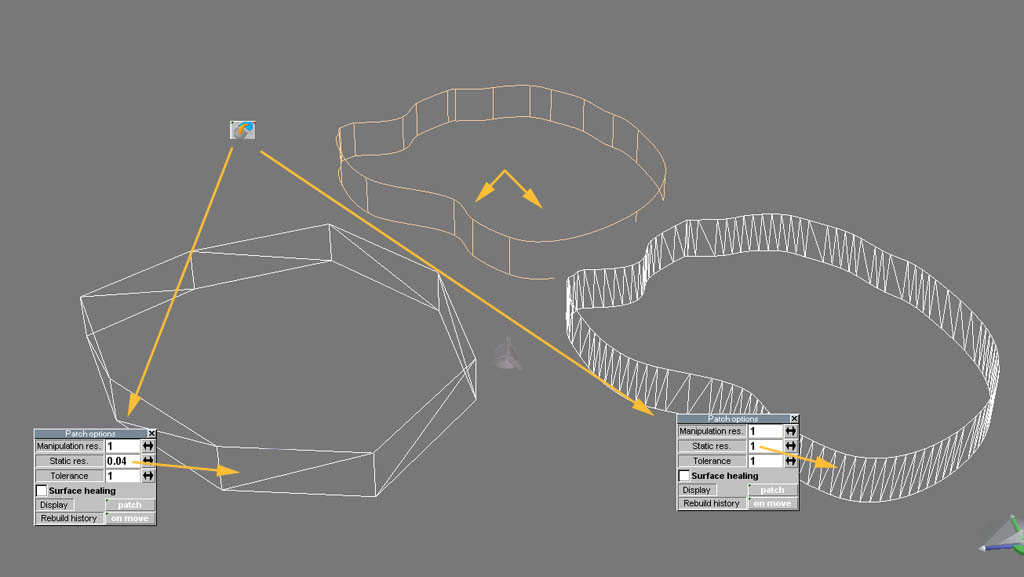
You can increase the resolution via the "static res." parameter in the Convert NURBS Patch To Polyhedron options panel.ck_c wrote: is it possible to set(increase) nurbs resolution when converting to poly.(nurbs surface which results after some operations-extrude+blend etc).or extra loops have to be manually added? and can we get quads instead of tris?
Unfortunately the max resolution is 1, and this is often not soft enough for many models.
See below : NURBS object is on top, left is the polygonal conversion with a low resolution setting, right is the polygonal conversion with max setting (1) but as you can see a value of 1 does not generate enough details on the curve.
Clinton, I tried your RebuildPatch and Nurbs2Poly plugins but it seems I can't really improve the details (poly details) on NURBS > Polyhedron convertion.
Do you have any trick or a special tool to force tS's Convert NURBS Patch To Polyhedron tool to go beyond its "1" max resolution ?
- Attachments
-
-
ck_c
- Seaman
- Posts: 5
- Joined: 09 Jan 2010, 08:09
Re: nurbs to poly
hi clintonman,
nurbs2poly plugin seems not to work on surfaces with trimcurves.for eg.i added a nurbs cylinder and made a hole with trimcurve,when i convert to poly it gives me a cylinder without the hole.(i even tried "Convert NURBS Object to Patch" tool before applying the plugin) is it a limitation?
nurbs2poly plugin seems not to work on surfaces with trimcurves.for eg.i added a nurbs cylinder and made a hole with trimcurve,when i convert to poly it gives me a cylinder without the hole.(i even tried "Convert NURBS Object to Patch" tool before applying the plugin) is it a limitation?
-
clintonman
- Captain
- Posts: 5659
- Joined: 21 May 2009, 21:08
- Type the number ten into the box: 0
- Location: California
Re: nurbs to poly
Yep, it's a limitation. Trim curves are kind of like a modification applied after the nurbs surface. I don't even know how to take that into account. I'll check it out when I get home later and let you know what I find.ck_c wrote:hi clintonman,
nurbs2poly plugin seems not to work on surfaces with trimcurves.for eg.i added a nurbs cylinder and made a hole with trimcurve,when i convert to poly it gives me a cylinder without the hole.(i even tried "Convert NURBS Object to Patch" tool before applying the plugin) is it a limitation?
Edit: I'm back and the limitation will have to remain. My plugin just reads the nurbs geometry and does a straight translation to polygons. Trim curves act more like masks than geometry. Generally, nurbs are 100% quads and the trim curves are a way around that limitation. So long story short it can't be done(programmed) except with a large amount of work. The only workaround I can think of is to use extrude from edge on the trim curves, convert all pieces to polygons and do some modelling and booleans to recreate it. The other option would be to create a mesh from my plugin and another from the built in tools and combine the meshes so you have the hole geometry and the quads everywhere else.
-
ck_c
- Seaman
- Posts: 5
- Joined: 09 Jan 2010, 08:09
Re: nurbs to poly
hi,
i will try the workarounds you have suggested.thanks.
i will try the workarounds you have suggested.thanks.