I've googled about it, and I looked at both old TS forum and this one, and I haven't found a similar problem. if it's already explained somewhere, then I apologise, but I overlooked it.
so with that said, here's the problem:
TS 7.61B8 won't display any of the things mentioned in the topic title, that is vertices, edges and faces. it displays a model and I can select any of those and move them around and transform them, but it won't actually display those elements. I've tried changing their colors and opacities, as shown in that Intro to Organic Modeling videos, but it didn't help. I also tried switching that view modes from opaque to wireframe to transparent w/ wireframe, but nothing worked. they (vertices, edges and faces) didn't show. so in case of full wireframe view, it resulted in.. well nothing; it was like there was no object there. I could still select any of them, and that widget thingy would appear where stuff was selected, but that's it. I tried opening new scenes, putting in a primitive cube and changing to a few more segments, but nothing showed where lines and vertices should be. I also tried to import the finished model from the mentioned course, nothing. model showing, edges not. I tried that context resetting to default, but that didn't help. I tried reinstalling, but that didn't help either. the only thing that comes to mind is my ancient graphics card (for which the drivers are updated as much as they can be, as well as dx9), but that would be strange, since I can see the model (and the model should be the tricky part to display, right?) and just not those little blasted things to manipulate said model.
the second thing that comes to mind is that this is just some feature of TS to hide those things, and it somehow defaults to not being shown, and I don't know how to change it back,
but in any case... HELP, PLEASE!!!!
TS won't display edges or vertices or faces
-
syn

- Seaman Recruit
- Posts: 3
- Joined: 21 Nov 2009, 13:33
- Type the number ten into the box: 0
- Location: lost inside Croatia
TS won't display edges or vertices or faces
hi
-
froo
- Captain
- Posts: 2554
- Joined: 22 May 2009, 12:13
Re: TS won't display edges or vertices or faces
Hi syn! Welcome to the forums! 
This is what I did;
1. add a cube
2. left click in the 3d space.
3. Switch to the Setting tab.
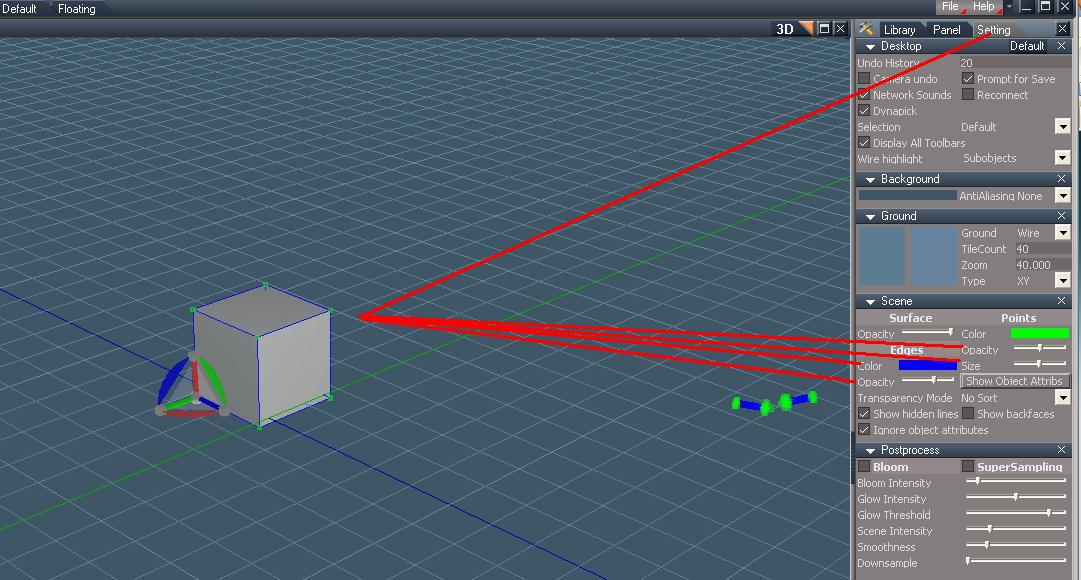
4. You should see something similar to the picture.
5. For edges and points, I double clicked the Color bar, to get the color dialog.
6. I selected a Basic Color, then pressed the OK button.
7. Then I adjusted the Opacity for Edges, and Opacity / Size for Points.
Please let us know if that works.
Froo
This is what I did;
1. add a cube
2. left click in the 3d space.
3. Switch to the Setting tab.
4. You should see something similar to the picture.
5. For edges and points, I double clicked the Color bar, to get the color dialog.
6. I selected a Basic Color, then pressed the OK button.
7. Then I adjusted the Opacity for Edges, and Opacity / Size for Points.
Please let us know if that works.
Froo
- Attachments
-
-
froo
- Captain
- Posts: 2554
- Joined: 22 May 2009, 12:13
Re: TS won't display edges or vertices or faces
you may also want to check your hardware settings.
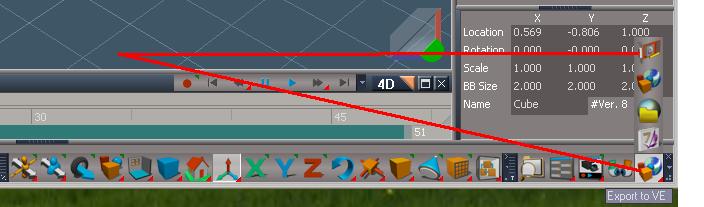
In the pic, I show how to access those settings.
In the lower right hand corner of the interface is the Export to VE icon.
Click, hold, and drag up, to get the flyout window.
Select the Hardware Settings icon (at the top of the flyout window),
then release the mouse.
The Workspace hardware settings dialog will appear.
You may need to adjust the settings: turn down some of them.
I am not sure which ones though.
In the pic, I show how to access those settings.
In the lower right hand corner of the interface is the Export to VE icon.
Click, hold, and drag up, to get the flyout window.
Select the Hardware Settings icon (at the top of the flyout window),
then release the mouse.
The Workspace hardware settings dialog will appear.
You may need to adjust the settings: turn down some of them.
I am not sure which ones though.
- Attachments
-
-
marcel

- Captain
- Posts: 2247
- Joined: 21 May 2009, 19:52
- Type the number ten into the box: 0
- Location: paris - France
Re: TS won't display edges or vertices or faces
I have a similar problem with opacity edge. the cursor don't change the opacity but in my case i have alway a 100% opacity for the edge.
Maybe it is a bug of TS 7.61 with some video card. I have not this problem with TS 7.6
Also I don't use TS 7.61 because it have too many bug on model side (most about setting not saved) that i have not with TS 7.6
Ts 7.61 is a beta version and we can have different bug because we have different hardware.
Maybe it is a bug of TS 7.61 with some video card. I have not this problem with TS 7.6
Also I don't use TS 7.61 because it have too many bug on model side (most about setting not saved) that i have not with TS 7.6
Ts 7.61 is a beta version and we can have different bug because we have different hardware.
Last edited by marcel on 21 Nov 2009, 17:36, edited 2 times in total.
Design - illustration - Animation
http://www.crea-vision.fr
http://www.crea-vision.fr
-
marcel
- Captain
- Posts: 2247
- Joined: 21 May 2009, 19:52
- Type the number ten into the box: 0
- Location: paris - France
Re: TS won't display edges or vertices or faces
You can try this:
1-Workspace hardware setting/ shading quality/ DX7 basic/ ok
2-close TS/open TS then return to the setting and choose full quality (my first setting with problems).
I don't know why but now "opacity for the edge" work i my pc. It seem to change the setting erase a wrong value on the config.
1-Workspace hardware setting/ shading quality/ DX7 basic/ ok
2-close TS/open TS then return to the setting and choose full quality (my first setting with problems).
I don't know why but now "opacity for the edge" work i my pc. It seem to change the setting erase a wrong value on the config.
Design - illustration - Animation
http://www.crea-vision.fr
http://www.crea-vision.fr
-
syn
- Seaman Recruit
- Posts: 3
- Joined: 21 Nov 2009, 13:33
- Type the number ten into the box: 0
- Location: lost inside Croatia
Re: TS won't display edges or vertices or faces
thanks, everyone, for welcoming me and for your quick responses, but none of those worked *cries*
oh and I see what you mean by settings not saved..
I already wanted to try the downgrade, but I missed it on the downloads page haha
anyways, while I'm writing this, the old version is installing. so I'll try in a few seconds.....
...
...
...
oh! oh! I tried the old version!
and it didn't help... *cries frantically*
just when I thought how it's awesome to find such a great tool with so many learning videos (from which I downloaded all of them.. apart from that one about ts 6.6) and all that for free....
it doesn't work hahaha
and such a stupid problem that pretty much no one else has...
(but then again, pretty much no one else has GeForce 3 ti200 either so...)
*sighs*
but anyways, I won't give up just yet! (soon, but not yet!)
here's a screenshot, maybe you'll see something that I don't and it will help
oh and I see what you mean by settings not saved..
I already wanted to try the downgrade, but I missed it on the downloads page haha
anyways, while I'm writing this, the old version is installing. so I'll try in a few seconds.....
...
...
...
oh! oh! I tried the old version!
and it didn't help... *cries frantically*
just when I thought how it's awesome to find such a great tool with so many learning videos (from which I downloaded all of them.. apart from that one about ts 6.6) and all that for free....
it doesn't work hahaha
and such a stupid problem that pretty much no one else has...
(but then again, pretty much no one else has GeForce 3 ti200 either so...)
*sighs*
but anyways, I won't give up just yet! (soon, but not yet!)
here's a screenshot, maybe you'll see something that I don't and it will help
- Attachments
-
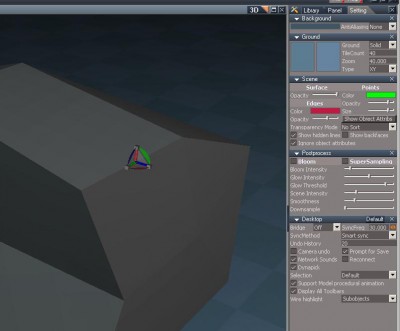
- that edge is supposed to be selected and as you can see, you can't see it's selected apart from the widget being there. it's the same with vertices and faces.

hi
-
marcel
- Captain
- Posts: 2247
- Joined: 21 May 2009, 19:52
- Type the number ten into the box: 0
- Location: paris - France
Re: TS won't display edges or vertices or faces
Screenshot can't help because it is a problem of old video card (probably). geforce 3 is very old and can't support some needed features. It is not necessary to have the last video card but you can find an old but more recent card for a very low price.
Design - illustration - Animation
http://www.crea-vision.fr
http://www.crea-vision.fr
-
syn
- Seaman Recruit
- Posts: 3
- Joined: 21 Nov 2009, 13:33
- Type the number ten into the box: 0
- Location: lost inside Croatia
Re: TS won't display edges or vertices or faces
aaah.. this makes me quite sad :'(
I really wanted to start learning 3D thingies right away!
but on the bright side, I'll quite possibly get a new PC soon and it should be awesome so..
hopefully it will be REALLY soon
in the meantime I'll have to work on some other skills required for game development.
such as opengl... -.-
ugh there's such a long road ahead.......
anyways, thanks to all you guys.
I truly hope I'll be able to bug you more in the near future
I really wanted to start learning 3D thingies right away!
but on the bright side, I'll quite possibly get a new PC soon and it should be awesome so..
hopefully it will be REALLY soon
in the meantime I'll have to work on some other skills required for game development.
such as opengl... -.-
ugh there's such a long road ahead.......
anyways, thanks to all you guys.
I truly hope I'll be able to bug you more in the near future
hi