I hope this wasn't covered before. It's a way to achieve a fake ambient occlusion look to models in the D3D window. This can be used to add a bit of grunge or a bit more realistic lighting to a model. It softens edges, giving the impression rounded edges with more polygons.
After:
Before:
It causes the shadows to "bleed" into seams and corners somewhat uniformly regardless of the direction of the light shadow. Hope it's useful
a day without orange juice is like... a day without orange juice
clintonman
Captain
Posts:5659
Joined: 21 May 2009, 21:08
Type the number ten into the box: 0
Location: California
Re: Real Time Ambient Occlusion Trick
Postby clintonman »
Is the trick to change the filter size of a spotlight?
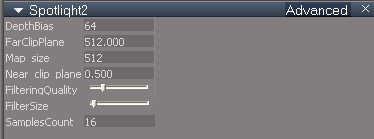
Yes that's it, but you need to give it enough samples and a big enough shadow map. Otherwise the effect is too weak to notice. I got the idea from a post at the Blender forum a long time ago explaining how to do the same thing in Blender.
For comparison, here is a snapshot of the default settings when I make a new spotlight.
ao3.jpg (5.11 KiB) Viewed 4371 times
a day without orange juice is like... a day without orange juice
DarkScythe
Senior Chief Petty Officer
Posts:243
Joined: 23 Sep 2009, 08:57
Re: Real Time Ambient Occlusion Trick
Postby DarkScythe »
Thats a nice trick, The only downside is it wont lit the whole scene and also the spotlight doesn't have a widget hard to rotate. maybe you can try using a cornell box scene.
Peter
Senior Chief Petty Officer
Posts:170
Joined: 18 Apr 2010, 15:18
Type the number ten into the box: 0
Location: Texas
Re: Real Time Ambient Occlusion Trick
Postby Peter »
I can get a similar effect with a directional light for a larger area (maybe enough for a whole scene). I have to use more samples and a bigger shadow map (not surprising). A good challenge DarkScythe! I'll keep tinkering.
Yeah, about the lack of a friendly widget on the spot. It's irritating. I usually parent the spot to a box and use the box's widget.
a day without orange juice is like... a day without orange juice
Peter
Senior Chief Petty Officer
Posts:170
Joined: 18 Apr 2010, 15:18
Type the number ten into the box: 0
Location: Texas
Re: Real Time Ambient Occlusion Trick
Postby Peter »
Whoa, I just saw Clinton's spot widget. Thanks Clinton!
a day without orange juice is like... a day without orange juice