Hi all!
I have no time to learn and create since a few months but i tried for the first time this free soft and after some hours i did this picture. Look like an old painting but it was my choose. No crash, time to render for a 2000x1125 pixels image with AA (quality option : super) and 650 000 polygons : 1 hours with an old core duo @ 2.4 ghz, 2 gigas ram only and XP.
Test with Bryce 7 pro free
-
marcel

- Captain
- Posts: 2247
- Joined: 21 May 2009, 19:52
- Type the number ten into the box: 0
- Location: paris - France

-
MikomDude

- Captain
- Posts: 1930
- Joined: 04 Oct 2010, 11:12
- Type the number ten into the box: 0
- Location: The Hague, Netherlands
Re: Test with Bryce 7 pro free
Most impressive, better then my first try anyway.
On my PC (Win7 64bit i7-2600 Intel processor 3.4GHz 8GB RAM) it crashed every time when doing a Rrender To Image. Could it be because I imported a trueSpace scene and that is what is making it buggy? <--this question isn't directed at you Marcel but to anyone with knowledge of Bryce in general.
I was playing around with it a couple of days ago but then I went modeling crazy on a Bionicle series so I haven't experimented with Bryce any further. I will do so though, I'm also curious about the UV-abilities of Hexagon. Still so much testing ahead
On my PC (Win7 64bit i7-2600 Intel processor 3.4GHz 8GB RAM) it crashed every time when doing a Rrender To Image. Could it be because I imported a trueSpace scene and that is what is making it buggy? <--this question isn't directed at you Marcel but to anyone with knowledge of Bryce in general.
I was playing around with it a couple of days ago but then I went modeling crazy on a Bionicle series so I haven't experimented with Bryce any further. I will do so though, I'm also curious about the UV-abilities of Hexagon. Still so much testing ahead
-
marcel
- Captain
- Posts: 2247
- Joined: 21 May 2009, 19:52
- Type the number ten into the box: 0
- Location: paris - France
Re: Test with Bryce 7 pro free
I need a new pc and i will try again with a similar config as your. What i see is some things cause problem of time to render. Example : avoid to intersect volumetric clouds and you win a lot of time for a similar render.
Maybe Bryce have the same problem as trueSpace : it work better on an old pc with XP, except time to render due to the power of the CPU. It seem also Bryce can use bigger scene than trueSpace with the same amount of ram. trueSpace "eat" ram for nothing with his two side (Stupid concept with duplication of similar function).
Maybe Bryce have the same problem as trueSpace : it work better on an old pc with XP, except time to render due to the power of the CPU. It seem also Bryce can use bigger scene than trueSpace with the same amount of ram. trueSpace "eat" ram for nothing with his two side (Stupid concept with duplication of similar function).
Design - illustration - Animation
http://www.crea-vision.fr
http://www.crea-vision.fr
-
Finis

- Captain
- Posts: 5410
- Joined: 21 May 2009, 18:26
- Type the number ten into the box: 0
- Location: America!
Re: Test with Bryce 7 pro free
That sure does look like an old painting!
The plants and land were generated by Bryce?
Looks like Bryce is sensitive to something. Works fine for some but trouble for others. Maybe it is system configuration or maybe bad geometry. TS has quirks to avoid and Bryce will too.
The plants and land were generated by Bryce?
Looks like Bryce is sensitive to something. Works fine for some but trouble for others. Maybe it is system configuration or maybe bad geometry. TS has quirks to avoid and Bryce will too.
I prefer dangerous freedom over peaceful servitude. -- Thomas Jefferson/Jean Jacques Rousseau
-
marcel
- Captain
- Posts: 2247
- Joined: 21 May 2009, 19:52
- Type the number ten into the box: 0
- Location: paris - France
Re: Test with Bryce 7 pro free
@ Finis : it is a render with no post process made with Bryce, no imported object from other soft. Just to know what the soft can do. Then i keep only the best that each soft do for my work. You know i prefer the result, the method don't interest me. 
Design - illustration - Animation
http://www.crea-vision.fr
http://www.crea-vision.fr
-
v3rd3
- Lieutenant Commander
- Posts: 1191
- Joined: 21 May 2009, 20:04
Re: Test with Bryce 7 pro free
Very nice image Marcel... glad to see you back here for a bit.
-
marcel
- Captain
- Posts: 2247
- Joined: 21 May 2009, 19:52
- Type the number ten into the box: 0
- Location: paris - France
Re: Test with Bryce 7 pro free
Thank v3rd3. I think i Will Have more time this year to do news illustrations. I Am happy to come back. This year : no animations but
big illustrations.
big illustrations.
Design - illustration - Animation
http://www.crea-vision.fr
http://www.crea-vision.fr
-
pugman 1
- Captain
- Posts: 1555
- Joined: 21 May 2009, 19:26
- Type the number ten into the box: 0
- Location: Germany
Re: Test with Bryce 7 pro free
Nice pic, I think alot of people are happy to see you back,
Your work is awsome and your knowhow irreplaceble.
Your work is awsome and your knowhow irreplaceble.
-
RAYMAN

- Captain
- Posts: 2547
- Joined: 21 May 2009, 18:56
Re: Test with Bryce 7 pro free
Bryce is more painterly then Vue or any of those other render engines..
i used it for a few years but the material editor drove me nuts !
i also downloaded the new pro version and will use it for making skies for my photography
and the trees are nice too !
I´m used to Vue though and I´m not into many pieces of software at one time.....!
but Bryce isnt bad .. its free in that case and there is nothing to say against free isnt it !
Good to see you back Marcel !
Peter
i used it for a few years but the material editor drove me nuts !
i also downloaded the new pro version and will use it for making skies for my photography
and the trees are nice too !
I´m used to Vue though and I´m not into many pieces of software at one time.....!
but Bryce isnt bad .. its free in that case and there is nothing to say against free isnt it !
Good to see you back Marcel !
Peter
-
Peter
- Senior Chief Petty Officer
- Posts: 170
- Joined: 18 Apr 2010, 15:18
- Type the number ten into the box: 0
- Location: Texas
Re: Test with Bryce 7 pro free
Lovely 
Keep at it.
Keep at it.
a day without orange juice is like... a day without orange juice
-
DanX
- Senior Chief Petty Officer
- Posts: 179
- Joined: 23 May 2009, 17:53
- Type the number ten into the box: 0
- Location: Florida
Re: Test with Bryce 7 pro free
very nice job..
I used Brice for a while in version 5 before Daz acquired it. Back then it was the premiere software for building environments. It has not changed much since then but you can still do some awesome things with it as good as any if you put the work into it. I just never got as good as others did with it. I used the terrain editor to design grey-scale images to be used as height maps for game mods so I never really got the lighting down that well.
I did like the mat editor. It is similar to Vue only Vue is way more developed now and has countless bells and whistles. Anyway awesome job will look for more...
I used Brice for a while in version 5 before Daz acquired it. Back then it was the premiere software for building environments. It has not changed much since then but you can still do some awesome things with it as good as any if you put the work into it. I just never got as good as others did with it. I used the terrain editor to design grey-scale images to be used as height maps for game mods so I never really got the lighting down that well.
I did like the mat editor. It is similar to Vue only Vue is way more developed now and has countless bells and whistles. Anyway awesome job will look for more...
-
bitkar

- Captain
- Posts: 2089
- Joined: 16 Mar 2010, 07:14
- Type the number ten into the box: 0
- Location: Czech Republic
Re: Test with Bryce 7 pro free
iam pretty sure i can do it with tS + vray and some tree generator (i have some free) within tents of minutes and rendering time would be 5-10min. on a 4core AMD.
i saw bryce many yrs ago and then few days ago. The difference is near zero and the user interface is just wierd to me. Althought its not a bad app. But i wonder where it got its good name :) nothing special, just some easy 3d app.
i saw bryce many yrs ago and then few days ago. The difference is near zero and the user interface is just wierd to me. Althought its not a bad app. But i wonder where it got its good name :) nothing special, just some easy 3d app.
Michal aka bitkar
tS freak since tS2 (1998) and forever (tS7.61 modeler)
tS freak since tS2 (1998) and forever (tS7.61 modeler)
-
DanX
- Senior Chief Petty Officer
- Posts: 179
- Joined: 23 May 2009, 17:53
- Type the number ten into the box: 0
- Location: Florida
Re: Test with Bryce 7 pro free
Brice is probably the weakest of the freebe give away. And I am not100% sold on the new daz studio with its new figures. But once into if a bit all of the version 3 functionality is still there. So rigging and animating is very easy. You can still use the legacy tools that come with the pro version to make good rigs. Animate , reduce poly count and export out as fbx for unity. Of course you can still do most of these things with TS if you want to. One thing the new genesis figures have not exported well into any other app other than z brush.
-
MikomDude
- Captain
- Posts: 1930
- Joined: 04 Oct 2010, 11:12
- Type the number ten into the box: 0
- Location: The Hague, Netherlands
Re: Test with Bryce 7 pro free
@DanX
Is rigging really that easy in Daz, even with robot-like models? I've been looking for a good software to rig my Bionicles in and I just got Daz Studio as well.
Is rigging really that easy in Daz, even with robot-like models? I've been looking for a good software to rig my Bionicles in and I just got Daz Studio as well.
-
pugman 1
- Captain
- Posts: 1555
- Joined: 21 May 2009, 19:26
- Type the number ten into the box: 0
- Location: Germany
Re: Test with Bryce 7 pro free
Hi MikomDude try blender for the rigging is so easy ,if you dont know how to in blender whatch a couple
vids or i can help .
vids or i can help .
-
marcel
- Captain
- Posts: 2247
- Joined: 21 May 2009, 19:52
- Type the number ten into the box: 0
- Location: paris - France
Re: Test with Bryce 7 pro free
@ Bitkar : the name of the soft was inspired by the Bryce canyon, a real canyon (usa). His look remember what Bryce did with his first version.
Design - illustration - Animation
http://www.crea-vision.fr
http://www.crea-vision.fr
-
DanX
- Senior Chief Petty Officer
- Posts: 179
- Joined: 23 May 2009, 17:53
- Type the number ten into the box: 0
- Location: Florida
Re: Test with Bryce 7 pro free
I don't know about blender rigging but compared to poser6 and truespace rigging it is much better. You still have go use morphs when its needed ( I am not that experienced with morph targets).
The bad thing is they don't have much out there to teach rigging.
I am guessing because they any to sell content.
I do have a few not so good tutorials that I made about a year ago on rigging in daz studio if you would like them I will put them all up and send you a link. If I can do it anyone can.
The bad thing is they don't have much out there to teach rigging.
I am guessing because they any to sell content.
I do have a few not so good tutorials that I made about a year ago on rigging in daz studio if you would like them I will put them all up and send you a link. If I can do it anyone can.
-
MikomDude
- Captain
- Posts: 1930
- Joined: 04 Oct 2010, 11:12
- Type the number ten into the box: 0
- Location: The Hague, Netherlands
Re: Test with Bryce 7 pro free
I have, Blender is my first choice for rigging and I rigged some of my previous models in that program. Somehow Blenders interface gives me a headache though every time I use it so I was just wondering if Daz was even easier.pugman 1 wrote:Hi MikomDude try blender for the rigging is so easy ,if you dont know how to in blender whatch a couple
vids or i can help .
@DanX
Hmm, I think I'll have a look it at anyway.
-
DanX
- Senior Chief Petty Officer
- Posts: 179
- Joined: 23 May 2009, 17:53
- Type the number ten into the box: 0
- Location: Florida
Re: Test with Bryce 7 pro free
@MikomDude go take a few minutes and check out these. I did a mech a few months ago and tried to record them as I went from the hip. Unfortunately I am new to doing tutorials but I am trying. I didn't make notes before I made these so they are a little screwy :0 . And the method I used works for mechanical objects but its not the best way I think if you want to use aniblocks. You can make your own aniblocks and it works fine but I plan on doing some new ones with Daz 4 pro maybe this weekend if I have time.
http://jagged3d.com/tutorial/daz-studio-3/daz-studio/
http://jagged3d.com/tutorial/daz-studio-3/daz-studio/
-
MikomDude
- Captain
- Posts: 1930
- Joined: 04 Oct 2010, 11:12
- Type the number ten into the box: 0
- Location: The Hague, Netherlands
Re: Test with Bryce 7 pro free
Sweet!! That's a great tutorial, I became a little wiser after watching. I'm going to watch it again though and follow it step by step when rigging my model. But that helps a lot, thanks! 
-
marcel
- Captain
- Posts: 2247
- Joined: 21 May 2009, 19:52
- Type the number ten into the box: 0
- Location: paris - France
Re: Test with Bryce 7 pro free
OK I return to the topic.
Bryce is a soft, weak and weird (?) (as you say) but I still finished this test. However I'm not sure that TS and Vray could do a scene with millions of polygons in a few tens of minutes on an old PC with only 2 gigs ram and render in 5 minutes (I ask to see a real test before to believe ). I know TS very well and I know better its limits. I love TS but I remain objective, even with all software I do not like because I can appreciate the work of others.
So I added vegetation and increase the number of rays and rendering quality. This image was rendered in 3840 x 2160 without crash (no crash since the beginning). Bryce seem to handles better the bit of memory than TS . It can be a good friend to TS because it is able to import large scenes of TS without problems. I did not test the animation here because it does not interest me. This year I'll just make high definition pictures.
The common point between Bryce and TS is their free, synonymous to stop updating. On this point they are equal, unfortunately ...
Bryce is a soft, weak and weird (?) (as you say) but I still finished this test. However I'm not sure that TS and Vray could do a scene with millions of polygons in a few tens of minutes on an old PC with only 2 gigs ram and render in 5 minutes (I ask to see a real test before to believe
). I know TS very well and I know better its limits. I love TS but I remain objective, even with all software I do not like because I can appreciate the work of others.So I added vegetation and increase the number of rays and rendering quality. This image was rendered in 3840 x 2160 without crash (no crash since the beginning). Bryce seem to handles better the bit of memory than TS . It can be a good friend to TS because it is able to import large scenes of TS without problems. I did not test the animation here because it does not interest me. This year I'll just make high definition pictures.
The common point between Bryce and TS is their free, synonymous to stop updating. On this point they are equal, unfortunately ...
- Attachments
-

Design - illustration - Animation
http://www.crea-vision.fr
http://www.crea-vision.fr
-
Finis
- Captain
- Posts: 5410
- Joined: 21 May 2009, 18:26
- Type the number ten into the box: 0
- Location: America!
Re: Test with Bryce 7 pro free
Looks good Marcel!
Could you render a version of that which looks less "painterly"? I like its painting like quality but I want to see how well Bryce does a realistic landscape. Comparing the two versions of the same scene could be good. Maybe just with less atmospheric effect or whatever you think would work.
Your test shows that Bryce can be learned quickly.
Could you render a version of that which looks less "painterly"? I like its painting like quality but I want to see how well Bryce does a realistic landscape. Comparing the two versions of the same scene could be good. Maybe just with less atmospheric effect or whatever you think would work.
Your test shows that Bryce can be learned quickly.
I prefer dangerous freedom over peaceful servitude. -- Thomas Jefferson/Jean Jacques Rousseau
-
Steinie

- Captain
- Posts: 2958
- Joined: 21 May 2009, 17:38
- Type the number ten into the box: 10
Re: Test with Bryce 7 pro free
Wow I really like the look Marcel! Welcome back!
-
DanX
- Senior Chief Petty Officer
- Posts: 179
- Joined: 23 May 2009, 17:53
- Type the number ten into the box: 0
- Location: Florida
Re: Test with Bryce 7 pro free
Still a nice job. Brice is not easy in my opinion but then I have never mastered any 3D app. The animation tools are adequate if I remember correctly. and free 
and free
Last edited by DanX on 11 Feb 2012, 23:57, edited 1 time in total.
-
spacekdet

- Captain
- Posts: 1810
- Joined: 27 May 2009, 15:00
- Type the number ten into the box: 10
- Location: On the day shift at the Utility Muffin Research Kitchen
Re: Test with Bryce 7 pro free
Slightly off topic:
A visit there is on my 'Bucket List'
And can you blame me?
Whoohoo, HooDoos!
marcel wrote:@ Bitkar : the name of the soft was inspired by the Bryce canyon, a real canyon (usa).
A visit there is on my 'Bucket List'
And can you blame me?
Whoohoo, HooDoos!
-
marcel
- Captain
- Posts: 2247
- Joined: 21 May 2009, 19:52
- Type the number ten into the box: 0
- Location: paris - France
Re: Test with Bryce 7 pro free
Thanck Spacekdet.
@Finis : i Will try an argentic photo with depth of Field. It seem easy to do. Just click on the target then choose a value for the lenght. I think the best is to do a 2 time bigger image than you need then reduce it with interpolation to smooth the dithering of Bryce. The effect could be good.
@Finis : i Will try an argentic photo with depth of Field. It seem easy to do. Just click on the target then choose a value for the lenght. I think the best is to do a 2 time bigger image than you need then reduce it with interpolation to smooth the dithering of Bryce. The effect could be good.
Design - illustration - Animation
http://www.crea-vision.fr
http://www.crea-vision.fr
-
marcel
- Captain
- Posts: 2247
- Joined: 21 May 2009, 19:52
- Type the number ten into the box: 0
- Location: paris - France
Re: Test with Bryce 7 pro free
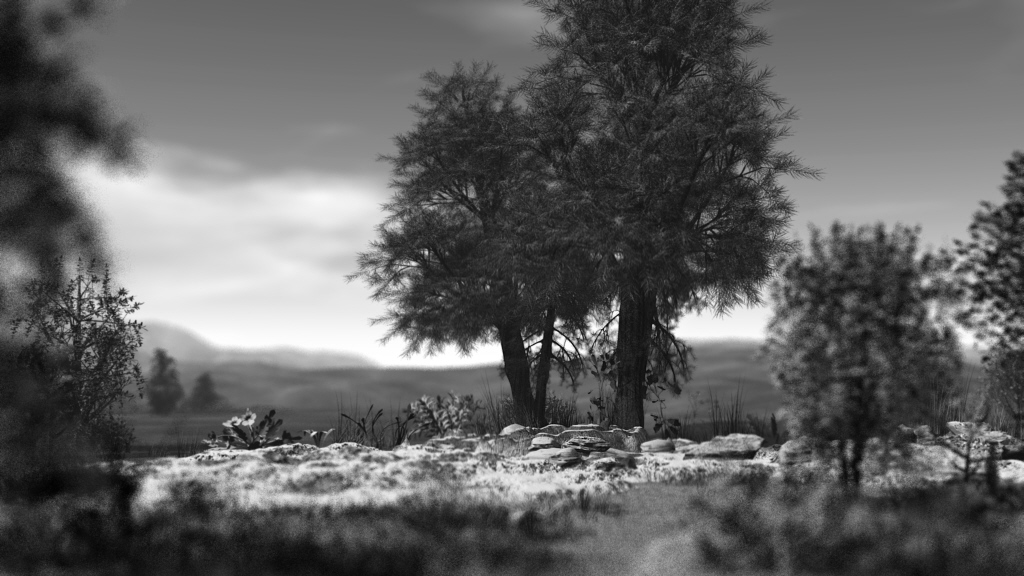
To do depth of field, just select the object that is the target of the shooting and then give a value to the focal length. In this example, the target is the tree trunk. Interesting to create argentic print look (with smooth dithering) or macro photography. Macro effect gives the landscape a world of miniature, as a model. But for a small object it must be good.
- Attachments
-
Design - illustration - Animation
http://www.crea-vision.fr
http://www.crea-vision.fr
-
MikomDude
- Captain
- Posts: 1930
- Joined: 04 Oct 2010, 11:12
- Type the number ten into the box: 0
- Location: The Hague, Netherlands
Re: Test with Bryce 7 pro free
That test is looking good Marcel though it looks a bit to blurry for my taste.
-
marcel
- Captain
- Posts: 2247
- Joined: 21 May 2009, 19:52
- Type the number ten into the box: 0
- Location: paris - France
Re: Test with Bryce 7 pro free
Right. But i exxagere the effect to see better what i do. As i explain This blur is good for a macro, not a landscape. It is why the picture is Black and White, like these old photos with very little DOF. This effect remains that. The next step Will be a modern colored DOF. I don't search reallity. Just tools and tips to helps my creation. I Have a Cam for the reallity.
Design - illustration - Animation
http://www.crea-vision.fr
http://www.crea-vision.fr
-
bitkar
- Captain
- Posts: 2089
- Joined: 16 Mar 2010, 07:14
- Type the number ten into the box: 0
- Location: Czech Republic
Re: Test with Bryce 7 pro free
well that looks good. I didnt say that it does not. But still, if you have a good image maps, you can build it in tS, maybe with less polygons. You are right that rendering a scene with milion or two polys with tS will be a bit of a pain tho... that is truth. Maybe i will try to replicate your bryce scene in tS. But dont know where to find a time for it.
i tried few yrs ago this as just a test:

I think that tree is generated by TreeDo tS3 plugin.
ps: thanks for info about bryce canyon ;) interesting...
i tried few yrs ago this as just a test:
I think that tree is generated by TreeDo tS3 plugin.
ps: thanks for info about bryce canyon ;) interesting...
Michal aka bitkar
tS freak since tS2 (1998) and forever (tS7.61 modeler)
tS freak since tS2 (1998) and forever (tS7.61 modeler)
-
Draise

- Captain
- Posts: 3200
- Joined: 21 Sep 2009, 19:33
- Type the number ten into the box: 0
- Location: Bogota, Colombia
Re: Test with Bryce 7 pro free
Download treedo here =P
Or there (same link, just so you see it):
http://tsx.uvworx.com/index.php?id=7
Or there (same link, just so you see it):
http://tsx.uvworx.com/index.php?id=7
-
bitkar
- Captain
- Posts: 2089
- Joined: 16 Mar 2010, 07:14
- Type the number ten into the box: 0
- Location: Czech Republic
Re: Test with Bryce 7 pro free
be aware that treedo doesnt work on tS7.6. Its very unstable. You need to get free tS3.2
Michal aka bitkar
tS freak since tS2 (1998) and forever (tS7.61 modeler)
tS freak since tS2 (1998) and forever (tS7.61 modeler)
-
marcel
- Captain
- Posts: 2247
- Joined: 21 May 2009, 19:52
- Type the number ten into the box: 0
- Location: paris - France
Re: Test with Bryce 7 pro free
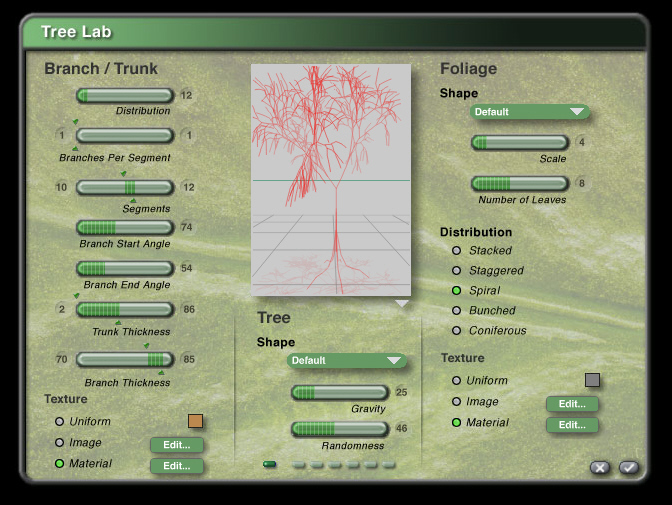
You have a tree lab with many more options on Bryce. Very simple to create A tree. The best is you can export a trueSpace object or scene with groups for the leaves and the trunk. Another tool that give Bryce a good friend for TS even if you don't use it.
- Attachments
-
Design - illustration - Animation
http://www.crea-vision.fr
http://www.crea-vision.fr
-
Draise
- Captain
- Posts: 3200
- Joined: 21 Sep 2009, 19:33
- Type the number ten into the box: 0
- Location: Bogota, Colombia
Re: Test with Bryce 7 pro free
Now THAT is what I'm talking about! AWESOME! I liked your trees in your scene and they look almost better than Vue's stock ones. =)
-
bitkar
- Captain
- Posts: 2089
- Joined: 16 Mar 2010, 07:14
- Type the number ten into the box: 0
- Location: Czech Republic
Re: Test with Bryce 7 pro free
iam using this http://www.frecle.net/index.php?show=treed.about. I consider it very easy to use and with a good realtime feedback of what iam doing. Good compatibility via .obj format. Very usable for tS.
I mean it only as an edition to what you said. Bryce scores with tS export indeed. And is not a bad as tree generator. But somehow i dont like the UI there :) just a matter of habbit i guess.
I mean it only as an edition to what you said. Bryce scores with tS export indeed. And is not a bad as tree generator. But somehow i dont like the UI there :) just a matter of habbit i guess.
Michal aka bitkar
tS freak since tS2 (1998) and forever (tS7.61 modeler)
tS freak since tS2 (1998) and forever (tS7.61 modeler)
-
Draise
- Captain
- Posts: 3200
- Joined: 21 Sep 2009, 19:33
- Type the number ten into the box: 0
- Location: Bogota, Colombia
Re: Test with Bryce 7 pro free
Cool cool! So many good apps to use! Thanks! The tree generator from Frecle is free! 