Hello again,
I have been thinking about this for a while and I can not find a way to make it look right on Model side. I am looking to make a Frosted glass Lampshade. I can not get the light to pass through it or I make it to trasparent and you can see clean through. Is there a trick to making a frosted glass material for the lightworks renderer?
Creating frosted glass.
-
Karthogen
- Master Chief Petty Officer
- Posts: 454
- Joined: 03 Jun 2009, 14:12
Creating frosted glass.
-
nigec

- Master Chief Petty Officer
- Posts: 561
- Joined: 21 May 2009, 18:46
Re: Creating frosted glass.
I just had a little play, if the shade wasn't so round it would look a lot better, but the trick seems to be turning of receiving shadows, theres probably a better way though so no doubt someone clever than me will step forward lol
- Attachments
-

-
Prodigy

- Site Admin
- Posts: 957
- Joined: 21 May 2009, 14:46
- Type the number ten into the box: 0
- Location: Uruguay
Re: Creating frosted glass.
yes there is..
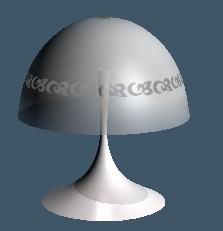
You are trying to get something like this right?

For this i should recommend you to use a alpha map.
If you don't know how attach alpha maps here is a small example where to find alpha textures.
here is a small test about the result of using alpha textures
and here is the texture used to have in mind the texture that youneed to create to get the effect.. black is 100% transparent, white is 0 transparency.. use gray scales to make less or more transparent as you desire.
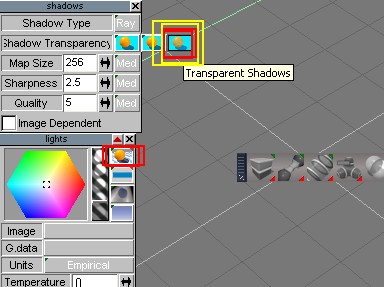
And finally if you need that the light must pass trough the glass in a proper way you need to have transparent shadows enabled
You are trying to get something like this right?
For this i should recommend you to use a alpha map.
If you don't know how attach alpha maps here is a small example where to find alpha textures.

- ttt.jpg (38.29 KiB) Viewed 7389 times
- example.jpg (6.94 KiB) Viewed 7389 times

- texture.jpg (6.13 KiB) Viewed 7389 times
- tt2.jpg (32.31 KiB) Viewed 7389 times
๑۩۞۩๑ prodigy ๑۩۞۩๑
-
Karthogen
- Master Chief Petty Officer
- Posts: 454
- Joined: 03 Jun 2009, 14:12
Re: Creating frosted glass.
Thank you for the help. I did not know about the additional shadow settings on the model side.
But I am still having problems
I did the alpha map, with light and I am see what seems like the inner faces. does this have to be a plain?
This is the test with other light and a light within the lamp. And this is the one with only the light within the lamp. Am I missing something here.
But I am still having problems
I did the alpha map, with light and I am see what seems like the inner faces. does this have to be a plain?
This is the test with other light and a light within the lamp. And this is the one with only the light within the lamp. Am I missing something here.
-
Prodigy
- Site Admin
- Posts: 957
- Joined: 21 May 2009, 14:46
- Type the number ten into the box: 0
- Location: Uruguay
Re: Creating frosted glass.
can you post the scene? or just the material if you want..
๑۩۞۩๑ prodigy ๑۩۞۩๑
-
Karthogen
- Master Chief Petty Officer
- Posts: 454
- Joined: 03 Jun 2009, 14:12
Re: Creating frosted glass.
Yeah,
I will post the scene tonight when I get home from work. Around 6 eastern time.
I will post the scene tonight when I get home from work. Around 6 eastern time.
-
Karthogen
- Master Chief Petty Officer
- Posts: 454
- Joined: 03 Jun 2009, 14:12
Re: Creating frosted glass.
These are the scenes. can't figure it out.
-
nigec
- Master Chief Petty Officer
- Posts: 561
- Joined: 21 May 2009, 18:46
Re: Creating frosted glass.
I did it Prodigy's way, and got the same result as you. I think maybe the shade could be a bit over complicated?
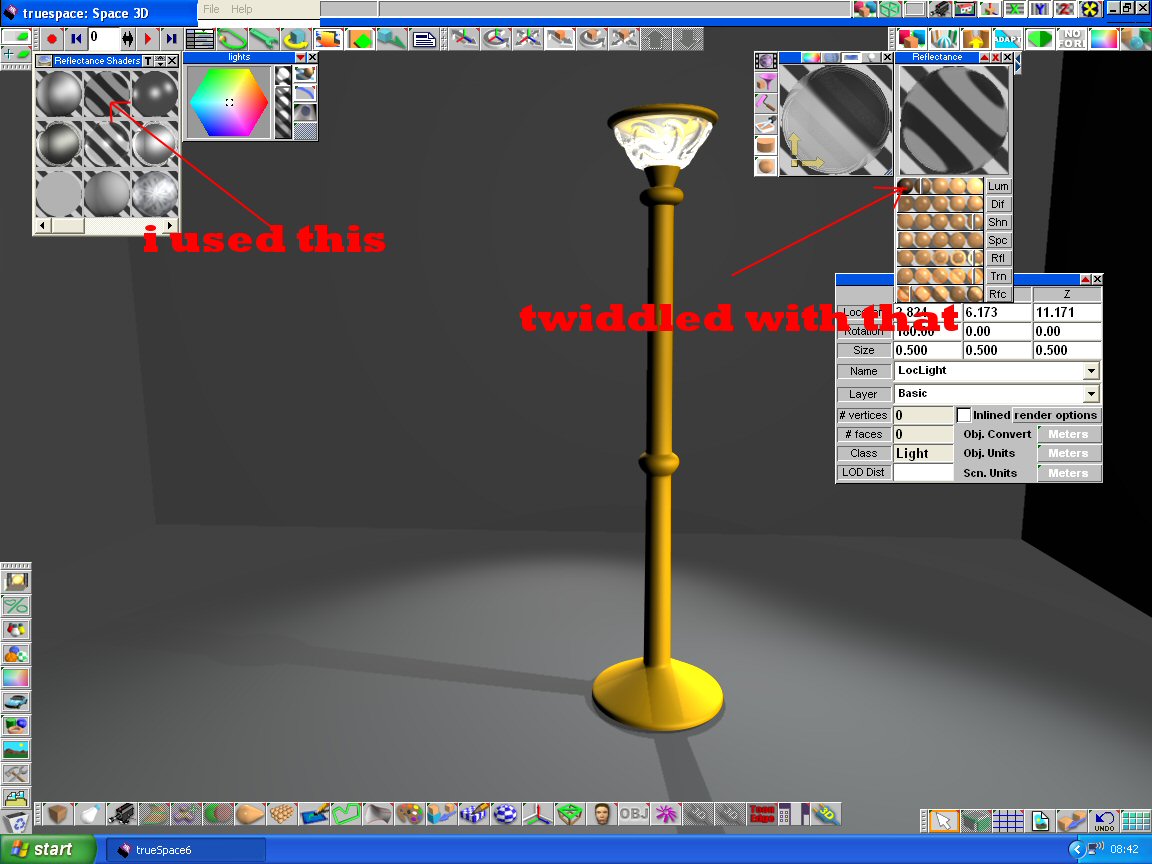
any way I added a flat glass shader, if you mess with the lumination you can get the shade to mimic the brightness if its not enough,
if you have the range massive you get really ugly shadows, in the pic the range is just outside of the light..
PS have the anti alais on adaptive, it must take ages for you to test render stuff
any way I added a flat glass shader, if you mess with the lumination you can get the shade to mimic the brightness if its not enough,
if you have the range massive you get really ugly shadows, in the pic the range is just outside of the light..
PS have the anti alais on adaptive, it must take ages for you to test render stuff
- Attachments
-
-
Karthogen
- Master Chief Petty Officer
- Posts: 454
- Joined: 03 Jun 2009, 14:12
Re: Creating frosted glass.
Whats the difference between adaptive and max for Antialias? is that what you mean for slowing down my render?
-
Finis

- Captain
- Posts: 5410
- Joined: 21 May 2009, 18:26
- Type the number ten into the box: 0
- Location: America!
Re: Creating frosted glass.
Antialiasing smooths the edges of things in a picture. Especially diagonal lines that can get that "stair step" jagged edge. Higher settings (2X, 3X, 4X) take longer to render but do a better job. Adaptive antialiasing tries to apply itself only where needed to do it faster.
I render most test pictures at 1X (no antialiising) or even 1/2X draft for speed. Some TS'ers don't use antialiasing for final renders but make the picture larger than needed and then shrink it in Paint Shop or such -- essentially antialiasing quickly at that point.
I tried your scene and found no good frosted glass technique. I did make these observations:
- The model has a very large number of polygons. Even the simple shapes do. More polygons means more render time. It also means more quality up to a point. After that they are just wasted.
- The inner shade surface is bright because it receives light directly. The outer surface isn't being lit much (maybe highlights) by the light as it is just passing through due to transparency.
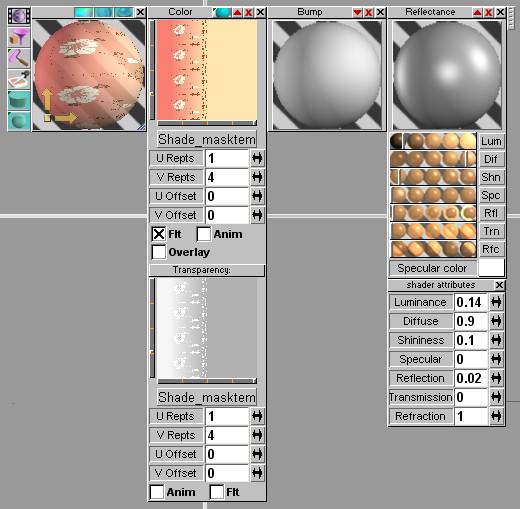
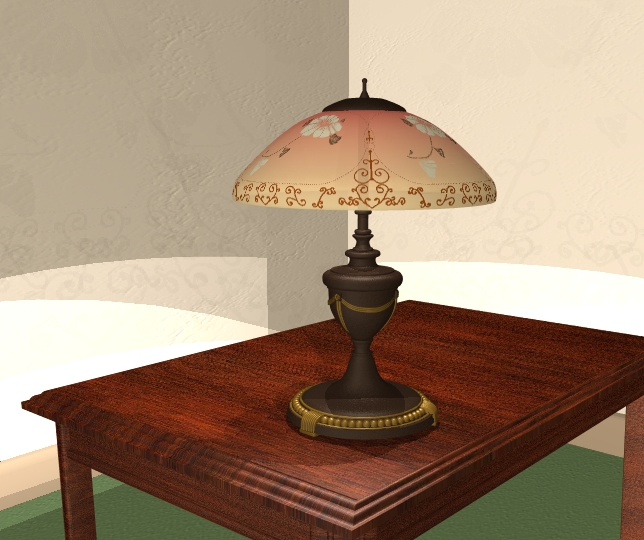
I got a porcelain look on this shade which would work for a frosted look. I used an image for the texture and for the transparency. The transparency is from the alpha channel of the tga. I made the texture and its transparency mostly in Paint Shop. The TS5 object (works in TS7 modelside too) is here while the Caligari forums exist: http://forums1.caligari.com/truespace/s ... stcount=58"
One thing about the texture for my lamp is that it is half plain (same color same transparency) and half flowers and fading transparency. The inside surface gets the plain part.
I render most test pictures at 1X (no antialiising) or even 1/2X draft for speed. Some TS'ers don't use antialiasing for final renders but make the picture larger than needed and then shrink it in Paint Shop or such -- essentially antialiasing quickly at that point.
I tried your scene and found no good frosted glass technique. I did make these observations:
- The model has a very large number of polygons. Even the simple shapes do. More polygons means more render time. It also means more quality up to a point. After that they are just wasted.
- The inner shade surface is bright because it receives light directly. The outer surface isn't being lit much (maybe highlights) by the light as it is just passing through due to transparency.
I got a porcelain look on this shade which would work for a frosted look. I used an image for the texture and for the transparency. The transparency is from the alpha channel of the tga. I made the texture and its transparency mostly in Paint Shop. The TS5 object (works in TS7 modelside too) is here while the Caligari forums exist: http://forums1.caligari.com/truespace/s ... stcount=58"
One thing about the texture for my lamp is that it is half plain (same color same transparency) and half flowers and fading transparency. The inside surface gets the plain part.
- Attachments
-
-
Last edited by Finis on 15 Jul 2009, 16:10, edited 3 times in total.
I prefer dangerous freedom over peaceful servitude. -- Thomas Jefferson/Jean Jacques Rousseau
-
Karthogen
- Master Chief Petty Officer
- Posts: 454
- Joined: 03 Jun 2009, 14:12
Re: Creating frosted glass.
Thank you for the clarification on the adaptive Anti-aliasing. I may hve to try some renders with both and compare.
For the poly count, Any specific areas or changes you would make to lower the poly count? I beleive teh shade itself has like 3 layers of SDS that may account for some of that but, I was just fooling around with it to give it a raised surface. But any modeling tips would be greatly appreciated, because I have noticed that I do have probably a lot of extra geometry that is not needed. and I think I rely to much on SDS that could increase that.
For the poly count, Any specific areas or changes you would make to lower the poly count? I beleive teh shade itself has like 3 layers of SDS that may account for some of that but, I was just fooling around with it to give it a raised surface. But any modeling tips would be greatly appreciated, because I have noticed that I do have probably a lot of extra geometry that is not needed. and I think I rely to much on SDS that could increase that.
-
Finis
- Captain
- Posts: 5410
- Joined: 21 May 2009, 18:26
- Type the number ten into the box: 0
- Location: America!
Re: Creating frosted glass.
I just edited the previous post to add a link to a lamp I made (object and texture image available there ... which has a zillion polys) with a good shade and a pic of the material settings.
The non-SDS parts (from memory, I already deleted the scene file) were mostly simple cylinders etc. They had a lot of polys too. They don't need that. Simple shapes usually don't need SDS if that was on them. You can change the attributes of the primitives to give enough sides to look good but not too many. Right click on the primitive's icon before or just after making one to get a control panel.
The non-SDS parts (from memory, I already deleted the scene file) were mostly simple cylinders etc. They had a lot of polys too. They don't need that. Simple shapes usually don't need SDS if that was on them. You can change the attributes of the primitives to give enough sides to look good but not too many. Right click on the primitive's icon before or just after making one to get a control panel.
I prefer dangerous freedom over peaceful servitude. -- Thomas Jefferson/Jean Jacques Rousseau
-
nigec
- Master Chief Petty Officer
- Posts: 561
- Joined: 21 May 2009, 18:46
Re: Creating frosted glass.
I only use primitives, there's nothing in my gallery with SDS that I can remember, I run a cr*ppy pc so less is more for me lol
-
Karthogen
- Master Chief Petty Officer
- Posts: 454
- Joined: 03 Jun 2009, 14:12
Re: Creating frosted glass.
That makes sense, I have been using SDS instead of just adding additional Faces through the panel to smooth it out. I think I use SDS on Just about everything.
-
Karthogen
- Master Chief Petty Officer
- Posts: 454
- Joined: 03 Jun 2009, 14:12
Re: Creating frosted glass.
Finis,
How many lights are in that lamp scene? I think I may be expecting to much from my lights. Is there a way to make one light that would fill the room with enough light showing through the transparent shade? Or maybe I should just be expecting to use more lights to accomplish the same affect.
How many lights are in that lamp scene? I think I may be expecting to much from my lights. Is there a way to make one light that would fill the room with enough light showing through the transparent shade? Or maybe I should just be expecting to use more lights to accomplish the same affect.
-
Finis
- Captain
- Posts: 5410
- Joined: 21 May 2009, 18:26
- Type the number ten into the box: 0
- Location: America!
Re: Creating frosted glass.
Mostly things don't work in 3D like they do in the real world. So extra and filler lights and various tricks are usually needed. I'm no expert on that but I'm sure some here will comment.
Lamp scene: There are 2 lights under the shade and 1 or 2 behind the camera. The lights under the shade project the shade texture onto the walls with the transparency map. The outer or top surface of the shade is lit by the room lights. Otherwise it would not be very bright.
If I worked on that scene now I would experiment with texture luminance or another texture layer with translucency to make it bright from the internal lights.
Modelside has light emitting textures. Maybe the shade could use that. The times I've played with that I've had to make it so bright to illuminate the room that the object was just a white silhouette. Slow rendering.
Lamp scene: There are 2 lights under the shade and 1 or 2 behind the camera. The lights under the shade project the shade texture onto the walls with the transparency map. The outer or top surface of the shade is lit by the room lights. Otherwise it would not be very bright.
If I worked on that scene now I would experiment with texture luminance or another texture layer with translucency to make it bright from the internal lights.
Modelside has light emitting textures. Maybe the shade could use that. The times I've played with that I've had to make it so bright to illuminate the room that the object was just a white silhouette. Slow rendering.
I prefer dangerous freedom over peaceful servitude. -- Thomas Jefferson/Jean Jacques Rousseau
-
Karthogen
- Master Chief Petty Officer
- Posts: 454
- Joined: 03 Jun 2009, 14:12
Re: Creating frosted glass.
Yeah I originally tried it with the Material light, I realized the internal light with a transparent shade was not enough to light the space. But you are correct, the render time on that was horendous, and it was not worth the time.