I've started to update my website and all updates to my previous scripts and plugins will be found in the new section
http://www.clintons3d.com/plugins/truespace/index.html"
Most new and updated items will have installers for them. I recently found old cali-forum script topics on using the Panel view, so the way they will work is I supply and script based installer that creates a button. When you push the button the script will either run straight away or will open a view in the panel aspect. All scripts will reside in the scripts section of the dependency graph instead of taking up space in the scene.
So far I've transferred/updated the
Maya style background widget,
the fix for the wireframe display problem caused by the clipping plane being too close,
updated the indigo exporter with an installer and the installer will automatically set itself up to work with newer versions of indigo
PE widget update that allows rotation of a selection about the objects pivot
PE pivot snap for moving the pivot to the center of a PE selection
Updated the Earth Day/Night sample with a "glow" created with a constant shader
ASE Exporter
Unreal PSK/PSA import export
Some items will need to be updated again. I just discovered how to switch to the panel view when an item is added to the panel view. So as they are now the script will open but you may have to manually click on the panel view tab.
Slowly updating my website
-
clintonman

- Captain
- Posts: 5659
- Joined: 21 May 2009, 21:08
- Type the number ten into the box: 0
- Location: California
Slowly updating my website
-
v3rd3
- Lieutenant Commander
- Posts: 1191
- Joined: 21 May 2009, 20:04
Re: Slowly updating my website
Just in case I have not thanked you enough for your scripts here is one more .... thank you.... 
-
Steinie

- Captain
- Posts: 2958
- Joined: 21 May 2009, 17:38
- Type the number ten into the box: 10
Re: Slowly updating my website
Well worth the effort, thanks Clintonman!
-
clintonman
- Captain
- Posts: 5659
- Joined: 21 May 2009, 21:08
- Type the number ten into the box: 0
- Location: California
Re: Slowly updating my website
Updated the target weld script to work with SDS meshes.
Added the normal map script to the buttons/panels.
Added a bevel script that is more like a chamfer in that it creates 45 degree angles.
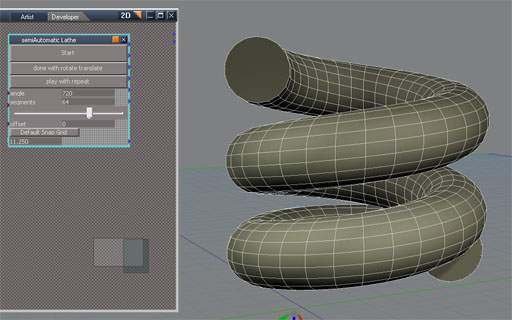
Added a lathe tool for workspace. See image:
-
clintonman
- Captain
- Posts: 5659
- Joined: 21 May 2009, 21:08
- Type the number ten into the box: 0
- Location: California
Re: Slowly updating my website
Update: Added an updated version of the 3D Stereo viewer to the site.
http://www.clintons3d.com/plugins/trues ... index.html"
This version for truespace7.61 lets you switch between using red/cyan glasses or magenta/green glasses.
Here is a link to the discussion of the previous version on the caligari forums
http://forums1.caligari.com/truespace/s ... php?t=8338"
Edit:
Sept 21 add updated truespace7.61 version of freeze transformation script with a toolbar button and right click options. This updated version uses the pivot and works with grouped objects.
http://www.clintons3d.com/plugins/trues ... index.html"
http://www.clintons3d.com/plugins/trues ... index.html"
This version for truespace7.61 lets you switch between using red/cyan glasses or magenta/green glasses.
Here is a link to the discussion of the previous version on the caligari forums
http://forums1.caligari.com/truespace/s ... php?t=8338"
Edit:
Sept 21 add updated truespace7.61 version of freeze transformation script with a toolbar button and right click options. This updated version uses the pivot and works with grouped objects.
http://www.clintons3d.com/plugins/trues ... index.html"
-
Rhino169

- Senior Chief Petty Officer
- Posts: 201
- Joined: 29 Nov 2009, 03:15
Re: Slowly updating my website
Clintonman....I'm having trouble making the freeze transformations work.
I can see it in the stack view and I have clicked the check boxes on and off..and have then gone and selected a cube using different check box combos, but I am still able to do whatever I like to the cube.
Am I missing a step?
I can see it in the stack view and I have clicked the check boxes on and off..and have then gone and selected a cube using different check box combos, but I am still able to do whatever I like to the cube.
Am I missing a step?
-
clintonman
- Captain
- Posts: 5659
- Joined: 21 May 2009, 21:08
- Type the number ten into the box: 0
- Location: California
Re: Slowly updating my website
No missing step, just a misunderstanding. "Freeze transforms" is a term from Maya meaning to set the scale to 1, set rotations to 0 and set translations to 0 without changing the appearance of the object. It doesn't lock anything.Rhino169 wrote:Clintonman....I'm having trouble making the freeze transformations work.
I can see it in the stack view and I have clicked the check boxes on and off..and have then gone and selected a cube using different check box combos, but I am still able to do whatever I like to the cube.
Am I missing a step?
-
Rhino169
- Senior Chief Petty Officer
- Posts: 201
- Joined: 29 Nov 2009, 03:15
Re: Slowly updating my website
LOL...oh welllll...it was doing all the stuff you mentioned really well then!.... 

Is there a way to lock an object or group so they are uneditable? And then there would be an unlock toggle as well?
Is there a way to lock an object or group so they are uneditable? And then there would be an unlock toggle as well?
-
Steinie
- Captain
- Posts: 2958
- Joined: 21 May 2009, 17:38
- Type the number ten into the box: 10
Re: Slowly updating my website
Yes a way to lock individual objects would be nice.
-
clintonman
- Captain
- Posts: 5659
- Joined: 21 May 2009, 21:08
- Type the number ten into the box: 0
- Location: California
Re: Slowly updating my website
Beats me how it could be done. I think there was something built into TrueServer that would protect objects from editing in any way. Maybe one of the trueserve experts like Froo could answer that one.Rhino169 wrote:LOL...oh welllll...it was doing all the stuff you mentioned really well then!....
Is there a way to lock an object or group so they are uneditable? And then there would be an unlock toggle as well?
-
clintonman
- Captain
- Posts: 5659
- Joined: 21 May 2009, 21:08
- Type the number ten into the box: 0
- Location: California
Re: Slowly updating my website
Only way I know to lock transforms would be to expand the Matrix input. That will stop all transforms in the 3D view.Steinie wrote:Yes a way to lock individual objects would be nice.
-
Rhino169
- Senior Chief Petty Officer
- Posts: 201
- Joined: 29 Nov 2009, 03:15
Re: Slowly updating my website
Is this something that would have to be programmed?
-
froo
- Captain
- Posts: 2554
- Joined: 22 May 2009, 12:13
Re: Slowly updating my website
Sorry for the delayed response. We were out in Colorado on a house hunting trip. Found one! We can't wait to get back there now. Had a great time!
Ok. Setting priveleges for objects in a Shared space...
This is explained in the trueserve manual.
Page 63 has a section discussing setting priveleges for objects in shared space.
Note that that section covers Step 5 of the server setup process.
So you should start with step 1, on page 59.
Basically, you create a server with authorization keys. You need an app which can read Excel xls files,
since the authorization keys are set in an xls file. With authorization keys, you set priveleges for users.
Read, write/delete (edit), etc. are granted for each user.
gotta go for now; more later! I believe there are a couple threads on this subject in these forums already; I'll try to find them and bring them to the top.
EDIT: btw; frooserve is back up.
Ok. Setting priveleges for objects in a Shared space...
This is explained in the trueserve manual.
Page 63 has a section discussing setting priveleges for objects in shared space.
Note that that section covers Step 5 of the server setup process.
So you should start with step 1, on page 59.
Basically, you create a server with authorization keys. You need an app which can read Excel xls files,
since the authorization keys are set in an xls file. With authorization keys, you set priveleges for users.
Read, write/delete (edit), etc. are granted for each user.
gotta go for now; more later! I believe there are a couple threads on this subject in these forums already; I'll try to find them and bring them to the top.
EDIT: btw; frooserve is back up.