How to eliminate the jagged edge?
-
Hicks
- Petty Officer First Class
- Posts: 48
- Joined: 24 Apr 2010, 14:17
How to eliminate the jagged edge?
When realtime render in the Workspace, how to eliminate the jagged edge of the Actor? (I have done the SDS, but seems no effect! )

-
Steinie

- Captain
- Posts: 2958
- Joined: 21 May 2009, 17:38
- Type the number ten into the box: 10
Re: How to eliminate the jagged edge?
1) I would look at 2.7.4 "Render Preferences" in your manual to set your
AntiAliasing.
2) I would also check your video card settings.
3) Also look at 2.7.9 "HW Settings" in your PDF manual.
AntiAliasing.
2) I would also check your video card settings.
3) Also look at 2.7.9 "HW Settings" in your PDF manual.
- Attachments
-

- Jaggies.JPG (23.37 KiB) Viewed 2881 times
-
Hicks
- Petty Officer First Class
- Posts: 48
- Joined: 24 Apr 2010, 14:17
Re: How to eliminate the jagged edge?
Thank you, I see. I know how to eliminate the jagged edge of the Actor in realtime render now!
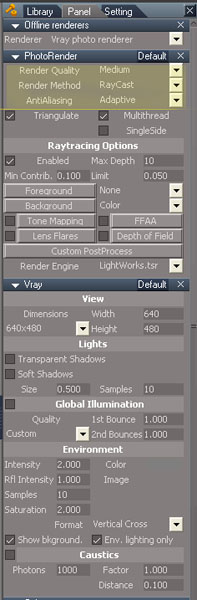
Do you know how to eliminate the jagged edge of the Actor in V-Ray 1.52?

Do you know how to eliminate the jagged edge of the Actor in V-Ray 1.52?
-
Steinie
- Captain
- Posts: 2958
- Joined: 21 May 2009, 17:38
- Type the number ten into the box: 10
Re: How to eliminate the jagged edge?
This panel should help...
- Attachments
-
-
Hicks
- Petty Officer First Class
- Posts: 48
- Joined: 24 Apr 2010, 14:17
Re: How to eliminate the jagged edge?
Thank you!